
Stutter HD Television playback (2 Viewers)

mm1352000

Retired Team Member
  • Premium Supporter
  • September 1, 2008
    21,544
    8,236
    Home Country
    New Zealand New Zealand
    Hi mhoogenbosch

    I think you can rule out the tuner side because the TsWriter log is clear. Clearly TsReader is constantly trying to compensate for late frames and the video renderer is constantly dropping those frames, however Tony would know much better than I would about that side of things. Have you considered the GPU driver? VLC and other applications like MediaPlayer may use software deinterlacing algorithms, whereas my understanding is that MP will tend to use hardware. In the dxdiag I see a lot more deinterlacing modes than I'm used to seeing. Doesn't explain why standard 576i would be okay when 1080i isn't, however these things can be strange like that.

    mm
     

    mhoogenbosch

    MP Donator
  • Premium Supporter
  • April 21, 2008
    308
    70
    Utrecht, Netherlands
    Home Country
    Netherlands Netherlands
    Hi mhoogenbosch

    I think you can rule out the tuner side because the TsWriter log is clear. Clearly TsReader is constantly trying to compensate for late frames and the video renderer is constantly dropping those frames, however Tony would know much better than I would about that side of things. Have you considered the GPU driver? VLC and other applications like MediaPlayer may use software deinterlacing algorithms, whereas my understanding is that MP will tend to use hardware. In the dxdiag I see a lot more deinterlacing modes than I'm used to seeing. Doesn't explain why standard 576i would be okay when 1080i isn't, however these things can be strange like that.

    mm
    Tried different drivers. The original drivers supplied with my system, and all the latest beta's and WHQL's.
     

    Owlsroost

    Retired Team Member
  • Premium Supporter
  • October 28, 2008
    5,539
    5,038
    Cambridge
    Home Country
    United Kingdom United Kingdom
    Looking at your latest logs, there's something a bit weird with the video FPS values/sample times....

    Can you upload a short recording (20-30 seconds maybe) from an HD channel ?

    Also try checking the GPU load/clocks with GPU-Z - http://www.techpowerup.com/gpuz/ - when playing an HD channel. This still feels like a performance issue (or GPU power saving kicking in when it shouldn't be, maybe).

    What were the system specs of the old PC (the one that worked OK with HD) ?

    Tony
     

    mhoogenbosch

    MP Donator
  • Premium Supporter
  • April 21, 2008
    308
    70
    Utrecht, Netherlands
    Home Country
    Netherlands Netherlands
    Looking at your latest logs, there's something a bit weird with the video FPS values/sample times....

    Can you upload a short recording (20-30 seconds maybe) from an HD channel ?

    Also try checking the GPU load/clocks with GPU-Z - http://www.techpowerup.com/gpuz/ - when playing an HD channel. This still feels like a performance issue (or GPU power saving kicking in when it shouldn't be, maybe).

    What were the system specs of the old PC (the one that worked OK with HD) ?

    Tony
    Specs other HTPC:

    Case: OrigenAE H6
    PSU: 550Watt Modulair Corsair
    Mobo: Gigabyte GA-MA78GM-S2H
    Proc: AMD x2 5050e
    Mem: 4x 1GB DDR667 Kingston
    HDD: 1TB WD Greenpower
    GFX: nVidia Geforce 9400 (+ onboard ATi HD3200)
    DVD: SATA DVD brander

    I'll upload a recording tonight, and ofcourse will check the load / clocks with GPU-Z
     

    mhoogenbosch

    MP Donator
  • Premium Supporter
  • April 21, 2008
    308
    70
    Utrecht, Netherlands
    Home Country
    Netherlands Netherlands
    Here's the recording. Its a recording of a FTA channel HD.

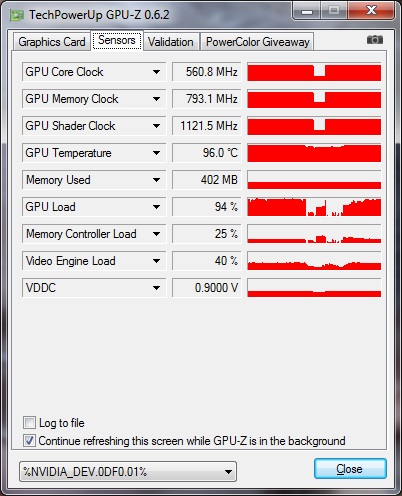
    But, i've also checked the GPU stats. and made two screenshots. As you can see at the GPU Load its way up. In videocard.jpg you can see in the beginning it 'hangs' at ~ 65%, then the channel runs fine and the three lines (shift - 1) are nice and steady. Then all of a sudden the GPU load goes to 95 / 98%, then the lines start to move and the image begins to stutter.

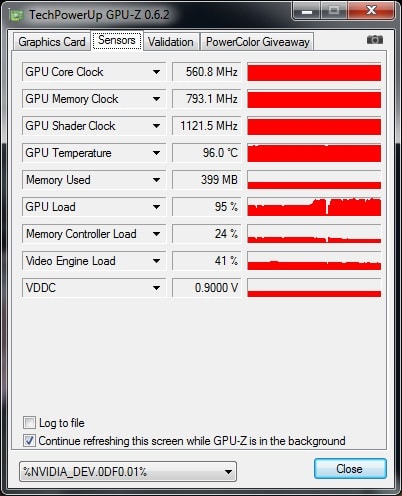
    At videocard1.jpg you can see a dip in the GPU load, at this time the image is perfect again but then, boooom.. at 95% and the image starts to stutter.

    What on earth can this be? I know i don't have any other grapical processes running. The weird thing ofcourse, when i play the recording in VLC Player the GPU load remains at 40%, which is even lower then the initial 65% in MediaPortal.

    Can this be explaned?
     

    Attachments

    • videocard1.jpg
      videocard1.jpg
      75.1 KB
    • videocard.jpg
      videocard.jpg
      72.9 KB

    mhoogenbosch

    MP Donator
  • Premium Supporter
  • April 21, 2008
    308
    70
    Utrecht, Netherlands
    Home Country
    Netherlands Netherlands
    Looking at your latest logs, there's something a bit weird with the video FPS values/sample times....

    Can you upload a short recording (20-30 seconds maybe) from an HD channel ?

    Also try checking the GPU load/clocks with GPU-Z - http://www.techpowerup.com/gpuz/ - when playing an HD channel. This still feels like a performance issue (or GPU power saving kicking in when it shouldn't be, maybe).

    What were the system specs of the old PC (the one that worked OK with HD) ?

    Tony
    Tony, Since we now know what the issue is (just as you expected a performance issue), is there anything left to do. Or just accept it? Can't it be a strange bug in combination with the Geforce 425M GT?, because all the other HD content performs just fine. Even if I play the .ts file with VLC it only takes 40% of my GPU instead of the 99% with TSreader.ax.

    The HTPC is not actively beeing used so i can test if you'd like to.
     

    Vasilich

    Portal Pro
    August 30, 2009
    3,392
    1,173
    Germany, Mayence
    Home Country
    Russian Federation Russian Federation
    I don't believe that TSReader can heavily load GPU - this is the task for decoder and renderer. What video decoder do you use for SDTV and HDTV?
     

    Owlsroost

    Retired Team Member
  • Premium Supporter
  • October 28, 2008
    5,539
    5,038
    Cambridge
    Home Country
    United Kingdom United Kingdom
    The GPU temperatures are quite high (95 C), so it's possible that some sort of clock throttling/power control is kicking in to stop the GPU from getting too hot.

    It's the deinterlacing (of 1080i HDTV) that will generate a large amount of the GPU load - the 'other HD content' is probably 1080p so no deinterlacing is required.....

    Tony
     

    Users who are viewing this thread

    Top Bottom