Is it possible to set different position and width/height settings for a GUIThumbnailPanel when in smallicon mode and largeicon mode? In the context of a Facade, if that makes any difference...
Thanks, although that is not exactly what I meant. I mean if I want the thumbpanel to be tall and skinny on the left side of the screen with small icons, but wide and short across the top of the screen with large icons, is that possible without creating two thumbnailpanels?
And yeah, this is for Moving Pictures. Really I am just trying to make sure things are as flexible as possible for the skinners.
Thanks, although that is not exactly what I meant. I mean if I want the thumbpanel to be tall and skinny on the left side of the screen with small icons, but wide and short across the top of the screen with large icons, is that possible without creating two thumbnailpanels?
And yeah, this is for Moving Pictures. Really I am just trying to make sure things are as flexible as possible for the skinners.
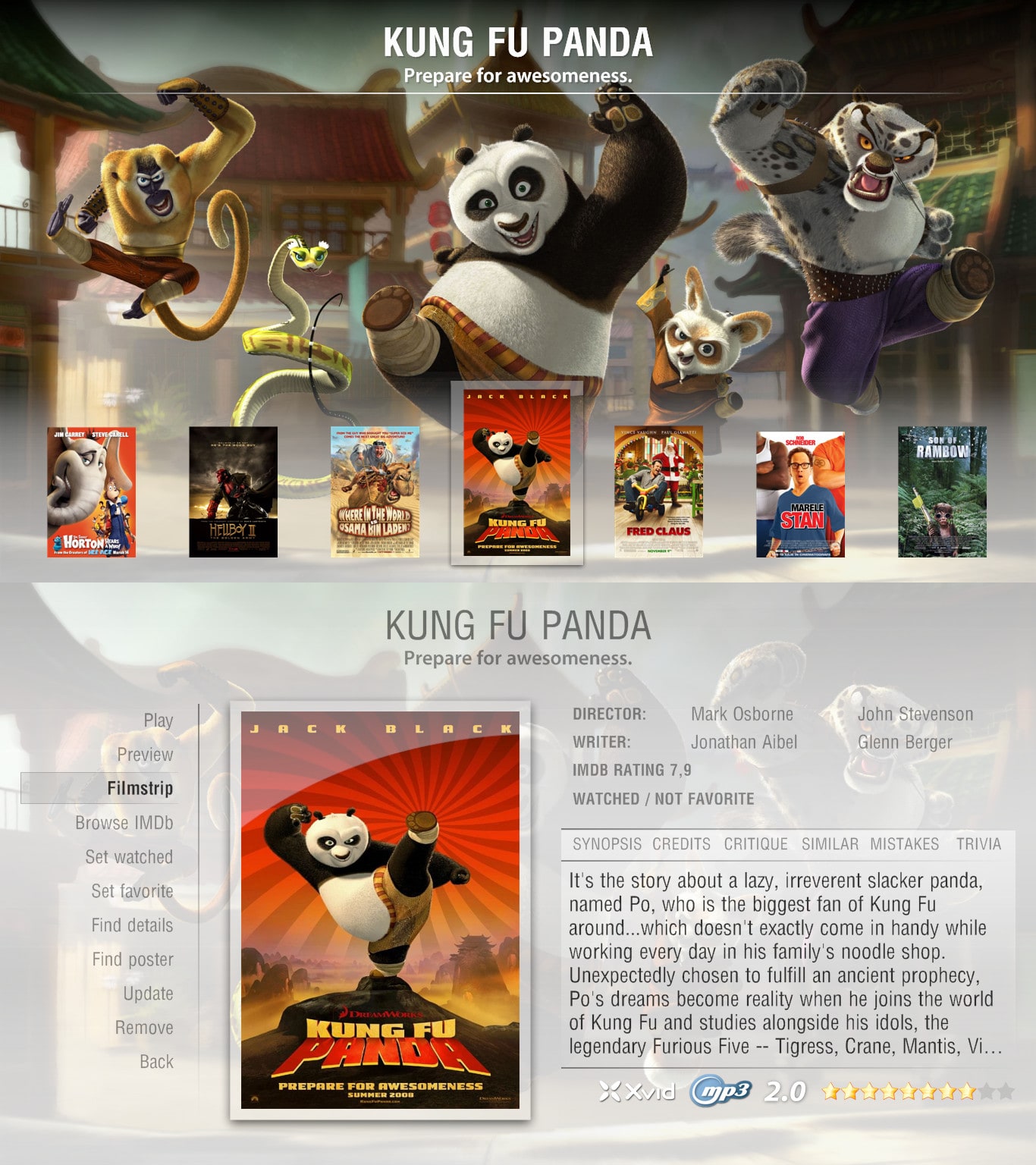
I imagine you will have to create two thumbnail panels as there isn't anything to define big or small icons position wise. A quick request while your on, would it be possible to create two filmstrip views or at least the option for two? Im looking at creating a Fanart themed filmstrip view and a info based filmstrip view (when you release the alpha).
PS Flexibility is great but I imagine the most popular views will be Filmstrip or list
That's what I figured on the positioning. Seems like a second set of positioning coordinates would be easy to implement, I am surprised it's never been done.
As far as a fan-art filmstrip view, sure I can do that. Any other requests?
That's what I figured on the positioning. Seems like a second set of positioning coordinates would be easy to implement, I am surprised it's never been done.
As far as a fan-art filmstrip view, sure I can do that. Any other requests?
Couple of quick questions also
- I'm interested in the way the fanart is implemented, at the moment with the current fanart hack, each fanart image once viewed is stored in the RAM so if you flip through a big movie collection with many fanarts you will eventually fill the RAM. The fanart also slows mediaportal down considerably in some instances.
-Is there going to an option in later builds to import a movie library from say ant movie catalogue?
Heh heh. I am working as fast as I can. I just don't want to release something that is going to change in five days for you guys skinning things. I am getting close though, I will keep you posted. I definitely will have a skinners alpha out by this weekend at the latest though.
Thats another thing I was going to ask, from a skinning point of view logos(ie Video Codec, Audio codec etc) have a big visual impact, will there be skinning support for logos. I'm guessing your using mediainfo.dll for that kind of info? The picture attached is sort of what im going to be aiming for with your plugin.
Definitely going to support logos and mediainfo.dll. That's not going to be there with the first release though unfortunately. It's on the todo list, but I just haven't gotten there yet. With logo support though, I'd really like to allow the skinners to define that stuff as a <define> tag if that is possible, rather than in the config screen. It seems to me more and more skinners are releasing a logo rules file for TV-Series and that's just one extra step for the user to take to get things up and running.
I am trying to figure out if there is a way to access <define> tags in the code though, if not it will have to be done the same was as with TV-Series...
Definitely going to support logos and mediainfo.dll. That's not going to be there with the first release though unfortunately. It's on the todo list, but I just haven't gotten there yet. With logo support though, I'd really like to allow the skinners to define that stuff as a <define> tag if that is possible, rather than in the config screen. It seems to me more and more skinners are releasing a logo rules file for TV-Series and that's just one extra step for the user to take to get things up and running.
I am trying to figure out if there is a way to access <define> tags in the code though, if not it will have to be done the same was as with TV-Series...
If you can make the backend config automatically convert all the different spellings of a codec to one value then it can be skinned in a similar manner (ie For the h264 codec logo there was h264, H264, MPEG-4 AVC etc) This probably didn't make any sense lol
The main thing I reckon is good documentation, If you implemented logos the same as tvseries it would be fine it just needs to be documented. Are you planning on releasing the plugin with an installer as you could get the installer to ask for a formatting rules file on installation.
Can anyone tell me the step-by-step procedure for bringing up a second channel in pip mode? I can only do it sometimes, after many tries, and it’s not clear what I am doing that makes it work on those occasions when it does. Cannot find guidance on the site.
Thanks, N.
Again, if anyone knows how to do this, would be much...
Can anyone tell me the step-by-step procedure for bringing up a second channel in pip mode? I can only do it sometimes, after many...
Can anyone tell me the step-by-step procedure for bringing up a second channel in pip mode? I can only do it sometimes, after many...
yes that is indeed what I did in that ticket. It may already be working without updating those plugins because most of it was not relevant to the plugin itself (test, some leftover unused parts etc).
yes that is indeed what I did in that ticket. It may already be working without updating those plugins because most of it was not...
We have just released MediaPortal 1.38 - Tatiana & Leo x86 and x64 version.
Highlights of this release
Bugfixes:
New...
Thanks for your reply.
In my configuration this setting is set to "no".
To avoid misunderstandings, the MP window size changes on screen resolution changes, MP always fulfills the whole screen.
Also, the home screen buttons size is adjusted.
Only the font size is not adjusted to the new screen resolution.
Thanks for your reply.
In my configuration this setting is set to "no".
To avoid misunderstandings, the MP window size changes on...
I use two monitors - a large display for TV and video watching and a small display for music playback, to get the current track...

 United States of America