Timeshifting Problem in 1.2.3 (1 Viewer)

edlight

New Member
October 5, 2012
5
0
79
Home Country
United States of America United States of America
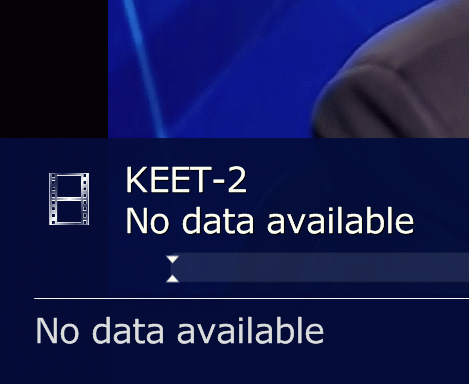
It makes the timeshift files on M:\Media Portal Timeshift, but the timeline is dead blank with the arrows all the way on the left.

Win 7 32 bit.
 
Last edited:

edlight

New Member
October 5, 2012
5
0
79
Home Country
United States of America United States of America
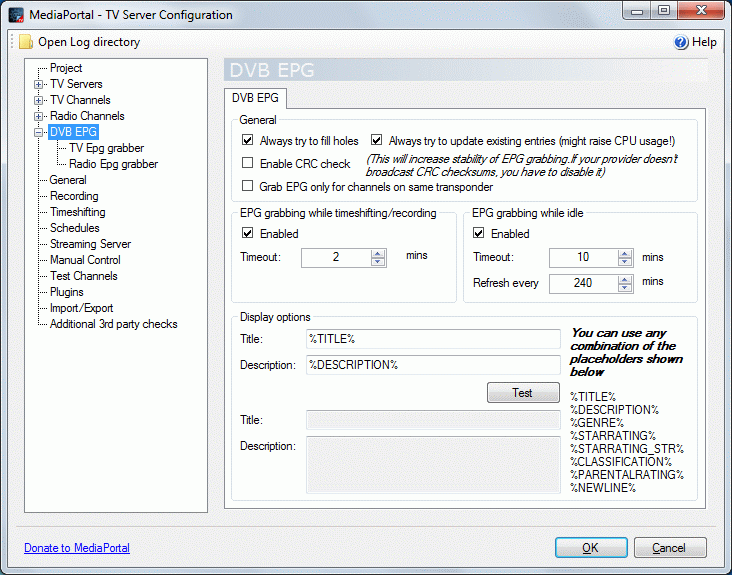
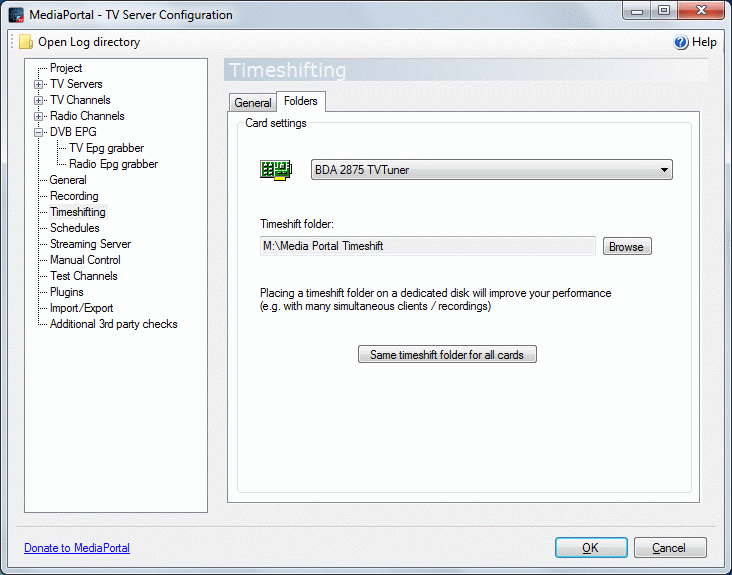
Here are screenshots, using "Upload a File." Not sure what they'll look like - my first try.
It shows all those tuners, and maybe it's using the wrong one, such as "Tuner for Windows Media Center" instead of the digital USB BDA 2875 or the PCI digital/analog "Digital Tuner" - the only 2 physical tuners.
 

Attachments

  • epg-settings-1.gif
    epg-settings-1.gif
    64.6 KB
  • epg-settings-2.gif
    epg-settings-2.gif
    61 KB
  • no-epg-data.gif
    no-epg-data.gif
    60.7 KB
  • no-timeshift-in-gui.gif
    no-timeshift-in-gui.gif
    45.2 KB
  • timeshift-files-real-time.gif
    timeshift-files-real-time.gif
    8.2 KB
  • timshift-settings-1.gif
    timshift-settings-1.gif
    57.6 KB
  • timshift-settings-2.gif
    timshift-settings-2.gif
    53 KB
  • tuner-listings.gif
    tuner-listings.gif
    66.2 KB
Last edited:

mm1352000

Retired Team Member
  • Premium Supporter
  • September 1, 2008
    21,544
    8,236
    Home Country
    New Zealand New Zealand
    Hello edlight

    I'm a little confused: what are you expecting to see?

    mm
     

    edlight

    New Member
    October 5, 2012
    5
    0
    79
    Home Country
    United States of America United States of America
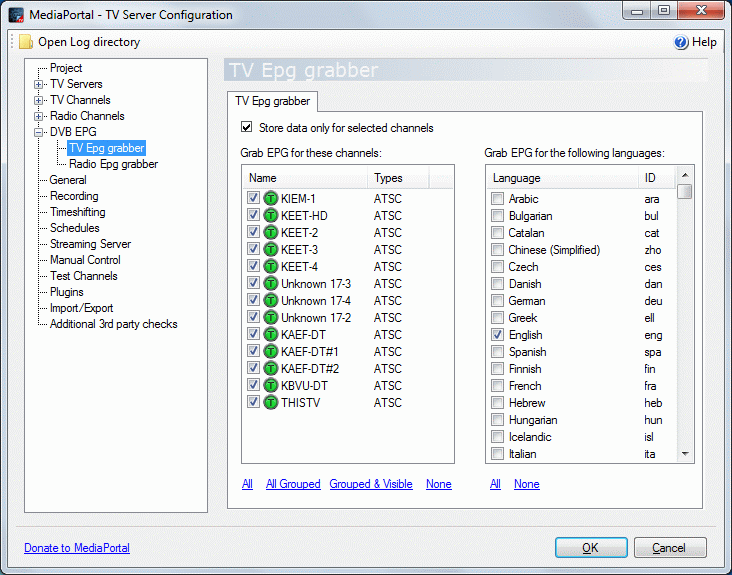
    mm, I'm expecting to see the colors on the timeshifting timeline, but it is dead, as you can see, and I'm expecting to see EPG information, but the EPG is dead also.
     

    mm1352000

    Retired Team Member
  • Premium Supporter
  • September 1, 2008
    21,544
    8,236
    Home Country
    New Zealand New Zealand
    Unfortunately EPG is not something that always works automatically in MediaPortal. It does in WMC because MS has various contracts in place and has laid out the money to ensure they can get the data for their users.
    So the EPG won't show anything unless it is configured to use an appropriate data source.
    The DVB EPG section that you've seen and attempted to configure is most useful for people from other parts of the world where EPG data is actually broadcast over the air. Some ATSC broadcasters in the US do carry very limited EPG over the air, but most people find it so limited and inaccurate as to be useless.
    For that reason, people turn to SchedulesDirect (MP plugin), mc2xml, or WebEPG to get data.

    The timeshift bar being blank is a side effect of your lack of EPG. MP can't show you much that is any use in there without EPG data available.
     

    edlight

    New Member
    October 5, 2012
    5
    0
    79
    Home Country
    United States of America United States of America
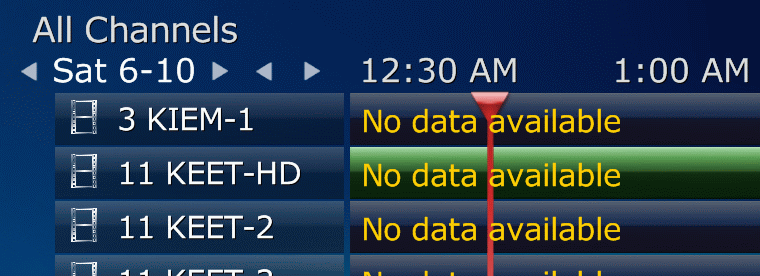
    Thanks for the EPG info.

    I think that will all the no data text in the screenshots you fellows have missed the timeline problem in no-timeshift-in-gui.gif.

    Note that the timeline is blank while playing tv. The timeshift tests in the setup pass for all the channels, but I can't move my position in time while playing. The timeline graph is dead.

    I'm not sure how timeshifting could be dependent on EPG, except to display program information. The graph should be linked to the position in the timeshift files.
     
    Last edited:

    mm1352000

    Retired Team Member
  • Premium Supporter
  • September 1, 2008
    21,544
    8,236
    Home Country
    New Zealand New Zealand
    I think that will all the no data text in the screenshots you fellows have missed the timeline problem in no-timeshift-in-gui.gif.

    Note that the timeline is blank while playing tv. The timeshift tests in the setup pass for all the channels, but I can't move my position in time while playing. The timeline graph is dead.
    Use the arrow keys to move your position - left to go back, right to go forward, up to jump forward, down to jump back.

    I'm not sure how timeshifting could be dependent on EPG, except to display program information.
    That is what I meant. The timeline is entirely visual. You can't click on a certain position and have MP jump to it.

    The graph should be linked to the position in the timeshift files.
    Not entirely sure what you meant by that, but certainly the TS splitter does keep track of position in the timeshift buffer and will allow you to move around within the buffer using the arrow keys.
     

    Vasilich

    Portal Pro
    August 30, 2009
    3,392
    1,173
    Germany, Mayence
    Home Country
    Russian Federation Russian Federation
    I just repeat what mm said, but in other words:
    timeshift doesn't depend on EPG data. It is just GUI that shows the current position and amount of timeshift mapped on EPG program. So no EPG - no timeshift indication in GUI, but timeshift function itself is working - just use arrows left/right.
     

    Users who are viewing this thread

    Similar threads

    @CyberSimian Sorry, I missed your last post. I ended up doing a clean install on the client and all is well now. It still doesn't let me go back in time when I change channels but it does continue operating from that point on. I'm ok with that. Thanks for your help! EDIT: I now downgraded the server (as I did with the client above)...
    @CyberSimian Sorry, I missed your last post. I ended up doing a clean install on the client and all is well now. It still doesn't...
    When I first start watching a TV program the timeshift functions works perfectly. I can shift back and forth in time and it works...
    Replies
    11
    Views
    3K
    Are the media/video folders on the Mint host?
    Are the media/video folders on the Mint host?
    I've used Mediaportal for years on a Windows Host with restricted online-access. Lately I reinstalled...
    Replies
    1
    Views
    1K
    I don't know about MP2 but as you said you tried MP1 too, how is the MP music config ? MP(1) will only use LAV if you select "Internal DirectShow player" as music output, but then you lose gapless playback. If you you don't have multichannel music you can choose WASAPI as the output and set the number of speakers to stereo. I have...
    I don't know about MP2 but as you said you tried MP1 too, how is the MP music config ? MP(1) will only use LAV if you select...
    Not sure if this a a bug/config/settings problem. I am running a media portal 2.5 server with 2.41 client but it seems I get the...
    Replies
    1
    Views
    653
    4.5 is really old. I'm not sure 4.5.5 even is a version that actually existed. You should be able to install .NET Framework 4.8.0 on Windows 7 SP1
    4.5 is really old. I'm not sure 4.5.5 even is a version that actually existed. You should be able to install .NET Framework 4.8.0...
    My TV PC is more a cast-off on older hardware (a 'Quiet PC' i5 4690, 16GB ram, 2xSSD 1xHDD, system graphics), mainly as a cheap way...
    Replies
    5
    Views
    2K
    I see no reason in Windows XP or 7, in my experience, on ancient Atom, Windows 10 worked faster than XP or 7...
    I see no reason in Windows XP or 7, in my experience, on ancient Atom, Windows 10 worked faster than XP or 7...
    Hi all, I'm new to MediaPortal and looking forward to using it. Just one catch and I apologize if it sounds silly - I want to run...
    Replies
    3
    Views
    2K
    Top Bottom