tv card (technotrend s2-3200) randomly works with MP (1 Viewer)

pjuegos

Portal Pro
April 28, 2011
101
1
45
MediaPortal Version: 1.1.3
MediaPortal Skin: streamedMP
Windows Version: win7 32bit
CPU Type: intel core duo
HDD: 1Tb
Memory: 3gb
Motherboard: gigabyte GA-EG41MF-S2H
Video Card:
Video Card Driver:
Sound Card: USB DAC Musiland md 10
Sound Card AC3:
Sound Card Driver: default windows usb dac driver
1. TV Card: Technotrend s2 3200
1. TV Card Type: dbv s2
1. TV Card Driver:
2. TV Card:
2. TV Card Type:
2. TV Card Driver:
3. TV Card:
3. TV Card Type:
3. TV Card Driver:
4. TV Card:
4. TV Card Type: 4. TV Card Driver:
MPEG2 Video Codec:
MPEG2 Audio Codec:
h.264 Video Codec:
Satelite/CableTV Provider: freeview sat
HTPC Case: mcubed
Cooling: passive mcubed
Power Supply: mcued
Remote: imon Pad
TV: Samsung 32 LCD
TV - HTPC Connection: HDMI


Hi all,

I am having problems with my TV card (technotrend s2 3200) in MEdia portal. I think that the card is OK since it was working in WMC before migrating to MP.

It is a strange problem, and it does not happen all the time.
When it does not work, which is most of the time, MP gets stuck when selecting a channel.
Also, in TV server config; if I choose the card from the "TV servers" menu, the system goes to "Non Responding". If I select a channel from the "TV Channels" menu to preview, the system also goes to "Non Responding".

So, for some reason the TV card is not accesible even though it appears in the device manager.

MP detected it previously and I was able to scan for channels from different satellites without major problems. Every now and again I still can use it. AFter a while it gets blocked again

Any help would be great!!!!!!!!!!!!

cheers
 

mm1352000

Retired Team Member
  • Premium Supporter
  • September 1, 2008
    21,544
    8,236
    Home Country
    New Zealand New Zealand
    Hi pjuegos

    Posting logs is required when you start support threads (like this). We are very unlikely to be able to help you if you don't post them. Instructions for how to collect logs are in the link in my signature...

    With that said, I have an S2 3200 myself - it works perfectly with XP SP3, MP 1.2.0b and the 5.0.1.8 driver. Even my CAM works flawlessly :)D:D:D). Have you disabled the WMC services? You can do that in TV Server configuration in the "additional 3rd party checks" section.
     

    pjuegos

    Portal Pro
    April 28, 2011
    101
    1
    45
    thanks for your reply.

    I did not know about the logs. Good to know. I will do that and I will post back.

    Yes, WMC services are disabled

    Great to know the same card works great for you!:)

    Thanks
     

    pjuegos

    Portal Pro
    April 28, 2011
    101
    1
    45
    OK, I think I have followed the guidelines for support now. I should have read them in the first place...:oops:

    This is how I have created the log

    1: I launched TT Viewer, which is the software that came with the TV card, and I selected one channel to confirm the card works
    2: I closed TT viewer
    3: I launched MP in debug mode and I tried to select the same channel in the TV menu. MP froze...
    4: I launched the task manager, and I used it to close MP. Automatically a log was created in MP


    Thanks for the help!!!
     

    mm1352000

    Retired Team Member
  • Premium Supporter
  • September 1, 2008
    21,544
    8,236
    Home Country
    New Zealand New Zealand
    Hi again pjuegos

    I can see where the problem is in your logs, but I'm not sure what is causing it. I will try to provide you with a debug DLL (which will put more information into the logs) this evening. Until then...
     

    pjuegos

    Portal Pro
    April 28, 2011
    101
    1
    45
    Thanks for taking a look of the logs mm1352000,

    I don't know if it is related to this problem, but strange things are happening in my PC. Just in case it might help in understanding the logs, the following unusual events happen after creating the logs:

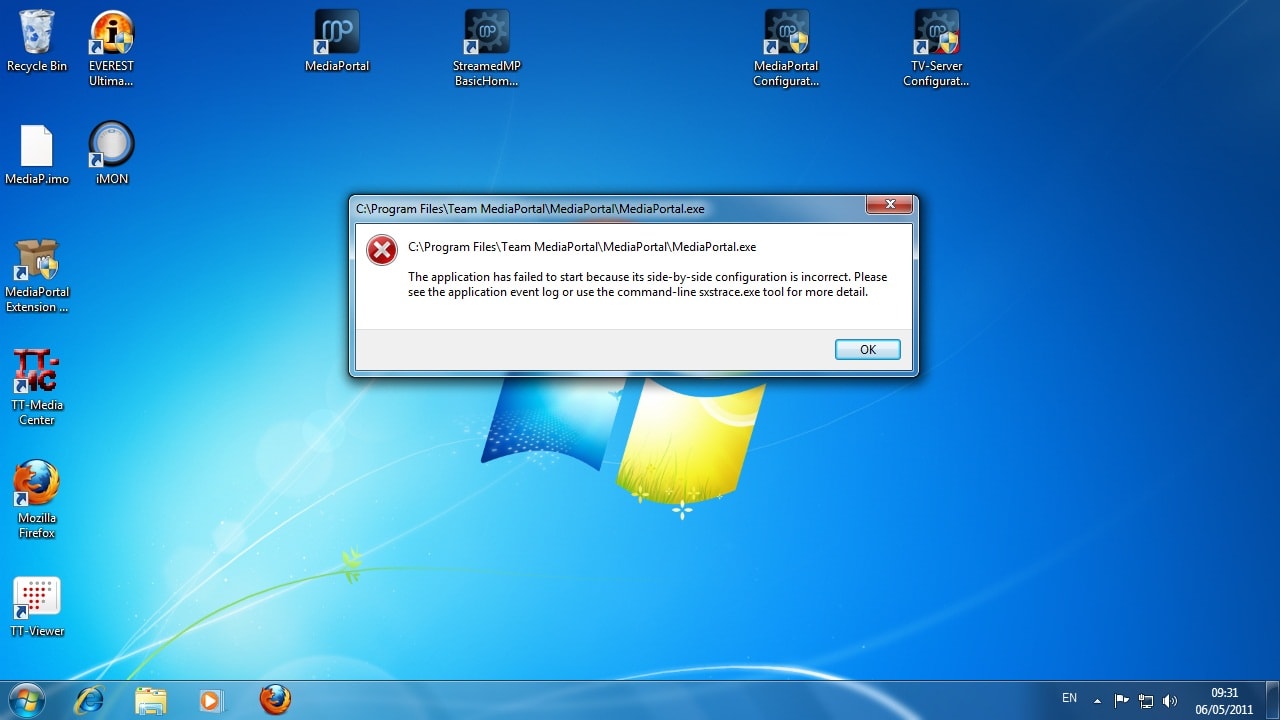
    It might be a coincidence but since I created the logs, I cannot launch MP anymore. I get the attached message.
    Also, I forgot to say in muy previous post, that whenever MP freezes and I have to kill the task, the taskbar of win7 dissapears completely and you only see the wndows buttom.
    The PC also restarted automatically and I got a "DISK BOOT FAILURE, INSERT SYSTEM DISK AND PRESS ENTER." message. Just by restarting again, the problem was gone

    As I said, I have no idea if the problems are connected.

    cheers
     

    Attachments

    • media portal not launching.jpg
      media portal not launching.jpg
      175.5 KB

    mm1352000

    Retired Team Member
  • Premium Supporter
  • September 1, 2008
    21,544
    8,236
    Home Country
    New Zealand New Zealand
    Hi again

    I saw that same error somewhere else today but I can't remember where! What I'm saying is that it is possible that it is not an S2 3200 problem but something else. I'll look around...

    [Edit: found it! --> here <--]
     

    mylle

    Portal Pro
    April 14, 2005
    574
    66
    Denmark
    Home Country
    Denmark Denmark
    Thanks for taking a look of the logs mm1352000,

    I don't know if it is related to this problem, but strange things are happening in my PC. Just in case it might help in understanding the logs, the following unusual events happen after creating the logs:

    It might be a coincidence but since I created the logs, I cannot launch MP anymore. I get the attached message.
    Also, I forgot to say in muy previous post, that whenever MP freezes and I have to kill the task, the taskbar of win7 dissapears completely and you only see the wndows buttom.
    The PC also restarted automatically and I got a "DISK BOOT FAILURE, INSERT SYSTEM DISK AND PRESS ENTER." message. Just by restarting again, the problem was gone

    As I said, I have no idea if the problems are connected.

    cheers

    It almost sounds like your harddrive or harddrive controller i failing, possible causing data corruption.
     

    pjuegos

    Portal Pro
    April 28, 2011
    101
    1
    45
    thanks for the link mm1352000, that problem sounds very similar

    It almost sounds like your harddrive or harddrive controller i failing, possible causing data corruption.

    Yes, that might be it. However, why does it only happen with MP? OR could it be that the hardware probs happened when MP was launched and got corropted?
     

    pjuegos

    Portal Pro
    April 28, 2011
    101
    1
    45
    Hi again,

    Quick update;
    I reinstalled MP, and it has now no problems to launch.
    However, the TV service is giving the same problems as before.

    Cheers

    pj
     

    Users who are viewing this thread

    Top Bottom