Operating System Windows 7 & half fullscreen (2 Viewers)

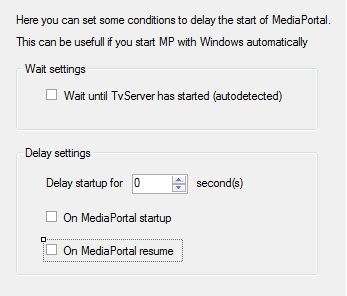
Please test attached patch. It's the final version we are going to commit to svn.

Simone
 

Attachments

  • screen_delay.JPG
    screen_delay.JPG
    22.9 KB
  • wait_on_resume2.patch
    30.6 KB
Can anyone confirm that this fixes the resizing issue where the HTPC stays on all the time and the TV gets turned on and off and the edid override doesn't work?
 
Can anyone confirm that this fixes the resizing issue where the HTPC stays on all the time and the TV gets turned on and off and the edid override doesn't work?

Hack / workaround wont affect that use case. HW issues in general should be fixed on driver / HW level.
 
AW: Windows 7 & half fullscreen

I think it is not a problem with resume or standby of the HTPC.
On my system it is a problem with the monitor-detection of W7, if there is no connection on the HDMI-Port it switches to 800x600, i think its to prevent problems if you connect a other monitor with lower resolution.

If i switch my AVR-1910 to standby or to a other Input, windows switches to the standard-resolution and MP to, when windows detect the AVR again it switches back to 1920x1080 but MP not.
If i connect my Philips-TV direct to the HTPC then i havo no problem in TV-Stanby (the HDMI-Port of my TV is in Standby readable), but when i switch of the TV the problem is the same.
When i open a other aplication (IE8) it is the same.
If i connect a second Monitor to my HTPC then MP is going to this Monitor if i switch on my AVR and it never goes back.

Now im looking for a setting of the Standard-Resolution of W7 to set it to 1920x1080, but i can find nothing.

hofi
 
I tried the new config option.

The 2 checkboxes are greyed out :(
Although I am able to set a delay value :)

/gibman

Please test attached patch. It's the final version we are going to commit to svn.

Simone
 
I tried the new config option.

The 2 checkboxes are greyed out :(
Although I am able to set a delay value :)

/gibman

Please test attached patch. It's the final version we are going to commit to svn.

Simone

New patch attached.

Strange but those 2 controls were disabled by default :confused:

Simone
 

Attachments

  • wait_on_resume3.patch
    30.6 KB
Re: AW: Windows 7 & half fullscreen

I think it is not a problem with resume or standby of the HTPC.
On my system it is a problem with the monitor-detection of W7, if there is no connection on the HDMI-Port it switches to 800x600, i think its to prevent problems if you connect a other monitor with lower resolution.

If i switch my AVR-1910 to standby or to a other Input, windows switches to the standard-resolution and MP to, when windows detect the AVR again it switches back to 1920x1080 but MP not.
If i connect my Philips-TV direct to the HTPC then i havo no problem in TV-Stanby (the HDMI-Port of my TV is in Standby readable), but when i switch of the TV the problem is the same.
When i open a other aplication (IE8) it is the same.
If i connect a second Monitor to my HTPC then MP is going to this Monitor if i switch on my AVR and it never goes back.

Now im looking for a setting of the Standard-Resolution of W7 to set it to 1920x1080, but i can find nothing.

hofi

@hofi - I'm having the exact same problem. Have you found a solution yet? I've been on this for a few days now, but so far no luck solving this :mad:
 

Users who are viewing this thread

Back
Top Bottom