Audio Delay (10 Viewers)

PCSentianl

MP Donator
  • Premium Supporter
  • July 1, 2012
    63
    7
    63
    Home Country
    United Kingdom United Kingdom
    Just trying to get the lip sync absolutely spot on, using 1.3 with LAV and MP Audio Codecs, but is there any way to dynamically adjust the lip sync as its difficult to keep swapping between MP and MP Config to see if the change has worked?
     

    Sebastiii

    Development Group
  • Team MediaPortal
  • November 12, 2007
    16,523
    10,466
    France
    Home Country
    France France
    Hi,
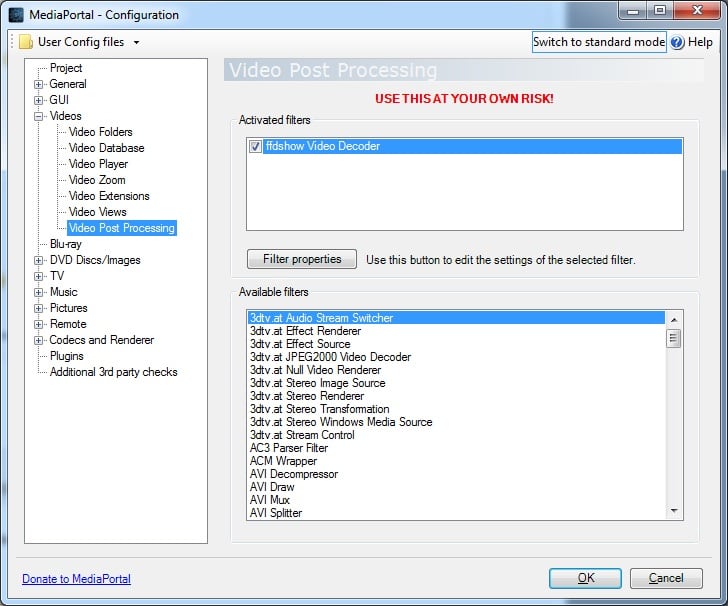
    The only way right now (for doing it dynamically) is to use ffdshow video decoder as Post Process filter but il will break DXVA until you use HD Intel or Nvidia CUVID with LAV Video Decoder.
    Like this you can ajust lipsync :)

    Like you use Nvidia Card + StreamedMP, you can do it perfectly :)
     
    Last edited:

    cruse

    MP Donator
  • Premium Supporter
  • November 7, 2007
    166
    41
    Home Country
    Germany Germany
    You could figure out the ms delay with the audio delay feature of LAV Audio Decoder. So you can switch between the MP and LAV Audio config windows and don't have to close MP all the time.

    Just enter the value into MP Audio Renderer later.

    Audio delay on the fly, while playing a video now that's another story...
     

    Sebastiii

    Development Group
  • Team MediaPortal
  • November 12, 2007
    16,523
    10,466
    France
    Home Country
    France France
    Yep you can do it like this too :)
    And while playing a video, the only ffdshow video post process solution is working.
     

    Sebastiii

    Development Group
  • Team MediaPortal
  • November 12, 2007
    16,523
    10,466
    France
    Home Country
    France France
    Sure :)
    I have set "ffdshow video decoder" (recent version) to post process filter (not ffdshow raw video)
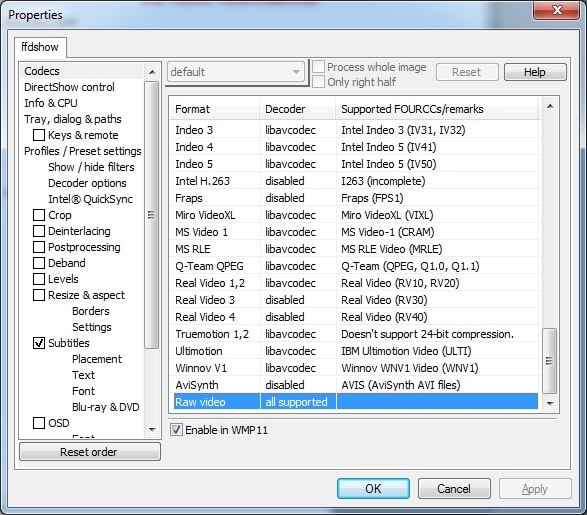
    In ffdshow setting, i have set raw video to "all supported".
    Like you have an Nvidia card, you should use LAV Video (with HW Nvidia CUVID).
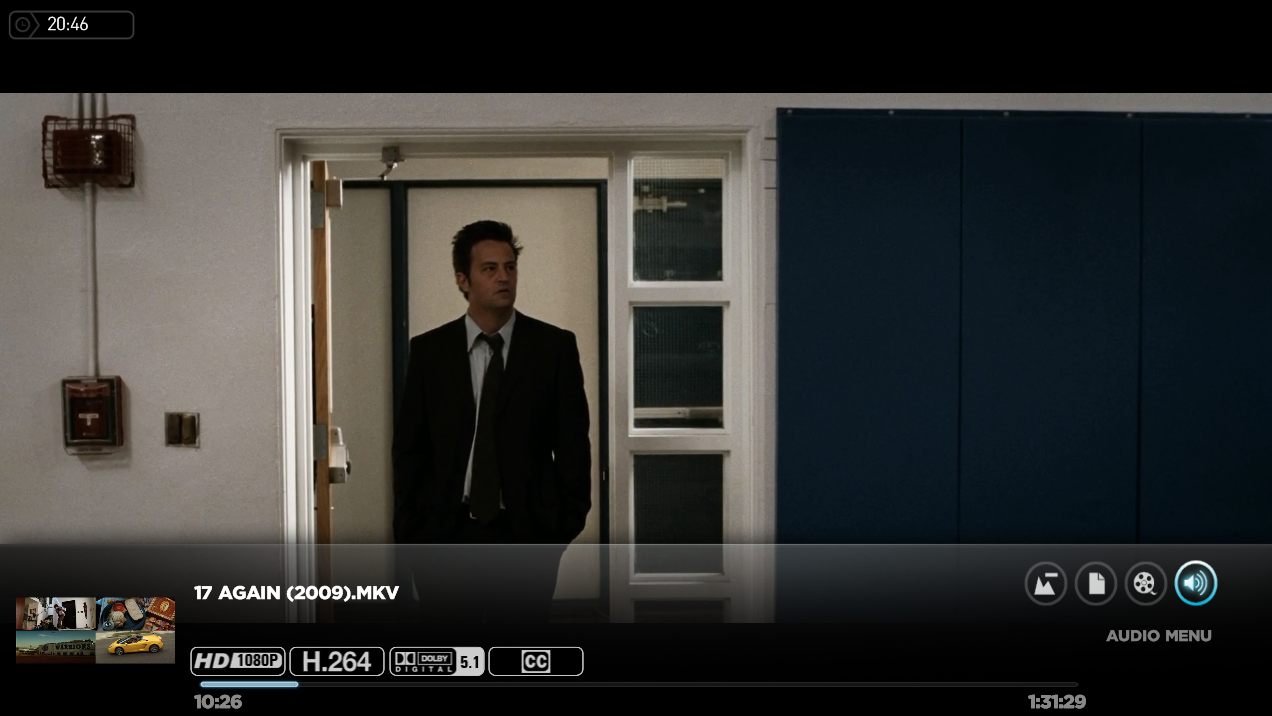
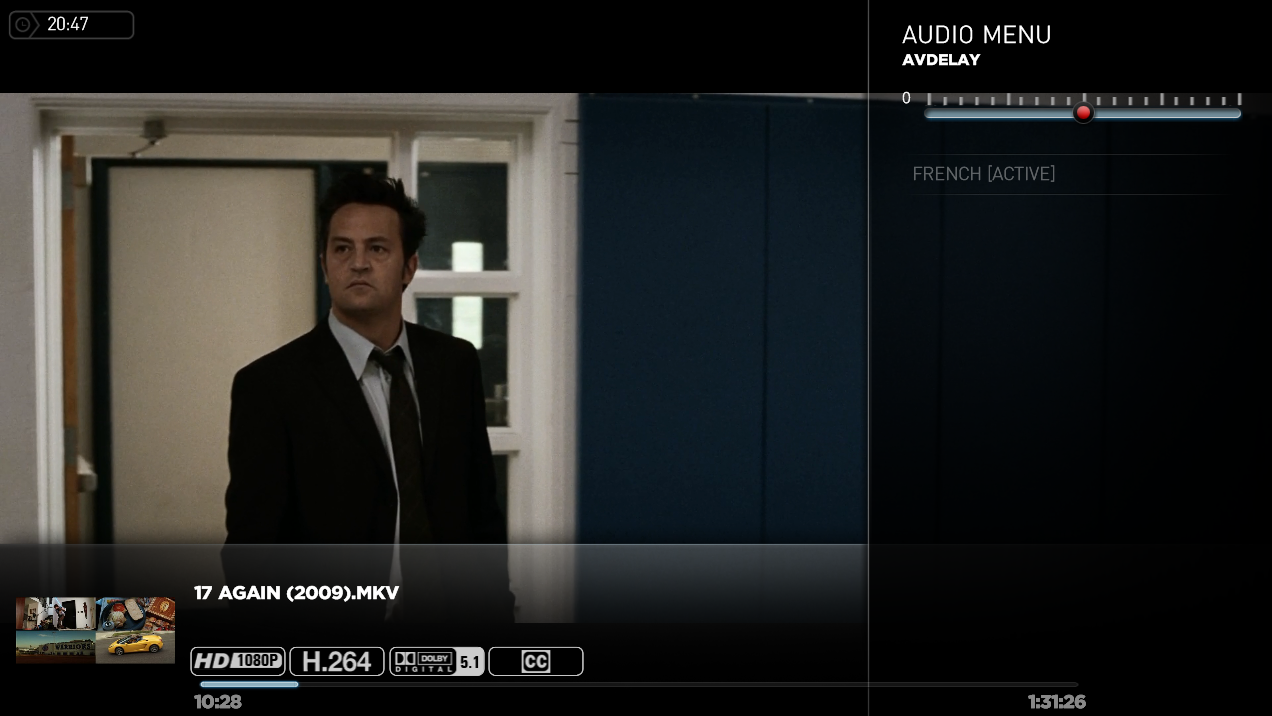
    So now when you play a video, you will have ffdshow video running and then in StreamedMP in "Y" Key -> Audio Menu -> you can change the delay :)
    You can see screenshot attached for help :p
    Also in WIKI :
    http://wiki.team-mediaportal.com/1_...ted_Changes/Audio_Delay?highlight=audio+delay
    http://wiki.team-mediaportal.com/1_MEDIAPORTAL_1/20_Reference/Postprocessing_Guide
    http://wiki.team-mediaportal.com/1_...ediaPortal/1_Videos/Post-Processing_(FFDShow)
    Enjoy :)
     

    Attachments

    • Setting1_ffdshow.jpg
      Setting1_ffdshow.jpg
      112.9 KB
    • Setting2_ffdshow.jpg
      Setting2_ffdshow.jpg
      135.3 KB
    • 20-46-57.png
      20-46-57.png
      683.6 KB
    • 20-47-00.png
      20-47-00.png
      567.9 KB

    Holzi

    Super Moderator
  • Team MediaPortal
  • April 21, 2010
    7,934
    2,235
    Ba-Wü
    Home Country
    Germany Germany
    + you have to install ffdshow x86 else you can not select it as MediaPortal is 32bit.
     

    Users who are viewing this thread

    Similar threads

    Sorry, it's my fault -- I did not notice that you are using MP2. :( MP1 has a separate configuration utility, similar to "TV Server Config". I have tried MP2 only a couple of times, and have never used it seriously. I don't know what MP2 supports with regard to adjusting audio delay, but I do know that all of the adjustments of...
    Sorry, it's my fault -- I did not notice that you are using MP2. :( MP1 has a separate configuration utility, similar to "TV...
    Hi. I recently upgraded my home cinema AVR which also meant changed from sending audio from my HTPC as 5.1 using optical to 7.1...
    Replies
    5
    Views
    1K
    MP has adjustable audio delay. I don't know whether this works for all video formats, but it certainly works for TS files, and may work for MP4 files. There is a slider that allows you to adjust the audio delay while playing a video. Press the INFO button on the remote control to display the OSD, select the "Audio" icon, and then...
    MP has adjustable audio delay. I don't know whether this works for all video formats, but it certainly works for TS files, and may...
    This is not an audio/video out of sync issue but a delay in audio in playback I have been using MP for years and noticed their...
    Replies
    1
    Views
    2K
    Default Direct Sound Device was the problem. MPAR worked better than Dircect Sound, but is still a problem. Changed Audio Renderer to use the TV and it's working.
    Default Direct Sound Device was the problem. MPAR worked better than Dircect Sound, but is still a problem. Changed Audio Renderer...
    New computer build with Windows 11 Pro. MediaPortal 1.34 x64. When I pause a video the audio drops out. This only occurs when...
    Replies
    2
    Views
    2K
    Now with Version 1.37 x64 MP is near to perfect with repect to speed, robustness and funtionality. There is just one point where I have an Idea for further improvement. As I am not too interested in advetisments, I am using comskip to mark times of ads, which is normally working, as it should but produces an error when trying to...
    Now with Version 1.37 x64 MP is near to perfect with repect to speed, robustness and funtionality. There is just one point where I...
    Now with Version 1.37 x64 MP is near to perfect with repect to speed, robustness and funtionality. There is just one point where I...
    Replies
    0
    Views
    716
    Brief update... Hauppauge support responded quickly, stating that the "driver for all of our product confirm to the BDA format". Not sure what that means, but to test that, I downloaded a copy of Capture4Me, and indeed, it switches LNBs without any issues with minimal configuration (just set DiSEqC to 1.x A/B/C/D and select the...
    Brief update... Hauppauge support responded quickly, stating that the "driver for all of our product confirm to the BDA format"...
    Due to ongoing issues with my TBS5520SE USB tuner, I've invested in a Hauppauge WinTV-NOVA-S2 tuner. I have a multi-LNB setup...
    Replies
    18
    Views
    3K
    Top Bottom