BleazleWide Skin V 6 (1 Viewer)

Status
Not open for further replies.

mruane

Portal Pro
June 4, 2006
182
5
Wellington
Home Country
New Zealand New Zealand
Actually - Speights - is one of my favourites also - especially the dark! Oh - using the wide screen blue as the basis resolves all of the screen size issues when running MP in windowed mode also. So, good choice in the foundation for your mods. Looks great on the notebook and the HDTV now!

Cheers Mike
 

Enzio

Portal Member
February 1, 2008
12
0
51
Gothenburg
Home Country
Sweden Sweden
Hi I've got the same problem as Rickyg mentioned earlier in this thread, but I can't sove it. How do you choose to show the banners instead of fanart in the
TV-Series main screen, and Fanart when you have selected a specific show? Bleazle, diden't you include the SVTPlugin? And of course I must say really impressive work once again, I just love this skin :)
 

Bleazle

Portal Pro
July 14, 2007
1,122
257
Pukekohe
Home Country
New Zealand New Zealand
..How do you choose to show the banners instead of fanart in the
TV-Series main screen, and Fanart when you have selected a specific show? Bleazle, diden't you include the SVTPlugin? And of course I must say really impressive work once again, I just love this skin :)

Did you read the README file? it's all in there. Glad you like the skin :)

Cheers

Dave
 

kszabo

MP Donator
  • Premium Supporter
  • December 6, 2007
    796
    86
    Germany, Bayern
    Home Country
    Hungary Hungary
    I join the group of thanksayers :)

    Bleazle:

    What still disturbs me in the skin is that images are sometimes distorted (squeezed) like square images are rectangular, round ones oval... (same problem have BueTwoWide also). Most disturbing:
    - square TV Logos are rectangular in EPG screen
    - icons of home screen are squeezed (a CD should be round and not oval I guess)
    - in title bar (left upper corner) images strongly squeezed (like SLR camera, camcorder, weather icon etc)

    Surely this is an .xml config problem (defined place holder side aspect ratio does not match the skin image file aspect ratio), would be very nice to have that corrected.

    like:
    home screen: music.png have 152x200 px (1:0,76), home.xml defines 209x187 (1:1,12) -> result is distorsion. We just have to edit this images to fit the aspect ratio (add transparent columns left and right in Photoshop)
    epg: channel image template is defined as 55x37px (not square) in mytvguide.xml, but all TV logos are square (your screenshots show that nicely). We need to change this value in mytvguide.xml simply to 37*37

    once I am at home (and wife/kids allow) I will do this and report.

    Greetings
     

    Bleazle

    Portal Pro
    July 14, 2007
    1,122
    257
    Pukekohe
    Home Country
    New Zealand New Zealand
    You mean when you have focus on a folder (rather than a movie file) and it shows information for one of the movies inside the folder right? I don't know of a way around that - I'll put up a post tonight to see if someone has an answer....

    Yep, it shows details of a movie when you focus on a folder... Also, it shows a blank cover and missing info if you dont focus on anything.

    That would be great if that could go away from the shares menu/screen :)

    Do you mean that you would prefer to have no IMDB info shown in any of the Shares views? Or just in the view where you're focused on folders, not files? (which is what I'm trying to do but I haven't received an answer to my post on this yet so that's not looking good..) I added IMDB info in Shares because someone asked for it earlier on in this thread (I can't remember who right now and haven't got time to look) and I like it myself. I could make it an option though - you either have IMDB info or you don't, but I'll stick with the big DVD cover preview, otherwise I might as well just use the Blue3Wide layout :eek:

    ...using the wide screen blue as the basis resolves all of the screen size issues when running MP in windowed mode also. So, good choice in the foundation for your mods. Looks great on the notebook and the HDTV now!..

    Good to hear :)

    ...images are sometimes distorted (squeezed) like square images are rectangular, round ones oval... (same problem have BueTwoWide also). Most disturbing:
    - square TV Logos are rectangular in EPG screen
    - icons of home screen are squeezed (a CD should be round and not oval I guess)
    - in title bar (left upper corner) images strongly squeezed (like SLR camera, camcorder, weather icon etc)....

    Thanks for the input :) - it's these sort of minor (but important!) tweaks that I will be sorting out for the next release :) The main focus with this release was to get it switched over to the Blue3Wide base which makes it easy to ensure the skin is up to date with the most current version of MediaPortal. I did change a number of things to do with aspect ratio which weren't quite right in Blue3Wide though (mainly to do with DVD/thumbnail views) but as you've noticed there is more fine tuning to do. I've already fixed the aspect ratio for the icons on the BasicHome screen on my local copy and I'll look into the things you have mentioned shortly.

    The next version of BleazleWide will be made available when MP 1.0.1 is released but what I'm thinking of doing (in the tradition of Micro$oft!) is releasing some "patches" before then so that people who are watching this thread can grab them and test/report on them, which will ensure BleazleWide (V6.0.1?) should be pretty much a "final" version (kind of like MediaPortal 1.0.0. was almost a "final" version :D ) I'll post whenever a new "patch" is available (it will be attached to the first post in this thread). That way anything I work on gets checked by many more eyes because even though (or probably because) I spend ages looking at this skin I still miss things that other people pick up! :rolleyes:

    Cheers

    Dave
     

    Spaldo

    MP Donator
  • Premium Supporter
  • May 7, 2008
    495
    12
    FlashFXP Development Team
    Home Country
    Do you mean that you would prefer to have no IMDB info shown in any of the Shares views? Or just in the view where you're focused on folders, not files? (which is what I'm trying to do but I haven't received an answer to my post on this yet so that's not looking good..) I added IMDB info in Shares because someone asked for it earlier on in this thread (I can't remember who right now and haven't got time to look) and I like it myself. I could make it an option though - you either have IMDB info or you don't, but I'll stick with the big DVD cover preview, otherwise I might as well just use the Blue3Wide layout :eek:

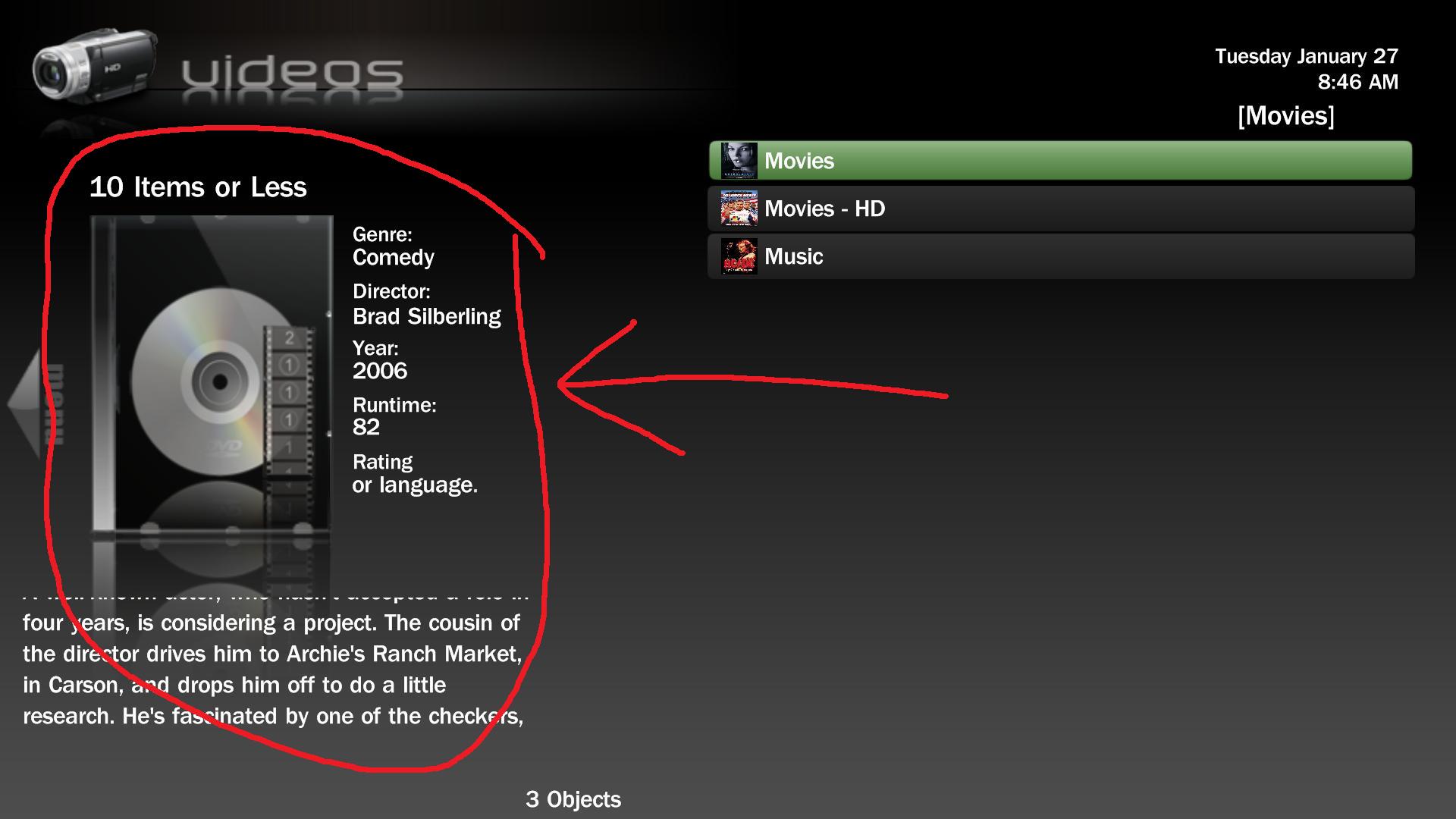
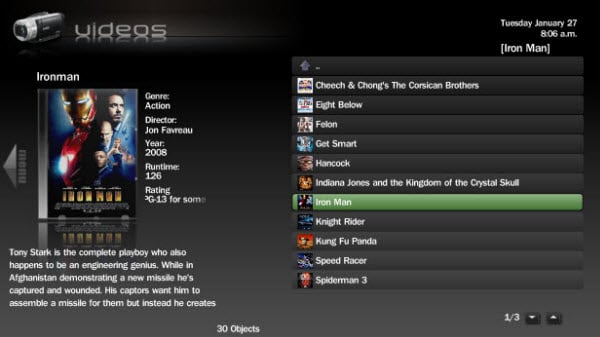
    I love both the IMDB info and big cover when I am browsing MyVideos inside the shares, but, prior to selecting a folder (share) I dont see why there should be anything shown ?

    I am not sure if this is possible and/or if you know exactly what I mean, here are the screenshots to show what I mean...

    One with Red is bad, other one is great! :D
     

    Attachments

    • Videos-Shares.jpg
      Videos-Shares.jpg
      130.2 KB
    • MovieView2.jpg
      MovieView2.jpg
      37.5 KB

    Bleazle

    Portal Pro
    July 14, 2007
    1,122
    257
    Pukekohe
    Home Country
    New Zealand New Zealand
    ...I love both the IMDB info and big cover when I am browsing MyVideos inside the shares, but, prior to selecting a folder (share) I dont see why there should be anything shown ? ....

    I know what you mean, and I agree but as covered previously this seems to be MP behaviour and might not be able to be changed in the skin ( :confused: ) It's the same as when you're in RecordedTV and you focus on a folder which contains multiple episodes - programme info is always shown for the 1st programme in the folder even though you haven't opened it (nothing should be shown in this case too..) :(

    Hopefully someone will answer my post and tell me if it's possible to "kill" the IMDB info when you're focused on a folder.... :rolleyes:

    Dave
     

    zubovsergei

    Portal Member
    January 26, 2009
    31
    0
    Home Country
    United States of America United States of America
    I love your skin Bleazle, but have a question, not sure maybe it was answered.

    I have my movies on three HDs and they are all included in the video database. In order to see all the movies in one large list, I have Switched View set to TITLE, so it shows all the movies combined from all HDs. If I use View such as Shares then I no longer have a complete list, but have to go from one harddrive to the next to see them all.

    So my setup looks exactly like your "MyVideos, Shares view" image on page one of this forum.

    I am trying to set it up so it looks like your "MyVideos, shares, filmstrip."

    THe problem is that whenever I use Layout: filmstrip, it shows the movies in filmstrip format fine but no text info describing the movie (like it should show it in bottom left corner).

    IF I use Layout: Icons or Bigicons, it also doesn't show any info about the movie selected, just an entire screen of movie icons.

    Anyway to include info on the movies in these layouts?


    TIA
     

    Bleazle

    Portal Pro
    July 14, 2007
    1,122
    257
    Pukekohe
    Home Country
    New Zealand New Zealand
    ...I have Switched View set to TITLE, so it shows all the movies combined from all HDs. ...The problem is that whenever I use Layout: filmstrip, it shows the movies in filmstrip format fine but no text info describing the movie (like it should show it in bottom left corner).
    IF I use Layout: Icons or Bigicons, it also doesn't show any info about the movie selected, just an entire screen of movie icons.

    Anyway to include info on the movies in these layouts?

    Yep, just ask me to set it up that way :D I don't use the TITLE view but I can see why you do and why you want the IMDB information shown so I'll work on that for you - I'll set it up the same as the SHARES views :)

    Keep an eye on this thread; I'll put a file up for you to download and try out next week sometime (sorry for the delay, I've decided I should do some work this week :eek: and I'll be away this weekend riding my jetski on the rapids at Lake Taupo :D - as long as that jetboat doesn't take me out I'll be back in front of MP next week...

    Dave

    (@Spaldo - this might be what you're looking for too??)
     
    Status
    Not open for further replies.

    Users who are viewing this thread

    Top Bottom