BleazleWide Skin V 6 (1 Viewer)

Status
Not open for further replies.

p13man

Portal Pro
November 20, 2008
50
2
Home Country
X and Y Coordinates - Grid Overlay

Updated 09.03.2009 for Bleazlewide
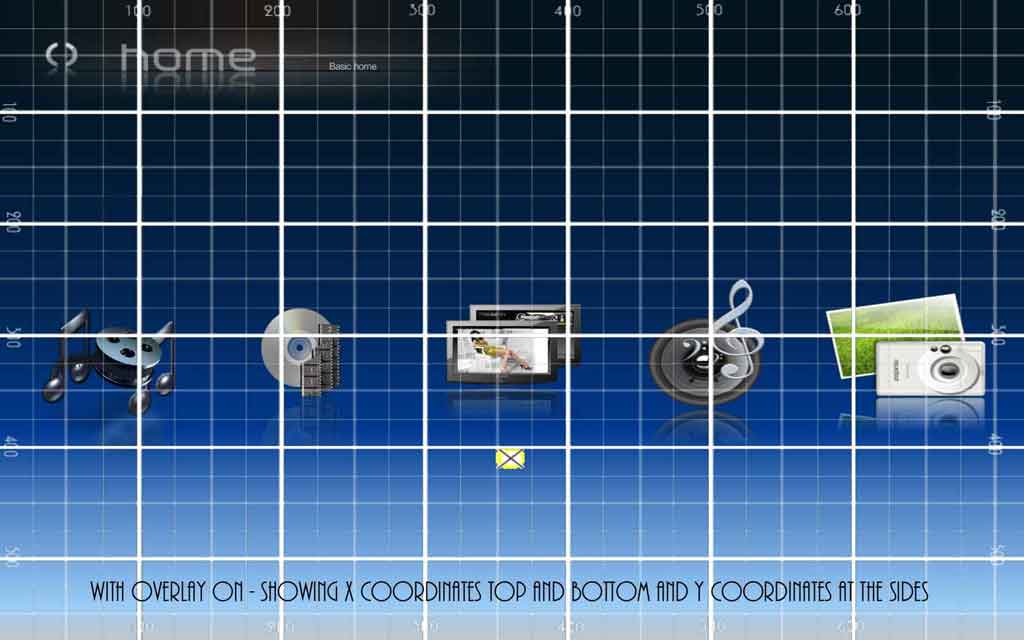
A problem when tweaking skin pages is that it can be something of a trial and error operation especially if you want to move an element to a different place on the page and have to guess the new coordinates' X and Y values.
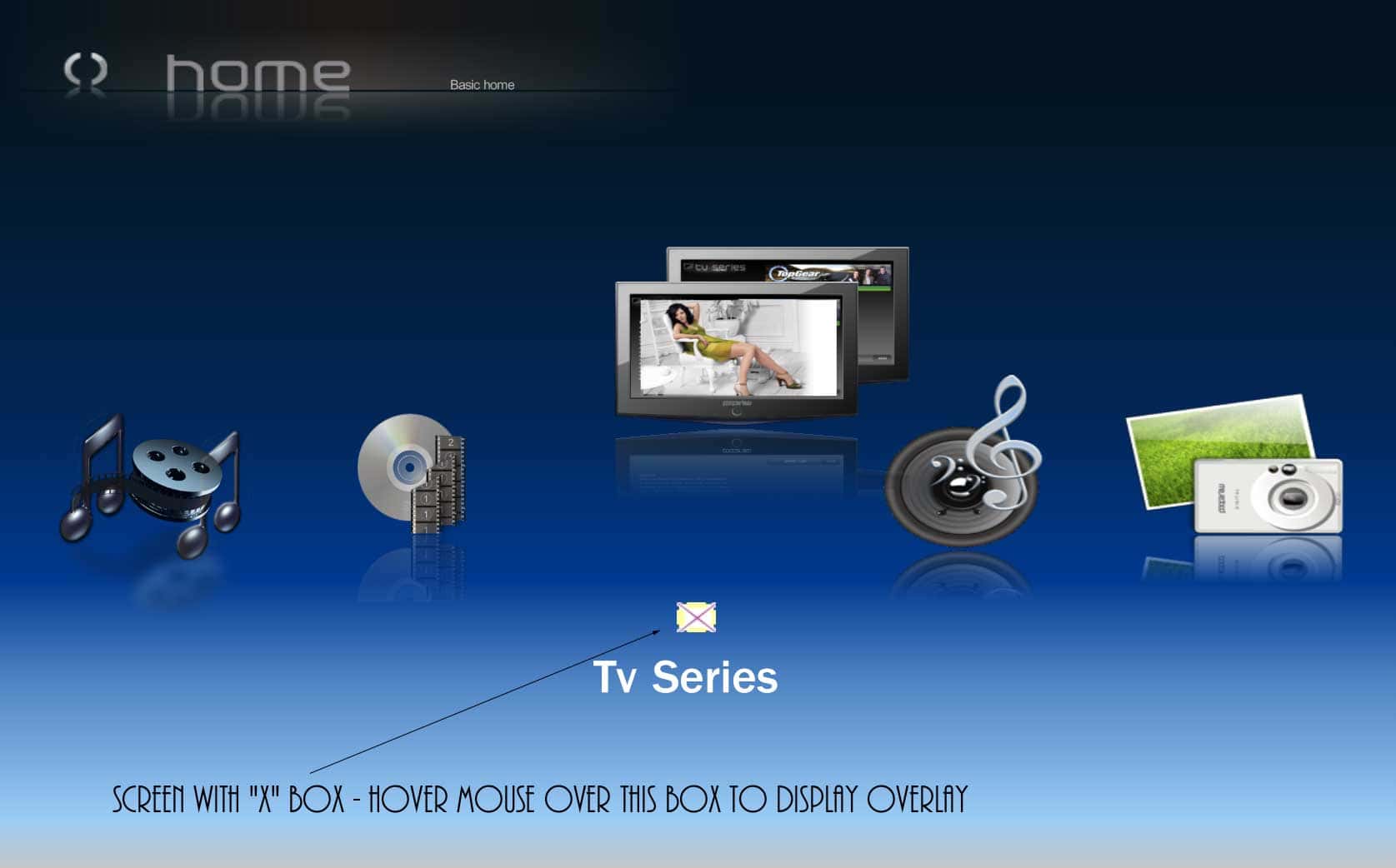
I've made an overlay which superimposes a grid over the page of your choice (see attached screen shots) so that you can identify the precise location of images, text boxes and other controls. I don't know if this will be of any use to anyone but I've attached it to this post and if I see that it is being downloaded, I might improve it so that it can be applied to any skin - or turn it into a plug-in, maybe.

The overlay must be the same size as the skin which for Bleazlewide is 1280x720. It doesn't matter what the display settings are on your monitor/TV screen because the overlay will scale up at the same ratio as the underlying skin so you can view the output on any monitor at any resolution and the X/Y values will be accurate. The overlay can only be seen when the mouse pointer hovers over a small control square so you can switch it on and off. I'm sure it can be improved upon but it's good enough to work with as it is.

See ReadMe.txt in rar file for instructions.

Comments appreciated.
 

Attachments

  • preview_overlay.jpg
    preview_overlay.jpg
    49.7 KB
  • preview_XBox.jpg
    preview_XBox.jpg
    59.6 KB
  • overlay.rar
    30.6 KB

Bleazle

Portal Pro
July 14, 2007
1,122
257
Pukekohe
Home Country
New Zealand New Zealand
p13man!! Where have you been all my life?!! (or for the last 3 weeks at least!) :D:D:D

That looks great, I'm sure a lot of skinners will love the idea and even if they don't, who cares? I love it!! :D

As you said placing graphics (not to mention tables, lists, labels etc etc) involves a LOT of trial and (in my case at least error!). I spent a lot of time taking screen shots then measuring things with a handy app called "screen callipers" but your overlay would've saved me hours...

You should start a new thread and make it available as a download (but thanks for posting here and making me aware of your work!)

Cheers

Dave
 

p13man

Portal Pro
November 20, 2008
50
2
Home Country
Bleazle
You should start a new thread and make it available as a download

It IS available by the link in my post (Overlay.rar). I haven't started a new thread because I will need to make a separate overlay for each of the different skin resolutions (the overlay must be the same size as the skin or it won't scale-up properly) and I wanted to see if there was enough interest to make it worthwhile doing. As I'm now using Bleazle (you might have heard of it :D) it made sense to offer it here first.
Thanks for all your work by the way, it's a great-looking skin and keeps getting better.
 

Bleazle

Portal Pro
July 14, 2007
1,122
257
Pukekohe
Home Country
New Zealand New Zealand
...It IS available by the link in my post (Overlay.rar). I haven't started a new thread because I will need to make a separate overlay for each of the different skin resolutions (the overlay must be the same size as the skin or it won't scale-up properly) and I wanted to see if there was enough interest to make it worthwhile doing.

I've downloaded it and will have a look as soon as I get a chance. What I meant was you should make it downloadable from another thread (i.e. one dedicated to "Overlay") so that other people know it's available but I see now why you can't do that :)

.. As I'm now using Bleazle (you might have heard of it :D) it made sense to offer it here first...

:D Heard of it? I just about dream about it:D :mad: :D Thanks for making Overlay for the Bleazle skin first, I'm sure it will come in handy :D

Dave
 

Bleazle

Portal Pro
July 14, 2007
1,122
257
Pukekohe
Home Country
New Zealand New Zealand
@ zubovsergei & Spaldo (and whoever else wants to give this a go..)

I found a few spare minutes this morning and came up with the attached files. They will give you the same IMDB info in Genre, Actor, Title & Year views as you now get in the Shares view but obviously the advantage of these views is that it doesn't matter if the files are stored on different HDDs as long as you've got IMDB info for them :) Sound like what you were looking for?

Just paste them into the BleazleWide skin directory (no need to delete the cache).

Let me know what you reckon.

Dave
 

Attachments

  • myvideoTitle.xml
    30.6 KB
  • common.facade.video.Title.xml
    30.7 KB
  • common.picback.video.xml
    30.7 KB

zubovsergei

Portal Member
January 26, 2009
31
0
Home Country
United States of America United States of America
@ zubovsergei & Spaldo (and whoever else wants to give this a go..)

I found a few spare minutes this morning and came up with the attached files. They will give you the same IMDB info in Genre, Actor, Title & Year views as you now get in the Shares view but obviously the advantage of these views is that it doesn't matter if the files are stored on different HDDs as long as you've got IMDB info for them :) Sound like what you were looking for?

Just paste them into the BleazleWide skin directory (no need to delete the cache).

Let me know what you reckon.

Dave

Thanks Bleazle, those files worked perfectly! One small thing. I am using the video overlay plugin that shows the movie being played in the background while I can still go through my list of movies, etc. But for some reason for filmstrip, instead of showing the movie playing in the background, it shows a magnified image of the boxart for that movie. I did not install any fanart stuff and did not copy any of the customization options from your orignial skin install file. For LIST, or Icons or Big Icons, it works fine and shows the movie in the background.

TIA
 

Spaldo

MP Donator
  • Premium Supporter
  • May 7, 2008
    495
    12
    FlashFXP Development Team
    Home Country
    Will give it a go today Bleazle..

    Just tried it.. maybe there was some confusion between what zubovsergei and I were asking about.

    I use the icon's view in MyVideos and there is no change for me.

    The thing I was suggesting/asking was about the IMDB info being displayed when you rested on the folder in shares view...
     

    Bleazle

    Portal Pro
    July 14, 2007
    1,122
    257
    Pukekohe
    Home Country
    New Zealand New Zealand
    ... I am using the video overlay plugin that shows the movie being played in the background while I can still go through my list of movies, etc. But for some reason for filmstrip, instead of showing the movie playing in the background, it shows a magnified image of the boxart for that movie. I did not install any fanart stuff and did not copy any of the customization options from your orignial skin install file. For LIST, or Icons or Big Icons, it works fine and shows the movie in the background....

    I see what you mean - go to the thread above and grab the "common.picback.video.xml" file which I've just uploaded, that'll fix it :)

    ..Just tried it.. maybe there was some confusion between what zubovsergei and I were asking about. I use the icon's view in MyVideos and there is no change for me.

    The thing I was suggesting/asking was about the IMDB info being displayed when you rested on the folder in shares view...

    No confusion - zubovsergei's issue was easy to fix :) unfortunately I can't fix the issue you're talking about, but I know what you mean :( I didn't really change anything in MyVideos this morning, just deleted some code that wasn't doing anything (so there was no real reason to upload it - I've removed it from the post above..)

    If someone comes up with a way to sort the issue out you're talking about I'll change it but even then I think you'd be better off using the TITLES view (which now has IMDB info in all views) that way you'll never see any folders anyway :)

    BEFORE anyone asks "why aren't there any page "up/down" buttons in the ICONs and BIG ICONS views it's because moving the layout tables (like I have) screws them up and makes things jam so I got rid of them. If you've got a big list of movies you want to scroll through quickly either use the LIST view (which has "up/down" buttons) or if you know the name of the movie you're looking for use your remote/keyboard to jump to it...

    Dave
     

    Spaldo

    MP Donator
  • Premium Supporter
  • May 7, 2008
    495
    12
    FlashFXP Development Team
    Home Country
    I think you'd be better off using the TITLES view (which now has IMDB info in all views) that way you'll never see any folders anyway :)

    Thanks, but, I use shares because I have 3 sections that I want to keep seperate...ie.

    Movies
    HD Movies
    Music Videos
     

    wogboy112

    Portal Pro
    January 18, 2009
    97
    4
    Home Country
    Australia Australia
    EPG

    Hi Guys,

    I was wondering if you have any recommendations for using an EPG tool with bleazle, I'm trying to get fortherecord to work, but with no luck as there is no skin files for it...

    any help or recommendations would be great
     
    Status
    Not open for further replies.

    Users who are viewing this thread

    Top Bottom