BleazleWide Skin V 6 (1 Viewer)

Status
Not open for further replies.

eetaylog

Portal Pro
March 6, 2007
874
41
44
South London
Home Country
England England
MyFilms Cover Art issue fixed

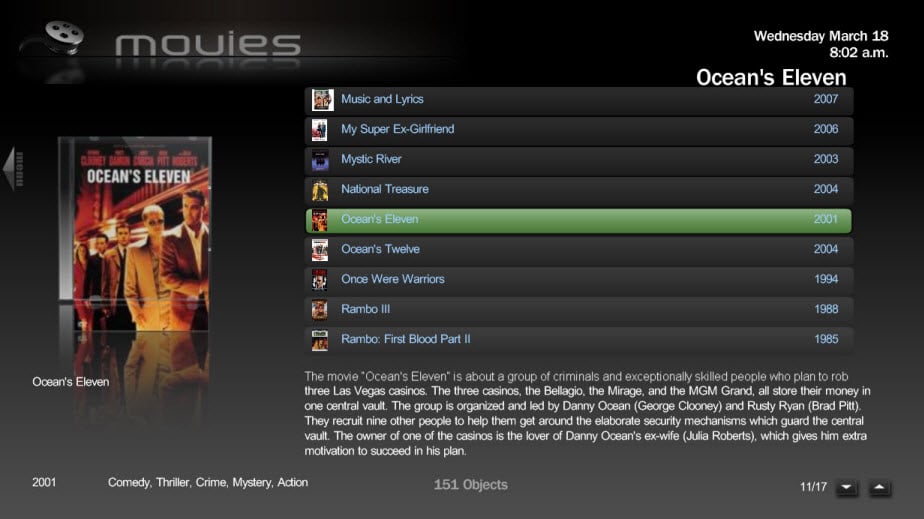
Dont know if anyone remembers, but last week i posted that there was an issue with the dvd cover art in the MyFilms plugin, where it was too small to fit in the DVD cover.png image.
18610.jpg


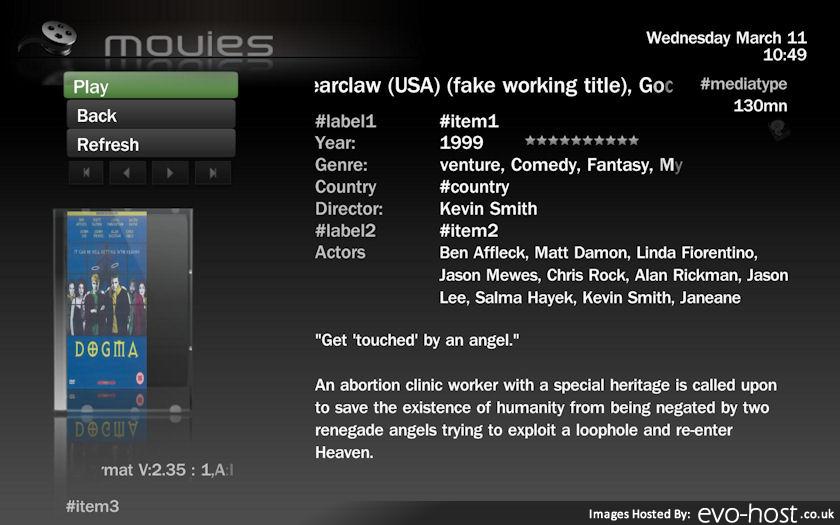
Ive had a quick look at the code for the plugin (V4.8), and it seems that it was an error in the image dimensions, which ive now changed and attached below. Just copy and paste them into your Bleazle folder over your current MesFilms.xml and MesFilmsDetail.xml files.
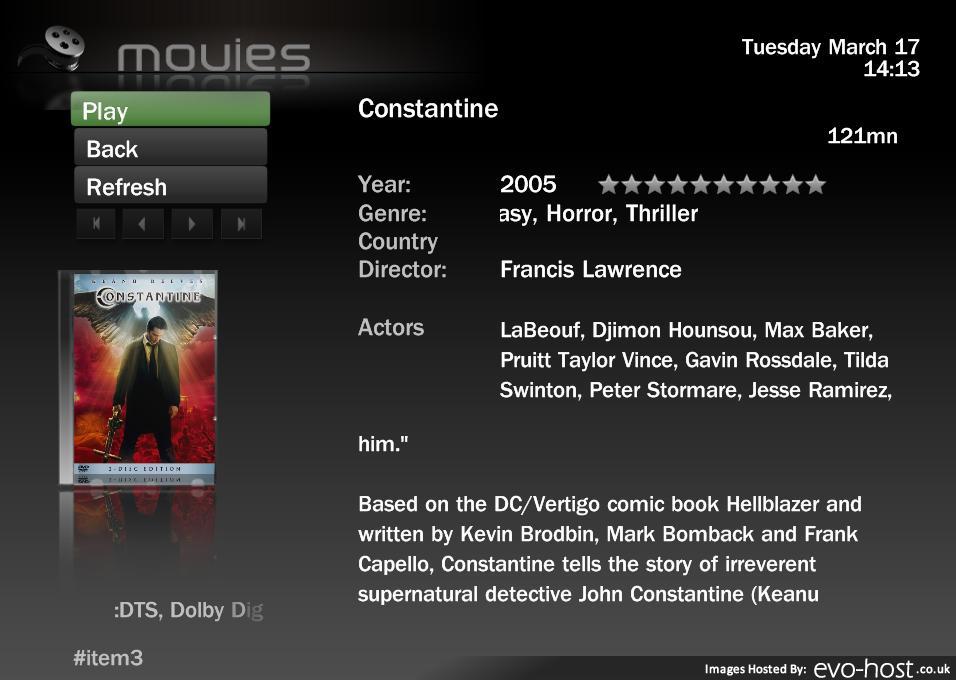
18694.jpg


Hopefully this solves the problem for anyone that was having the same issues as me...:)
 

Attachments

  • MesFilms.xml
    30.6 KB
  • MesFilmsDetail.xml
    30.6 KB

Bleazle

Portal Pro
July 14, 2007
1,122
257
Pukekohe
Home Country
New Zealand New Zealand
I gave it a go but unfortunately it didn't work for me :( - it just changed which covers had problems. Some of the covers which were fine ended up being longer than the DVD case (see pic below) while the covers which were messed up with the original XML files looked good.

I've only got 2 or 3 covers that look strange using the XML files I included in V6.1.2 so I can live with that but maybe you've got more and changing to the dimensions you've altered might fix them (all?). If it does that's great but it still sounds like a plugin issue to me.

Thanks for looking at it though - it might help someone else out :)

Dave/Bleazle/whatever (Deazle? :D)
 

Attachments

  • Copy of 18-03-2009 8.02.48 a.m..jpg
    Copy of 18-03-2009 8.02.48 a.m..jpg
    79.8 KB

eetaylog

Portal Pro
March 6, 2007
874
41
44
South London
Home Country
England England
Deazle, or Diesel? I smell a nickname coming on :D

Yeah i had another look at the rest of my films, and youre right, it doesnt work for all of them (in fact it only seems to have sorted about half of them) which makes me think its an issue with the resolution of the front cover .jpg file rather than the resuolution of the DVD cover image in the plugin.

Looks like the plugin needs a piece of code written into it to shrink the film cover image to the same resolution as the dvd background.
 

Bleazle

Portal Pro
July 14, 2007
1,122
257
Pukekohe
Home Country
New Zealand New Zealand
Deazle, or Diesel? I smell a nickname coming on :D...

:D

...Yeah i had another look at the rest of my films, and youre right, it doesnt work for all of them (in fact it only seems to have sorted about half of them) which makes me think its an issue with the resolution of the front cover .jpg file rather than the resuolution of the DVD cover image in the plugin.

Looks like the plugin needs a piece of code written into it to shrink the film cover image to the same resolution as the dvd background.

At least you can read that stuff (I can't, and don't want to learn either!) - hopefully you'll work out what the problem is so that it can be sorted :)

I had a look at that Drobo thing last night - looks good but damn expensive here and it looks like we have to get them from either Aussie or the States (or the EU) because as far as I could tell there is no NZ agent which would mean that warranty claims would be a major.

I'm in no real hurry so I'll just study up on that server stuff for a bit - starting with what is RAID? (we've got a fly spray here call Raid but I assume this is different :D) and what is NAS? looks like I'll be giving Wikipedia a hammering for a while!!

I don't expect you to answer those questions - I'll get there eventually! :)

Beerzle :D (had a few bevvies tonight :))
 

eetaylog

Portal Pro
March 6, 2007
874
41
44
South London
Home Country
England England
dont worry, i knew bugger all about any of this sort of stuff either until i built my server.:D its all pretty straight forward once you get stuck in.

NAS is a Network Attached Storage device that houses a number of hard drives that can be grouped together as one large volume (like RAID), and then accessed over a network via a router. some NAS devices come with firewire or usb connections for direct pc connection though. the good thing about thes is that they have their own data controllers.

RAID (random array of inexpensive disks btw:cool:) is a way of grouping a bunch of HDD's together, and use them as one large storage space (your pc will see it as one large drive).

The drives are handled by a controller, which sorts out where and how the data is arranged across the drives. There are 2 main types of contollers, software and hardware, i wont go into this too much because its a bit of an in-depth subject, but bascially, hardware contollers are much more reliable and stable than software ones, but also pretty expensive (you can pick up a PCI software raid controller for around £20, whereas a hardware controller will set you back hundreds).

One of the main advantages of using RAID (in most cases, but we'll get to that in a sec) is that your data is backed up using a technique called 'redundancy', where the RAID assigns an area of the raid volume as backup space, so that if one of the hard disks in the volume dies, you can just plug in a new one, rebuild your raid and carry on without losing any data. This obviously means that you cant use all of your collective HDD space as storage since some of it will be used as backup. The amount of space used for backup depends on the type of RAID level you choose. There are loads of different types out there, but heres the main types:

RAID0 - this doesnt use any redundancy, so if a disk dies, you will lose all your data. :( on the plus side though, data transfer rates are very quick using raid0, and you get to use all the disk space on your HDD's.

RAID1 - This uses a redundancy type called mirroring, where data written to one disk drive is simultaneously written to another disk drive. If one disk fails, the other disk can be used to run the system and reconstruct the failed disk. This does mean however that you only get to use half the collective HDD space for storage (ie 2x1Tb hard drives = 1Tb actual storage space on your pc, which can work out expensive).

RAID5 - This is a happy medium between 0 and 1 types of raid. It uses striping and parity to backup your data. which means that 1 disk in 3 will be used as redundancy (eg 3x1Tb HDD's = 2Tb actual storage space). Data transfer (write) speeds are slower using this type though.

Theres loads more to this subject, but this should give you the basics, just google it :)

Hope this helps Dave (sorry to everyone else for the hijack :rolleyes: ). If you need any more info you can PM me if you like.

gary
 

Bleazle

Portal Pro
July 14, 2007
1,122
257
Pukekohe
Home Country
New Zealand New Zealand
Thanks for all of that info! I haven't had a chance to digest it yet but at least now I've got a starting point! (I meant it when I said that I didn't expect you to spell it all out for me though! :D )

Back to BleazleWide skin stuff - I've just added support (on my local copy) for Simon Says - the kids like it :)

Has anyone played around with the fading hover images I posted a while back, and if so did it effect your systems performance?

I think I'll included them as an optional download/add on when the next version is released which is one of the reasons I decided to run with making the skin "hot" - it's better if there are separate threads for things like that...

Dave
 

eetaylog

Portal Pro
March 6, 2007
874
41
44
South London
Home Country
England England
Has anyone played around with the fading hover images I posted a while back, and if so did it effect your systems performance?

I think I'll included them as an optional download/add on when the next version is released which is one of the reasons I decided to run with making the skin "hot" - it's better if there are separate threads for things like that...

Dave

i installed them and had a play around the other day and think they look great :). No problems with performance this end, though did you make a mistake in your instructions in saying that the .xml files have to be copied to the media folder? surely they had to be copied to the root bleazleWide folder? i copied them to both in the end just in case.
 

Bleazle

Portal Pro
July 14, 2007
1,122
257
Pukekohe
Home Country
New Zealand New Zealand
...i installed them and had a play around the other day and think they look great :). No problems with performance this end, though did you make a mistake in your instructions in saying that the .xml files have to be copied to the media folder? surely they had to be copied to the root bleazleWide folder? i copied them to both in the end just in case.

Good to hear they work for ya :) The XML files only need to go in the Media folder - renaming the hover images makes MP use the XML files (don't ask me how though!) which then load the fading image effect.

Dave
 

eetaylog

Portal Pro
March 6, 2007
874
41
44
South London
Home Country
England England
ok, ill remove the xml's from the root folder later and double check that it still works. the fading effect is a definate improvement though. just need the images for the rest of the plugin hovers now.... could take a long time! :D

did you do them yourself btw? if you need a hand doing the other hovers (MyFilms, TVSeries etc) give me a shout and ill have a go.
 

Bleazle

Portal Pro
July 14, 2007
1,122
257
Pukekohe
Home Country
New Zealand New Zealand
ok, ill remove the xml's from the root folder later and double check that it still works...

it will because that's how I've got it set up :)

... the fading effect is a definate improvement though. just need the images for the rest of the plugin hovers now.... could take a long time! :D

did you do them yourself btw? if you need a hand doing the other hovers (MyFilms, TVSeries etc) give me a shout and ill have a go.

It's only a small effect (I started off trying out a zoom in effect but it wasn't subtle enough for me) but I agree, it looks better. I did the images and it took ages :rolleyes: I guess it could be automated in Photoshop but I haven't tried doing that yet. Basically each image fades in by about 4% (100%/24 frames) - if you want to work on some of the other images that would be great. I was thinking of reducing the number of images to 12 but I haven't had a chance to see how that would look. The problem with creating so many images is that you end up with more packed graphics files in the cache which is no good for people with GPU issues. That's why this will be an option rather than a skin feature.

Dave
 
Status
Not open for further replies.

Users who are viewing this thread

Top Bottom