[Approved] Fix for TVE #0002126 (2 Viewers)

framug

Super Moderator
  • Team MediaPortal
  • January 31, 2005
    6,213
    2,348
    South of France
    Home Country
    France France
    • Thread starter
    • Moderator
    • #2
    Since I tested it on a USB key, I found better cartridges for my rifle.
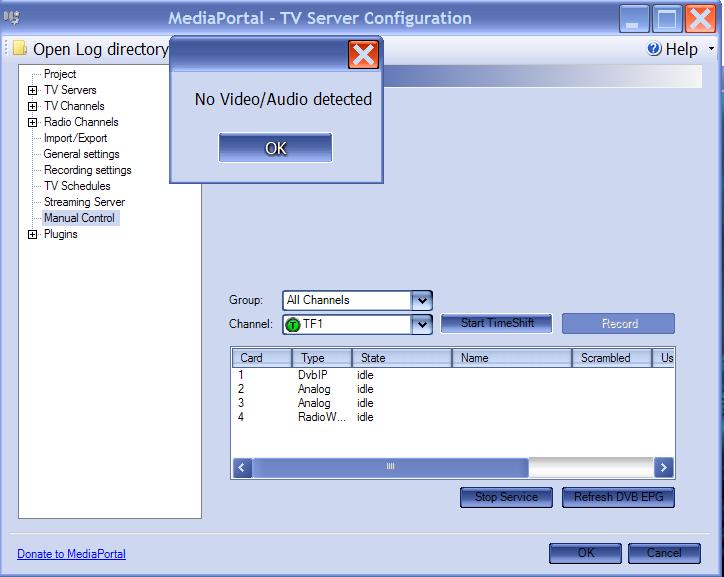
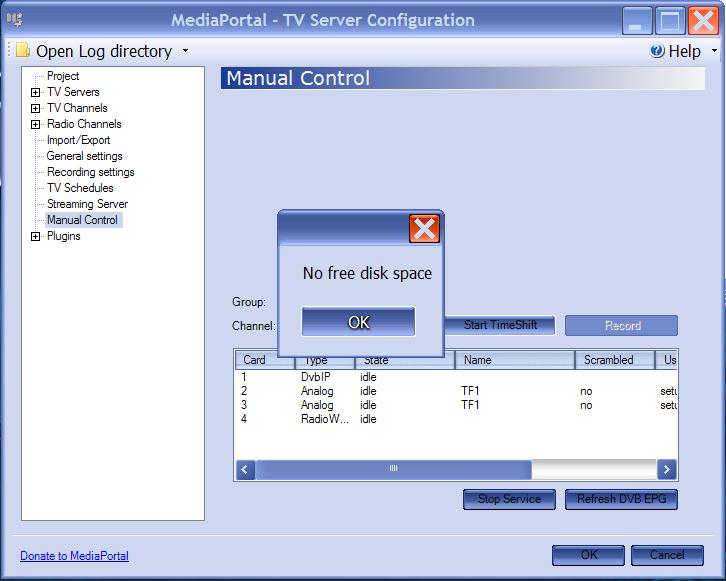
    And, here are the evidences (screenshots before/after) :

    I modified older classes wich are now for latest #23143 SVN.
     

    Attachments

    • before.JPG
      before.JPG
      49 KB
    • after.JPG
      after.JPG
      49.5 KB

    tourettes

    Retired Team Member
  • Premium Supporter
  • January 7, 2005
    17,301
    4,800
    Actually it would be more important to fix the MediaPortal client side to show the correct error note when the disk is full.
     

    framug

    Super Moderator
  • Team MediaPortal
  • January 31, 2005
    6,213
    2,348
    South of France
    Home Country
    France France
    • Thread starter
    • Moderator
    • #4
    Hi tourettes,

    Ah, OK, it was not very clear, in the mantis. ;)
    May I hope this fix will be integrated anyway ?
    Then I didn't work for nothing ?
    I will have a look on the client side but, I don't promise something for sure.
     

    morpheus_xx

    Retired Team Member
  • Team MediaPortal
  • March 24, 2007
    12,070
    7,459
    Home Country
    Germany Germany
    I think it's also important to handle disk space also during recording and timeshifting, not only on starting.

    does your patch cover this?
     

    framug

    Super Moderator
  • Team MediaPortal
  • January 31, 2005
    6,213
    2,348
    South of France
    Home Country
    France France
    • Thread starter
    • Moderator
    • #6
    Hi morpheus,

    I admit not, for the server side but, I would like to explain you what I found :

    For the server side :
    TimeShifter doesn't want to start if there is less space than 488,5 MB.
    I'm absolutely sure of that because fully tested.
    The TimeShift file is always 250 MB.
    Then, for this event, user has to stay on record state in the TV-Server Configuration during more than 7 minutes.
    And even if more than 7 minutes, the TV-Server doesn't crash.
    Of course, in this case, .ts file will not be really usable but, click record button on Manual Control Form, isn't it intended only for testing if record is OK, finally ?
    Then, shouldn't it be enough, just for this case ?
    Don't forget, before, it was a messagebox with another message displayed but, there was neither specific thread or timer for that too.
    Then, I thought it was just a bug to fix.

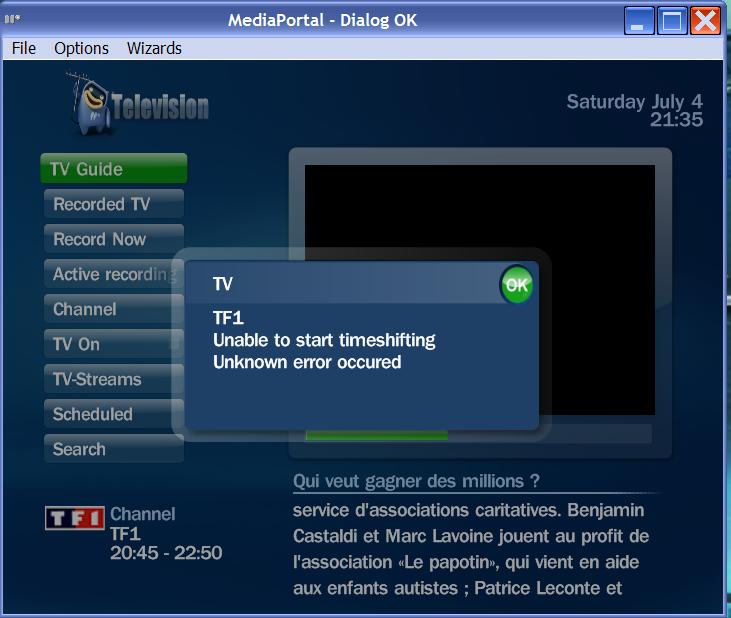
    For the client side, it's not the same error message (look at screenshot) :
    It appears to be inside TVHome.cs, when ChannelTuneFailedNotifyUser(TvResult succeeded, bool wasPlaying, Channel channel) method is called.
    Then, shouldn't it be another mantis record for that ?
    (Just wonder and of course, I agree, we have to fix it too).

    What do you think, about ?

    Edit : ooops, just seen that unknown error, is because of the new NoFreeDiskSpace implemented and, not treated yet in TVHome.
    I must to look a bit more inside.
     

    Attachments

    • before_client.JPG
      before_client.JPG
      55.9 KB

    framug

    Super Moderator
  • Team MediaPortal
  • January 31, 2005
    6,213
    2,348
    South of France
    Home Country
    France France
    • Thread starter
    • Moderator
    • #7
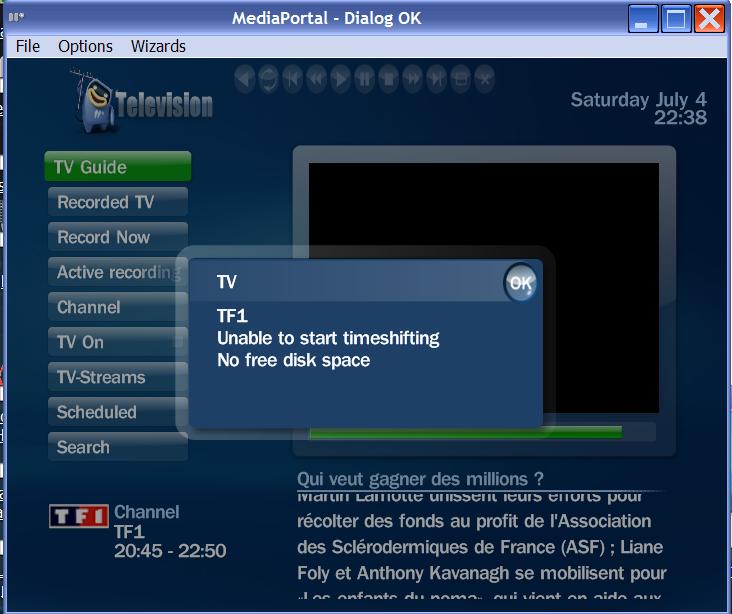
    Enjoy Client side :
     

    Attachments

    • after_client.JPG
      after_client.JPG
      57.6 KB
    • TVHome.patch
      30.6 KB
    • strings_en.patch
      30.6 KB

    morpheus_xx

    Retired Team Member
  • Team MediaPortal
  • March 24, 2007
    12,070
    7,459
    Home Country
    Germany Germany
    shouldn't your patch consider also the settings from tvservice?

    i.e. you can set timeshift file size to 1 GB per file, min 2, max 4. your hardcoded check "<500000" wouldn't fit here.

    I think this should be possible to check?
    :D
     

    framug

    Super Moderator
  • Team MediaPortal
  • January 31, 2005
    6,213
    2,348
    South of France
    Home Country
    France France
    • Thread starter
    • Moderator
    • #9
    morpheus, sorry to ask you this.
    Remember, I'm a bit noob, with this TVE3. :p
    I didn't know there were such settings.
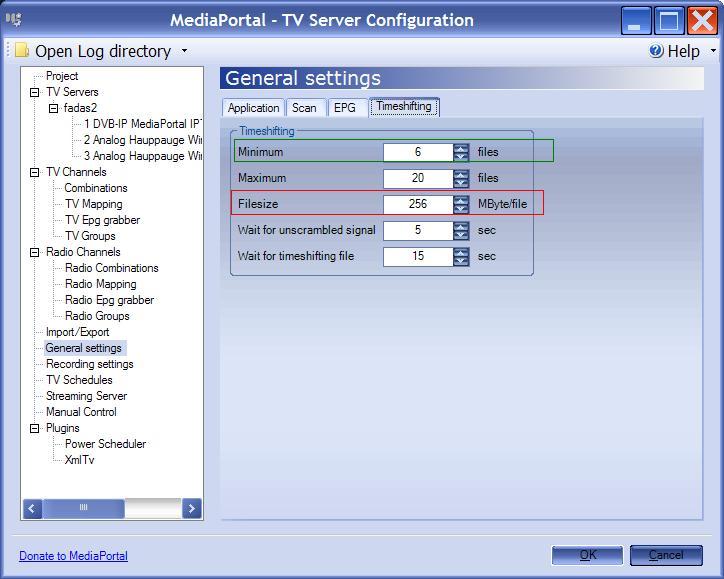
    Is it what I surrounded in red and green ?
    I have to multiply Minimum files with Filesize to obtain the value and finally use it in the test ?
    Is it what you ask me for ?

    Edit : Well, or maybe, I suppose multiply Maximum files with Filesize, isnt it ?
     

    Attachments

    • noob.JPG
      noob.JPG
      58.6 KB

    framug

    Super Moderator
  • Team MediaPortal
  • January 31, 2005
    6,213
    2,348
    South of France
    Home Country
    France France
    • Thread starter
    • Moderator
    • #10
    After many tests :

    - Changing Minimum or Maximum files settings doesn't change disk space needed.
    - Only changing Filesize is influential with disk space needed.
    A 256 MB/file value in Filesize implies 512 000 000 bytes free on HDD for it works.
    (488 MB exactly because, you know of this story for bad commercial disk size, they count 1 KB = 1000 Bytes and 1 MB = 1000 KB).
    A 257 MB/file value in Filesize implies 514 000 000 bytes free on HDD for it works.

    Then, I determined this calcul solution for it works :

    Error No Free Disk Space if :

    Free Disk Space on HDD < (timeshiftMaxFileSize in Bytes * 2)


    I uploaded newer TimeShifter.patch in the first post, if you agree with my solution...
     

    Users who are viewing this thread

    Similar threads

    To other people reading about this 'issue', Doskabouter provided me with a fix/patch. It is a modified version of tswriter.ax which solved the problem with dolby digital plus audio. I want to thank Doskabouter for all his time and energy he put into resolving this!!
    To other people reading about this 'issue', Doskabouter provided me with a fix/patch. It is a modified version of tswriter.ax which...
    Hi all, I could use some help with the following; OS: Win11 24H2 TV server: 1.37.000.0|x64 (working with Mediaportal for maybe 20...
    Replies
    4
    Views
    2K
    i love how subtitles are implemented in the MP2 videoplayer, this is just perfect. 1080p playback is also very good. But video playback in MP2 is buggy when playing 4k material. Therefore: PLEASE add an option for an external video player! I'd LOVE to have VLC back as videoplayer, like in MP1! This works perfectly. You will make a...
    i love how subtitles are implemented in the MP2 videoplayer, this is just perfect. 1080p playback is also very good. But video...
    i love how subtitles are implemented in the MP2 videoplayer, this is just perfect. 1080p playback is also very good. But video...
    Replies
    0
    Views
    1K
    I have recently installed MediaPortal 1.37 (x64) and MP-TVSeries v4.5.1.697 and unfortunately the TV episode runtime duration is missing in my Titan skin. This only applies to my .TS files, my .MKV files are OK. I believe the difference is likely to be because .MKV files embed the runtime in the file unlike .TS files. I have done...
    I have recently installed MediaPortal 1.37 (x64) and MP-TVSeries v4.5.1.697 and unfortunately the TV episode runtime duration is...
    I have recently installed MediaPortal 1.37 (x64) and MP-TVSeries v4.5.1.697 and unfortunately the TV episode runtime duration is...
    Replies
    0
    Views
    662
    MP1 MP2 Not working! DE
    O Frabjous Joy! That seems to have done the trick. Thank you so much for your help and advice, CyberSimian. I hadn't thought of deleting the various folders, but I'll bear that in mind for any future disasters. Now I can record King & Conqueror on Sunday! Cheers Ralph
    O Frabjous Joy! That seems to have done the trick. Thank you so much for your help and advice, CyberSimian. I hadn't thought of...
    I've been running MediaPortal on my PC for several years, but the most recent update "MediaPortal 1.38 Release " does...
    Replies
    5
    Views
    2K
    So, you're power cycling the TV, but not putting the PC to sleep ? In General => Startup/Resume settings, try checking "Ignore Windows resolution/size changes" In Codecs and Render, try selecting the specific audio device rather than "Default DirectSound device" Just ideas, no guarantee this will do anything. If this doesn't work, I...
    So, you're power cycling the TV, but not putting the PC to sleep ? In General => Startup/Resume settings, try checking "Ignore...
    I'm running MP1 as a client only on this: https://www.amazon.com/dp/B0DZX5DWS5?ref_=pe_123509780_1038749300_t_fed_asin_title&th=1...
    Replies
    4
    Views
    478
    Top Bottom