Frames for MediaPortal 1.3.x (1 Viewer)

rsbrux

Documentation Group
  • Team MediaPortal
  • April 15, 2007
    1,215
    176
    Home Country
    Switzerland Switzerland
    This has become my favorite skin for MP1.3, now that the Default skins have become less minimalistic.
    Here are my few criticisms:
    1. In the album view, it would be nice to have more than 4 items per screen. PureVisionHD 1080 has at least twice as many. Since you have a nice blowup of the album cover on the left, I would even be willing to give up having the album cover thumbnail to the left of each list item.
    2. It looks to me as though the large album cover on the left in album view could be even larger. At least it doesn't use the available space on my screen.
    3. The world wide weather page shows the formal parameter where the feed would be, if no feed is enabled for a particular location (see 07-08-03.png).
    4. For locations with fewer than 6 images, I was unable to navigate to those whose names are displayed above the image frame (e.g. webcam & swiss radar in 06-49-35.png)
    Nonetheless, these are minor flaws and this is far and away my favorite out of the new crop of skins: clean, uncluttered and easy to use, with elegant and intuitive icons!

    P.S. Thanks to the clear organization in columns (using classic view) the navigation is also easier and more intuitive than in other skins, which increasingly mix horizontal and vertical lists/menus.
     

    Attachments

    • 06-49-35.png
      06-49-35.png
      378.1 KB
    • 07-08-03.png
      07-08-03.png
      491 KB
    Last edited:

    Lbr_Lion

    Extension Designer
    July 19, 2008
    243
    372
    Home Country
    Netherlands Netherlands
    • Thread starter
    • Moderator
    • #12
    Last edited:

    Lbr_Lion

    Extension Designer
    July 19, 2008
    243
    372
    Home Country
    Netherlands Netherlands
    • Thread starter
    • Moderator
    • #13
    1) is it possible when you disable all fan art that the room taken up by this area be removed and the text expands to take up its place? or expanded by another 20 chars and centered text?

    Do you have a certain screen(s) where this should happen and can you make maybe a example? When I have to do this for every screen it will need a complete rework of the skin and this will take too much time.

    2) think this is a more general question? i have disabled skin sounds in the gui but they continue to play when i use the play/stop/frw etc? can anyone think why it still plays?

    I have no other idea then that it is maybe caused by software that is part of the remote: Is there seperate software installed for the remote and where you can link also sounds to buttons?
     

    Lbr_Lion

    Extension Designer
    July 19, 2008
    243
    372
    Home Country
    Netherlands Netherlands
    • Thread starter
    • Moderator
    • #14
    1. In the album view, it would be nice to have more than 4 items per screen. PureVisionHD 1080 has at least twice as many. Since you have a nice blowup of the album cover on the left, I would even be willing to give up having the album cover thumbnail to the left of each list item.
    2. It looks to me as though the large album cover on the left in album view could be even larger. At least it doesn't use the available space on my screen.
    3. The world wide weather page shows the formal parameter where the feed would be, if no feed is enabled for a particular location (see 07-08-03.png).
    4. For locations with fewer than 6 images, I was unable to navigate to those whose names are displayed above the image frame (e.g. webcam & swiss radar in 06-49-35.png)


    1. Do you mean something like this? (See attachment for a updated facade file for music)

    Albumview.png

    2. It should be the same size for all views, but I use the mirror effect and this needs also some space. Maybe it can be a little larger

    3. Can you please try the attached file: WorldWeatherCondition.xml

    4. I don't expect a gap in the assignment of the images and probably you did not assign an image for Image6, but can you try the attached file WorldWeatherImage.xml. (I removed the 'OnUp' item in this file, but had some issues with it in the past: It jumped also not to the upper buttons)

    Cheers,
     

    Attachments

    • common.facade.music.xml
      12.1 KB
    • WorldWeatherCondition.xml
      58.9 KB
    • WorldWeatherImage.xml
      11.4 KB

    rsbrux

    Documentation Group
  • Team MediaPortal
  • April 15, 2007
    1,215
    176
    Home Country
    Switzerland Switzerland
    1. Do you mean something like this? (See attachment for a updated facade file for music)

    Yes, big improvement, :D

    2. It should be the same size for all views, but I use the mirror effect and this needs also some space. Maybe it can be a little larger

    I prefer it without the mirror effect (see attached attempt, 18-20-13.png). Not knowing what I was doing, I probably screwed up more than I improved, but I have also attached the XML files that I changed, in case they are helpful.
    3. Can you please try the attached file: WorldWeatherCondition.xml

    Fixed, :D
    4. I don't expect a gap in the assignment of the images and probably you did not assign an image for Image6, but can you try the attached file WorldWeatherImage.xml. (I removed the 'OnUp' item in this file, but had some issues with it in the past: It jumped also not to the upper buttons)
    Actually, I had assigned images to all except for 9; I usually try to keep the images which WW considers "standard" in the places Micropolis provides by default, which does sometimes result in gaps. Frames seems able to deal with these, as long as it gets images at all.
    As it turns out, many of the URLs I was using (from MeteoSchweiz) changed recently. After updating them, they all appear in the images menus. However, there is one (unchanged) image, which never appears, even though it works fine in a browser running on the HTPC. It is the last image (entitled "Europe") in each of my profiles (WorldWeather.xml attached for your convenience). Other skins don't show this entry either, so I suspect it is a problem with the WW plugin, not the skin.
    Unfortunately, as you expected, OnUp does not work for me. In fact I now cannot access the images (7-12) in the top row of the menu at all. Since it is such a pain to have to go left so many times to get back to the main WW menu after looking at custom images, I would suggest simply replacing the "actual conditions" panel on the left with a 12 line images menu when images are selected, and then replacing the images menu with "actual conditions" panel again "OnLeft". This is the approach used by other skins I have tried, including DefaultWide.
    Another minor suggestion would be to make the icons on the right-hand side of the Classic main menu (for "close", "full screen", etc.) a little bigger, and maybe even add some explanatory text (perhaps replacing the InfoService ticker) when they are selected. If you made the REC indicator below it the same size, it might have room to put the letters "REC" on it (as some other skins do) making it self-explanatory.
    :D again for your great new skin, and for the quick response!
     

    Attachments

    • 18-20-13.png
      18-20-13.png
      642.5 KB
    • mymusicgenres.xml
      26.8 KB
    • mymusicsongs.xml
      27 KB
    • mymusicplaylist.xml
      19.3 KB
    • WorldWeather.xml
      73.9 KB
    Last edited:

    sab-to-go

    Portal Pro
    October 18, 2012
    80
    3
    Home Country
    Australia Australia
    Do you have a certain screen(s) where this should happen and can you make maybe a example? When I have to do this for every screen it will need a complete rework of the skin and this will take too much time.
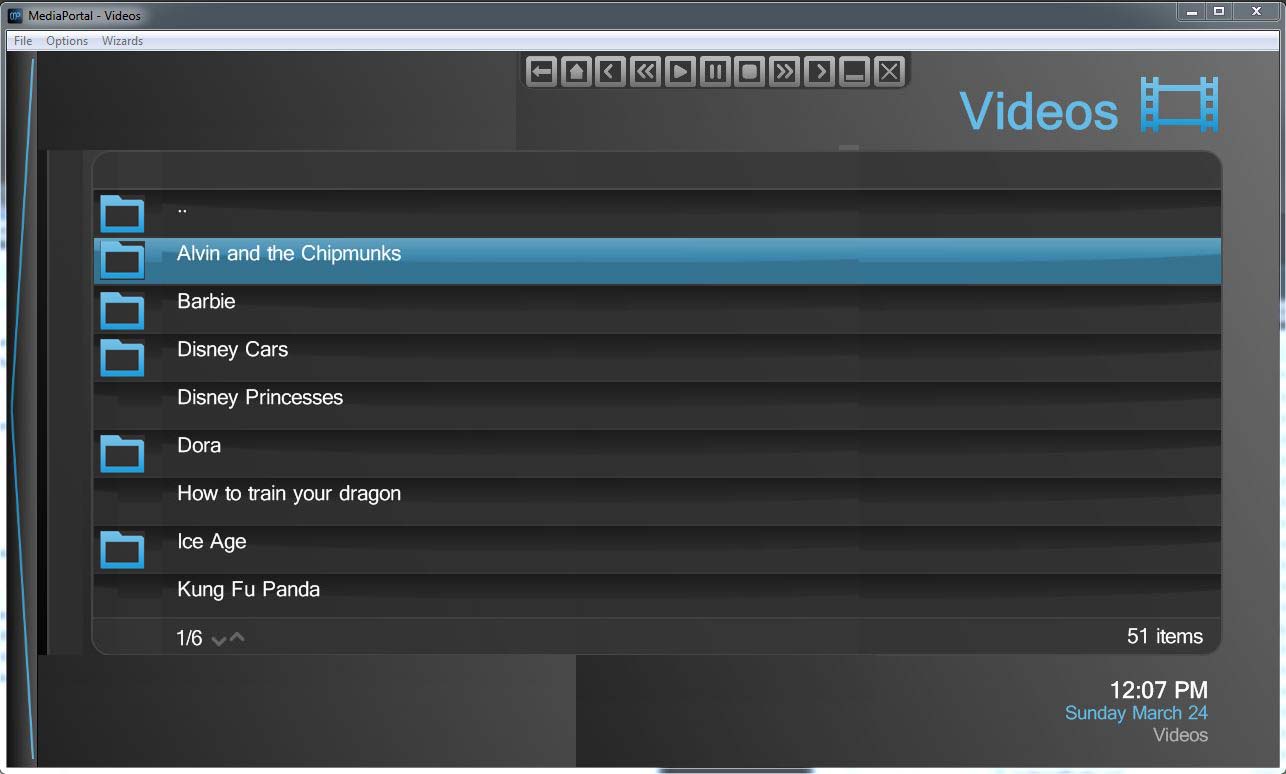
    i would like to change the "video" screen, eg home screen then select "video"? can you tell me which xml file/s i edit to change these screens?
    will keep looking around. will edit this xml file to make it look like what am after to give example. folder icon appears on folders and files have no icon.
    Update: i have attached a screen of what im after? i cannot find the xml files to edit, can some one please give me ideas of which files i would need to edit? thanks
     

    Attachments

    • mp_frames_video_screen_full.jpg
      mp_frames_video_screen_full.jpg
      92.9 KB
    Last edited:

    Lbr_Lion

    Extension Designer
    July 19, 2008
    243
    372
    Home Country
    Netherlands Netherlands
    • Thread starter
    • Moderator
    • #17
    Do you have a certain screen(s) where this should happen and can you make maybe a example? When I have to do this for every screen it will need a complete rework of the skin and this will take too much time.
    i would like to change the "video" screen, eg home screen then select "video"? can you tell me which xml file/s i edit to change these screens?
    will keep looking around. will edit this xml file to make it look like what am after to give example. folder icon appears on folders and files have no icon.
    Update: i have attached a screen of what im after? i cannot find the xml files to edit, can some one please give me ideas of which files i would need to edit? thanks

    Ok, I understand what you want and the files to edit are myVideoTitle.xml (and/or myvideo.xml) for the info frame and common.facade.video.xml to resize the list view. I will have also a look into it and add updated files when finished.
     

    Lbr_Lion

    Extension Designer
    July 19, 2008
    243
    372
    Home Country
    Netherlands Netherlands
    • Thread starter
    • Moderator
    • #18
    1. Do you mean something like this? (See attachment for a updated facade file for music)

    Yes, big improvement, :D

    2. It should be the same size for all views, but I use the mirror effect and this needs also some space. Maybe it can be a little larger

    I prefer it without the mirror effect (see attached attempt, 18-20-13.png). Not knowing what I was doing, I probably screwed up more than I improved, but I have also attached the XML files that I changed, in case they are helpful.
    3. Can you please try the attached file: WorldWeatherCondition.xml

    Fixed, :D
    4. I don't expect a gap in the assignment of the images and probably you did not assign an image for Image6, but can you try the attached file WorldWeatherImage.xml. (I removed the 'OnUp' item in this file, but had some issues with it in the past: It jumped also not to the upper buttons)
    Actually, I had assigned images to all except for 9; I usually try to keep the images which WW considers "standard" in the places Micropolis provides by default, which does sometimes result in gaps. Frames seems able to deal with these, as long as it gets images at all.
    As it turns out, many of the URLs I was using (from MeteoSchweiz) changed recently. After updating them, they all appear in the images menus. However, there is one (unchanged) image, which never appears, even though it works fine in a browser running on the HTPC. It is the last image (entitled "Europe") in each of my profiles (WorldWeather.xml attached for your convenience). Other skins don't show this entry either, so I suspect it is a problem with the WW plugin, not the skin.
    Unfortunately, as you expected, OnUp does not work for me. In fact I now cannot access the images (7-12) in the top row of the menu at all. Since it is such a pain to have to go left so many times to get back to the main WW menu after looking at custom images, I would suggest simply replacing the "actual conditions" panel on the left with a 12 line images menu when images are selected, and then replacing the images menu with "actual conditions" panel again "OnLeft". This is the approach used by other skins I have tried, including DefaultWide.
    Another minor suggestion would be to make the icons on the right-hand side of the Classic main menu (for "close", "full screen", etc.) a little bigger, and maybe even add some explanatory text (perhaps replacing the InfoService ticker) when they are selected. If you made the REC indicator below it the same size, it might have room to put the letters "REC" on it (as some other skins do) making it self-explanatory.
    :D again for your great new skin, and for the quick response!

    Thanks for your feedback:

    1 and 2: I will look into a skinsetting to resize the thumbs and a skinsetting for a larger albumview.
    4: I will try to find a solution for the WW images, else I will add the buttons on the left panel instead of the conditions . I don't know or I will rezise the buttons, but a info text will indeed be useful.

    Cheers,
     

    AlfredENeuma

    Portal Pro
    October 10, 2008
    433
    156
    Home Country
    Germany Germany
    3. Can you please try the attached file: WorldWeatherCondition.xml
    Hi Lbr_Lion,
    found a small bug in your file: Feed is not shown, as since WW1.1.1 the properties for feeds have been extended by a digit (#WorldWeather.Feed<digit>Text, #WorldWeather.Feed<digit>Description).
    Please find attached my corrected version (based on your version from March 17.
    Cheers
    Alfred
     

    Attachments

    • WorldWeatherCondition.xml
      59 KB
    Last edited:

    Lbr_Lion

    Extension Designer
    July 19, 2008
    243
    372
    Home Country
    Netherlands Netherlands
    • Thread starter
    • Moderator
    • #20
    @rsbrux and @sab-to-go

    Please find attached some updated files related to your requests. Most of the requests are optional and can be set under Settings-->Skin.

    The proposed change for the WW images is not (yet) implemented because I want to stick to design for the moment;)

    Please let me know what you think and /or this is what you want.

    Thanks,
     

    Attachments

    • Frames_Update.zip
      49.3 KB

    Users who are viewing this thread

    Similar threads

    Are the media/video folders on the Mint host?
    Are the media/video folders on the Mint host?
    I've used Mediaportal for years on a Windows Host with restricted online-access. Lately I reinstalled...
    Replies
    1
    Views
    1K
    I don't know about MP2 but as you said you tried MP1 too, how is the MP music config ? MP(1) will only use LAV if you select "Internal DirectShow player" as music output, but then you lose gapless playback. If you you don't have multichannel music you can choose WASAPI as the output and set the number of speakers to stereo. I have...
    I don't know about MP2 but as you said you tried MP1 too, how is the MP music config ? MP(1) will only use LAV if you select...
    Not sure if this a a bug/config/settings problem. I am running a media portal 2.5 server with 2.41 client but it seems I get the...
    Replies
    1
    Views
    655
    Many thanks:).
    Many thanks:).
    I have had to reinstall windows on my development machine (sigh...). I have lost the link to the source code for MP1. Would...
    Replies
    2
    Views
    439
    Maybe the server is/was too busy when you tried to authenticate. I occasionally run into that too, also with the opensubtitles api I regularly get 429's... there isn't much that can be done about it, except making sure the software isn't hammering the service and having patience...
    Maybe the server is/was too busy when you tried to authenticate. I occasionally run into that too, also with the opensubtitles api...
    Hello, Hello, when I try to authorize trakt configuration for mediaportal using the trakt plugin, I get the following error...
    Replies
    1
    Views
    751
    MP1 MP2 Not working! DE
    O Frabjous Joy! That seems to have done the trick. Thank you so much for your help and advice, CyberSimian. I hadn't thought of deleting the various folders, but I'll bear that in mind for any future disasters. Now I can record King & Conqueror on Sunday! Cheers Ralph
    O Frabjous Joy! That seems to have done the trick. Thank you so much for your help and advice, CyberSimian. I hadn't thought of...
    I've been running MediaPortal on my PC for several years, but the most recent update "MediaPortal 1.38 Release " does...
    Replies
    5
    Views
    2K
    Top Bottom