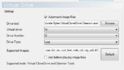
help me to config Virtual CloneDrive with MP 1.3 (1 Viewer)

rickyman

Portal Pro
February 5, 2008
210
1
i have installed MP 1.3 and Virtual Clonedrive. when i try to play iso, it tells me that " Unable to mount".

i have follow the instruction on Wiki. and it is still not working.

please help me.
 

gijoe73

MP Donator
  • Premium Supporter
  • April 29, 2011
    192
    14
    Home Country
    Germany Germany
    Have you entered the correct path to the virtual clone drive daemon ?

    Have you selected the daemon.exe in MePo configuration?
     

    rickyman

    Portal Pro
    February 5, 2008
    210
    1
    Untitled.jpg


    this is my config on mP
     

    HomeY

    Test Group
  • Team MediaPortal
  • February 23, 2008
    6,418
    4,717
    51
    ::1
    Home Country
    Netherlands Netherlands
    Could you try to mount the Blu-ray manually and see if that works?
    Code:
    2012-10-28 08:52:46.579273 [Info.][MPMain(1)]: Mounting failed after 10s (first timeout). Check your settings.

    Not sure if it's related to the popup box you got from MovingPictures (at least i assume something like that happened when you mounted the ISO). I think it asks to add the movie to the collection/database? What happens if you answer YES on that dialog?

    These settings work great for me:
    VCD.JPG
     
    Last edited:

    rickyman

    Portal Pro
    February 5, 2008
    210
    1
    1. When i just to mount the iso on windows explorer, it works fine.

    2. What happens if you answer YES on that dialog? if i say yes, it freezed.
     
    Last edited:

    HomeY

    Test Group
  • Team MediaPortal
  • February 23, 2008
    6,418
    4,717
    51
    ::1
    Home Country
    Netherlands Netherlands
    So mounting doesn't seem to be the issue, unless your settings aren't correct :cautious:
    Are you sure it's mounted into drive 1?? with only 1 Virtual Drive, you have to set that to 0
     

    limpwhizkid

    Retired Team Member
  • Premium Supporter
  • February 22, 2008
    573
    77
    on your IPC$
    Home Country
    Netherlands Netherlands
    ah... here it is .. the right post.. lots of peeps with virtual drive problems..

    anyway .. here is my config which just works...
    Knipsel.PNG
     

    limpwhizkid

    Retired Team Member
  • Premium Supporter
  • February 22, 2008
    573
    77
    on your IPC$
    Home Country
    Netherlands Netherlands
    damn .. old shot... from 1.2.3

    you have drive type on VCD.. should be DT...

    i only have one machine with Virtual clone drive..

    the alpha one is with deamon .. (and works also..)
     

    HomeY

    Test Group
  • Team MediaPortal
  • February 23, 2008
    6,418
    4,717
    51
    ::1
    Home Country
    Netherlands Netherlands
    Uhm.... are you mixing things up?? He needs VCD support, so needs to set drive type to 'vcd' ;) but indeed, your screenshot is outdated :)

    My settings should work for him (and are equal to yours, except for the pulldown box for drive tyep), but i think it has to do with the drive number he added (1 instead of 0)
     
    Last edited:

    limpwhizkid

    Retired Team Member
  • Premium Supporter
  • February 22, 2008
    573
    77
    on your IPC$
    Home Country
    Netherlands Netherlands
    as mentioned in the other thread, i have user account control set to "dev0" ..
    i hate popups... , so worth a try maybe if that could be the difference? (reboot needed after change)
     

    Users who are viewing this thread

    Similar threads

    I switched back to MePo 1 some time ago, and havent really used it that much. But i wanted to watch some old movies stored as ISO file. Virtuel Clone drive is installed, and it can mount the ISO file. However when i try to select it from MePo i only get an error that i cannot mount it. [2026-06-07 14:56:35,994] [Error ] [MPMain ]...
    I switched back to MePo 1 some time ago, and havent really used it that much. But i wanted to watch some old movies stored as ISO...
    I switched back to MePo 1 some time ago, and havent really used it that much. But i wanted to watch some old movies stored as ISO...
    Replies
    0
    Views
    625
    Thankyou High_Five, that worked perfectly, I now remember doing that 10 years ago, thanks for jogging my old memory. Cheers Tony
    Thankyou High_Five, that worked perfectly, I now remember doing that 10 years ago, thanks for jogging my old memory. Cheers Tony
    Hi everyone, I have been using it For 16 years now (from V1.1.1) and it has worked flawlessly. I only use TV Series and Moving...
    Replies
    2
    Views
    688
    MP1 MP2 1.39 x86 1.39 won't install DE
    That did it, thanks.
    That did it, thanks.
    Before you create this bug report: Make sure that your system (windows, codecs and drivers) is up to date, matching the...
    Replies
    2
    Views
    502
    I compliment you on the thoroughness of your investigations. (y) Unfortunately, I don't have any ideas what the problem might be. :( Perhaps someone else will post with some suggestions. :unsure: -- from CyberSimian in the UK
    I compliment you on the thoroughness of your investigations. (y) Unfortunately, I don't have any ideas what the problem might be...
    Would appreciate it if someone could solve (or point me in the right direction to resolve) this issue. I have “MultiSeat”...
    Replies
    4
    Views
    2K
    • Sticky
    Many many years ago, I opened a bug report after I got that same message but I never got a reply. The reason was I had unchecked the Windows Media Player item in Windows 10 Control Panel > Program and Features > Turn Windows features on or off as I didn't need it, without thinking that it was needed by MediaPortal. I kept the "Media...
    Many many years ago, I opened a bug report after I got that same message but I never got a reply. The reason was I had unchecked...
    We have just released MediaPortal 1.39 - Endurance x86 and x64 version. Highlights of this release Bugfixes: [MP1-5257] - Skin...
    Replies
    13
    Views
    1K
    Top Bottom