how can i map SHIFT+1 to remote? (1 Viewer)

disaster123

MP Donator
  • Premium Supporter
  • May 14, 2008
    3,558
    434
    Home Country
    Germany Germany
    Hi,

    how can i MAP the shift+1 directshowhelper stats to my remote? Can anybody tell which action i have to select in the MP control plugin?

    Stefan
     

    Jay_UK

    Test Group
  • Team MediaPortal
  • October 6, 2009
    1,780
    283
    Derby
    Home Country
    United Kingdom United Kingdom
    Hi there,

    I have the blue button mapped to shift-1, I have done this as a keystroke action.

    I will double check my setup later....

    J.
     

    disaster123

    MP Donator
  • Premium Supporter
  • May 14, 2008
    3,558
    434
    Home Country
    Germany Germany
    AW: how can i map SHIFT+1 to remote?

    that whould be nice i entered as keystroke ! but that didn't work. So you should have something different.
     

    bribbon

    MP Donator
  • Premium Supporter
  • September 11, 2008
    469
    101
    Home Country
    Switzerland Switzerland

    rekenaar

    Retired Team Member
  • Premium Supporter
  • December 17, 2006
    4,421
    805
    Home Country
    South Africa South Africa
    Hi bribbon_81
    please translate to English
     

    bribbon

    MP Donator
  • Premium Supporter
  • September 11, 2008
    469
    101
    Home Country
    Switzerland Switzerland

    disaster123

    MP Donator
  • Premium Supporter
  • May 14, 2008
    3,558
    434
    Home Country
    Germany Germany
    AW: how can i map SHIFT+1 to remote?

    mhm but that sadly doesn't help - does anybody know how to map SHIFT + X keys in IRSS? I can only insert an Keycodes but how is the keycode for that?
     

    sjeffrey

    Portal Pro
    August 22, 2008
    232
    7
    Canada
    Home Country
    Canada Canada
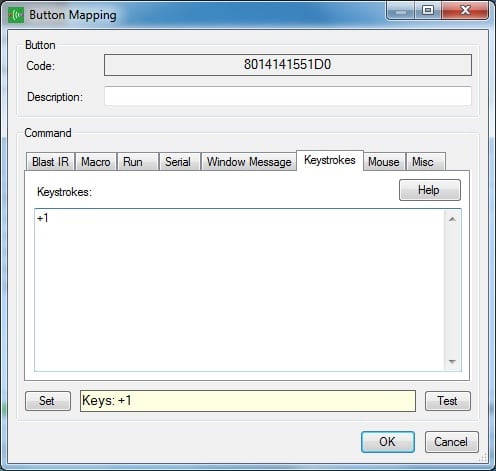
    Try using "+1"
    I use Translator for things like this, Like sometimes when switching HDMI input my MediaPortal is not full screen. I mapped a button to do "%{ENTER}%{ENTER}" which sends alt+enter twice to fix my fullscreen issue.
    If you right click in the keystrokes input box you will have a popup menu and in there there is a special keys / modifiers menu. That will give you the list of special keys you can map.
     

    disaster123

    MP Donator
  • Premium Supporter
  • May 14, 2008
    3,558
    434
    Home Country
    Germany Germany
    AW: how can i map SHIFT+1 to remote?

    thanks but when i map the button in irss and set the action to key pressed i can just enter numbers in the two fields.
     

    sjeffrey

    Portal Pro
    August 22, 2008
    232
    7
    Canada
    Home Country
    Canada Canada
    I just tried that here and it worked for me.
    Here's a screenshot just to make sure we are talking about the same thing.
     

    Attachments

    • irss_plus1.jpg
      irss_plus1.jpg
      50.1 KB

    Users who are viewing this thread

    Similar threads

    I'm running 2.5 with the WMC skin. I have .mp4 files, along with the related .srt files in the same folder. I can watch the movies just fine. In past versions of MP, like 2.4x, I could press the More Info button on my remote twice, and on the second press, an option for showing/choosing the subtitles was listed. I'd select the...
    I'm running 2.5 with the WMC skin. I have .mp4 files, along with the related .srt files in the same folder. I can watch the...
    I'm running 2.5 with the WMC skin. I have .mp4 files, along with the related .srt files in the same folder. I can watch the...
    Replies
    0
    Views
    3K
    It is present, but not with that name. It is called Scheduler, viz: Interesting. I had never noticed that when the "command" is "ACTION", the "cmdproperty" is the actual window id, but it makes sense that it is. Try this for yourself. First backup your working profile for the remote, then in the "Mapping" panel make a change to...
    It is present, but not with that name. It is called Scheduler, viz: Interesting. I had never noticed that when the "command" is...
    I would like to be able to go directly to the Scheduled recordings window without having to first go to the home menu. I saw this...
    Replies
    1
    Views
    1K
    You can always try, select any window, turn off the Media Portal, change the ID of the selected one to the desired one (plugin) and check.
    You can always try, select any window, turn off the Media Portal, change the ID of the selected one to the desired one (plugin) and...
    I don't have a TV card in my HTPC setup, so I really only use plugins that browse and show media files, like MP TV-Series, Moving...
    Replies
    5
    Views
    3K
    MP1 MP2 Picture-in-picture DE
    Can anyone tell me the step-by-step procedure for bringing up a second channel in pip mode? I can only do it sometimes, after many tries, and it’s not clear what I am doing that makes it work on those occasions when it does. Cannot find guidance on the site. Thanks, N. Again, if anyone knows how to do this, would be much...
    Can anyone tell me the step-by-step procedure for bringing up a second channel in pip mode? I can only do it sometimes, after many...
    Can anyone tell me the step-by-step procedure for bringing up a second channel in pip mode? I can only do it sometimes, after many...
    Replies
    0
    Views
    1K
    Ran into this problem following an otherwise sucessful upgrade from MP 1.34 x64 to MP 1.35 x64 the CEC Remote plugin which I use just to control volume and standby, will no longer put my devices (TV & AVR) to sleep when the HTPC is put in standby. Also when I wake up the HTPC MP closes or crashes (not sure which) as per the example in...
    Ran into this problem following an otherwise sucessful upgrade from MP 1.34 x64 to MP 1.35 x64 the CEC Remote plugin which I use...
    Ran into this problem following an otherwise sucessful upgrade from MP 1.34 x64 to MP 1.35 x64 the CEC Remote plugin which I use...
    Replies
    0
    Views
    1K
    Top Bottom