I cant go to the config (1 Viewer)

z3us

Portal Pro
December 4, 2007
1,047
123
46
Home Country
Spain Spain
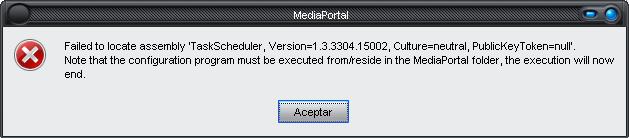
When I try to enter in the config window, Im gfetting this error message.
Im running last MP 1.1 svn
Any help?
tHANKS
 

Attachments

  • mp.JPG
    mp.JPG
    17.6 KB

Guzzi

Retired Team Member
  • Premium Supporter
  • August 20, 2007
    2,159
    750
    When I try to enter in the config window, Im gfetting this error message.
    Im running last MP 1.1 svn
    Any help?
    tHANKS

    You have to add the TaskScheduler.dll to the Plugins/Window directory. Zebons has posted this somewhere in the MyFilms area.
     

    RanaUK

    Portal Member
    August 22, 2007
    38
    1
    49
    Home Country
    United Kingdom United Kingdom
    I started having that problem when I password protected a configuration: I thought that error has something to do with the pin. However taking the pass out didn't change anything.
     

    zebons

    Portal Pro
    January 2, 2006
    1,484
    114

    pilehave

    Community Skin Designer
  • Premium Supporter
  • April 2, 2008
    2,566
    521
    Hornslet
    Home Country
    Denmark Denmark
    Hey zebons, why don't you make a sticky thread in the My Films forum, with link til latest version of the plugin, other needed files etc. Would make life easier for us users :)
     

    z3us

    Portal Pro
    December 4, 2007
    1,047
    123
    46
    Home Country
    Spain Spain
    Thanks.
    I found thepost you are talking about, here:
    https://forum.team-mediaportal.com/my-films-164/my-films-4-8-0c-crashes-config-69146/
    But, as the author, Im getting a new error window when entering the config.
    67194689.jpg


    Clicking on the continue button, I can go inside the config. Annoying, but better than nothing....
    Can you post your MyFilms config file (C:\Documents and Settings\All Users\Application Data\Team MediaPortal\MediaPortal\MyFilms.xml)
    No need, it auto-fixed by itself
     

    Guzzi

    Retired Team Member
  • Premium Supporter
  • August 20, 2007
    2,159
    750
    I had a similar errormessage once and could fix it by choosing a default config in the setup instead of always choosing via menu. I never compared the MyFilms configfiles before and after, so can't give details on the exact problem inside the configfile ...
     

    Users who are viewing this thread

    Similar threads

    MP2 appeared later, and it was not published in the general documentation, they immediately made a section for it, so everything that is not in the MP2 section is for MP1, but due to multiple changes and migrations, something could have been lost, but the documentation is available. Also for MP1 you can just take any existing plugin...
    MP2 appeared later, and it was not published in the general documentation, they immediately made a section for it, so everything...
    Why cant I download any of this info? Thanks
    Replies
    3
    Views
    1K
    I did a check of MP 1.36 x64 on Win11 and I can confirm, that the TV server correctly detects running MediaPortal.exe process.
    I did a check of MP 1.36 x64 on Win11 and I can confirm, that the TV server correctly detects running MediaPortal.exe process.
    Hi, I am using MP in a client-only setup including DVB-S card for over 10 years now. And regularily scheduling records waking up...
    Replies
    9
    Views
    2K
    It is present, but not with that name. It is called Scheduler, viz: Interesting. I had never noticed that when the "command" is "ACTION", the "cmdproperty" is the actual window id, but it makes sense that it is. Try this for yourself. First backup your working profile for the remote, then in the "Mapping" panel make a change to...
    It is present, but not with that name. It is called Scheduler, viz: Interesting. I had never noticed that when the "command" is...
    I would like to be able to go directly to the Scheduled recordings window without having to first go to the home menu. I saw this...
    Replies
    1
    Views
    1K
    MP1 MP2 1.38 Titan Skin Bug DE
    I fixed the bug, the file menu should work again now! You just need to copy the attached DialogFile.xml to the Titan folder and the graphic files to the corresponding media folder! ;) There also seems to be a problem with the background displayed, which @ajs might be able to fix! ;)
    I fixed the bug, the file menu should work again now! You just need to copy the attached DialogFile.xml to the Titan folder and the...
    MP 32bit 1.38.003 A bug is in the videos section. I use the folder-view. When I try to move a file to another folder, I get the...
    Replies
    9
    Views
    1K
    Interesting. :coffee: I always have DVB subtitles enabled in "MP Config", but I actually switch on subtitles only for those films that have deafening sound effects and music, combined with inaudible dialogue. I have never noticed the problem that you have described, but I also use the EVR renderer, and not the Madvr renderer. So...
    Interesting. :coffee: I always have DVB subtitles enabled in "MP Config", but I actually switch on subtitles only for those films...
    Every so often, when I switch to a TV channel, my MP client stops accepting user inputs, either from the remote or keyboard/mouse...
    Replies
    27
    Views
    3K
    Top Bottom