[NEW ISSUE] Marvel's Agents of S.H.I.E.L.D. makes this plugin crash (probably due to the long path)? (5 Viewers)

emphatic

Design Group
  • Team MediaPortal
  • August 25, 2006
    3,758
    1,250
    Alingsås
    Home Country
    Sweden Sweden
    • Thread starter
    • Moderator
    • #2
    @seco Have you seen this thread? It's still a problem, and I have no idea how to fix it.

    Emph
     

    fischy667

    Super User
  • Team MediaPortal
  • Super User
  • May 5, 2010
    975
    301
    43
    Rostock
    Home Country
    Germany Germany
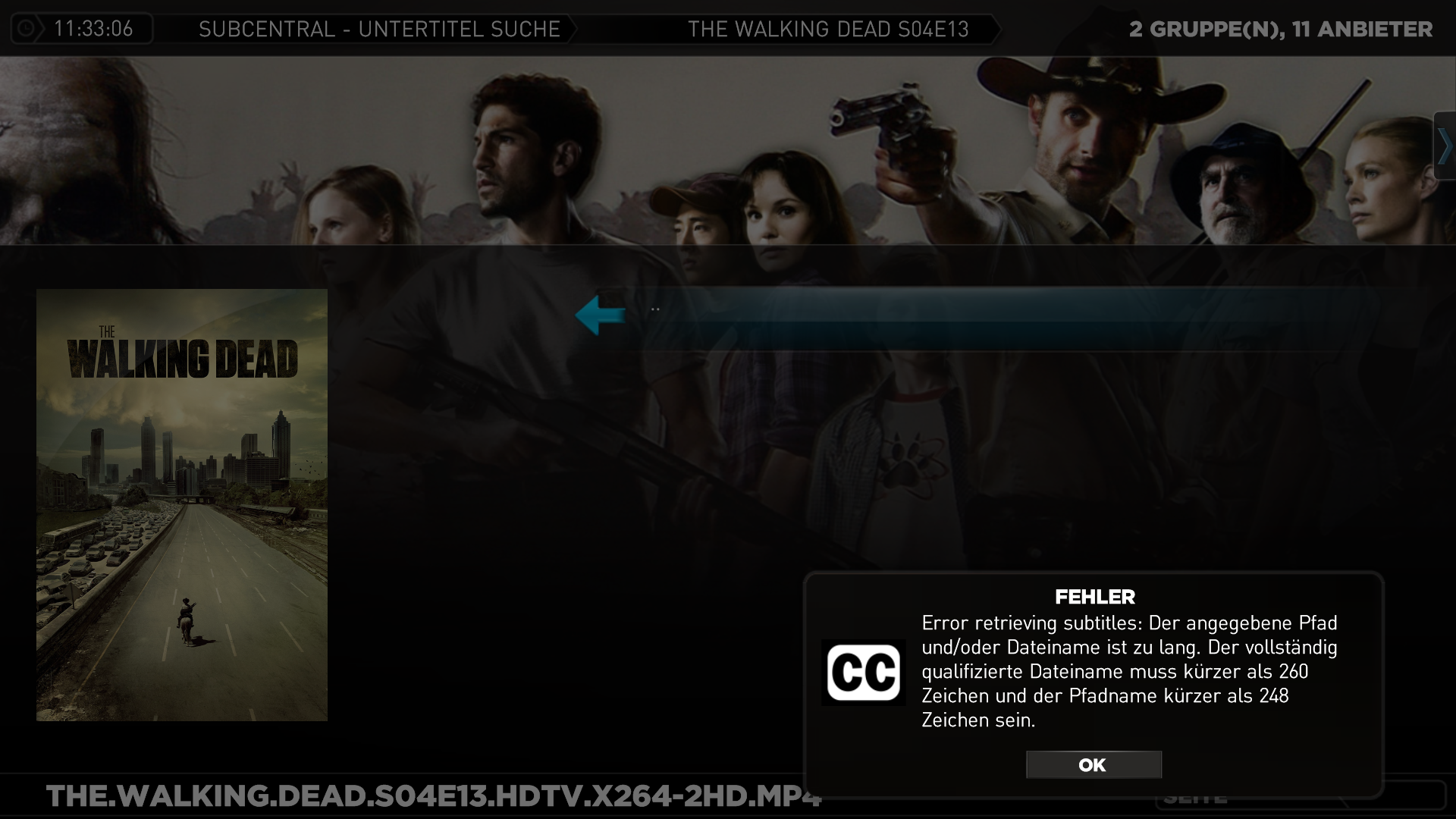
    I don't know if is related but I get this error, when I search subtitles in podnapisi.net (from the SubCentral.log)

    Code:
    10-Mar-2014 11:33:06.246 Debug [           Retriever]: ...using TV show query: 'The Walking Dead 4x13 TvdbId: 153021
    10-Mar-2014 11:33:06.246 Debug [           Retriever]: Searching site Podnapisi...
    10-Mar-2014 11:33:06.562 Error [       SubCentralGUI]: Error while retrieving subtitles
    System.IO.PathTooLongException: Der angegebene Pfad und/oder Dateiname ist zu lang. Der vollständig qualifizierte Dateiname muss kürzer als 260 Zeichen und der Pfadname kürzer als 248 Zeichen sein.
       bei System.Windows.Forms.Control.MarshaledInvoke(Control caller, Delegate method, Object[] args, Boolean synchronous)
       bei System.Windows.Forms.Control.Invoke(Delegate method, Object[] args)
       bei SubCentral.GUI.Retriever.OnBeforeCompleted(List`1 allResults)
       bei SubCentral.GUI.Retriever.SearchSubtitlesAsync(Object mediaDetailObj)

    translation: The path and/or the file name is too long. The file name must be under 260 characters and the path under 248.
     

    Attachments

    • 11-33-14.png
      11-33-14.png
      1.1 MB
    Last edited:

    emphatic

    Design Group
  • Team MediaPortal
  • August 25, 2006
    3,758
    1,250
    Alingsås
    Home Country
    Sweden Sweden
    • Thread starter
    • Moderator
    • #5
    I just got an error for True Detective too, not a crash, but a "path, filename or both contain too many characters". I get this error randomly, I'm gonna see if there's something wrong with my config files.

    Edit: The full file path to the True Detective episode is 62 characters long. There are no weird characters in the path either.

    Emph
     
    Last edited:

    slarti

    MP Donator
  • Premium Supporter
  • March 26, 2009
    73
    5
    Home Country
    Finland Finland
    NTSF:: SD:: SUV:: is a series that has at least a similar problem.
     

    emphatic

    Design Group
  • Team MediaPortal
  • August 25, 2006
    3,758
    1,250
    Alingsås
    Home Country
    Sweden Sweden
    • Thread starter
    • Moderator
    • #8
    I don't know what type of bug report you want, @seco, as I haven't seen any comment if you yourself can reproduce this issue or not, but it still happens daily for me now, and I don't know if it's because I'm running 1.7 pre or what, so this time I'll include all of my logs.

    The series I was unsuccessfully trying to retrieve subtitles for in these logs are:
    Intelligence
    The Blacklist

    Emph
     

    Terra

    Portal Pro
    August 25, 2009
    230
    57
    Home Country
    Austria Austria
    I am having the same issue for some time now, my paths are way below 260 characters for shares and the real folders on the server.
    The error appears in Moving Pictures, however as they are using the subtitle downloader I hope this is the right place to report it.

    I am using MePo 1.6

    The error message I get:
    Code:
    [2014-03-23 01:10:31,000] [Error  ] [Subtitles Downloader Thread] [ERROR] - MediaPortal: Unhandled exception occured
    [2014-03-23 01:10:41,250] [Log    ] [Subtitles Downloader Thread] [ERROR] - Exception: System.IO.PathTooLongException: The specified path, file name, or both are too long. The fully qualified file name must be less than 260 characters, and the directory name must be less than 248 characters.
       at System.Windows.Forms.Control.MarshaledInvoke(Control caller, Delegate method, Object[] args, Boolean synchronous)
       at System.Windows.Forms.Control.Invoke(Delegate method, Object[] args)
       at SubCentral.GUI.Retriever.OnBeforeCompleted(List`1 allResults)
       at SubCentral.GUI.Retriever.SearchSubtitlesAsync(Object mediaDetailObj)
       at System.Threading.ThreadHelper.ThreadStart_Context(Object state)
       at System.Threading.ExecutionContext.Run(ExecutionContext executionContext, ContextCallback callback, Object state, Boolean ignoreSyncCtx)
       at System.Threading.ExecutionContext.Run(ExecutionContext executionContext, ContextCallback callback, Object state)
       at System.Threading.ThreadHelper.ThreadStart(Object obj)  Message: The specified path, file name, or both are too long. The fully qualified file name must be less than 260 characters, and the directory name must be less than 248 characters.  Site   : System.Object MarshaledInvoke(System.Windows.Forms.Control, System.Delegate, System.Object[], Boolean)  Source : System.Windows.Forms  Stack Trace:     at System.Windows.Forms.Control.MarshaledInvoke(Control caller, Delegate method, Object[] args, Boolean synchronous)
       at System.Windows.Forms.Control.Invoke(Delegate method, Object[] args)
       at SubCentral.GUI.Retriever.OnBeforeCompleted(List`1 allResults)
       at SubCentral.GUI.Retriever.SearchSubtitlesAsync(Object mediaDetailObj)
       at System.Threading.ThreadHelper.ThreadStart_Context(Object state)
       at System.Threading.ExecutionContext.Run(ExecutionContext executionContext, ContextCallback callback, Object state, Boolean ignoreSyncCtx)
       at System.Threading.ExecutionContext.Run(ExecutionContext executionContext, ContextCallback callback, Object state)
       at System.Threading.ThreadHelper.ThreadStart(Object obj)

    Attached are the full logs! (Password upon request)
     

    arion_p

    Retired Team Member
  • Premium Supporter
  • February 7, 2007
    3,367
    1,642
    Athens
    Home Country
    Greece Greece
    It would be interesting to log the full pathname being downloaded. While none of your paths are > 260, concatenating a long sus file name can easily throw the total length over 260 chars. Also from the log it is not evident whether the error occurs while downloading (in temp folder) or when moving the downloaded file in its final place. If the error occurs with certain provider(s) only (same video file ofc) then it is during downloading and probably has to do with unpacking the subs from multiply nested zip/rar archives.
     

    Users who are viewing this thread

    Similar threads

    I compliment you on the thoroughness of your investigations. (y) Unfortunately, I don't have any ideas what the problem might be. :( Perhaps someone else will post with some suggestions. :unsure: -- from CyberSimian in the UK
    I compliment you on the thoroughness of your investigations. (y) Unfortunately, I don't have any ideas what the problem might be...
    Would appreciate it if someone could solve (or point me in the right direction to resolve) this issue. I have “MultiSeat”...
    Replies
    4
    Views
    1K
    Ran into this problem following an otherwise sucessful upgrade from MP 1.34 x64 to MP 1.35 x64 the CEC Remote plugin which I use just to control volume and standby, will no longer put my devices (TV & AVR) to sleep when the HTPC is put in standby. Also when I wake up the HTPC MP closes or crashes (not sure which) as per the example in...
    Ran into this problem following an otherwise sucessful upgrade from MP 1.34 x64 to MP 1.35 x64 the CEC Remote plugin which I use...
    Ran into this problem following an otherwise sucessful upgrade from MP 1.34 x64 to MP 1.35 x64 the CEC Remote plugin which I use...
    Replies
    0
    Views
    1K
    Ok, so perhaps a solution, but not the "right" solution. On the client, within media portal configuration, under TV settings, advanced options, I switched to UNC paths instead of the default RSS, and it's working very well. Sure I had to figure out the paths, but no big deal. Maybe helpful for someone in the future. Thanks for the...
    Ok, so perhaps a solution, but not the "right" solution. On the client, within media portal configuration, under TV settings...
    Hi folks. I have an issue with a new install/integration into my mediaportal system. I have a “mediaportal server” which has the TV...
    Replies
    5
    Views
    2K
    @Brownard another logs of failed installations. I'll take a look into the user management. Edit: I can confirm user management is completey broken with NET4 and NET6 :( Neither an existing profile can be selected nor a new one can be created.
    @Brownard another logs of failed installations. I'll take a look into the user management. Edit: I can confirm user management is...
    Description: Hi there. First of all, I appreciate all the effort in MediaPortal 2 release 2.5 - visible changes look great (eg...
    Replies
    1
    Views
    2K
    That was it! :) I had to set it to "Maintain display scaling". I think it was set to "Maintain Aspect Ratio", which added black bars to MediaPortal when playing videos that didn't conform to a strict 16:9 ratio, I suppose. Thanks to everyone for the patience and help, I can finally enjoy videos fully.
    That was it! :) I had to set it to "Maintain display scaling". I think it was set to "Maintain Aspect Ratio", which added black...
    I'm running MePo in 1080p to my 4K TV (because my Intel NUC HTPC ain't powerful enough to run in 4K) and for some videos, I see...
    Replies
    12
    Views
    4K
    Top Bottom