Moving Picture 0.7 (2 Viewers)

Johan

Portal Pro
April 19, 2006
443
11
50
Home Country
Sweden Sweden
Can we expect any updates for new Moving Pictures 0.7?
 

emphatic

Design Group
  • Team MediaPortal
  • August 25, 2006
    3,758
    1,246
    Alingsås
    Home Country
    Sweden Sweden
    Here you go. I've done a little modification to the filmstrip view also. Hope you like it.

    Emph
     

    Attachments

    • AEON_Wide_Moving_Pictures_0.70_skin.zip
      30.7 KB

    scythe000

    Portal Pro
    July 6, 2008
    379
    15
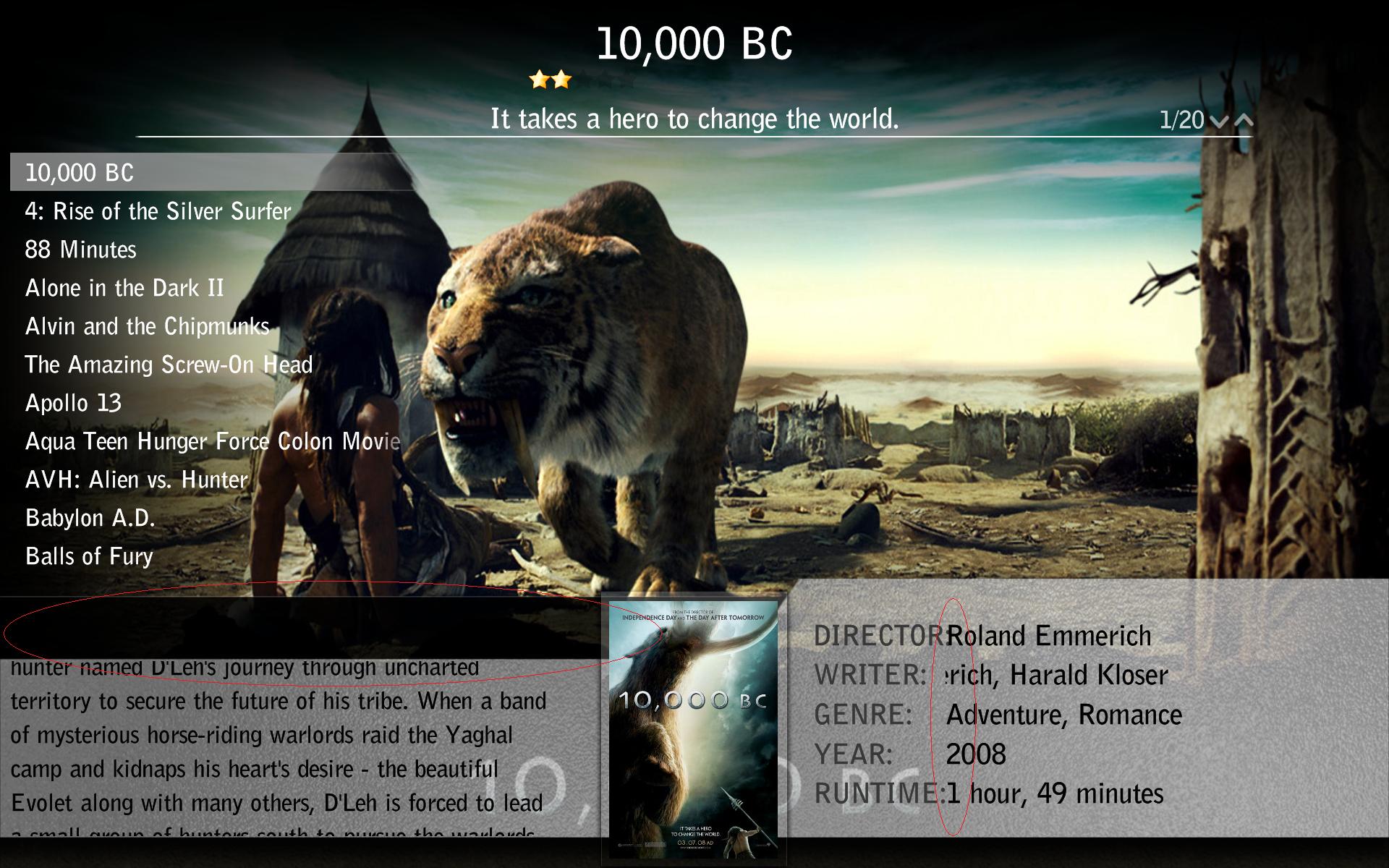
    Thanks so much for your quick reply in the other thread. I see a few glitches in film strip view as well as list view. such as: in list view, on the bottom left, there is a black bar that looks a bit kludgey above and below the synopsis. Maybe this can be cleaned up a bit? Also, the director and actor text is slightly covering up the colon.

    In Filmstrip view, the movie title at the bottom is always in black. This doesn't work if there is black fanart behind it. maybe add a grey background strip?
     

    Attachments

    • filmstrip.jpg
      filmstrip.jpg
      338.9 KB
    • list.jpg
      list.jpg
      306.3 KB

    emphatic

    Design Group
  • Team MediaPortal
  • August 25, 2006
    3,758
    1,246
    Alingsås
    Home Country
    Sweden Sweden
    I thought I had. Aren't those them above?

    If you unpacked the Media\MovingPictures\overlay_bottom.png to your Aeon Wide 1.3\Media\MovingPictures\ and then go to your cache folder (C:\Documents and Settings\All Users\Application Data\Team MediaPortal\MediaPortal\Cache) where you delete your Aeon Wide 1.3 folder it should work just fine.

    Edit: I just tried this myself just now, and it didn't work. Brb with an update.

    Edit2: It seems I've attached the wrong .png. Use the one attached to this post in the Media\MovingPictures folder and delete you cache and it works.

    Emph
     

    Attachments

    • shiny_overlay.png
      shiny_overlay.png
      271 KB

    Rayures

    Portal Pro
    October 8, 2008
    76
    4
    Home Country
    Netherlands Netherlands
    tnx for the update!
    But do you also have a fix for the rating stars? It shows only 5 stars (see screens in earlier post)
     

    emphatic

    Design Group
  • Team MediaPortal
  • August 25, 2006
    3,758
    1,246
    Alingsås
    Home Country
    Sweden Sweden
    Open movingpictures.xml in Notepad, press CTRL+H (search and replace) and paste:
    Code:
    <imagesToDraw>5</imagesToDraw>

    Into the upper field (search) and into the other field (replace) paste:
    Code:
    <imagesToDraw>10</imagesToDraw>

    Delete your Aeon Wide folder from the cache. Done.
    Emph
     

    Users who are viewing this thread

    Similar threads

    i think info but I'm really not sure
    i think info but I'm really not sure
    When I import new films using Moving Pictures, it takes an incredibly long time for the information to be found and downloaded...
    Replies
    3
    Views
    699
    You could use a different player that handles HDR content but thats more hassle then installing MadVR
    You could use a different player that handles HDR content but thats more hassle then installing MadVR
    I searched several days now but could only find non-working ideas and mostly based on MadVR. Is there a way to play HDR content...
    Replies
    1
    Views
    1K
    Thanks guys. Ok, spent the (whole) weekend on this lol. First; TVHeadend/Kodi.... Nah. Given up on that - 'non-tech'; its horrible. 'Tech' - a few reasons but mostly that it is buggy. It is actually a real shame as it does have potential and promises a lot (was great to have Kodi on my phone and be able to watch live/recordings...
    Thanks guys. Ok, spent the (whole) weekend on this lol. First; TVHeadend/Kodi.... Nah. Given up on that - 'non-tech'; its...
    So, a very long-time MP fan here. Family have used MP (Only MP1 as all addicted to Titan skin) for ever - for my 13yo, thats 100%...
    Replies
    5
    Views
    5K
    I made some updates to the Wiki page describing the <import> and <include> tags, including adding a couple of new xml examples. For the first example, I highlighted the example text and eventually found the location in the menus where I could select the CODE macro to have the example text formatted as a code example. So far, so good...
    I made some updates to the Wiki page describing the <import> and <include> tags, including adding a couple of new xml examples. For...
    I made some updates to the Wiki page describing the <import> and <include> tags, including adding a couple of new xml examples. For...
    Replies
    0
    Views
    523
    here is a small update: it is probably not due to the Windows update. I ran a new transmitter scan and got the same result. MP no longer starts. Then I got the fuse back and everything works again. A simple reinstall of MP does not bring a solution. Maybe I should reinstall MP from scratch. However, I need a lot of time for this...
    here is a small update: it is probably not due to the Windows update. I ran a new transmitter scan and got the same result. MP no...
    I've been working with Windows 11 for a while now. Today, updates came through again, and I can no longer start MP1. There seems...
    Replies
    5
    Views
    1K
    Top Bottom