MP Configuration - Volume settings - Custom (1 Viewer)

marttoma

MP Donator
  • Premium Supporter
  • March 24, 2014
    282
    88
    Praha
    Home Country
    Czech Republic Czech Republic
    Custom Volume settings in Titan skin does not work properly - does not go to max, when go to min it does not go to up.
     

    marttoma

    MP Donator
  • Premium Supporter
  • March 24, 2014
    282
    88
    Praha
    Home Country
    Czech Republic Czech Republic
    Here is the description - http://wiki.team-mediaportal.com/1_...0_Configuration/11_General/03_Volume_Settings
    • Custom
      MediaPortal allows you to specify your own volume table. This is a comma-separated list of volume level values, between 0 and 65535. Using this option you can customize the volume control to your own liking, with more or less steps than the default, and with another distribution. There is no maximum number of entries in the volume table, though Windows guidelines state that a table should consist of no more than 201 entries. The default volume table is MediaPortal's logarithmic table:
      • 0, 1039, 1234, 1467, 1744, 2072, 2463, 2927, 3479, 4135, 4914, 5841, 6942, 8250, 9806, 11654, 13851, 16462, 19565, 23253, 27636, 32845, 39037, 46395, 55141, 65535.
    When I selected "Custom" volume setting with MP default - see above values from 0 to 65535, it does not work in Titan skin properly (it is not usable).

    I could use "Vista/Win7", but here is a problem with the scale range - it is too small. If I set up main volume to e.g. 50-100 (in Windows main driver), then in Titan the scale for option "Vista/Win7" is too small - number of volume values is low - i,e, for night time the volume is too high as there just ~15 volume steps. On other hand if I set up lower value for max volume in main Windows driver - to e.g.20, then the max volume is not as high as I would need.

    Is there any limitation how many values can be set up for "Custom" volume?

    Does it exist any workaround / help?
     

    marttoma

    MP Donator
  • Premium Supporter
  • March 24, 2014
    282
    88
    Praha
    Home Country
    Czech Republic Czech Republic
    Good news for others, who has similar issue (Win7Pro x64):
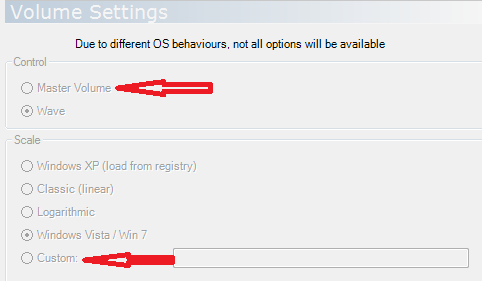
    • If I set up "Control" to the "Wave", then the "Custom" does not work propetly in Tinan skin:(
    • If I set up "Control"to the "Master Volume", then the "Custom" works fine in Tinan skin:)

    upload_2014-9-23_0-5-34.png


    I am happy I dont have the issue anymore.
     

    Attachments

    • upload_2014-9-23_0-5-0.png
      upload_2014-9-23_0-5-0.png
      19.3 KB

    Users who are viewing this thread

    Similar threads

    I haven't tested it. I use MP1, but sometimes I try to help with MP2 :).
    I haven't tested it. I use MP1, but sometimes I try to help with MP2 :).
    This happened immediately after my Windows 11 x64 monthly update for November. The update included also cumulative update to .NET...
    Replies
    9
    Views
    2K
    Ran into this problem following an otherwise sucessful upgrade from MP 1.34 x64 to MP 1.35 x64 the CEC Remote plugin which I use just to control volume and standby, will no longer put my devices (TV & AVR) to sleep when the HTPC is put in standby. Also when I wake up the HTPC MP closes or crashes (not sure which) as per the example in...
    Ran into this problem following an otherwise sucessful upgrade from MP 1.34 x64 to MP 1.35 x64 the CEC Remote plugin which I use...
    Ran into this problem following an otherwise sucessful upgrade from MP 1.34 x64 to MP 1.35 x64 the CEC Remote plugin which I use...
    Replies
    0
    Views
    1K
    updated both --> works! Thanks!
    updated both --> works! Thanks!
    this window opens and closes after some seconds when I try to "Authorize Application": It does not create a Usercode. Also...
    Replies
    4
    Views
    285
    i think info but I'm really not sure
    i think info but I'm really not sure
    When I import new films using Moving Pictures, it takes an incredibly long time for the information to be found and downloaded...
    Replies
    3
    Views
    758
    I was just tinkering with a few settings in the MediaPortal configuration and am happy to have found the cause of the problem. Disabling the option "Single seat setup: force RTSP usage" under "TV/Radio", "Advanced Options" resolved the issue. After I disabled this option, I was able to delete the recordings the first time...
    I was just tinkering with a few settings in the MediaPortal configuration and am happy to have found the cause of the problem...
    Deleting recordings sometimes doesn't work. Neither the 0 button nor the Info/Delete button works. Nothing happens at all with...
    Replies
    6
    Views
    529
    Top Bottom