Yeah - that would be awesome. I made an unstable version, hardcoded to use adapter 1 instead of 0. _Most_ of the GUI worked (after a few hacks), but videooverlays were slightly off (very strange offset!) and things like the realtime video controlpanel popped up on the wrong monitor.
It would really be nice if somebody with a somewhat better overview of the code could take a shot at it. It should'nt take more than a few hours.
(also - some of the textures are not recreated when switching mode/adapter)
Yeah - that would be awesome. I made an unstable version, hardcoded to use adapter 1 instead of 0. _Most_ of the GUI worked (after a few hacks), but videooverlays were slightly off (very strange offset!) and things like the realtime video controlpanel popped up on the wrong monitor.
It would really be nice if somebody with a somewhat better overview of the code could take a shot at it. It should'nt take more than a few hours.
(also - some of the textures are not recreated when switching mode/adapter)
I been trying all kind of tricks to get MP to show on a secondary monitor, but the only way i can get to function properly is to switch primary and secondary monitors.
Exact : it would be a very very good option for M-P
I have a Matrox Parhelia (3 screens possible !) so it should be the best for me to have :
- First screen (small lcd 15' ) for OS, setups, M-P setup, and programs (example : program to pilot a video scaler from the HTPC..)
and
- Second screen (projector) with M-P in fulll screen for videos and so on
In this case, resolutions of the 2 screens must be different, and these 2 screens don't have the same info ( it must not be a "clone" mode ..)
Actually, the only possibillity of having M-P on the second screen is either:
- The "clone mode" between the 2 screens, (2 identical screens)
or
- The "2 screens independant mode" (2 different resolutions possible) with "Window desktop extended to the 2d screen :
The 2 screens are different but in this case, the M-P window is OK only on the MAIN screen ..
->impossible to re-open the M-P window if dragged from the 1st to the 2nd screen !
note : I tested only with the VGA output, not the TV output.
- The "2 screens independant mode" (2 different resolutions possible) with "Window desktop extended to the 2d screen :
The 2 screens are different but in this case, the M-P window is OK only on the MAIN screen ...
bad info ; I apologize
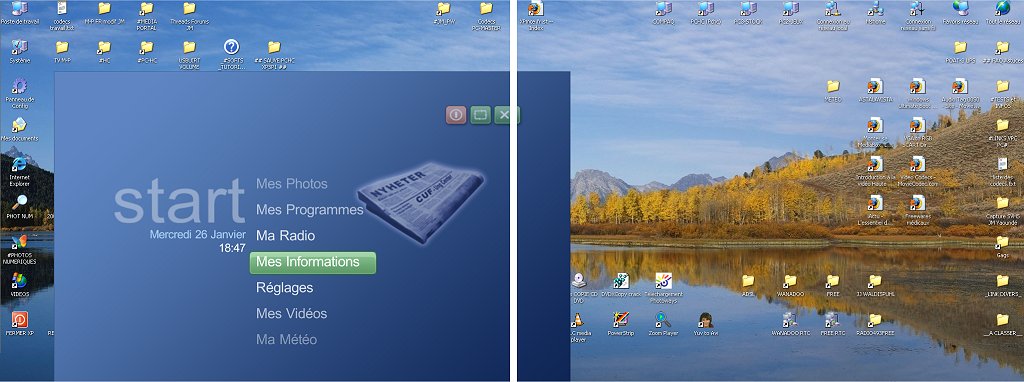
The full screen window of M-P doesn't fill the primary screen but it's curiously placed 90% on the primary screen , 5% on the second screen, 5% lost because cut in the bottom !
Screen capture with MCE skin:
On the left, the main screen (1024x768), on the right, the second screen (1024x768) , Desktop paper : 2048x768
If you’re planning to submit a pull request, let’s go through the list of issues and their solutions.
I or someone from the team will create a Jira ticket, and for each ticket, you’ll make the changes and submit a pull request.
This will be transparent and straightforward.
If you’re planning to submit a pull request, let’s go through the list of issues and their solutions.
I or someone from the team...
I'm very glad to see that mediaportal 1 is on github, where ordinary devs with github accounts can make contributions.
Please can...
Good to hear you got it working.(y)
I have attached a screenshot of my Power Scheduler settings and, yes my TV does stay off when a scheduled recording starts.
Regarding the monitor sleeping when playing music, if the screensaver option is set in your MP skin settings try disabling it, I have a vague recollection it may get...
Good to hear you got it working.(y)
I have attached a screenshot of my Power Scheduler settings and, yes my TV does stay off when...
Hi, everytime my computer awakes for scheduled recordings, the monitor awake too and does not switch of during the whole recording...