[Approved] New tuning details - Australia - Victoria - South Yarra (1 Viewer)

henrysinn

MP Donator
  • Premium Supporter
  • September 8, 2009
    36
    8
    Melbourne
    Home Country
    Australia Australia
    Hi all.

    Just did an upgrade to MP2.5 from 2.4.1 (Client and server) and it blew away settings and setups everywhere (My fault for not backing up)
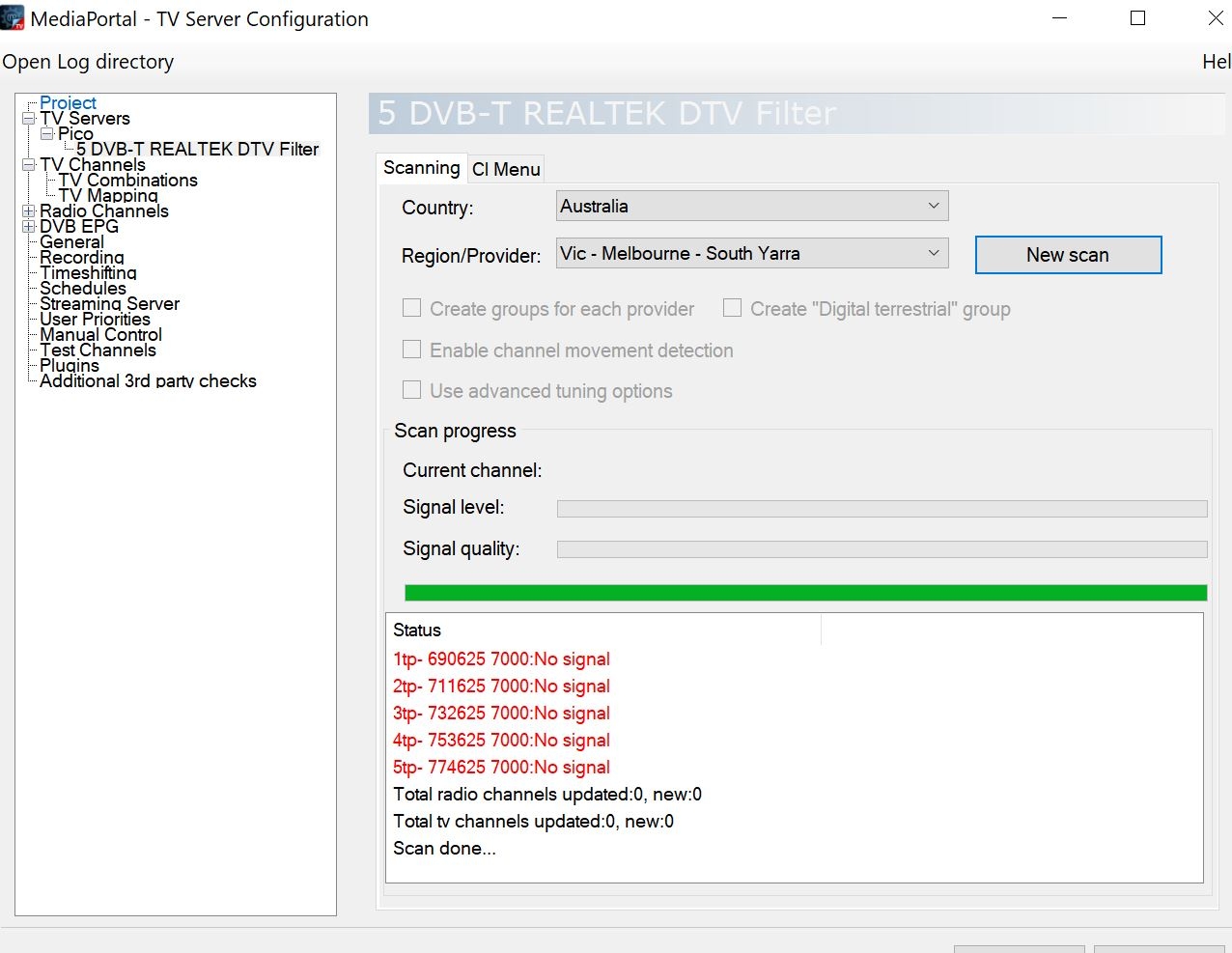
    Just trying to re-scan TV channels for Australia - VIC - South Yarra (Where I live) and getting nothing as per 'South Yarra scanned.jpg' attached (note the frequencies).
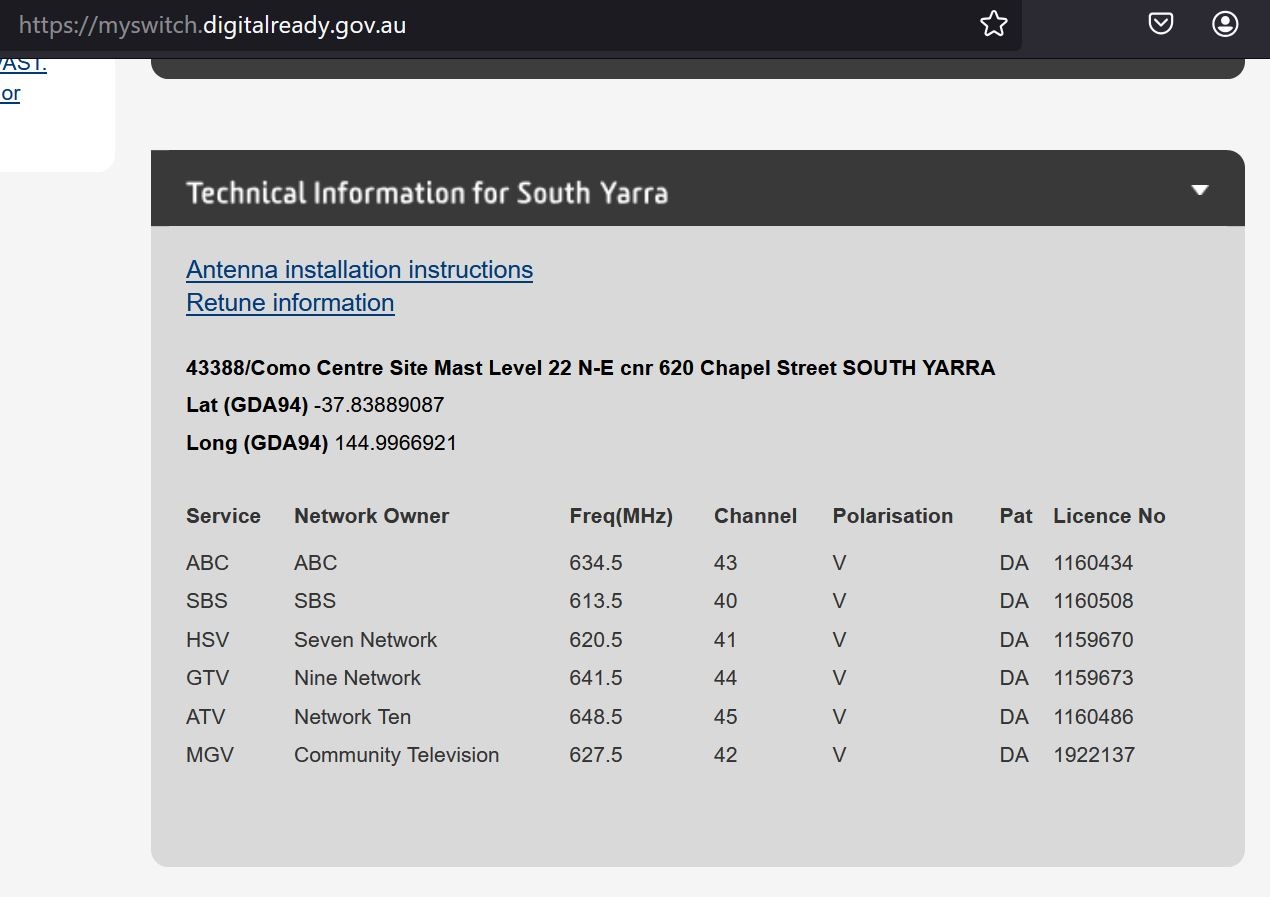
    As per this thread and the confirmation in 'South Yarra real' attached, the details from the scan are wrong for South Yarra.
    Question:
    Does anyone have any idea where to put the xml file I posted previously? For the life of me I can't find it to replace it anywhere.
     

    Attachments

    • Australia-VIC-South Yarra real.JPG
      Australia-VIC-South Yarra real.JPG
      148 KB
    • Australia-VIC-South Yarra scanned.JPG
      Australia-VIC-South Yarra scanned.JPG
      241.4 KB

    CyberSimian

    Test Group
  • Team MediaPortal
  • June 10, 2013
    3,830
    3,027
    Southampton
    Home Country
    United Kingdom United Kingdom
    Just trying to re-scan TV channels for Australia - VIC - South Yarra (Where I live) and getting nothing
    I use MP1, but your post states that you are using MP2. There are some releases of MP2 that offer three different TV Servers during the installation process: TVE3, TVE3.5, and TvMosaic. My understanding is that only TVE3 works correctly. Did you choose this TV Server, or TVE3.5? If you selected TVE3.5, run the installer again and select TVE3 (the installer will uninstall TVE3.5 and then install TVE3).

    I am not familiar with the MP2 folder tree, but for TVE3 there should be a folder called TuningParameters within the MP2 folder tree in C:\ProgramData\Team MediaPortal\. Within TuningParameters there should be several subfolders, one for each type of TV signal. You want the one called dvbt.

    If scanning still finds nothing, try using the All Regions selection. It will take longer to complete the scan, but it should find the channels that are available at your location.

    -- from CyberSimian in the UK
     

    henrysinn

    MP Donator
  • Premium Supporter
  • September 8, 2009
    36
    8
    Melbourne
    Home Country
    Australia Australia
    I use MP1, but your post states that you are using MP2. There are some releases of MP2 that offer three different TV Servers during the installation process: TVE3, TVE3.5, and TvMosaic. My understanding is that only TVE3 works correctly. Did you choose this TV Server, or TVE3.5? If you selected TVE3.5, run the installer again and select TVE3 (the installer will uninstall TVE3.5 and then install TVE3).

    I am not familiar with the MP2 folder tree, but for TVE3 there should be a folder called TuningParameters within the MP2 folder tree in C:\ProgramData\Team MediaPortal\. Within TuningParameters there should be several subfolders, one for each type of TV signal. You want the one called dvbt.

    If scanning still finds nothing, try using the All Regions selection. It will take longer to complete the scan, but it should find the channels that are available at your location.

    -- from CyberSimian in the UK
    Thank you for your post @CyberSimian
    Was very helpful as it's been a while since I've dug in..
    Was using TVE3. New install is TVE3.5
    Was a long journey today but I have finally fixed the xml file for this transmitter with frequencies as per
    Updated XML attached
    Suspect I might be the only person using MP in the area
    fixed
     

    Attachments

    • Australia.Vic - Melbourne - South Yarra.xml
      1.5 KB

    Users who are viewing this thread

    Similar threads

    • Sticky
    intentionally left blank
    intentionally left blank
    Skin Properties MediaPortal 1 This thread is intended for all active/ongoing Skin Designers to find out about the available skin...
    Replies
    31
    Views
    3K
    4.5 is really old. I'm not sure 4.5.5 even is a version that actually existed. You should be able to install .NET Framework 4.8.0 on Windows 7 SP1
    4.5 is really old. I'm not sure 4.5.5 even is a version that actually existed. You should be able to install .NET Framework 4.8.0...
    My TV PC is more a cast-off on older hardware (a 'Quiet PC' i5 4690, 16GB ram, 2xSSD 1xHDD, system graphics), mainly as a cheap way...
    Replies
    5
    Views
    2K
    Hi there, since I changed TV and HTPC's CPU, I'm wondering if this guide: Guide could be considered still good today, since it's been almost 13 years since then and it's still referring to a resolution of 1080p? I say this because I have a new Panasonic 4K HDR TV, and with that settings, even if I have an old Gygabyte GPU (bought...
    Hi there, since I changed TV and HTPC's CPU, I'm wondering if this guide: Guide could be considered still good today, since it's...
    Hi there, since I changed TV and HTPC's CPU, I'm wondering if this guide: Guide could be considered still good today, since it's...
    Replies
    0
    Views
    1K
    MP1 MP2 MP2 - V2.3 EPG has stopped DE
    This recent thread also relates to the discontinuation of MC2XML. The user in that thread eventually found a solution that works for him, although there probably exists more than one solution. -- from CyberSimian in the UK
    This recent thread also relates to the discontinuation of MC2XML. The user in that thread eventually found a solution that works...
    Before you create this bug report: Make sure that your system (Windows, codecs and drivers) is up to date, matching the...
    Replies
    12
    Views
    7K
    All good now!!
    All good now!!
    We have just released MediaPortal 1.36 - Polar Express x86 and x64 version. Highlights of this release Bugfixes: [MP1-5229] -...
    Replies
    2
    Views
    3K
    Top Bottom