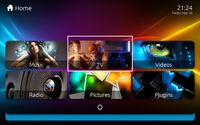
I have moved your thread to the appropriate forum. I think he wants to change his TV button to launch a plugin, probably the anime plugin. You need to edit basichome.xml. You can probably find some guidelines / instructions by searching this forum.
Alternatively if you upgrade to MP 1.4 and the latest version of Titan Extended there is support for a home editor for the alternative layout. Please use the TitanEdit.exe located in MP base dir in that case. (e.g.: c:\Program Files (x86)\Team MediaPortal\MediaPortal\TitanEdit.exe)
Thank you for this tip! I'm moving MP TV Server to a new machine. I installed the 64-bit version and most of the MP firewall rules were set to Public. I couldn't connect to the new TV Server from my old single-seat installation running 32-bit until I changed all MP-related firewall rules on the new machine to Private. Before I did...
Thank you for this tip! I'm moving MP TV Server to a new machine. I installed the 64-bit version and most of the MP firewall...
Server and client on modern uptodate Windows 11 desktop. Software is Server and Client version x86 1.38.003
Remote client on...
Many many years ago, I opened a bug report after I got that same message but I never got a reply. The reason was I had unchecked the Windows Media Player item in Windows 10 Control Panel > Program and Features > Turn Windows features on or off as I didn't need it, without thinking that it was needed by MediaPortal. I kept the "Media...
Many many years ago, I opened a bug report after I got that same message but I never got a reply. The reason was I had unchecked...
We have just released MediaPortal 1.39 - Endurance x86 and x64 version.
Highlights of this release
Bugfixes:
[MP1-5257] - Skin...



 England


