
You are using an out of date browser. It may not display this or other websites correctly.
You should upgrade or use an alternative browser.
You should upgrade or use an alternative browser.
SAF v4.00 ''stable'' (StandAlone Filters) - DXVA ready (H.264 and VC-1). (6 Viewers)
- Thread starter hoborg
- Start date
Hi, something weird is happening here since I installed beta20. Randomly the image freezes and the audio begins to loop, just the second of the audio that was being played loops for 3 or 4 seconds and then the audio continues normally, but image keeps frozen. You can even stop the movie, you can try and come back to Basichome and you hear the sounds and noises you'd expect to hear, but still you'll keep watching that last frame frozen on screen. All that I can do then is killing the MP process and then get back. I can't tell you anything else to reproduce it because it happens really randomly so I can't trace what leads to it... after reloading MP I try to get to the same point in the movie but now it works properly. Freezing happens always at different and random points of the movie. Any ideas ?
BTW, I've changed a little bit my config, now I own an ATI HD4350 with Catalyst 9.10, but it also happened with my previous 3450 card... I've waited to tell until I was sure it wasn't something I could trace in my computer, so I had time to even change my video card
BTW, I've changed a little bit my config, now I own an ATI HD4350 with Catalyst 9.10, but it also happened with my previous 3450 card... I've waited to tell until I was sure it wasn't something I could trace in my computer, so I had time to even change my video card
Hi, something weird is happening here since I installed beta20. Randomly the image freezes and the audio begins to loop, just the second of the audio that was being played loops for 3 or 4 seconds and then the audio continues normally, but image keeps frozen. You can even stop the movie, you can try and come back to Basichome and you hear the sounds and noises you'd expect to hear, but still you'll keep watching that last frame frozen on screen. All that I can do then is killing the MP process and then get back. I can't tell you anything else to reproduce it because it happens really randomly so I can't trace what leads to it... after reloading MP I try to get to the same point in the movie but now it works properly. Freezing happens always at different and random points of the movie. Any ideas ?
BTW, I've changed a little bit my config, now I own an ATI HD4350 with Catalyst 9.10, but it also happened with my previous 3450 card... I've waited to tell until I was sure it wasn't something I could trace in my computer, so I had time to even change my video card
Hi,
I had exactly the same (also before beta 20 btw) problem. After referring back to Beta 1.1 (no svn releases anymore) and using Catalyst 9.5 the problem seems to be solved so far. I would start with downgrading Catalyst to 9.5.
Best
Yuri
Furthermore, how do I get WMV to play in MediaPortal with beta20 ? If I launch MyTrailers and switch to GameTrailers I can choose a trailer, but by clicking it nothing happens (not even a blank screen or something, so I can't use GraphStudio)
And are you able to play wmv from local disk?
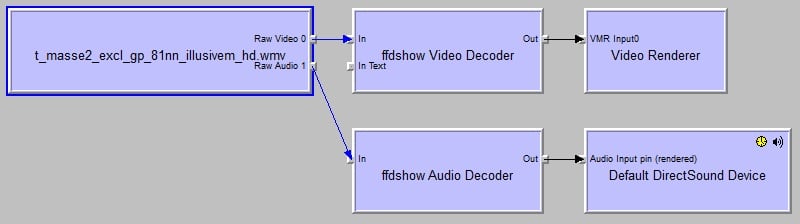
No, but it shows a different behaviour. I installed SAF beta20, so MS DMO is deactivated. If I try to get a video to play in OnlineVideos (MyTrailers doesn't work at all, don't know why) the Message "unable to play xyz.wmv" pops up. If I try using MPC HC in Windows with the same configuration it plays the first picture and second of sound from the video, then freezes. (Graphstudio shows no graph when connecting to remote). I configured all wmv related codecs to be decoded by ffdshow, but that didn't help either.
Activating DMO shows the video only in a preview window which flickers and shows up in a screencorner too.
@Hoborg: Did you get WMV to work with Windows 7 ? Could you please post your settings (Preferably in the first post as this thread gets longer and longer)
EDIT: Fiddled with the settings some more, I get the correct graph now in Graphstudio if I render the file directly, it even plays in graphstudio but not in MPC-HC or MediaPortal
EDIT2: OK got it working, idiotic error from me by not adding .wmv to list of playable files in MP config, sorry -.-
Attachments

- March 8, 2008
- 21
- 0
- Home Country
-
 United States of America
Quote:
Originally Posted by MongarEric View Post
I have a problem where avi files will not play correctly in Media Portal. I just get audio and a frozen screen of artifacts of what I assume to be the first frame. Any video in MKV and the 5 I have in MP4 work fine. All videos play correctly in MPC-HC. I also have another computer with the same versions of Media Portal and SAF installed, and all the videos play fine. I have tried searching for a couple of hours, most threads seem to be about people having trouble with HD video playback. My HD videos work fantastic, the old DIVX and XVID files do not. Dare to be different. Anyone got any ideas about what could be going wrong?
The problem can be really old AVI format. If you are using latest SAF, there is DSmux in START - SAF - TOOLS. Try to mux AVI to MKV here to fix compatibility.
I don't think the problem is the AVI format. My second computer that has the same version of SAF and MediaPortal installed can play all the video files fine. That coupled with the fact that all videos play fine in MPC-HC, really has me grasping at straws to find a solution. Maybe I should uninstall MediaPortal and SAF and try again. Also, if I change to Enhanced Video Renderer, then all the AVI files play fine. However, this causes the playback of HD videos to become choppy. So it's not a workable solution. Thanks for the help.
*EDIT - I went ahead and used MKVmerge to convert an AVI that wasn't working to MKV and the problem persists. The MKV I created this way plays fine on my second computer.
***EDIT AGAIN****
I installed new drivers for my HD 3200 and that fixed everything. The reason I didn't do this in the first place is that the last time I tried to install new drivers the drivers from the ATI website BSOD'd my computer. I then went on to read somewhere that I had to use the drivers from Gigabyte, since I had an HD 3200, which is integrated into the motherboard. Gigabyte hasn't updated their drivers in a while, so I gave the new ATI drivers a shot and it worked.

Anyone tried ATI CCC 9.11 yet?

Hi, Horborg how can I get SAF *unlocked* ?? Thaxx........
Yeah, i would like to know that too
me too !
Guys - you just have to read Hoborg's first post - the bit where it says -MPEG2/h.264 LiveTV (and DVD's will be using DXVA only when you use *unlocked* SAF (PM me how to unlock SAF)
HTH ...

- Thread starter
- #3,658
Anyone tried ATI CCC 9.11 yet?
No problem here - Win7x64, ATI 4770.

- Moderator
- #3,659
.... if I would delete all questions how to get SAF unlocked this thread would have only 100 pages...Guys - you just have to read Hoborg's first post - the bit where it says -MPEG2/h.264 LiveTV (and DVD's will be using DXVA only when you use *unlocked* SAF (PM me how to unlock SAF)
HTH ...

- Moderator
- #3,660
Hoborg,
Please add me to the list requesting instructions on how to unlock saf.
Thanks.
Omg...the post just above the one you wrote explains how to get it unlocked. Guess people are more or less blind in here...
Users who are viewing this thread
Online now: 7 (members: 0, guests: 7)