Difference between Mediaportal 1 and 2 (2 Viewers)

Lehmden

Retired Team Member
  • Premium Supporter
  • December 17, 2010
    12,584
    3,973
    Lehmden
    Home Country
    Germany Germany
    Depends on the skin you're using. In Blue Vision (default MP2 Skin) you can find it in the videos section of the top menu.
    In German it's called "Medien Durchsuchen":
    Zwischenablage-1.jpg


    You can not oversee it, I'm sure...
     

    thoath

    Portal Pro
    June 8, 2012
    69
    3
    20
    Home Country
    Germany Germany
    Yes I found "Medien durchsuchen". But there are no options, to configure that I can see the videos in the picture menu. The question is also, why I have to go to video-section, when I want to see the videos in the picture-section. Thats not clear for me.
     

    Lehmden

    Retired Team Member
  • Premium Supporter
  • December 17, 2010
    12,584
    3,973
    Lehmden
    Home Country
    Germany Germany
    Browse media is not related to videos only. It is for all types of media. The original Author of the Blue Vision skin has added it to "Videos" menu. If you like you can change the top menu structure by yourself so you will find it in "Pictures" and/or "Audio" and/or "Video". You even can add it to the "News" or "Settings" section if you like... It's a simple XML file where the structure is saved. With the next release there also will be a menu editor so you don't need to edit the xml by yourself. But this editor is not completely finished yet. I never use the default menu myself but I've preferred "Browse media" in Videos.
    I always use "Browse Media" for videos, music and pictures atm as I don't like databases for pictures in general (my "database" is my folder structure) and for Music I prefer DLNA software so I don't use MP2 for music at all. Only exceptions are Series and Movies where I use the database views and some HiRes Music my AVR can't play directly over the network...
     

    thoath

    Portal Pro
    June 8, 2012
    69
    3
    20
    Home Country
    Germany Germany
    Thanks Lehmden,
    I must admit that I increasingly look only TV with MediaPortal. For music, photos, there are more flexible software.
    But now I wanted to once again make an attempt to do with MP2 more. Now, it fails on simple things that I can't see any videos in a picture slide-show or that on-edge images are displayed in landscape mode.
    I still do not know where I set that I also see my videos. I think I'll stop the attempt again.
    It's pity. I enjoy the new default-skin. But when i can't use the MP for simple things. I leave it.
    Thank you for your time. And thanks for the work of programmers. I know it is non commercial and gratuitous for customers.
    Thomas
     

    Kotik

    MP Donator
  • Premium Supporter
  • March 19, 2009
    699
    485
    Athens
    Home Country
    Greece Greece
    MP2 is much faster than MP1 and it is "future proof".

    Eventually we will all switch to it and i am glad that it is being developed.
    Keep up the good good work guys and thank u all for the many years of joy that u gifted me with MP1!!!
     

    Lehmden

    Retired Team Member
  • Premium Supporter
  • December 17, 2010
    12,584
    3,973
    Lehmden
    Home Country
    Germany Germany
    Hi.
    Now, it fails on simple things that I can't see any videos in a picture slide-show
    It's not MP2 that fails... I added a mixed source only for testing. It contains video files (mkv) and their fanart (jpg). They are shown nicely together in the GUI and also are played nicely in the "on the fly" playlist...

    Here a JPG named "Mark Knopfler in Berlin.jpg" (It's the selfmade poster of this concert movie).
    Zwischenablage-1.jpg


    next media item is "Mark Knopfler in Berlin.mkv" (the video file containing this concert movie)
    Zwischenablage-2.jpg

    Here you also can see the usage of the selfmade fanart in "Browse media"...

    And the third media item again is an Image "Mark Knopfler in Berlin-fanart.jpg" (the fanart/background image for this concert movie).
    Zwischenablage-3.jpg


    If you want to watch the images and the videos together in a slide show you simply have to add "video and image" to the "on the fly" playlist
    Zwischenablage-4.jpg


    Do I need to make a screen video or can you trust me that it plays well?

    on-edge images are displayed in landscape mode.
    "on-edge" normally is for extreme content. But I think you're talking about portrait oriented (or square) images here...
    And again it's not MP2, that fails...
    Portrait:
    Zwischenablage-5.jpg


    and square:
    Zwischenablage-6.jpg


    No settings changed or even touched for this...
     

    thoath

    Portal Pro
    June 8, 2012
    69
    3
    20
    Home Country
    Germany Germany
    Picture/Video
    • After I waited over 3 hours for re-importing my old media-source, i deleted all media-sources.
    • In a NAS-Folder I copied a mix of files (jpg, png, mov, mp4, wmv).
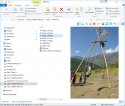
      Win10Explorer-hochkant.png
    • Then I added a new media-source with content-type "picture" and "video" and with the NAS-Folder.
    • Then I navigated to video-section/ browse media-source
    • double-click of the first picture
    • select "picture und videos hinzufügen"
    • Then I see the first picture
    • when I arrived the first png-File the show aborted.
    • I'm also not able to see a video.
    Problem with portrait format
    I never rotate my pictures after the import from the camera.
    The orientation is stored in EXIF-Information.
    All my picture-programs are able to rotate the picture automaticly, that it is in the right orientation.
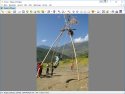
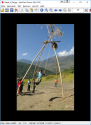
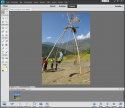
    In the next Screenshots I show it for Windows10Explorer, Photoshop, IrfanView, XNView.
    But MP2 isn't able to respect the EXIF-Info.

    See picture in MP2
    MP2-hochkant.png


    See the picture in Windows 10 Explorer
    Win10Explorer-hochkant.png

    XNView
    XNView-hochkant.png

    Photoshop
    Photoshop-hochkant.png

    IrfanView
    IrfanView-hochkant.png


    Best regards
    thoath
     

    morpheus_xx

    Retired Team Member
  • Team MediaPortal
  • March 24, 2007
    12,070
    7,459
    Home Country
    Germany Germany
    Can you please attach this image? Usually the EXIF orientation is properly considered, so something must be wrong here.
     

    Lehmden

    Retired Team Member
  • Premium Supporter
  • December 17, 2010
    12,584
    3,973
    Lehmden
    Home Country
    Germany Germany
    The orientation is stored in EXIF-Information.
    I also using the EXIF informations for rotation / orientation and here it's working properly...

    I'm also not able to see a video.
    Here it is working... Have you tried to start with that video, only to see if it generally is working (codec and similar)...
     

    thoath

    Portal Pro
    June 8, 2012
    69
    3
    20
    Home Country
    Germany Germany
    Hier is the image and the first video as attachments. The other videos also do not start.
    The video cannot start in MP2. In VLC it works fine.
     

    Attachments

    • Nepal_4_054.jpg
      Nepal_4_054.jpg
      1.5 MB
    • Nepal_4_119.wmv
      18 MB

    Users who are viewing this thread

    Similar threads

    MP1 MP2 MP2 - V2.5 Sony Bravia 32S5100 DE
    When i was using 2.5, and like im using MP1, i set the resolution of my desktop. And MEPo just uses whatever i have set.
    When i was using 2.5, and like im using MP1, i set the resolution of my desktop. And MEPo just uses whatever i have set.
    MP 2.5 does not recognize my Bravia 32S5100 as 1920x1080 but only as 1280x720. The PC's monitor is recognized as 1920x1080. Both...
    Replies
    2
    Views
    771
    • Sticky
    yes that is indeed what I did in that ticket. It may already be working without updating those plugins because most of it was not relevant to the plugin itself (test, some leftover unused parts etc).
    yes that is indeed what I did in that ticket. It may already be working without updating those plugins because most of it was not...
    We have just released MediaPortal 1.38 - Tatiana & Leo x86 and x64 version. Highlights of this release Bugfixes: New...
    Replies
    37
    Views
    9K
    Thank you for this tip! I'm moving MP TV Server to a new machine. I installed the 64-bit version and most of the MP firewall rules were set to Public. I couldn't connect to the new TV Server from my old single-seat installation running 32-bit until I changed all MP-related firewall rules on the new machine to Private. Before I did...
    Thank you for this tip! I'm moving MP TV Server to a new machine. I installed the 64-bit version and most of the MP firewall...
    Server and client on modern uptodate Windows 11 desktop. Software is Server and Client version x86 1.38.003 Remote client on...
    Replies
    26
    Views
    2K
    MP1 MP2 Picture-in-picture DE
    Can anyone tell me the step-by-step procedure for bringing up a second channel in pip mode? I can only do it sometimes, after many tries, and it’s not clear what I am doing that makes it work on those occasions when it does. Cannot find guidance on the site. Thanks, N. Again, if anyone knows how to do this, would be much...
    Can anyone tell me the step-by-step procedure for bringing up a second channel in pip mode? I can only do it sometimes, after many...
    Can anyone tell me the step-by-step procedure for bringing up a second channel in pip mode? I can only do it sometimes, after many...
    Replies
    0
    Views
    2K
    Sorry, I didn't get email notifications on these latest replies. I just came here to report I solved the problem after adjusting power settings for "Intel Graphics". I set it to Maximum Performance. I tried many other things so it could be a combination of them, but this was the last thing I did and I haven't had the problem return...
    Sorry, I didn't get email notifications on these latest replies. I just came here to report I solved the problem after adjusting...
    I'm running MP1 as a client only on this: https://www.amazon.com/dp/B0DZX5DWS5?ref_=pe_123509780_1038749300_t_fed_asin_title&th=1...
    Replies
    5
    Views
    2K
    Top Bottom