[solved] JRiver as external player (1 Viewer)

ajs

Development Group
  • Team MediaPortal
  • February 29, 2008
    16,210
    13,831
    Kyiv
    Home Country
    Ukraine Ukraine
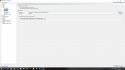
    In MP Config select full path to JRiver player (drive:\fullpath\mc24.exe)
    In Parameters set /Play %filename% or /Play "%filename%"

    Or try run manualy from cmd, press [Win][R] enter cmd and press [Enter]
    In command line enter drive:\fullpath\mc24.exe /Play drive:\fullpathtovideo\video.mkv
    And check work or not ...
     

    joecrow

    Test Group
  • Team MediaPortal
  • August 9, 2012
    2,721
    2,074
    Home Country
    Germany Germany
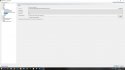
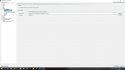
    I have done a real quick install of JRiver, the X64 version and using the settings shown in the screenshot this played a video from MP1 in JRiver.
    jriv1.jpg
    i.e Media Center24.exe seems to be the way to go.:)
     

    Icaro

    Portal Pro
    November 29, 2013
    77
    22
    53
    USA
    Home Country
    Algeria Algeria
    Thank you guys,
    Unfortunately I also tried it, but nothing happens.
    :(
     

    joecrow

    Test Group
  • Team MediaPortal
  • August 9, 2012
    2,721
    2,074
    Home Country
    Germany Germany
    Can you play the video you are testing from MP directly in JRiver, if yes then MP debug logs needed.
     

    Icaro

    Portal Pro
    November 29, 2013
    77
    22
    53
    USA
    Home Country
    Algeria Algeria
    :eek: Wow,
    in debug mode it works,
    But I loaded the ISO manually,
    Play, and the film started with JRiver
    But I normally use the Skin Titanus, with Automount and Autoplay,
    but with JRiver it does not work
    While in Debug mode it starts with Titan.
    What can it be?

    Perhaps a problem with VCD and Automount?
    Here the Log
     

    Attachments

    • MediaPortalLogs_10_03_19__19_36.zip
      30.7 KB
    Last edited:

    Icaro

    Portal Pro
    November 29, 2013
    77
    22
    53
    USA
    Home Country
    Algeria Algeria
    Can you play the video you are testing from MP directly in JRiver, if yes then MP debug logs needed.

    I noticed now that when I select Play, the ISO is mounted, and after a second unmounted.
    Maybe that's why JRiver does not start ?
     
    Last edited:

    joecrow

    Test Group
  • Team MediaPortal
  • August 9, 2012
    2,721
    2,074
    Home Country
    Germany Germany
    But you managed to start an ISO automatically ?

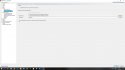
    My initial test was with a video file (.mkv). This morning I have tested with both an iso and an actual Bluray disk using the settings shown in the screenshots, note if the .iso was originally a Bluray you do need to specify JRiver as the external player also in the Bluray settings (last screenshot).

    The Bluray iso mounted automatically and MP asks me if I want to open it, "yes" and it starts playing immediately in JRiver, without a menu. With an actual Bluray Disk MP switched to JRiver where I got a message saying I needed to install an additional program to play Blurays.

    I used both Titan and Default Wide HD skins.

    jriv1.jpg jriv2.jpg jriv3.jpg jriv4.jpg
    All looks good to me.:)
     

    Icaro

    Portal Pro
    November 29, 2013
    77
    22
    53
    USA
    Home Country
    Algeria Algeria
    My initial test was with a video file (.mkv). This morning I have tested with both an iso and an actual Bluray disk using the settings shown in the screenshots, note if the .iso was originally a Bluray you do need to specify JRiver as the external player also in the Bluray settings (last screenshot).

    The Bluray iso mounted automatically and MP asks me if I want to open it, "yes" and it starts playing immediately in JRiver, without a menu. With an actual Bluray Disk MP switched to JRiver where I got a message saying I needed to install an additional program to play Blurays.

    I used both Titan....:)


    I tried in every way but nothing,
    the ISO is mounted and disassembled immediately without giving JRiver time to start.

    I also use Moving Pictures, the same settings I put there, but nothing.
     

    ajs

    Development Group
  • Team MediaPortal
  • February 29, 2008
    16,210
    13,831
    Kyiv
    Home Country
    Ukraine Ukraine
    May be problem in MovPics? Try in standard MyVideo plugin...

    --
    WBR, ajs :):whistle::coffee:
     

    Users who are viewing this thread

    Similar threads

    I don't think so, because MP has no way of knowing at which timestamp the external player stopped playback. Best way to achieve this would be to use an auto-resume feature in your external player itself. (MPC-HC can do that, I don't know about VLC)
    I don't think so, because MP has no way of knowing at which timestamp the external player stopped playback. Best way to achieve...
    Hello Folks, Is it possible to enable MP to resume in an External Player, where it left off ? I guess the question also is, can...
    Replies
    2
    Views
    2K
    I don't know about MP2 but as you said you tried MP1 too, how is the MP music config ? MP(1) will only use LAV if you select "Internal DirectShow player" as music output, but then you lose gapless playback. If you you don't have multichannel music you can choose WASAPI as the output and set the number of speakers to stereo. I have...
    I don't know about MP2 but as you said you tried MP1 too, how is the MP music config ? MP(1) will only use LAV if you select...
    Not sure if this a a bug/config/settings problem. I am running a media portal 2.5 server with 2.41 client but it seems I get the...
    Replies
    1
    Views
    902
    Fixed, I think. Certainly the vintage MP2 installer that I was using no longer installs the LAV filters. I can only assume that these were never part of the install package itself, but rather downloaded during the install, and that link no longer exists. Shame that the installer doesn't indicate this. Last time when I installed the...
    Fixed, I think. Certainly the vintage MP2 installer that I was using no longer installs the LAV filters. I can only assume that...
    Hi all, I've recently retired my MP2 setup for my main HTPC and gone back to separates, but I wanted to retain the ability to play...
    Replies
    4
    Views
    690
    MP1 MP2 TVGuide Users DE
    Greetings Fellow MP'rs. Does anyone out there use tvguide.com to access TV listings..? :unsure: If so, can you advise on how it is set up for use with MediaPortal..? I havebeen using Zap2XML / GraceNote but that just died (for me alone seemingly) and I am out of listings. :( Would appreciate any help - Thanks.
    Greetings Fellow MP'rs. Does anyone out there use tvguide.com to access TV listings..? :unsure: If so, can you advise on how it...
    Greetings Fellow MP'rs. Does anyone out there use tvguide.com to access TV listings..? :unsure: If so, can you advise on how it...
    Replies
    0
    Views
    1K
    Thankyou High_Five, that worked perfectly, I now remember doing that 10 years ago, thanks for jogging my old memory. Cheers Tony
    Thankyou High_Five, that worked perfectly, I now remember doing that 10 years ago, thanks for jogging my old memory. Cheers Tony
    Hi everyone, I have been using it For 16 years now (from V1.1.1) and it has worked flawlessly. I only use TV Series and Moving...
    Replies
    2
    Views
    543
    Top Bottom