[solved] JRiver as external player (3 Viewers)

ajs

Development Group
  • Team MediaPortal
  • February 29, 2008
    15,959
    13,420
    Kyiv
    Home Country
    Ukraine Ukraine
    In MP Config select full path to JRiver player (drive:\fullpath\mc24.exe)
    In Parameters set /Play %filename% or /Play "%filename%"

    Or try run manualy from cmd, press [Win][R] enter cmd and press [Enter]
    In command line enter drive:\fullpath\mc24.exe /Play drive:\fullpathtovideo\video.mkv
    And check work or not ...
     

    joecrow

    Test Group
  • Team MediaPortal
  • August 9, 2012
    2,721
    2,074
    Home Country
    Germany Germany
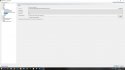
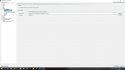
    I have done a real quick install of JRiver, the X64 version and using the settings shown in the screenshot this played a video from MP1 in JRiver.
    jriv1.jpg
    i.e Media Center24.exe seems to be the way to go.:)
     

    Icaro

    Portal Pro
    November 29, 2013
    77
    22
    53
    USA
    Home Country
    Algeria Algeria
    Thank you guys,
    Unfortunately I also tried it, but nothing happens.
    :(
     

    joecrow

    Test Group
  • Team MediaPortal
  • August 9, 2012
    2,721
    2,074
    Home Country
    Germany Germany
    Can you play the video you are testing from MP directly in JRiver, if yes then MP debug logs needed.
     

    Icaro

    Portal Pro
    November 29, 2013
    77
    22
    53
    USA
    Home Country
    Algeria Algeria
    :eek: Wow,
    in debug mode it works,
    But I loaded the ISO manually,
    Play, and the film started with JRiver
    But I normally use the Skin Titanus, with Automount and Autoplay,
    but with JRiver it does not work
    While in Debug mode it starts with Titan.
    What can it be?

    Perhaps a problem with VCD and Automount?
    Here the Log
     

    Attachments

    • MediaPortalLogs_10_03_19__19_36.zip
      30.7 KB
    Last edited:

    Icaro

    Portal Pro
    November 29, 2013
    77
    22
    53
    USA
    Home Country
    Algeria Algeria
    Can you play the video you are testing from MP directly in JRiver, if yes then MP debug logs needed.

    I noticed now that when I select Play, the ISO is mounted, and after a second unmounted.
    Maybe that's why JRiver does not start ?
     
    Last edited:

    joecrow

    Test Group
  • Team MediaPortal
  • August 9, 2012
    2,721
    2,074
    Home Country
    Germany Germany
    But you managed to start an ISO automatically ?

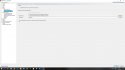
    My initial test was with a video file (.mkv). This morning I have tested with both an iso and an actual Bluray disk using the settings shown in the screenshots, note if the .iso was originally a Bluray you do need to specify JRiver as the external player also in the Bluray settings (last screenshot).

    The Bluray iso mounted automatically and MP asks me if I want to open it, "yes" and it starts playing immediately in JRiver, without a menu. With an actual Bluray Disk MP switched to JRiver where I got a message saying I needed to install an additional program to play Blurays.

    I used both Titan and Default Wide HD skins.

    jriv1.jpg jriv2.jpg jriv3.jpg jriv4.jpg
    All looks good to me.:)
     

    Icaro

    Portal Pro
    November 29, 2013
    77
    22
    53
    USA
    Home Country
    Algeria Algeria
    My initial test was with a video file (.mkv). This morning I have tested with both an iso and an actual Bluray disk using the settings shown in the screenshots, note if the .iso was originally a Bluray you do need to specify JRiver as the external player also in the Bluray settings (last screenshot).

    The Bluray iso mounted automatically and MP asks me if I want to open it, "yes" and it starts playing immediately in JRiver, without a menu. With an actual Bluray Disk MP switched to JRiver where I got a message saying I needed to install an additional program to play Blurays.

    I used both Titan....:)


    I tried in every way but nothing,
    the ISO is mounted and disassembled immediately without giving JRiver time to start.

    I also use Moving Pictures, the same settings I put there, but nothing.
     

    ajs

    Development Group
  • Team MediaPortal
  • February 29, 2008
    15,959
    13,420
    Kyiv
    Home Country
    Ukraine Ukraine
    May be problem in MovPics? Try in standard MyVideo plugin...

    --
    WBR, ajs :):whistle::coffee:
     

    Users who are viewing this thread

    Similar threads

    I don't think so, because MP has no way of knowing at which timestamp the external player stopped playback. Best way to achieve this would be to use an auto-resume feature in your external player itself. (MPC-HC can do that, I don't know about VLC)
    I don't think so, because MP has no way of knowing at which timestamp the external player stopped playback. Best way to achieve...
    Hello Folks, Is it possible to enable MP to resume in an External Player, where it left off ? I guess the question also is, can...
    Replies
    2
    Views
    1K
    I don't know about MP2 but as you said you tried MP1 too, how is the MP music config ? MP(1) will only use LAV if you select "Internal DirectShow player" as music output, but then you lose gapless playback. If you you don't have multichannel music you can choose WASAPI as the output and set the number of speakers to stereo. I have...
    I don't know about MP2 but as you said you tried MP1 too, how is the MP music config ? MP(1) will only use LAV if you select...
    Not sure if this a a bug/config/settings problem. I am running a media portal 2.5 server with 2.41 client but it seems I get the...
    Replies
    1
    Views
    650
    MP1 MP2 TVGuide Users DE
    Greetings Fellow MP'rs. Does anyone out there use tvguide.com to access TV listings..? :unsure: If so, can you advise on how it is set up for use with MediaPortal..? I havebeen using Zap2XML / GraceNote but that just died (for me alone seemingly) and I am out of listings. :( Would appreciate any help - Thanks.
    Greetings Fellow MP'rs. Does anyone out there use tvguide.com to access TV listings..? :unsure: If so, can you advise on how it...
    Greetings Fellow MP'rs. Does anyone out there use tvguide.com to access TV listings..? :unsure: If so, can you advise on how it...
    Replies
    0
    Views
    751
    You can find ton of guide here: https://www.avsforum.com/threads/madvr-player-support-thread.2215490/?post_id=39123050#post-39123050
    You can find ton of guide here: https://www.avsforum.com/threads/madvr-player-support-thread.2215490/?post_id=39123050#post-39123050
    Hi, I have a problem if I set madVR as Video Render. When I try to play my .mkv files I have an 'Unable to play. Video COdec...
    Replies
    3
    Views
    2K
    i love how subtitles are implemented in the MP2 videoplayer, this is just perfect. 1080p playback is also very good. But video playback in MP2 is buggy when playing 4k material. Therefore: PLEASE add an option for an external video player! I'd LOVE to have VLC back as videoplayer, like in MP1! This works perfectly. You will make a...
    i love how subtitles are implemented in the MP2 videoplayer, this is just perfect. 1080p playback is also very good. But video...
    i love how subtitles are implemented in the MP2 videoplayer, this is just perfect. 1080p playback is also very good. But video...
    Replies
    0
    Views
    1K
    Top Bottom