
You are using an out of date browser. It may not display this or other websites correctly.
You should upgrade or use an alternative browser.
You should upgrade or use an alternative browser.
[WiP] madVR support in MP1 (63 Viewers)
- Thread starter Sebastiii
- Start date


- August 9, 2012
- 2,715
- 2,078
- Home Country
-
 Germany
Good news, I can't put my finger on it but the first impression of 0.92.* was the the PQ was improved and noted a slight reduction (still very very good) on going back to 0.91.10, using same settings.He is really active this month so i dont think it will be long before he adds D3D11 deinterlacing support and fixes the major bugs.


- July 2, 2008
- 147
- 120
- Home Country
-
Belgium
@joecrow Was the difference in PQ that you noticed between DXVA2 Native in 0.91 and D3D11 Native in 0.92? Because nevcairiel said that D3D11 Native (only available with 0.92) preserves full chroma quality on NVIDIA cards while DXVA2 Native does not (something about the correct texture format for that not being accessible directly by the renderer in DXVA2).
- July 2, 2008
- 147
- 120
- Home Country
-
Belgium
If anyone happens to have problems with messed up levels in RGB Full output to a TV with an NVIDIA on Windows 1703, I've found a weird workaround for my issue: Doom9's Forum - View Single Post - madVR - high quality video renderer (GPU assisted)
Still haven't heard back from NVIDIA since I reported this last tuesday not even an acknowledge. What do you guys think is the better way to report bugs to NVIDIA, by filling up their official report form or by posting on their forum?
Still haven't heard back from NVIDIA since I reported this last tuesday not even an acknowledge. What do you guys think is the better way to report bugs to NVIDIA, by filling up their official report form or by posting on their forum?
- August 9, 2012
- 2,715
- 2,078
- Home Country
-
Germany
If anyone happens to have problems with messed up levels in RGB Full output to a TV with an NVIDIA on Windows 1703, I've found a weird workaround for my issue:
I'm also using a 1050Ti and 385.69 on my desktop, so HDMI connected to full HD monitor, not a TV, "Content Type Reported to Display" is the default "Auto-select. (my HTPC with TV is using an AMD Rx 460). I've not seen the problem you describe maybe because its a monitor. Do you have an AVR on the HDMI?
Not sure about Nvidia but it surely can't be any worse than AMD.What do you guys think is the better way to report bugs to NVIDIA, by filling up their official report form or by posting on their forum?
- July 2, 2008
- 147
- 120
- Home Country
-
Belgium
Yes I have an AVR but the problem wasn't happening with previous Windows versions, it started with 1703 literally on the first boot after update. Also, in Safe Mode or when using Microsoft Basic Display Adapter the levels are OK so it's definitely a driver bug and not hardware related (or a Windows bug when interacting with the driver and hardware in specific way ).
).Can confirm new madvr version runs now as it should with HDR on AMD. So last unfunny problem is solved for me. Option is activated by madvr if needed and you don't need to / shouldn't activate it in windows, also the color now looks like it should comparing with running video on TV direct through usb. If you have problems or wrong color, you should proof the correct mode YCbCr 4:2:2 / 10 or 12 bit. Mine was on YCbCr 4:4:4 / 8bit, don't know if the amd driver update or the windows hdr setting brought this option to me. I normally used 4:2:2.
And realized while testing that LG OLED is capable with HDR in 3D Mode, funny. You can force this with activating HDR in windows and starting a 3D MVC blue ray. HDR is activated and 3D is working, also the colors are wrong because for sure there is no 3D material with HDR. Marketing gag also confirmed
Option is activated by madvr if needed and you don't need to / shouldn't activate it in windows, also the color now looks like it should comparing with running video on TV direct through usb. If you have problems or wrong color, you should proof the correct mode YCbCr 4:2:2 / 10 or 12 bit. Mine was on YCbCr 4:4:4 / 8bit, don't know if the amd driver update or the windows hdr setting brought this option to me. I normally used 4:2:2.And realized while testing that LG OLED is capable with HDR in 3D Mode, funny. You can force this with activating HDR in windows and starting a 3D MVC blue ray. HDR is activated and 3D is working, also the colors are wrong because for sure there is no 3D material with HDR. Marketing gag also confirmed

- Thread starter
- Moderator
- #4,028
Hi Guys
V330 in first post
- Preparing Frame grabber (Auto3D) and fix memory leak for screenshot when using madVR (fix on madVR side in the future next version)
- Fix subtitle delay (setting was reinitialized when D3D subtitle device was set for madVR)
- Disable Core CC parser for madVR
- For now only Screenshot feature will use the new madVR code (the GrabFrame code in there but no enable because it trigger performance issue)
So Atmolight/ambilight should work as before (only when D3D9 is used).
Screenshot can be done for all kind of mode (leak is fixed on MP side and the one from madVR will be in the next future version).
@daWooky the Auto3D detection works if there is no madVR stats on screen and when using D3D9 later when performance issue will be fixed, it will work for all kind of settings (even with madVR stat on screen).
V330 in first post
- Preparing Frame grabber (Auto3D) and fix memory leak for screenshot when using madVR (fix on madVR side in the future next version)
- Fix subtitle delay (setting was reinitialized when D3D subtitle device was set for madVR)
- Disable Core CC parser for madVR
- For now only Screenshot feature will use the new madVR code (the GrabFrame code in there but no enable because it trigger performance issue)
So Atmolight/ambilight should work as before (only when D3D9 is used).
Screenshot can be done for all kind of mode (leak is fixed on MP side and the one from madVR will be in the next future version).
@daWooky the Auto3D detection works if there is no madVR stats on screen and when using D3D9
later when performance issue will be fixed, it will work for all kind of settings (even with madVR stat on screen).- January 31, 2008
- 541
- 493
- Home Country
-
Spain
Hi @sebastii.Hi Guys
V330 in first post
Its been long I don't test MadVr versions. Unfortunately, since finals versions for me its been almost unusable. 99% of the time, GUI is not visible. I have a lot of Windows crashses (not only MP) and I'm not able to use it.
Yesterday I tried again (you'll see lots of crashes( after several Nvidia drivers test (I went back to 382 05) and LAV filters (im on 0.70.2.67) Im able to more or less see something. Most of the time no GUI, unless video or tv in SD resolution, then it may appear GUI from time to time.
Here is a MadVr error message on ZAP from SD to HD channel. MP closed by it self and logs created. Whatchdog on Option1.
Crash at 1648.
Nvidia 1050 2gb LP in use.
I'm on holidays so am ready for testing or anydesk...
Cheers!
Last edited:
- January 31, 2008
- 541
- 493
- Home Country
-
Spain
I can also confirm that having the MadVr status in view causes a really high posibility of having problems with the GUI.
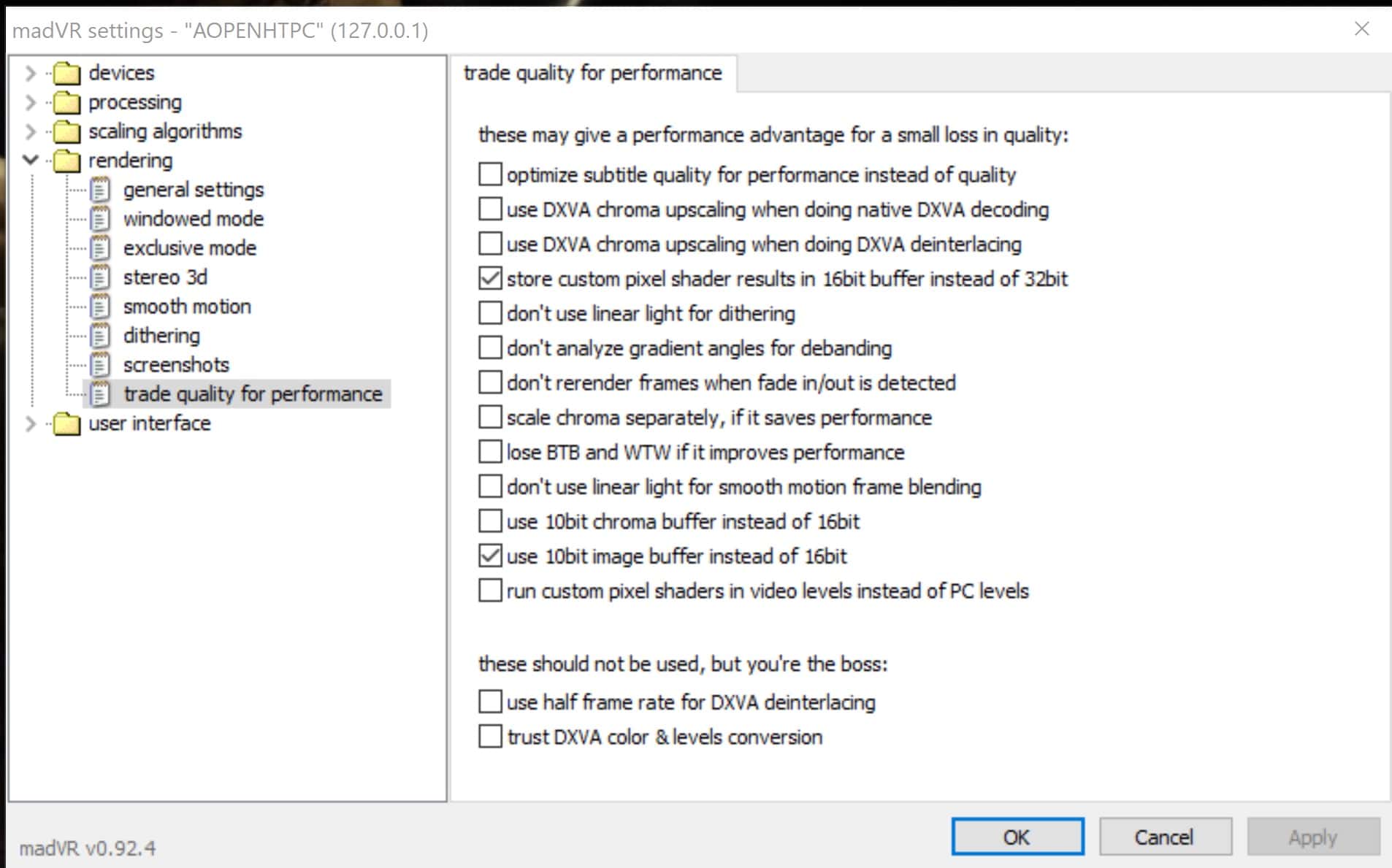
EDIT (I correct my self) TV zap Tests today shown that having "Store custom pixel shader" plus "Use 10bit image buffer instead 16bit" see shown in the attached image (in trade performance for quallity), really, REALLY helps on having the GUI on view almost 99% of the time. And if I have the Status in view (or any other image like MAdVR control pannel) , will brake and cause a problems and GUI gets missing. On channel stop and restart it goes on again. Weird...
EDIT (I correct my self) TV zap Tests today shown that having "Store custom pixel shader" plus "Use 10bit image buffer instead 16bit" see shown in the attached image (in trade performance for quallity), really, REALLY helps on having the GUI on view almost 99% of the time. And if I have the Status in view (or any other image like MAdVR control pannel) , will brake and cause a problems and GUI gets missing. On channel stop and restart it goes on again. Weird...
Attachments
Last edited:
Users who are viewing this thread
Online now: 61 (members: 0, guests: 61)