
You are using an out of date browser. It may not display this or other websites correctly.
You should upgrade or use an alternative browser.
You should upgrade or use an alternative browser.
[WiP] madVR support in MP1 (89 Viewers)
- Thread starter Sebastiii
- Start date

- August 9, 2012
- 2,715
- 2,078
- Home Country
-
 Germany
Strange there is nothing in the log. Not a problem on regular resume from sleep, all OK there, so far. With Auto3D disabled I tried with a recording again this morning and it powered up from sleep as it should in Away mode, I'm now waiting for a further scheduled recording with Auto3D enabled and will let you know what happens shortly.it seems no log about this time, can you reproduce it easily on resume ?
Please note I use the CEC Remote plugin on my HTPC in conjunction with a Pulse Eight CEC dongle to control both the audio volume of the AVR and Sleep and resume of AVR and TV. I do not use the TV remote to control MP but the Centera remote controls both MP as well as those aforementioned functions. I think it is most likely that the CEC Remote plugin may be the issue here, I use the same Centera remote setup (no CEC Remote plugin) on my Desktop PC (no AVR etc) but without volume problem.

- August 9, 2012
- 2,715
- 2,078
- Home Country
-
Germany
No problem with resume from sleep for the recording all OK in Away mode, will keep trying. Also volume problem is gone, but got a freeze in Live TV on stop, cleared after starting Task Manager so did not close MP and continued on without further problems. Logs attached, also CEC Remote plugin settings, devices selected in the Power options are TV and Audio System.
Attachments
Last edited:

- Thread starter
- Moderator
- #5,045
Hello Sebastiii,
if feasible for you, we can open a teamviewer session tonight. Hopefully, I will be at home at 19:00. I will try to contact you over ICR.
Regards
Markus
Great, i will be back to home at the same time if all goes well at work
- Thread starter
- Moderator
- #5,047
No problem with resume from sleep for the recording all OK in Away mode, will keep trying. Also volume problem is gone, but got a freeze in Live TV on stop, cleared after starting Task Manager so did not close MP and continued on without further problems. Logs attached, also CEC Remote plugin settings, devices selected in the Power options are TV and Audio System.
View attachment 195457 View attachment 195458
If you can reproduce it, try the new workaround option FCU
it should fix it
- August 9, 2012
- 2,715
- 2,078
- Home Country
-
Germany
Well spotted@joecrow what is the version of auto3D, because in log i can see null ref about a ping and this part was fixed in recent auto3D from first post, can you try to update to latest version (1.16.0.7) ?
, totally my fault I had downloaded the ver. 1.16.0.7 but installed an old version that was at the top of my download folder.Now no more SBS GUI.
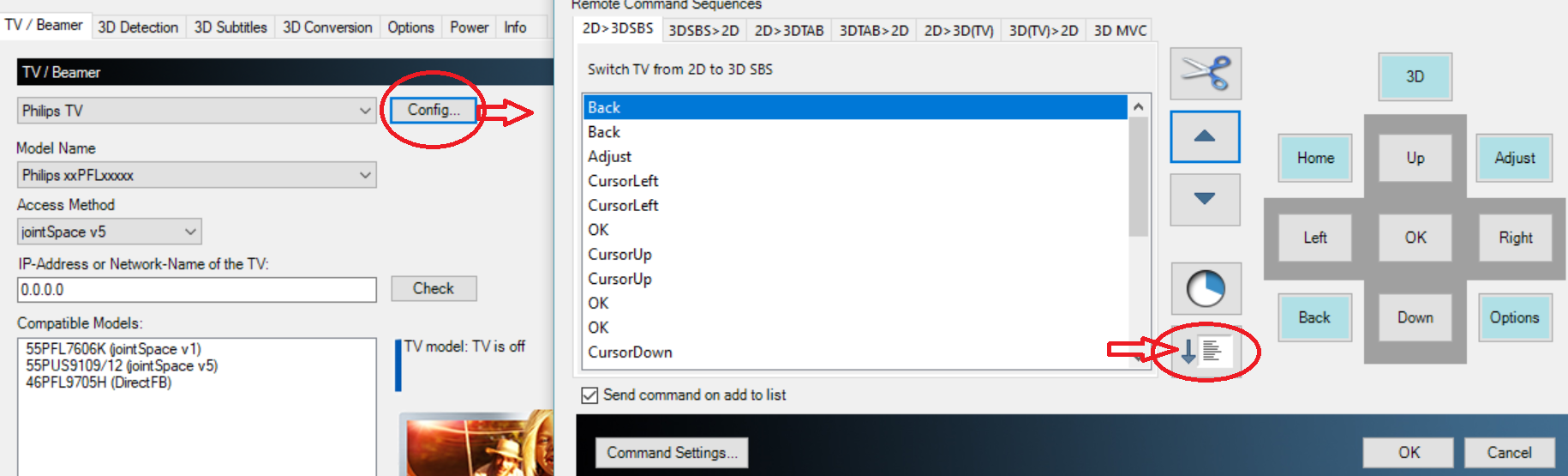
. Will continue testing.I have not been able to get Auto3D to switch my TV to 3D for an 3DSBS video, my TV is detected correctly if I select on the first screen but I'm not sure where to go from there, all help would be much appreciated.
nice^^
i'm not sure what you mean.. if tv is detected right, press the config button and try if a command seq. works (you probably have to adapt it to your tv)I'm not sure where to go from there
Attachments

- January 19, 2007
- 791
- 741
- Home Country
-
England
I'm really pushing my luck today:
Latest MP
Latest madVR
Latest LAV
Latest W10
Latest NVIDIA
3 hours and counting...(which is much longer than last time on latest NVIDIA)
Latest MP
Latest madVR
Latest LAV
Latest W10
Latest NVIDIA
3 hours and counting...(which is much longer than last time on latest NVIDIA)
Users who are viewing this thread
Online now: 87 (members: 0, guests: 87)