MP2 - V2.1 [MP2-592] BluRay ISO Files are not playing (2 Viewers)

Status
Not open for further replies.

Scheibes

Portal Pro
June 14, 2012
817
71
41
Home Country
Germany Germany
Works fine :)


EDIT:
After a restart and a new import, the movies works in MP2.1 Pre2.
I think the issue is fixed.

@breese
You have the movie Planes, too.
Can you confirm the fixed issue?
 

HTPCSourcer

Retired Team Member
  • Premium Supporter
  • May 16, 2008
    11,382
    2,369
    Home Country
    Germany Germany
    Works fine :)
    Yeah, but Windows is using MS-DTV as the video codec.

    Please run graphedit manually, use "add filter" -> "LAV Splitter Source" and open the "index.bdmv" from the (mounted) BD folder. This should either work or give an error message box with an error code.
     

    Scheibes

    Portal Pro
    June 14, 2012
    817
    71
    41
    Home Country
    Germany Germany
    I don't know if i make it right, therefore i make screenshots from all steps.

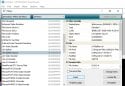
    Step 1:
    Schritt 1.jpg

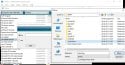
    Step 2:
    Schritt 2.jpg

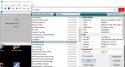
    Step 3:
    Schritt 3.jpg

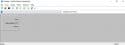
    Finish:
    Fertig.jpg
     

    HTPCSourcer

    Retired Team Member
  • Premium Supporter
  • May 16, 2008
    11,382
    2,369
    Home Country
    Germany Germany
    After step 3, can you try and click on the play icon? You can also try to select one of the true movie entries.
     

    morpheus_xx

    Retired Team Member
  • Team MediaPortal
  • March 24, 2007
    12,070
    7,459
    Home Country
    Germany Germany
    You need to right-click the output pins of the Splitter Source and use "Render Pin". This loads matching filters and connects them automatically.

    After this playback should work
     

    Scheibes

    Portal Pro
    June 14, 2012
    817
    71
    41
    Home Country
    Germany Germany
    You need to right-click the output pins of the Splitter Source and use "Render Pin". This loads matching filters and connects them automatically.

    After this playback should work

    Result:
    Result.jpg

    Movies starts with out error.
     

    HTPCSourcer

    Retired Team Member
  • Premium Supporter
  • May 16, 2008
    11,382
    2,369
    Home Country
    Germany Germany
    You need to right-click the output pins of the Splitter Source and use "Render Pin". This loads matching filters and connects them automatically.
    No LAV.

    I am a bit lost. What is the conclusion now?
     

    morpheus_xx

    Retired Team Member
  • Team MediaPortal
  • March 24, 2007
    12,070
    7,459
    Home Country
    Germany Germany
    What is the conclusion now?
    As the error happened before when the source splitter was added to graph, it is fixed now. Splitter source is loaded correctly and pins can be rendered.

    @Scheibes can you confirm playback results in MP2?
     
    Status
    Not open for further replies.

    Users who are viewing this thread

    Similar threads

    PS: But maybe the MP2 team will be back tomorrow, and development and bug fixes will continue. Time will tell.
    PS: But maybe the MP2 team will be back tomorrow, and development and bug fixes will continue. Time will tell.
    Hi, Help Please. I've got several FLAC audio files that play OK on my PC, and my HTPC, via: Media Player / Windows Media Player /...
    Replies
    8
    Views
    735
    Hi. I was probably being a bit fast and loose with my terminology. I meant "somewhere within the files that MP2 uses in its database". Anyway, I found a way to do this which was far from automated but relatively low effort. I found what looked like all the images (CD covers, DVD covers, backgrounds etc all lumped together in...
    Hi. I was probably being a bit fast and loose with my terminology. I meant "somewhere within the files that MP2 uses in its...
    I am in the process of setting up a legacy media player (Mede8er) which I happened to have laying around into my home cinema setup...
    Replies
    2
    Views
    424
    Fixed, I think. Certainly the vintage MP2 installer that I was using no longer installs the LAV filters. I can only assume that these were never part of the install package itself, but rather downloaded during the install, and that link no longer exists. Shame that the installer doesn't indicate this. Last time when I installed the...
    Fixed, I think. Certainly the vintage MP2 installer that I was using no longer installs the LAV filters. I can only assume that...
    Hi all, I've recently retired my MP2 setup for my main HTPC and gone back to separates, but I wanted to retain the ability to play...
    Replies
    4
    Views
    207
    I don't think so, because MP has no way of knowing at which timestamp the external player stopped playback. Best way to achieve this would be to use an auto-resume feature in your external player itself. (MPC-HC can do that, I don't know about VLC)
    I don't think so, because MP has no way of knowing at which timestamp the external player stopped playback. Best way to achieve...
    Hello Folks, Is it possible to enable MP to resume in an External Player, where it left off ? I guess the question also is, can...
    Replies
    2
    Views
    2K
    I don't know about MP2 but as you said you tried MP1 too, how is the MP music config ? MP(1) will only use LAV if you select "Internal DirectShow player" as music output, but then you lose gapless playback. If you you don't have multichannel music you can choose WASAPI as the output and set the number of speakers to stereo. I have...
    I don't know about MP2 but as you said you tried MP1 too, how is the MP music config ? MP(1) will only use LAV if you select...
    Not sure if this a a bug/config/settings problem. I am running a media portal 2.5 server with 2.41 client but it seems I get the...
    Replies
    1
    Views
    804
    Top Bottom