MP2 - V2.1 [MP2-592] BluRay ISO Files are not playing (1 Viewer)

Status
Not open for further replies.

Scheibes

Portal Pro
June 14, 2012
817
71
41
Home Country
Germany Germany
Works fine :)


EDIT:
After a restart and a new import, the movies works in MP2.1 Pre2.
I think the issue is fixed.

@breese
You have the movie Planes, too.
Can you confirm the fixed issue?
 

HTPCSourcer

Retired Team Member
  • Premium Supporter
  • May 16, 2008
    11,382
    2,369
    Home Country
    Germany Germany
    Works fine :)
    Yeah, but Windows is using MS-DTV as the video codec.

    Please run graphedit manually, use "add filter" -> "LAV Splitter Source" and open the "index.bdmv" from the (mounted) BD folder. This should either work or give an error message box with an error code.
     

    Scheibes

    Portal Pro
    June 14, 2012
    817
    71
    41
    Home Country
    Germany Germany
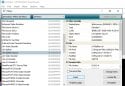
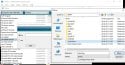
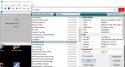
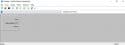
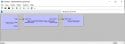
    I don't know if i make it right, therefore i make screenshots from all steps.

    Step 1:
    Schritt 1.jpg

    Step 2:
    Schritt 2.jpg

    Step 3:
    Schritt 3.jpg

    Finish:
    Fertig.jpg
     

    HTPCSourcer

    Retired Team Member
  • Premium Supporter
  • May 16, 2008
    11,382
    2,369
    Home Country
    Germany Germany
    After step 3, can you try and click on the play icon? You can also try to select one of the true movie entries.
     

    morpheus_xx

    Retired Team Member
  • Team MediaPortal
  • March 24, 2007
    12,070
    7,459
    Home Country
    Germany Germany
    You need to right-click the output pins of the Splitter Source and use "Render Pin". This loads matching filters and connects them automatically.

    After this playback should work
     

    Scheibes

    Portal Pro
    June 14, 2012
    817
    71
    41
    Home Country
    Germany Germany
    You need to right-click the output pins of the Splitter Source and use "Render Pin". This loads matching filters and connects them automatically.

    After this playback should work

    Result:
    Result.jpg

    Movies starts with out error.
     

    HTPCSourcer

    Retired Team Member
  • Premium Supporter
  • May 16, 2008
    11,382
    2,369
    Home Country
    Germany Germany
    You need to right-click the output pins of the Splitter Source and use "Render Pin". This loads matching filters and connects them automatically.
    No LAV.

    I am a bit lost. What is the conclusion now?
     

    morpheus_xx

    Retired Team Member
  • Team MediaPortal
  • March 24, 2007
    12,070
    7,459
    Home Country
    Germany Germany
    What is the conclusion now?
    As the error happened before when the source splitter was added to graph, it is fixed now. Splitter source is loaded correctly and pins can be rendered.

    @Scheibes can you confirm playback results in MP2?
     
    Status
    Not open for further replies.

    Users who are viewing this thread

    Similar threads

    I don't think so, because MP has no way of knowing at which timestamp the external player stopped playback. Best way to achieve this would be to use an auto-resume feature in your external player itself. (MPC-HC can do that, I don't know about VLC)
    I don't think so, because MP has no way of knowing at which timestamp the external player stopped playback. Best way to achieve...
    Hello Folks, Is it possible to enable MP to resume in an External Player, where it left off ? I guess the question also is, can...
    Replies
    2
    Views
    1K
    I don't know about MP2 but as you said you tried MP1 too, how is the MP music config ? MP(1) will only use LAV if you select "Internal DirectShow player" as music output, but then you lose gapless playback. If you you don't have multichannel music you can choose WASAPI as the output and set the number of speakers to stereo. I have...
    I don't know about MP2 but as you said you tried MP1 too, how is the MP music config ? MP(1) will only use LAV if you select...
    Not sure if this a a bug/config/settings problem. I am running a media portal 2.5 server with 2.41 client but it seems I get the...
    Replies
    1
    Views
    656
    After many hours of troubleshooting I've given up and accepted that it's just "one of these things" when using madVR for watching live TV. I've now ticked the box to "Use EVR for LiveTV", with a default display refresh rate of 50Hz. In combination with tweaking some of the Nvidia 3D settings for the MP executable only, I now have a...
    After many hours of troubleshooting I've given up and accepted that it's just "one of these things" when using madVR for watching...
    Every so often, when I switch to a TV channel, my MP client stops accepting user inputs, either from the remote or keyboard/mouse...
    Replies
    30
    Views
    8K
    Are different people taking turns watching the same thing on the same HTPC? For me, separating users in MP2 is a drawback, as is the interface. Simply put, this can't be done in MP1, or rather, it can't be done quickly, because everything would have to be rewritten. But if each user logs in with their own Windows account, MP1 can...
    Are different people taking turns watching the same thing on the same HTPC? For me, separating users in MP2 is a drawback, as is...
    Hello, Is there a way to integrate a multi-user interface in MP1 where you can create different end users, similar to MP2? A...
    Replies
    2
    Views
    1K
    Hello, Name need to be the same as computer name. Also, logs could be useful.
    Hello, Name need to be the same as computer name. Also, logs could be useful.
    It is a bit of a long story! I successfully installed MP2 on my old PC as client/server with client on my laptop to confirm my...
    Replies
    2
    Views
    1K
    Top Bottom