aMPed 3.0 - revaMPed (2 Viewers)

ned_flanders

Portal Pro
December 17, 2007
88
2
Detmold
Home Country
Germany Germany
Hi Dadeo,

first of all I also have to pay you a big compliment for your work. In my opinion aMPed 3.0 is the nicest 4:3 skin left.
Unfortunately I have a little problem I didn't have with version 2.0.
Since installing version 3.0, the menu list focus (menu_list_focus.png) isn't shown anymore although the file is present in die Media folder and the accordant .xml (I think it is the DialogMenu.xml) wasn't changed. So the active menu item isn't highlighted anymore.
De- and reinstalling the skin couldn't change this behaviour.

Greetings,
Stefan
 

Dadeo

Docs Group Manager
  • Premium Supporter
  • November 26, 2006
    5,340
    3,321
    Himalayas, India
    Home Country
    Canada Canada
    Wow Stefan, thanks for the big compliment, it's nice to know! I can never tell if anyone likes aMPed since most users are like me and only report when they have problems. :)

    I know what you are talking about, but I can't duplicate your problem. I just checked all the dialogs and the menu_list_focus.png is there. (EDIT and it displays for me everywhere I checked)

    Did you clear your cache for aMPed when you reinstalled? If you change themes, aMPedconfig will clear it for you, but I am not sure if it does the first time you install if you don't switch themes.

    Can you tell me where the menu focus is not showing? Or post a screenshot? Which theme are you using?
     

    ned_flanders

    Portal Pro
    December 17, 2007
    88
    2
    Detmold
    Home Country
    Germany Germany
    Hi Dadeo,

    you're welcome! Good work has to be honored :)

    The cleaning of cache by choosing one of the other themes or even another skin didn't fix the issue.
    After testing some things the problem itself isn't fixed, but I think I have found the reason for the missing "onfocus".
    I attached some screenshots so that you better can comprehend the issue.

    Usually the particular active menu element is placed in the middle of the shown menu list and is "highlighted" by the menu_list_focus.png.
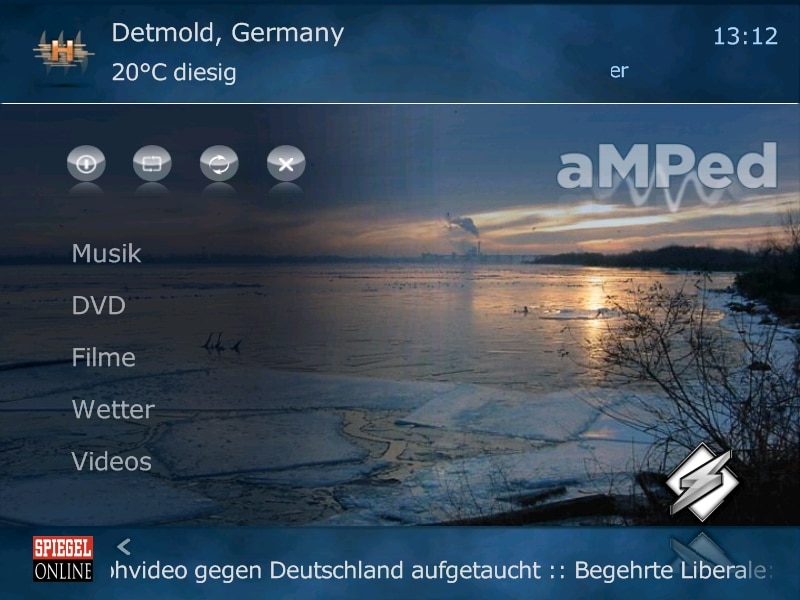
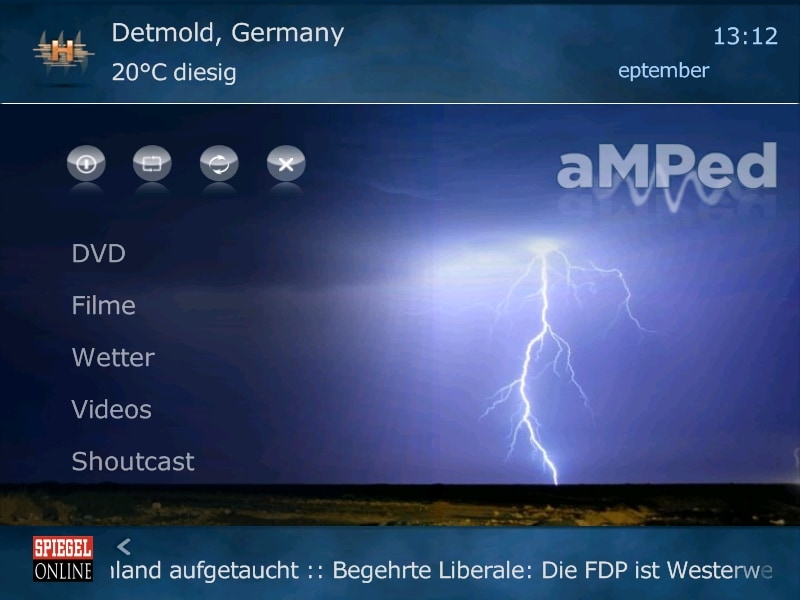
    In my case the particular active menu element is placed under the particular last element of the menu, as you can see when you look after the small hover pictures in the right lower corner. That's why the menu_list_focus.png-highlighting can't be seen.
    In the first screenshot you can see the "Radio" element in the middle of the menu but the hover_dvd picture in the lower right corner. The second sreenshot shows that the actually DVD element is placed right among the "Musik" element which was placed in the last position in the menu list on screenshot number one - and so on.
    What might be the reason for this behaviour?

    Greetings
    Stefan

    ps: this issue isn't present with all my other skins like PureVision 4:3 and so on.
     

    Attachments

    • Screen 1.jpg
      Screen 1.jpg
      324.2 KB
    • Screen 2.jpg
      Screen 2.jpg
      258.3 KB
    • Screen 3.jpg
      Screen 3.jpg
      325.2 KB
    • Screen 4.jpg
      Screen 4.jpg
      323.5 KB
    • Screen 5.jpg
      Screen 5.jpg
      259.2 KB

    Dadeo

    Docs Group Manager
  • Premium Supporter
  • November 26, 2006
    5,340
    3,321
    Himalayas, India
    Home Country
    Canada Canada
    What might be the reason for this behaviour?
    I have no clue yet! It's quite weird! But interesting! So we are going to have to try and figure it out. Are you still using MP 1.0.2 like your System specs say?

    That is the Myhome.xml screen and it uses menu_focus.png so check that is in your Media folder. But I doubt that is your problem. Is this only happening on MyHome or elsewhere as well? Does it do the same thing on BasicHome?

    Your MyHome Menu doesn't seem to be functioning correctly at all in aMPed. As you said the highlighted button seems to be off the screen which is probably why you are not seeing the focus bar/item focus or the correct hover.

    In looking at MyHome.xml I see I accidentally left a scrolloffset code in there - I was trying to get the Menu to focus on the center item, but it wouldn't. It does not cause any problems on my system but maybe it does on yours. I removed it in the attached file so see if that works. I'll keep thinking about what else it could be.

    Just so you know when it is correct, I attached a screenshot of how it should look.
     

    Attachments

    • MyHome.jpg
      MyHome.jpg
      99.2 KB
    • myHome.xml
      30.6 KB

    joz

    Portal Pro
    March 17, 2008
    1,353
    306
    Home Country
    Netherlands Netherlands
    ned_flanders:

    if Dadeo's steps don't help;

    could you please check your error.log for entries! If there are could you post the log?
    And if there are, are they also showing the same errors with blue3(wide)?
     

    ned_flanders

    Portal Pro
    December 17, 2007
    88
    2
    Detmold
    Home Country
    Germany Germany
    Ok, we are getting closer!
    The modified MyHome.xml didn't fix the issue. The issue doesn't come up when using basic home screen.
    When using MyHome screen it also comes up in the submenu "Sonstiges" (which might be called "other stuff" or something like that in english version i think) but not in the particular "apps" like music, videos and so on.

    What surprised me is that the issue is also there when using Blue3 skin. PureVision and StreamedMP aren't affected by the issue (ok, in StreamedMP there is no real highlighting by a seperate graphic).

    There are no specific errors for all of the four tested skins. The only error deals with the MusicVids plugin and its database which should not affect any of the skins (deactivating the plugin doesn't change a thing with the skin issue).

    Greetings
    Stefan
     

    Dadeo

    Docs Group Manager
  • Premium Supporter
  • November 26, 2006
    5,340
    3,321
    Himalayas, India
    Home Country
    Canada Canada
    ned_flanders (love the Simpson's reference btw!) Yes that submenu Sonstiges - (My)Plugins - uses exactly the same code as MyHome so we are getting really close.

    I noticed in your screenshots you are using 800x600 screensize is that right? If so that could definitely be the problem. I increased the spacing between menu items in aMPed 3.0 to show more of the background images and I am guessing on 800x600 it is scaling up and making it too big for the screen.

    Are you comfortable editing xml files? If so can you try a couple of things in MyHome.xml in the tags for the Menu Control (<type>menu</type>)?
    1. Reduce the <numberOfButtons>5 to 4 just to test and see if I am right.
    2. Reduce the <spaceBetweenButtons>10 to 5 or even less to see what works

    If I am correct and it is a screen resolution problem, you could also try changing the skin resolution in references.xml from 720x576 to 800x600, but I don't know if that will do anything! Perhaps someone with more experience with 800x600 screens can help?
     

    ned_flanders

    Portal Pro
    December 17, 2007
    88
    2
    Detmold
    Home Country
    Germany Germany
    I modified the MyHome.xml as you mentioned but that only does what it indicates: the number of buttons is reduced and the whole menu contracts because of the less space between the buttons. The particular active button is still out of sight.
    I also reduced the screen resolution to 720x576 but that changes nothing with the menu issue.

    What really bothers me is that the issue appears also within Blue3 skin. Some days ago before changing to StreamedMP and then to aMPed 2.0 the Blue3 skin worked fine.
    That it doesn't appear in PureVision which also has a highlighting function but appears in Blue3 and aMPed 3.0 indicates, that Blue3 and aMPed 3.0 do something with the menu in a different way than PureVision does in MyHome screen.


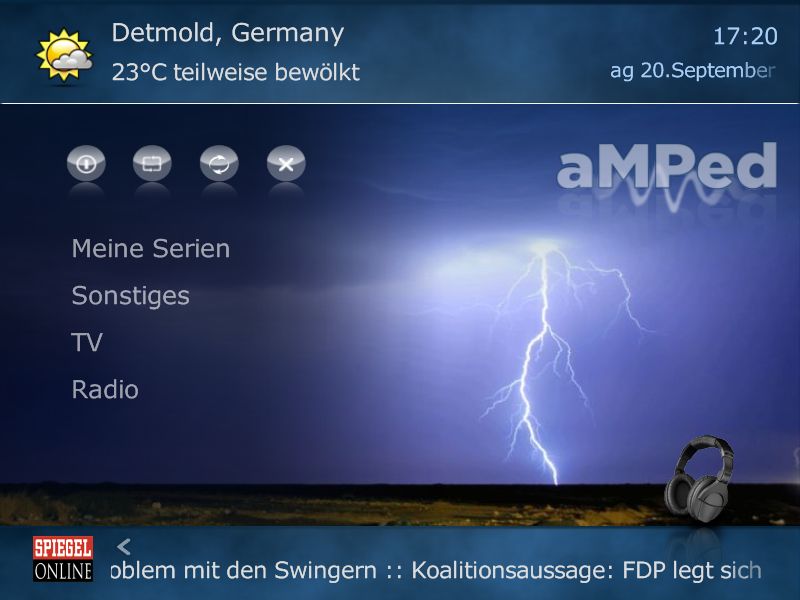
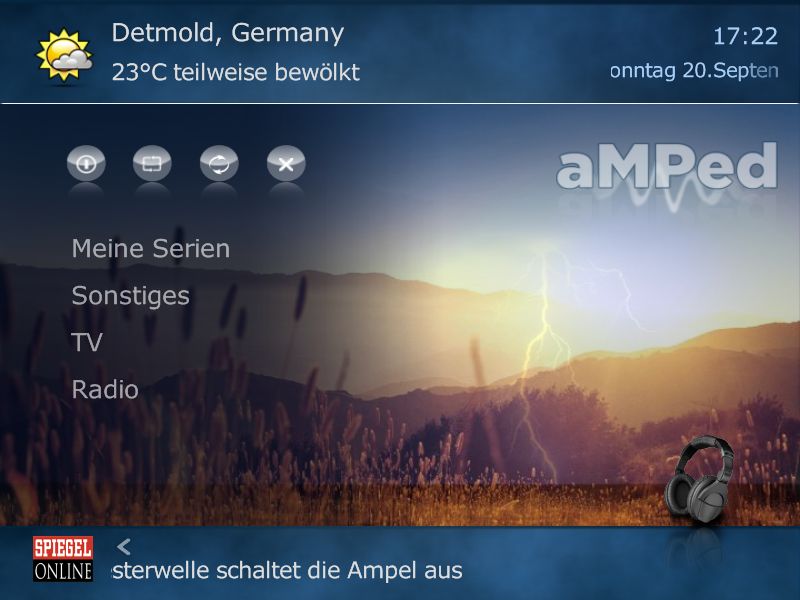
    Edit: Some other behaviour I could notice was a kind of slipping of the lightning backgrounds. Don't know if that is connected with the menu issue. Please have a look at the attached screenshots.
     

    Attachments

    • Lightning 1.jpg
      Lightning 1.jpg
      50.4 KB
    • Lightning 2.jpg
      Lightning 2.jpg
      61.1 KB
    • Lightning 3.jpg
      Lightning 3.jpg
      56.1 KB

    Dadeo

    Docs Group Manager
  • Premium Supporter
  • November 26, 2006
    5,340
    3,321
    Himalayas, India
    Home Country
    Canada Canada
    Thanks for trying those tests. When you say Purevision which version do you mean 2.6(4:3)? or another? Also, which version of streamedMP? Did you use a menu generator or anything else to adjust settings? Finally, does your aMPed 2.0 MyHome Menu still work?

    I know it is frustrating, but don't despair! If you tell me the version of Purevision I can check the code and try to figure out what is different. It's hard to test when I cannot duplicate the problem.

    What do you mean by the lightning backgrounds slipping? If you just mean they are in a slightly different position, yes that will happen on 800x600. A lot of other minor changes will take place as well. aMPed is designed for 720x576 native resolution like Blue3, but so is PureVision 2.6 (4:3).
     

    ned_flanders

    Portal Pro
    December 17, 2007
    88
    2
    Detmold
    Home Country
    Germany Germany
    Hi Dadeo,

    yep, I mean PureVision 2.6. StreamedMP is also the newest version v0.9.601 but as I said the highlighting function is released in another way here, so I think one can't compare it to PureVision or aMPed.
    I didn't use a menu generator, I actually don't really know what a menu generator is used for ;)

    I already deleted version 2.0 of aMPed, but your question made me think of the way I installed aMPed 3.0. Think I didn't delete aMPed 2.0 and just installed 3.0 over the old skin. Could that cause the problem in any way?

    Yep, I mean the different position of the background images, but your explanation makes it clear.

    Greetings
    Stefan
     

    Users who are viewing this thread

    Similar threads

    MP1 MP2 EPG woes DE
    Yes, I saw that. Was beyond my understanding, however. Didn't see how to set that up. I'm a relative neophyte, who's done hardly any command-line coding. To be more specific: I don't see, under either "Grabbing Listings" or in the "First use example," where it is designated just where on one's C drive the tv.xml file is...
    Yes, I saw that. Was beyond my understanding, however. Didn't see how to set that up. I'm a relative neophyte, who's done hardly...
    Does anyone know how to “fix” the MC2XML application, and hopefully permanently? Mine stopped working sometime after September 29...
    Replies
    16
    Views
    2K
    • Sticky
    Many many years ago, I opened a bug report after I got that same message but I never got a reply. The reason was I had unchecked the Windows Media Player item in Windows 10 Control Panel > Program and Features > Turn Windows features on or off as I didn't need it, without thinking that it was needed by MediaPortal. I kept the "Media...
    Many many years ago, I opened a bug report after I got that same message but I never got a reply. The reason was I had unchecked...
    We have just released MediaPortal 1.39 - Endurance x86 and x64 version. Highlights of this release Bugfixes: [MP1-5257] - Skin...
    Replies
    13
    Views
    1K
    MP1 MP2 1.39 x86 1.39 won't install DE
    That did it, thanks.
    That did it, thanks.
    Before you create this bug report: Make sure that your system (windows, codecs and drivers) is up to date, matching the...
    Replies
    2
    Views
    406
    Thankyou High_Five, that worked perfectly, I now remember doing that 10 years ago, thanks for jogging my old memory. Cheers Tony
    Thankyou High_Five, that worked perfectly, I now remember doing that 10 years ago, thanks for jogging my old memory. Cheers Tony
    Hi everyone, I have been using it For 16 years now (from V1.1.1) and it has worked flawlessly. I only use TV Series and Moving...
    Replies
    2
    Views
    676
    • Sticky
    intentionally left blank
    intentionally left blank
    Skin Properties MediaPortal 1 This thread is intended for all active/ongoing Skin Designers to find out about the available skin...
    Replies
    31
    Views
    3K
    Top Bottom