[no Bug] Blu-Ray menues do not work (1 Viewer)

megahorst

Super User
  • Team MediaPortal
  • Super User
  • July 8, 2006
    879
    259
    Home Country
    Germany Germany
    Steps to reproduce:
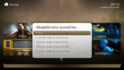
    1. Insert a Blu-Ray
    2. See the popup in the screenshoot
    3. upload_2013-11-24_9-18-30.png
    4. Choose Menu
    5. See that the popup is on the screen again
    6. When choosing another entry the disc plays fine
     

    mm1352000

    Retired Team Member
  • Premium Supporter
  • September 1, 2008
    21,515
    8,256
    Home Country
    New Zealand New Zealand
    Hello megahorst

    Which BD?

    24-11-2013 09:16:38.273 [ 1100]--------------------------
    24-11-2013 09:16:38.273 [ 1100]aacs_detected: 0
    24-11-2013 09:16:38.274 [ 1100]aacs_handled: 0
    24-11-2013 09:16:38.275 [ 1100]bdplus_detected: 0
    24-11-2013 09:16:38.275 [ 1100]bdplus_handled: 0
    24-11-2013 09:16:38.276 [ 1100]bluray_detected: 1
    24-11-2013 09:16:38.277 [ 1100]first_play_supported: 0
    24-11-2013 09:16:38.277 [ 1100]libaacs_detected: 0
    24-11-2013 09:16:38.278 [ 1100]libbdplus_detected: 0
    24-11-2013 09:16:38.279 [ 1100]num_bdj_titles: 1
    24-11-2013 09:16:38.279 [ 1100]num_hdmv_titles: 1
    24-11-2013 09:16:38.280 [ 1100]num_unsupported_titles: 1
    24-11-2013 09:16:38.281 [ 1100]top_menu_supported: 0
    24-11-2013 09:16:38.281 [ 1100]--------------------------
    24-11-2013 09:16:38.282 [ 1100]CLibBlurayWrapper - First play is not supported - cannot play in navigation mode!
    24-11-2013 09:16:38.385 [ 1100]index: 0 duration: 0:0:0 chapters: 1 angles: 1 clips 1
    24-11-2013 09:16:38.394 [ 1100]index: 1 duration: 0:1:28 chapters: 1 angles: 1 clips 1
    24-11-2013 09:16:38.403 [ 1100]index: 2 duration: 1:34:20 chapters: 10 angles: 1 clips 1
    24-11-2013 09:16:38.413 [ 1100]index: 3 duration: 1:38:21 chapters: 14 angles: 1 clips 1
    24-11-2013 09:16:38.415 [ 1100]index: 4 duration: 0:0:0 chapters: 1 angles: 1 clips 1
    24-11-2013 09:16:38.416 [ 1100]index: 5 duration: 0:1:28 chapters: 1 angles: 1 clips 1
    24-11-2013 09:16:38.418 [ 1100]index: 6 duration: 1:34:20 chapters: 10 angles: 1 clips 1
    24-11-2013 09:16:38.420 [ 1100]index: 7 duration: 1:38:21 chapters: 14 angles: 1 clips 1
    24-11-2013 09:16:42.357 [ 1100]CLibBlurayWrapper - Play
    24-11-2013 09:16:42.358 [ 1100]CLibBlurayWrapper - _bd_select_title 0
    24-11-2013 09:16:42.359 [ 1100]CLibBlurayWrapper - Play failed!

    Looks like BD-J.
     

    megahorst

    Super User
  • Team MediaPortal
  • Super User
  • July 8, 2006
    879
    259
    Home Country
    Germany Germany
    Thx!

    The Blu-Ray is called "Und weg bist Du".
    How do I check if it is BD-J?

    If it is BD-J:
    Is it possible to check this before showing the the popup where to choose what should be played? This could avoid these kind of questions
     
    Last edited:

    HomeY

    Test Group
  • Team MediaPortal
  • February 23, 2008
    6,418
    4,717
    51
    ::1
    Home Country
    Netherlands Netherlands
    several ways to check if a disc is BD-J or not:

    1. Check the BDMV folder and look for a JAR folder. If this JAR folder contains content, it's BD-J
    2. 2nd option is to check the BDReader logs and look for the 'number of bd-j titles:
      24-11-2013 09:16:38.279 [ 1100]num_bdj_titles: 1

    So when you select Menu, and nothing happens, most of the time it's because it's a BD-J disc, so you'll have to select a Title for playback.
     

    megahorst

    Super User
  • Team MediaPortal
  • Super User
  • July 8, 2006
    879
    259
    Home Country
    Germany Germany
    I have checked the disk. It has BD-J features.

    It would be nice if someone of the dev-team could think about this idea:
    Is it possible to check BD-J before showing the the popup where to choose what should be played? This could avoid these kind of questions
     

    Sebastiii

    Development Group
  • Team MediaPortal
  • November 12, 2007
    16,514
    10,467
    France
    Home Country
    France France
    I have checked the disk. It has BD-J features.

    It would be nice if someone of the dev-team could think about this idea:
    Is it possible to check BD-J before showing the the popup where to choose what should be played? This could avoid these kind of questions

    In fact some BD-J disc can work, it's random but most of the time it didn't but we need to have the list of items selection (Menu will not work) but title mode yes.
    The best will be to have BD-J working solution :)
     

    Users who are viewing this thread

    Similar threads

    MP1 MP2 1.39 x86 1.39 won't install DE
    That did it, thanks.
    That did it, thanks.
    Before you create this bug report: Make sure that your system (windows, codecs and drivers) is up to date, matching the...
    Replies
    2
    Views
    445
    Fixed, I think. Certainly the vintage MP2 installer that I was using no longer installs the LAV filters. I can only assume that these were never part of the install package itself, but rather downloaded during the install, and that link no longer exists. Shame that the installer doesn't indicate this. Last time when I installed the...
    Fixed, I think. Certainly the vintage MP2 installer that I was using no longer installs the LAV filters. I can only assume that...
    Hi all, I've recently retired my MP2 setup for my main HTPC and gone back to separates, but I wanted to retain the ability to play...
    Replies
    4
    Views
    971
    Thanks again for all the help. I deleted 'BDHandler.dll" from the process folder, and as expected, it no longer appears in the MePo configuration utility. I also downloaded the X86 BDReader plugin that you posted. Renamed the existing files in the MePo folder, and copied the updated files to the MePo folder. For the most part...
    Thanks again for all the help. I deleted 'BDHandler.dll" from the process folder, and as expected, it no longer appears in the...
    I'm not sure that this works on 32-bit, but if I try to play a 4K UHD Blu-ray (Using makeMKV, modified firmware, and AnyDVD HD) the...
    Replies
    22
    Views
    7K
    Attached are new TV service logs with your latest DLL. I see lots of EPG events and none of the messages from earlier. Congratulations!
    Attached are new TV service logs with your latest DLL. I see lots of EPG events and none of the messages from earlier. Congratulations!
    I have some weird behavior trying to operate the MP GUI in a new installation of MP 1.36 under Windows 11 Pro. Some of the remote...
    Replies
    33
    Views
    11K
    Reading through your code, I can see it's more than a couple steps above my paygrade. :cry:
    Reading through your code, I can see it's more than a couple steps above my paygrade. :cry:
    I used to run the TVService under the "NT Service\TVService" account to follow least privileges principal (not exposing my whole...
    Replies
    3
    Views
    2K
    Top Bottom