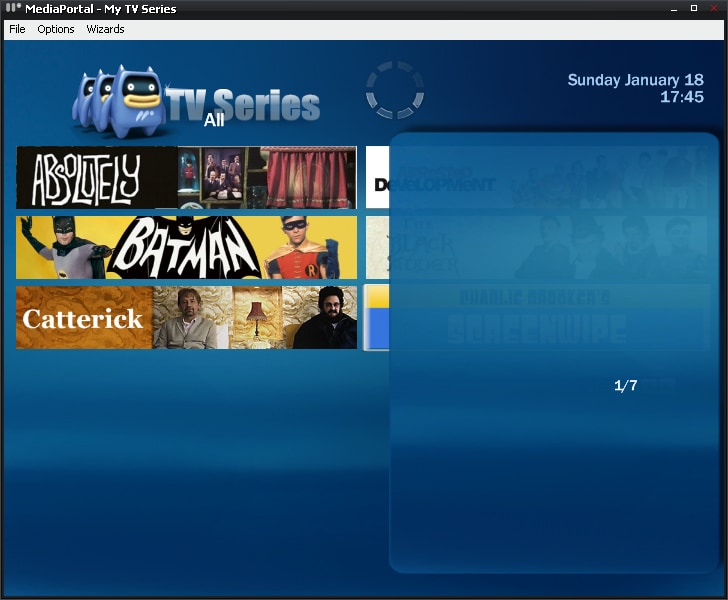
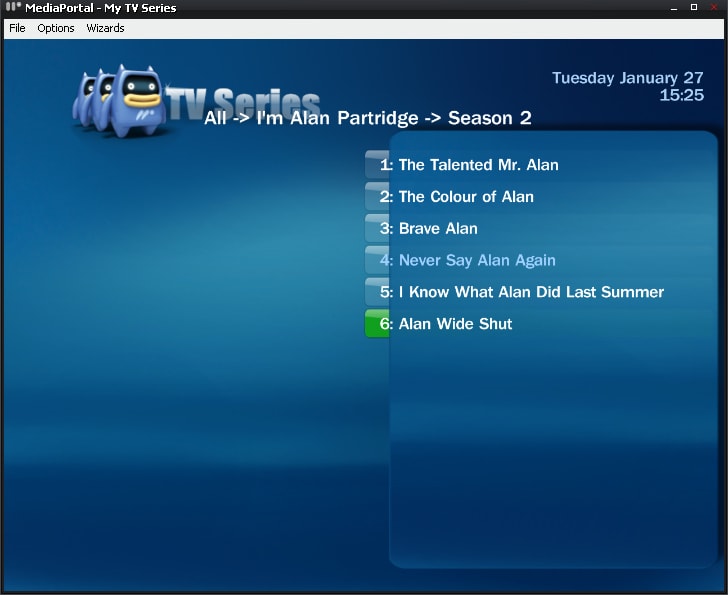
Blue3 Skinfiles For TV-Series (2 Viewers)

Cybertex

Portal Pro
August 9, 2007
200
14
Milano
Home Country
Italy Italy
I gave it a fast try, and it rocks :D

Only a thing I noticed; in episode detail, there's a typo: "Staring" should be "Starring".

Great skin!:D
 

Dadeo

Docs Group Manager
  • Premium Supporter
  • November 26, 2006
    5,340
    3,321
    Himalayas, India
    Home Country
    Canada Canada
    This is a great improvement for 4:3 screens - you can get a lot more data on the screen. THREE CHEERS and FIVE STARS!

    The only thing I noticed so far is after using fanart chooser, you lose the side panel, even the right left buttons won't get it back for me. But I think this is a known issue with the Fanart Chooser isn't it?

    P.S. A title on the Fanart Page would be nice!
     

    gamejester

    Retired Team Member
  • Premium Supporter
  • May 13, 2007
    418
    37
    Home Country
    United Kingdom United Kingdom
    Will fix the typo and sort the title (font) issue in the skin.
    The other animation issues lie with the rendering from core.dll (think there is only one left here) and some conditionally evaluation ordering in the plugin which will take a bit longer to track down.
     

    decorativeed

    Portal Member
    November 9, 2008
    39
    0
    Home Country
    United Kingdom United Kingdom
    Hmmm, I think I've done something wrong somewhere along the line as when I've used your new version and the previous ones I've had trouble with panes overlapping, episode frames and/or descriptions showing only about 50% of the time and fanart being even more hit and miss.

    Any ideas? If I replaced my current version of blue 3 with the original and started again, what exactly should I do? I take it the small number of files in your version simply replace the files of the same name in the default Blue 3 skin (as packaged with MP 1)? Or have I gone wrong from the start?

    Any (further) help would be greatly appreciated.

    Here are some screenshots to show you what I mean, BTW (the problem in the first pic seems to correct itself when returning to the screen after clicking on a banner, the second is always like that):
     

    Attachments

    • skin problem 1.jpg
      skin problem 1.jpg
      238.8 KB
    • skin problem 2.jpg
      skin problem 2.jpg
      365.1 KB

    gamejester

    Retired Team Member
  • Premium Supporter
  • May 13, 2007
    418
    37
    Home Country
    United Kingdom United Kingdom
    First screen is weird as you have the banners showing only in the top part of the screen (aka the simple view) but the pop out desciption pannel (aka the animated version).
    Which version are you using, simple or animated?

    The second screen is becasue the view is wrong, have you changed the contents of TVseries.SkinSettings.xml or it is not present as that view type is not supported in the skin.
     

    decorativeed

    Portal Member
    November 9, 2008
    39
    0
    Home Country
    United Kingdom United Kingdom
    Simple, but it was like that before I installed the newest version of your skin...

    I haven't changed the content of any of the files, mainly because I have no idea how they work. I simply added your files to my Blue3 skin folder, overwriting the old ones (which I backed up elsewhere). I've added my TVseries.SkinSettings.xml file as an attachment, maybe (please!) you could tell me what is wrong with it?

    Also, when an episode has ended and it returns to the series page it looks like the picture below.:D
     

    Attachments

    • skin problem 4.jpg
      skin problem 4.jpg
      201.9 KB
    • TVSeries.SkinSettings.xml
      30.7 KB

    decorativeed

    Portal Member
    November 9, 2008
    39
    0
    Home Country
    United Kingdom United Kingdom
    I can only find the dll file of the latest SVN to download, which is indeed already in the folder "C:\Program Files\Team MediaPortal\MediaPortal\plugins\Windows" on my system. Is there something else I'm missing?

    It would be hugely helpful if someone who has this working well could post the whole of their Blue 3 skin folder containing all the files (rather than just the modified ones that gamejester has kindly supplied), so that I can just overwrite my folder to see if the problem is rectified. Trying to work out which individual file is wrong (and how it went wrong) seems like a bit of a headache! :D
     

    Users who are viewing this thread

    Similar threads

    Sorted, it is a Rating flag that I have never seen before, silly me !! Cheers Tony
    Sorted, it is a Rating flag that I have never seen before, silly me !! Cheers Tony
    I have just done a clean install of v1.36. Current setup Media Portal 1.36 Titan skin (only classic home) TV Series 4.5.1.737...
    Replies
    1
    Views
    302
    Thankyou High_Five, that worked perfectly, I now remember doing that 10 years ago, thanks for jogging my old memory. Cheers Tony
    Thankyou High_Five, that worked perfectly, I now remember doing that 10 years ago, thanks for jogging my old memory. Cheers Tony
    Hi everyone, I have been using it For 16 years now (from V1.1.1) and it has worked flawlessly. I only use TV Series and Moving...
    Replies
    2
    Views
    360
    i think info but I'm really not sure
    i think info but I'm really not sure
    When I import new films using Moving Pictures, it takes an incredibly long time for the information to be found and downloaded...
    Replies
    3
    Views
    1K
    fixed the episode naming above ^. There was no error in the naming of the file itself. Every time I enter TV Series, it tries to re-scan the episodes. The series appears for just a few seconds and disappears again.
    fixed the episode naming above ^. There was no error in the naming of the file itself. Every time I enter TV Series, it tries to...
    I recorded all 6 episodes of "Walking With Dinosaurs (2025)" from PBS, edited the non essential stuff out and saved them as MKV. I...
    Replies
    1
    Views
    2K
    PS: But maybe the MP2 team will be back tomorrow, and development and bug fixes will continue. Time will tell.
    PS: But maybe the MP2 team will be back tomorrow, and development and bug fixes will continue. Time will tell.
    Hi, Help Please. I've got several FLAC audio files that play OK on my PC, and my HTPC, via: Media Player / Windows Media Player /...
    Replies
    8
    Views
    735
    Top Bottom