Blue3 Skinfiles For TV-Series (1 Viewer)

gamejester

Retired Team Member
  • Premium Supporter
  • May 13, 2007
    418
    37
    Home Country
    United Kingdom United Kingdom
    The reason the 4:3 skin file release here does not work for people on a wide screen display is they are using this file with Blue3wide; that of course will render as shown in the aboive post.

    All the issues I was working on are now fixed so unless i find some new ones an offical B3 and B3w skin file will be released with the next plugin svn which should be around the MP RC4 time.
     

    apoptygma

    Portal Pro
    November 14, 2008
    160
    16
    Adelaide
    Home Country
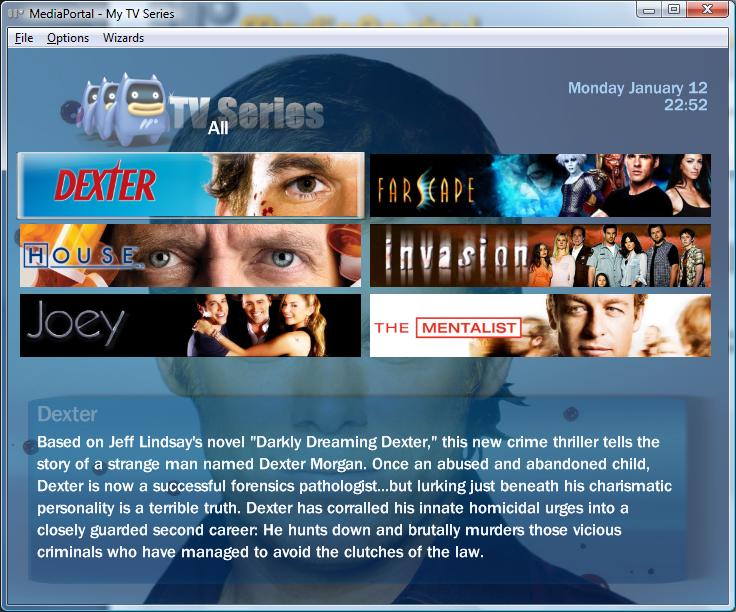
    I downloaded this from the original 1st post last night and it's actually what appears to be an older skin than the one I was using, the one I had was the one which displays banners over the entire screen, and swings the list left and right to show series information - the one linked on the first post now is the version which shows just 6 (possibly 8?) banners and the series info is at the bottom and there seems to be a lot less rotation effects.
    Is there a version of the full-screen-of-banners one which doesn't have the bug which causes the series info to display over the top of the banners? as this is the the one I have and it seems to happen about 1/2 the time when I watch a show and return to the banner screen or simply rotate to show the series info. It's resolved easily enough by hiding/showing the filter screen (all, watched etc) but it's somewhat annoying
     

    Bleazle

    Portal Pro
    July 14, 2007
    1,122
    257
    Pukekohe
    Home Country
    New Zealand New Zealand
    Hi all

    just thought I'd let you know that the latest version of my skin supports TV Series - lists 12 banners and supports Fanart. The XML file is based on the one here by gamejester with a few tweaks.

    Screenshots/info/download link here: https://forum.team-mediaportal.com/skins-50/bleazle-skin-49456/

    bleazle-albums-dec-14th-release-picture147-copy-16-12-2008-5-40-27-m.jpg


    bleazle-albums-dec-14th-release-picture144-15-12-2008-6-11-09-p-m.jpg

    BLEAZLE
     

    gamejester

    Retired Team Member
  • Premium Supporter
  • May 13, 2007
    418
    37
    Home Country
    United Kingdom United Kingdom
    Quick post with an updated 4:3 skin file.
    This is just a simple one, no animation or other good stuff that will be coming in the final cut; but based on the same layout. Damien had a good idea of releasing both a simple and fancy version of the B3 skin files so users can choose what best suits the pc they are using; a simple one like this works well on a laptop when you don't care so much about eye candy :)

    Anyway, this one is more or less ready now so you might as well make use of it.

    FYI - the animated one is working quite well now, all the original bugs in the core.dll are fixed, however I tweaked it a little more (could not resist) and have uncovered a few more bugs, so we need to get them fixed before it can be released - nothing major (I think).

    Download pulled due to a few bugs - see a few posts down for the new version.
     

    Attachments

    • home-simple.jpg
      home-simple.jpg
      89.1 KB
    • deason-fan.jpg
      deason-fan.jpg
      68.8 KB
    • episode-fan.jpg
      episode-fan.jpg
      74 KB

    Cybertex

    Portal Pro
    August 9, 2007
    200
    14
    Milano
    Home Country
    Italy Italy
    Great work gamejester.

    A MyTVSeries skin for Blue3 4:3 (and Blue3 mods too) it's really needed, for us poor guys with a 4:3 monitor :)

    What about a skin for Moving Pictures too? The default skin is good, but it is a lot different from Blue3 style..
     

    Dadeo

    Docs Group Manager
  • Premium Supporter
  • November 26, 2006
    5,340
    3,321
    Himalayas, India
    Home Country
    Canada Canada
    Looks REALLY Good! And that's the simple one?? Fanart always displays YEAH! No more losing focus when using the left and right buttons YEAH! (will this still work in single column banner skins?)

    One thing though, the logo rules are defined for streamedMP location. So they don't work. Since this is the 4:3 version, not likely many of us have streamedMP :)

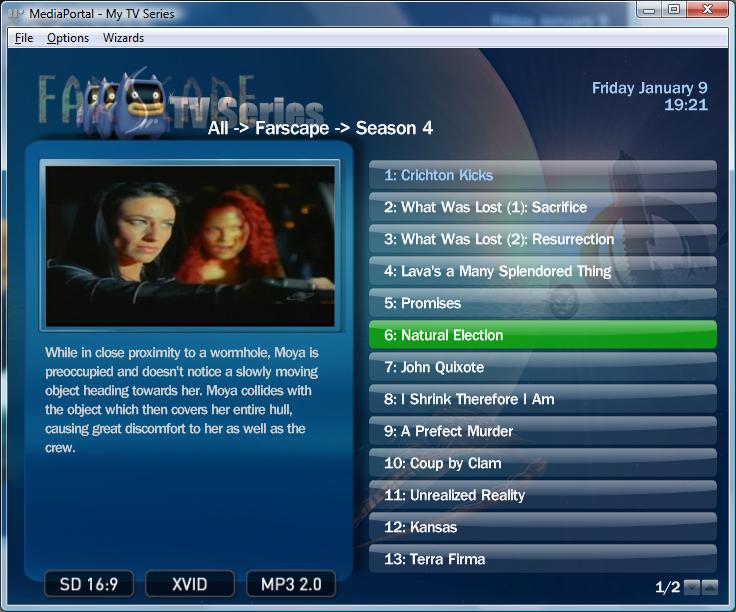
    The First Aired label and data are overlapping on my screen. And I do find the upper left corner pretty busy with all the graphics and the View Label Title, but that's just me!

    One suggestion, on 4:3 with little room, you can make the video preview overlay the Episode Image so you can go back and look at details while you are playing an episode if you want.

    The best part is, skinners will have a model to work from, so soon our favorite skins will fully support TVSeries. So thanks for doing this and to Damien for pushing for it!
     

    Dadeo

    Docs Group Manager
  • Premium Supporter
  • November 26, 2006
    5,340
    3,321
    Himalayas, India
    Home Country
    Canada Canada
    Hey Gamejester, here's some feedback on the new files, just in case you haven't found these issues yet and can get them improved in the 'final cut'

    1. The font you used for Download Status and Fanart Resolution is mediastream11, not available on most 4:3 systems, it ends up way too small to read. I can't even find the font for "Available for Download" which is also too small to read.

    2. The fanart does not always display. If Random Fanart is ON and Fanart in Series view is OFF, then the fanart displays the first time I access a series, but not after that (until I go to another series with fanart).

    3. When I download fanart, it is creating a NEW folder Fanart\Fanart\Original in the already existing folder Fanart (which is the default one specified in MP-TVSeries Config - About tab). So when I already have fanart for a series, and I download a new one, no fanart displays.

    4. After downloading fanart, it displays in every series that does not have fanart, until I select a series that does have fanart.

    5. Is there any way to cancel downloading fanart?

    6. How about a progress bar for the download? In case there are several you are downloading :)
     

    gamejester

    Retired Team Member
  • Premium Supporter
  • May 13, 2007
    418
    37
    Home Country
    United Kingdom United Kingdom
    Moving Pictures skin - maybe! I have just started using that pluigin again and the default one is not in keeping with B3 like you say.

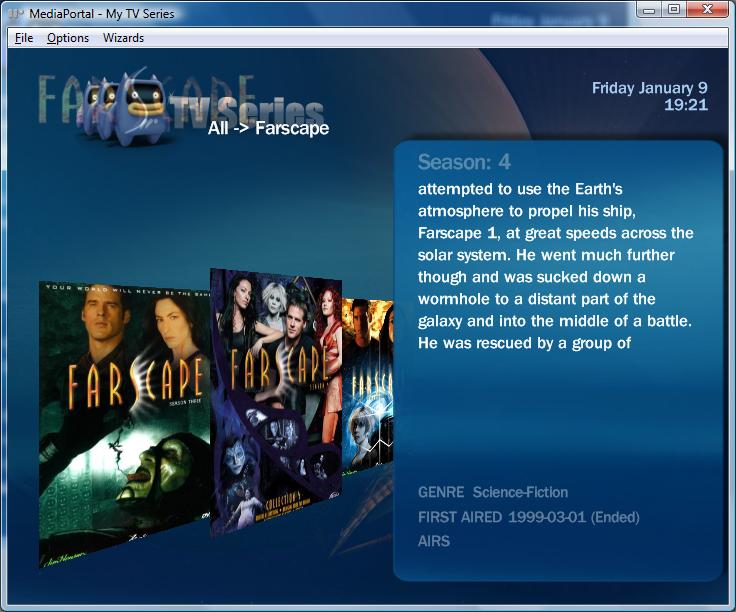
    Loosing focus on left right :) That is by design in the fancy one! but the inital leaked release did not work due to bugs in various places; these are now fixed (mostly). What the left and right do with the fancy version is rotate the pannel to the background and slide out further info. This leaves the main screen clutter free for the 90% of the time you do not need the extra info; but available for when you do. There is something very special coming with this for full episode details!

    logorules - oopps, missed that. I use streamMP most of the time so based this quick release on that skinsettings file as it was the first released. I will fix that now.

    First aired overlapping. Weird, did not se that in my tests. Can you give me a screen shot or series info so I can test. I only did my testing with 6 shows (was a really quick release as I say!) What is your resolution? is it rue 4:3 or a TV or something else?

    Now playing - sure I can overlap that with the season image. Just using the default include from B3 at the moment, but will override it, makes sense. Might hide it completly on the season view, duno about the series??

    mediastream11 font - that is a mistake - this font is form streamMP - I quickly hacked there fanart screen, must have missed it. Will fix.

    Fanart - that is a bug in the pluign. Please log it with full details over at googlecode. Not sure if we are using the new fanart plugin there or built in code. Have noticed an issue on the series view with fanart when you go between a series with fanart and one without that also causes visibility issues.

    3. Again not skin related. Could again be due to the shift to using the new fanart API. Sorry not looked at that yet. Best to log the issue seperatly in the forum for comment by Damien. Same for 4,5,6 all general plugin related questions that should be asked in a seperate thread.

    Also noticed that common.window.TVseries.xml is missing from the rar, this will be effecting things! Will have to do a re-pack tonight.
     

    Users who are viewing this thread

    Similar threads

    Sorted, it is a Rating flag that I have never seen before, silly me !! Cheers Tony
    Sorted, it is a Rating flag that I have never seen before, silly me !! Cheers Tony
    I have just done a clean install of v1.36. Current setup Media Portal 1.36 Titan skin (only classic home) TV Series 4.5.1.737...
    Replies
    1
    Views
    317
    Thankyou High_Five, that worked perfectly, I now remember doing that 10 years ago, thanks for jogging my old memory. Cheers Tony
    Thankyou High_Five, that worked perfectly, I now remember doing that 10 years ago, thanks for jogging my old memory. Cheers Tony
    Hi everyone, I have been using it For 16 years now (from V1.1.1) and it has worked flawlessly. I only use TV Series and Moving...
    Replies
    2
    Views
    370
    i think info but I'm really not sure
    i think info but I'm really not sure
    When I import new films using Moving Pictures, it takes an incredibly long time for the information to be found and downloaded...
    Replies
    3
    Views
    1K
    fixed the episode naming above ^. There was no error in the naming of the file itself. Every time I enter TV Series, it tries to re-scan the episodes. The series appears for just a few seconds and disappears again.
    fixed the episode naming above ^. There was no error in the naming of the file itself. Every time I enter TV Series, it tries to...
    I recorded all 6 episodes of "Walking With Dinosaurs (2025)" from PBS, edited the non essential stuff out and saved them as MKV. I...
    Replies
    1
    Views
    2K
    PS: But maybe the MP2 team will be back tomorrow, and development and bug fixes will continue. Time will tell.
    PS: But maybe the MP2 team will be back tomorrow, and development and bug fixes will continue. Time will tell.
    Hi, Help Please. I've got several FLAC audio files that play OK on my PC, and my HTPC, via: Media Player / Windows Media Player /...
    Replies
    8
    Views
    740
    Top Bottom