
Channel Ordering (1 Viewer)

daniellog

Portal Member
June 2, 2015
12
1
36
Home Country
Great Britain (UK) Great Britain (UK)
I've installed this service but my channel order is all over the place, and is not sorted by channel number. Can someone explain to me how I can fix this and sort by channel number?
 

marc44

Portal Member
July 25, 2015
14
1
44
Home Country
United States of America United States of America
Hi,
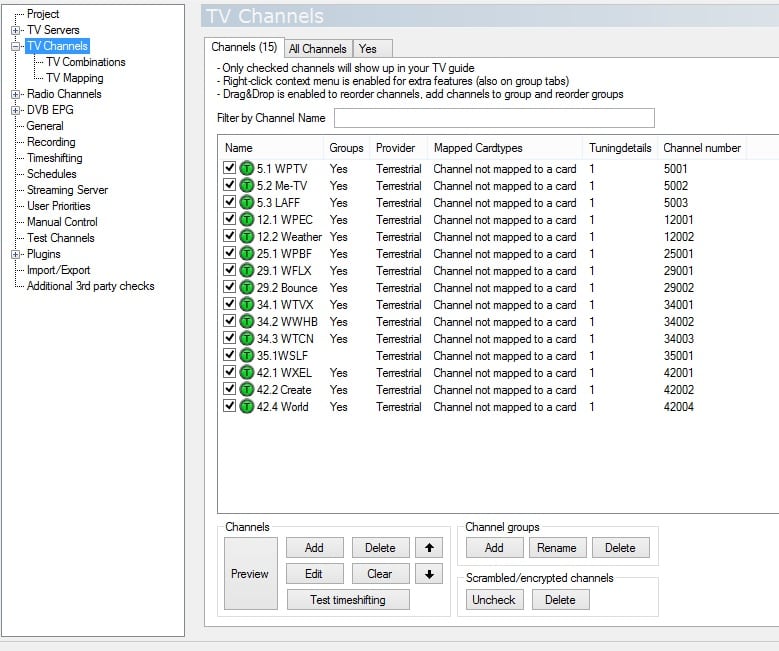
I am new too and I guess I have more time to play with MP2. :) I am still learning too. As for your question, I attached my 2 files I have. I think it makes it easier if you see how somebody else was setting up the channels. I am used to have the channel number of the station in front of the station name so I added that too. I have only ((Over the Air (OTA)) on my TV, no cable. I believe in free TV. Open the 2 files in notepad and scroll way down (almost to the bottom) where you will see "channel groups", "mapping" "channel name..... , sort order...). export3 is the actual one I am using. Missed a space between channel 35.1 and the name. So the station shows up in the player "35.1WSLF" instead of "35.1 WSLF"
Just a space, no big deal. Anyhow hope that helps otherwise come back and be patient for an answer.
Attached 1 zip file with export2.xml and export3.xmls in it. Extract, Forum does not allow to UL xml files directly
Have fun, MP2 is a excellent replacement for MSMC. Marc
 

Attachments

  • MediaPortal.zip
    7.5 KB

daniellog

Portal Member
June 2, 2015
12
1
36
Home Country
Great Britain (UK) Great Britain (UK)
Thanks for your reply marc, but I'm a bit confused with your reply. My channels are numbered and named correctly, but mpextended seems to ignore the channel numbers and they are all out order on the guide.
 

marc44

Portal Member
July 25, 2015
14
1
44
Home Country
United States of America United States of America
Hi,
OK, lets try another way.
1) Anything that happens or needs to be changed has to happen in the MP2 Setup not theMP2 player.
2) Open MP2 Setup
3) Left side click on TV Channels
4) Right side, first tab "Channels" highlight a channel
5) Look at bottom of page you can see the UP/Down arrows move the channel up or down (sorting)
6) Close MP2 setup and open MP2 player and they should be sorted the way you want

On mine I took out the radio-part since I am not interested in radio. Old fashioned, I still have a regular radio.
I use MP just for TV. :)
I attach my picture of MP2 Setup
Hope it helps a bit more
Marc
 

Attachments

  • MP2Setup.jpg
    MP2Setup.jpg
    185.5 KB

mm1352000

Retired Team Member
  • Premium Supporter
  • September 1, 2008
    21,544
    8,236
    Home Country
    New Zealand New Zealand
    @marc44
    With the greatest respect, I have to contradict part of what you said. Specifically:
    4) Right side, first tab "Channels" highlight a channel
    5) Look at bottom of page you can see the UP/Down arrows move the channel up or down (sorting)

    Client channel order is only guaranteed for channels groups. That means if you want channels to appear in a certain order on the clients, you should set that order within the group(s).

    I would have said:
    4) Right side, NOT first tab. Any tab other than the first one. The first tab is just for general channel maintenance. The other tabs are channel groups, and they're what you see on clients.
    5) Look at bottom of page you can see the various ordering options. Of the top of my head, I think drag/drop works too.
     

    marc44

    Portal Member
    July 25, 2015
    14
    1
    44
    Home Country
    United States of America United States of America
    Hi mm,
    I am sure you are right about the setup since you are doing it longer (much longer) then I am. It was just last Saturday that I found and started with MediaPortal :)
    I actually did it the way I wrote above after installing MP2 and created my "Yes" Tab after all was done in the first (Channels-Tab). Lucky me (Beginners Luck) that it worked whether by accident or default. True, somewhere in the Instructions it mentioned not to fool around in the first Tab and create other Tabs to fool around in it, just remembered it. :)
    Hopefully Daniel gets it sorted either way.
    Thanks Marc (Back to MP2 Updates)
     

    daniellog

    Portal Member
    June 2, 2015
    12
    1
    36
    Home Country
    Great Britain (UK) Great Britain (UK)
    I already have them in the order I want?
     

    Attachments

    • Screenshot from 2015-07-31 16:33:31.png
      Screenshot from 2015-07-31 16:33:31.png
      63.9 KB

    mm1352000

    Retired Team Member
  • Premium Supporter
  • September 1, 2008
    21,544
    8,236
    Home Country
    New Zealand New Zealand
    I already have them in the order I want?
    Your screenshot shows the first tab. As per my previous post, the order of channels in the first tab is not respected. Ensure the order in the channel group tabs (ie. every tab except tab 1) is correct.
     

    daniellog

    Portal Member
    June 2, 2015
    12
    1
    36
    Home Country
    Great Britain (UK) Great Britain (UK)
    Ah yes I see, you have to order them per group! Okay that seems to have fixed it, thanks for the help!
     

    Users who are viewing this thread

    Similar threads

    I meant use MP client to try to spot how it's requesting streams for specific channels and then try to do the same with VLC. TV Server development looks dead so I'm afraid you're going to have to figure that out by yourself if it's even possible.
    I meant use MP client to try to spot how it's requesting streams for specific channels and then try to do the same with VLC. TV...
    Hi everyone, I've set up Mediaportal TV Server on a Windows 11 box, tuner deteced okay, scanned channels, can preview, all seems...
    Replies
    8
    Views
    1K
    Thanks very much, Jasmeet. Worked. But note that this setting has moved, apparently, to: Settings > TV (not Plugins)
    Thanks very much, Jasmeet. Worked. But note that this setting has moved, apparently, to: Settings > TV (not Plugins)
    I recently did a fresh install of 2.5 on a new Windows 11 PC. My previous (Windows 10) version of 2.5 gave my broadcast TV channel...
    Replies
    2
    Views
    2K
    I don't know about MP2 but as you said you tried MP1 too, how is the MP music config ? MP(1) will only use LAV if you select "Internal DirectShow player" as music output, but then you lose gapless playback. If you you don't have multichannel music you can choose WASAPI as the output and set the number of speakers to stereo. I have...
    I don't know about MP2 but as you said you tried MP1 too, how is the MP music config ? MP(1) will only use LAV if you select...
    Not sure if this a a bug/config/settings problem. I am running a media portal 2.5 server with 2.41 client but it seems I get the...
    Replies
    1
    Views
    652
    I note that you are using MP2. The following applies to MP1, but I think that MP2 is identical in this situation. "TV Server Config" has a "TV Mapping" panel in the "TV Channels" section. On the "TV Mapping" tab: The left column lists the channels that have not yet been mapped to the TV tuner identified by the drop-down menu just...
    I note that you are using MP2. The following applies to MP1, but I think that MP2 is identical in this situation. "TV Server...
    I've scanned for channels, and got all channels mapped to tuner 0 of my 8 channel TV card (eg: 2 cards of 4 channels each) Is there...
    Replies
    1
    Views
    813
    Reading through your code, I can see it's more than a couple steps above my paygrade. :cry:
    Reading through your code, I can see it's more than a couple steps above my paygrade. :cry:
    I used to run the TVService under the "NT Service\TVService" account to follow least privileges principal (not exposing my whole...
    Replies
    3
    Views
    2K
    Top Bottom