Germany
hi @Sebastiii
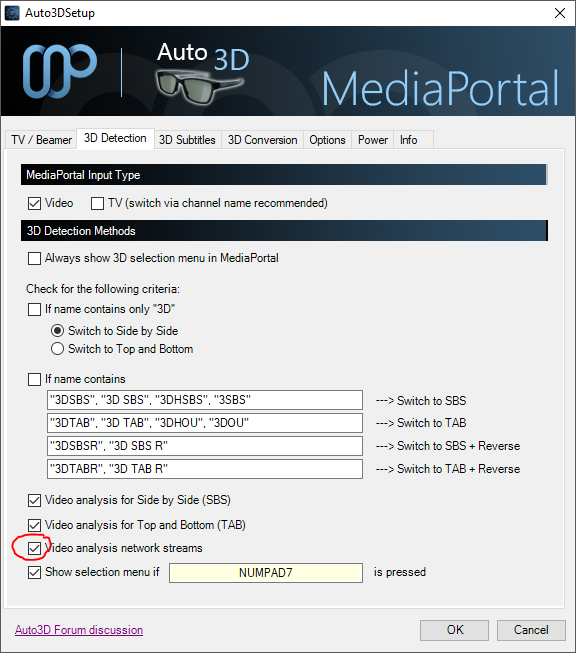
played once more with auto3d enabled yesterday and unfortunately i didn't notice any difference if analysis is ticked or not.
but this htpc is also nearly 100% flicker free (all downscaling with DXVA) so im not so shure anymore which of the flickers is it you described before^^
and one good (or bad^^) thing is that now i know again why i had deactivated the auto3d plugin earlier
because it seems to interfere heavily with 3d-framepacked videos.
if enabled it did make a mess on start playing 3d-fp. (acts like with stopmotion style and half 3d ^^) and even the mepo commands (pause, stop, back....) are delayed. until a execution it feels like a 20 seconds delay... and madvr crashed report attached
the run was with auto3d was enabled-> playing a framepacked 3d-mkv -> changed directly without manual stop in between to a framepacked 3d-iso -> no 3d i think exclusive mode was lost or dx11 idk. -> stuttering playback -> blackscreen with madvr crash on stopping...
it was ok to use auto3d plugin with sbs/tab stuff, also with other non 3d videos, it all seems playing ok and the 3d detection works flawlessly..
but personally, i always tend to prefer the framepacked 3d stuff if possible, i may can do all that manually, if i had to watch a sbs video but tbh. i wont be in the mood to do so and if it better be called manu3d... anyway 3d-fp. is just so much better^^ idk. maybe its possible to disable the whole 3d framepacked stuff within the auto3d plugin in general?
cheers m8
played once more with auto3d enabled yesterday and unfortunately i didn't notice any difference if analysis is ticked or not.
but this htpc is also nearly 100% flicker free (all downscaling with DXVA) so im not so shure anymore which of the flickers is it you described before^^
and one good (or bad^^) thing is that now i know again why i had deactivated the auto3d plugin earlier
because it seems to interfere heavily with 3d-framepacked videos.
if enabled it did make a mess on start playing 3d-fp. (acts like with stopmotion style and half 3d ^^) and even the mepo commands (pause, stop, back....) are delayed. until a execution it feels like a 20 seconds delay... and madvr crashed
report attachedthe run was with auto3d was enabled-> playing a framepacked 3d-mkv -> changed directly without manual stop in between to a framepacked 3d-iso -> no 3d i think exclusive mode was lost or dx11 idk. -> stuttering playback -> blackscreen with madvr crash on stopping...
it was ok to use auto3d plugin with sbs/tab stuff, also with other non 3d videos, it all seems playing ok and the 3d detection works flawlessly..
but personally, i always tend to prefer the framepacked 3d stuff if possible, i may can do all that manually, if i had to watch a sbs video but tbh. i wont be in the mood to do so and if it better be called manu3d... anyway 3d-fp. is just so much better^^ idk. maybe its possible to disable the whole 3d framepacked stuff within the auto3d plugin in general?
cheers m8