Feedback on 1.2 music changes (1 Viewer)

Mr. V

Portal Pro
September 15, 2007
150
164
Brisbane
Home Country
Thanks for the info and sorry for the late reply.

Check out the Streamed MP forum to see images of what i have been working on.


4. I have images for years view. Is there a default place for them?

5. My idea for this was to have a button for a new music tag such as #AlbumInfo.Years so the user can directly go to the appropriate year. Seems a bit complex to do at this stage. So will leave it out of the skin files.


A few more question for you;

1. The number of channels for an mp3 doesnt seem to display correctly. For some reason most of my mp3's pick up as 1 channel. Just to be sure i checked the database and most are listed as 1 channel. Checking the file with media info shows two channel.

2. Having some issues with the star rating. Not sure if its my code. If the rating is 0 in the data base it always shows up as 1 in the skin.

<control>
<id>0</id>
<description>Track Star Rating</description>
<type>imagelist</type>
<visible>[facadeview.list|facadeview.album]+string.equals(#itemtype,#(L(1052)))+!string.equals(#rating,0)</visible>
<posX>395</posX>
<posY>303</posY>
<textureWidth>24</textureWidth>
<textureHeight>24</textureHeight>
<percentage>#rating</percentage>
<imagesToDraw>5</imagesToDraw>
<orientation>HORIZONTAL</orientation>
<align>LEFT</align>
<subitems>
<subitem>white-star-outline.png</subitem>
<subitem>white-star-filled.png</subitem>
</subitems>
<animation delay="0" time="250" effect="fade">WindowClose</animation>
</control>

3. Can you have too many lines of code in the *.xml that it will impact performance.

4. Can you suggest what i should be doing with skin design so it will not impact performance. My concern is i have a over powered HTPC. I dont really have anyway to test the skin on a slower machine.
 

dir

MP Donator
  • Premium Supporter
  • August 30, 2006
    408
    36
    Home Country
    Afghanistan Afghanistan
    I find the whole mp3 thing in MP way too complex and non-intuitive. Perhaps I just haven't spent enough time with it or read a wiki if there's one. But it just seems to me that the default approach to viewing my music collection and selecting stuff to listen to is way hard.

    is there a wiki or something that itemises the use cases for browsing and listening to music? Like something that lists
    - select an album to listen to
    - select a track to listen to immediately
    - select a track to listen to, then add to the current playlist
    - adding an album to the current playlist
    - browsing the collection and adding tracks to a current playlist/new playlist
    - creating permanent playlists

    Those are some typical things I'd imagine doing, but I get the idea that there are probably quite a few other things that people do that MP either can do already or people would like it to do in the future. A set of Use Cases would help clarify what can be done today and prioritise what it should be able to do.
     

    Der_Bub

    MP Donator
  • Premium Supporter
  • June 17, 2008
    830
    60
    Cologne
    Home Country
    Germany Germany
    AW: Re: Feedback on 1.2 music changes

    OK attached is what I have proposed to the team for 1.2 RC. To get this in I am going to need your help to test this.

    Since the last patch I have added an action to add to the playlist so you can map this to your remote and it will now move to the next item on the list if you add an item to the playlist.

    I now really need your help to test this else things will stay as they are in beta. I need testing of all different settings and options not just how you use music normally.

    Didn't those good changes went into 1.2 final?!? :eek:

    The feedback was very good in this thread...

    Actually I'm not able to find them and have this (terrible) behaviour like with the beta. :eek:
     

    jameson_uk

    Retired Team Member
  • Premium Supporter
  • January 27, 2005
    7,257
    2,533
    Birmingham
    Home Country
    United Kingdom United Kingdom
    Didn't those good changes went into 1.2 final?!? :eek:

    The feedback was very good in this thread...

    Actually I'm not able to find them and have this (terrible) behaviour like with the beta. :eek:
    Untick the playlist shows current tracks option in config under playlist section (on phone so can't remember exact name). That should put the behaviour back to your liking
     

    mysteryboard

    MP Donator
  • Premium Supporter
  • August 6, 2011
    34
    2
    Aachen
    Home Country
    Germany Germany
    AW: Feedback on 1.2 music changes

    Bugs/Ideas for the music library!

    When I choose an album and starts playing the first song, the selected song repeats playing endless! It doesn't jumps to the next song, why? I haven't found a possibility to change this in the MediaPortal configuration.

    When I use the global music search to find a special album, and I add this album to the playlist, the album is not sorted by titlenumber! In the playlist menu isn't an entry for changing the album sorting. The same problem happens, when I use the plugin smart playlists.

    I have a lot of music-mp3's and my list of interprets is very long. It would be nice, when I can jump to a special letter in my list of interprets or albums, when I tip a letter on my keyboard.

    Sometimes I have the possibility to clear the playlist, when I add an album to the playlist, sometimes I can "queue all items" only. The playlist wouldn't clear and the tracks are part of the playlist.

    Thanx for your work.:D
     

    jameson_uk

    Retired Team Member
  • Premium Supporter
  • January 27, 2005
    7,257
    2,533
    Birmingham
    Home Country
    United Kingdom United Kingdom
    Re: AW: Feedback on 1.2 music changes

    When I choose an album and starts playing the first song, the selected song repeats playing endless! It doesn't jumps to the next song, why? I haven't found a possibility to change this in the MediaPortal configuration.
    How are you starting playback? What is showing on the playlist screen? (It sounds like you are pressing play on a track which will only play that track and you have repeat playlist option turned on). If you want to play all the tracks in an album either press play on the album folder or press enter/ok on a track inside the folder (default behaviour anyway)

    When I use the global music search to find a special album, and I add this album to the playlist, the album is not sorted by titlenumber! In the playlist menu isn't an entry for changing the album sorting. The same problem happens, when I use the plugin smart playlists.
    There are a couple of changes needed to that plugin. Hopefully it will be updated soon

    I have a lot of music-mp3's and my list of interprets is very long. It would be nice, when I can jump to a special letter in my list of interprets or albums, when I tip a letter on my keyboard.
    The SMS style input does this (eg. press 1 for A, press 1 twice for B and so on just like an SMS keyboard)

    Sometimes I have the possibility to clear the playlist, when I add an album to the playlist, sometimes I can "queue all items" only. The playlist wouldn't clear and the tracks are part of the playlist.
    Pressing play will always clear the playlist. If you want to queue items then use the context meny (f9 or i on remote)
     

    IchBinsShort

    Portal Pro
    January 3, 2008
    683
    54
    Home Country
    Germany Germany
    AW: Re: AW: Feedback on 1.2 music changes

    I have a lot of music-mp3's and my list of interprets is very long. It would be nice, when I can jump to a special letter in my list of interprets or albums, when I tip a letter on my keyboard.
    The SMS style input does this (eg. press 1 for A, press 1 twice for B and so on just like an SMS keyboard)

    This works only in the Playlist but not in the MusicView. In the MusicView you see the Letter (A,B etc.) but it didn't jump to the position.
     

    rlevis

    MP Donator
  • Premium Supporter
  • August 15, 2008
    510
    34
    Home Country
    New Zealand New Zealand
    We press Info on our remote which adds the current selected track to the playlist. That is still working. The problem is that we, and I would have thought most people, want to play a track to ensure it is suitable before adding it to the playlist. Currently when you start a track playing, it adds the entire folder of tracks to the playlist.

    As I mentioned, currently we need to write down the track name on paper and browse through the tracks later to add them to the playlist. Surely there is a better way. We didn't have this problem with MP 1.1 or 1.0.
    Some changes have been made for playlists for 1.2 RC
    0003627: Rework Music Playlists - MediaPortal Bugtracker
    I thought this was going to be resolved but it appears not. My wife today spent an hour compiling a playlist, or she thought she was, but at the end all that was in the Current Playlist was the last folder she played a track from. I got the blunt end of that frustration:(

    How on earth can you compile a playlist now in 1.2? It is necessary to listen to a track before adding it, but it seems this is inow mpossible. It use to work in 1.1 and earlier. It's now not usable.
     

    IchBinsShort

    Portal Pro
    January 3, 2008
    683
    54
    Home Country
    Germany Germany
    AW: Feedback on 1.2 music changes

    I can confirm that it isn't really good now. But I think it is difficult to make it better, to find the best way. Today I had a lock of the Windows Mediacenter but I think it don't have a better Solution.

    I think it is difficult to make it easy for the use with a remote and Big enough to see it from the Couch. On the other Hand it should be have a lot funkction. You must find a good compromise.

    But the Playlist handling must be improved in 1.3. Now this not so good. But how we can find the right way ? Is there an idea from the Mediaportal Team ?

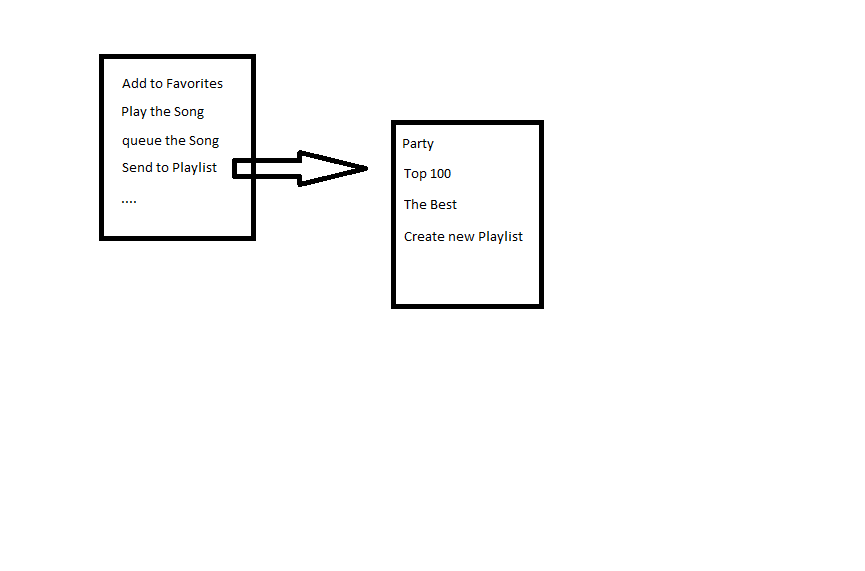
    Perhaps it would make it easier, if you have an Option to send it to any Playlist or create a new Playlist, and not only the current Playlist. You have an option "Send to Playlist" an you get an Menu with your saved Playlist, where you can choose one of this or create a new Playlist. And the Playlist schould be saved automatical.
    This Options should be available in all Screens (Now Playing, MusicLibrary and also Playlist). Because sometimes you would have an Song in more than Playlist one Playlist.

    And the Play Button or Okay play the Song in the current Playlist. And the current Options you have in the Contectmenu can queue it into the current Playlist., so you can hear the song, and over the "Send to plalist" you can add it to another Playlist.

    When you will hear your songs from the createt Playist (over the Send to Playlist Menu) you can open it with the "Saved playlis" entry in the right Menu.

    rlevis Waht do you think about this ? It is good ?
     

    Attachments

    • Unbenannt.png
      Unbenannt.png
      14.5 KB

    Der_Bub

    MP Donator
  • Premium Supporter
  • June 17, 2008
    830
    60
    Cologne
    Home Country
    Germany Germany
    ...
    How on earth can you compile a playlist now in 1.2? It is necessary to listen to a track before adding it, but it seems this is inow mpossible. It use to work in 1.1 and earlier. It's now not usable.

    I did had the same Problem, but it was only a configuration problem ... a few threads up

    Seems that after updating to 1.2 it went back to "default" and have to set again :mad:
     

    Users who are viewing this thread

    Similar threads

    I don't know about MP2 but as you said you tried MP1 too, how is the MP music config ? MP(1) will only use LAV if you select "Internal DirectShow player" as music output, but then you lose gapless playback. If you you don't have multichannel music you can choose WASAPI as the output and set the number of speakers to stereo. I have...
    I don't know about MP2 but as you said you tried MP1 too, how is the MP music config ? MP(1) will only use LAV if you select...
    Not sure if this a a bug/config/settings problem. I am running a media portal 2.5 server with 2.41 client but it seems I get the...
    Replies
    1
    Views
    651
    Thank you for this tip! I'm moving MP TV Server to a new machine. I installed the 64-bit version and most of the MP firewall rules were set to Public. I couldn't connect to the new TV Server from my old single-seat installation running 32-bit until I changed all MP-related firewall rules on the new machine to Private. Before I did...
    Thank you for this tip! I'm moving MP TV Server to a new machine. I installed the 64-bit version and most of the MP firewall...
    Server and client on modern uptodate Windows 11 desktop. Software is Server and Client version x86 1.38.003 Remote client on...
    Replies
    26
    Views
    2K
    MP1 MP2 MP2 - V2.5 MP2 - V2.5 Server on Windows 11 Pro DE
    Good evening, the last weeks my MP2.5 Server with TVE3 is running not very good/stable. After 30 min the server quits working after changing EPG from EPG Buddie to Clickfinder (TV Movie). The OS and the MP2.5 Server Software were installed several times new, but in general nothing changed. Are there any changes or setting needed for...
    Good evening, the last weeks my MP2.5 Server with TVE3 is running not very good/stable. After 30 min the server quits working...
    Good evening, the last weeks my MP2.5 Server with TVE3 is running not very good/stable. After 30 min the server quits working...
    Replies
    0
    Views
    1K
    After many hours of troubleshooting I've given up and accepted that it's just "one of these things" when using madVR for watching live TV. I've now ticked the box to "Use EVR for LiveTV", with a default display refresh rate of 50Hz. In combination with tweaking some of the Nvidia 3D settings for the MP executable only, I now have a...
    After many hours of troubleshooting I've given up and accepted that it's just "one of these things" when using madVR for watching...
    Every so often, when I switch to a TV channel, my MP client stops accepting user inputs, either from the remote or keyboard/mouse...
    Replies
    30
    Views
    8K
    I compliment you on the thoroughness of your investigations. (y) Unfortunately, I don't have any ideas what the problem might be. :( Perhaps someone else will post with some suggestions. :unsure: -- from CyberSimian in the UK
    I compliment you on the thoroughness of your investigations. (y) Unfortunately, I don't have any ideas what the problem might be...
    Would appreciate it if someone could solve (or point me in the right direction to resolve) this issue. I have “MultiSeat”...
    Replies
    4
    Views
    1K
    Top Bottom