[solved] "Keyboard Help" Screen? (1 Viewer)

2BitSculptor

Super Moderator
  • Team MediaPortal
  • January 23, 2008
    2,007
    1,052
    South Central Wisconsin
    Home Country
    United States of America United States of America
    • Thread starter
    • Moderator
    • #21
    @2BitSculptor @TLD
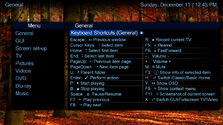
    After adding some more icons and replacing the arrows with colons, the new screen look like this:

    The attached XML has the coloured topbar commented out (this will be the official screen in next release), but you can remove the tags and let the topbar show ;)
    Hope you´ll like it ;)
    BTW: Should we change the orden of the items, e.g. first all playing items, then all navigation items, then the rest - or e.g. alphabetically?
    What do you think?
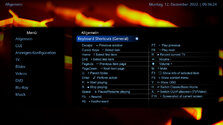
    I darkened the top label background, which helped to set off the heading from the body because of the larger fonts) I also had removed arrows, then used colons followed by 2 spaces (gave me more room for line length). I like the extra icons; to be more uniform. I considered arranging the list by function (as you suggested) based on likely most used functions, eg, navigation, playing, and other.
     
    Last edited:

    2BitSculptor

    Super Moderator
  • Team MediaPortal
  • January 23, 2008
    2,007
    1,052
    South Central Wisconsin
    Home Country
    United States of America United States of America
    • Thread starter
    • Moderator
    • #23
    I'm still open to suggestions :rolleyes:

    12-45-41.png
     
    Last edited:

    Users who are viewing this thread

    Similar threads

    Thanks for explaining. I found a passing reference to this here: https://www.team-mediaportal.com/wiki/display/MediaPortal1/HID%20Profiles which I had overlooked in the past. I would find it logical for a created custom profile to be automatically activated, but until that happens, I will try to create a wiki page for the current...
    Thanks for explaining. I found a passing reference to this here...
    I have used custom actions in the "Mapping" section of "HID" since moving to a FLIRC as a remote receiver a couple of years ago...
    Replies
    14
    Views
    3K
    I noticed there's an updated Visual C++ Runtime (14.50.35710), maybe try to reinstall the runtimes? That's what fixed the issue when I tried 1.38.1
    I noticed there's an updated Visual C++ Runtime (14.50.35710), maybe try to reinstall the runtimes? That's what fixed the issue...
    I just updated from 1.37 to 1.38. MediaPortal 1.38 exits abruptly when stopping video playback. I did three tests; Debug with...
    Replies
    38
    Views
    9K
    After many hours of troubleshooting I've given up and accepted that it's just "one of these things" when using madVR for watching live TV. I've now ticked the box to "Use EVR for LiveTV", with a default display refresh rate of 50Hz. In combination with tweaking some of the Nvidia 3D settings for the MP executable only, I now have a...
    After many hours of troubleshooting I've given up and accepted that it's just "one of these things" when using madVR for watching...
    Every so often, when I switch to a TV channel, my MP client stops accepting user inputs, either from the remote or keyboard/mouse...
    Replies
    30
    Views
    8K
    4.5 is really old. I'm not sure 4.5.5 even is a version that actually existed. You should be able to install .NET Framework 4.8.0 on Windows 7 SP1
    4.5 is really old. I'm not sure 4.5.5 even is a version that actually existed. You should be able to install .NET Framework 4.8.0...
    My TV PC is more a cast-off on older hardware (a 'Quiet PC' i5 4690, 16GB ram, 2xSSD 1xHDD, system graphics), mainly as a cheap way...
    Replies
    5
    Views
    2K
    That screen is generated by the file "MyVideo.xml", but it uses various other files too. When the list on the right is a list of episodes, the area in the middle contains the programme information for the episode that has the focus. In your screen shot, the list on the right is a list of folders. You could fill the area in the...
    That screen is generated by the file "MyVideo.xml", but it uses various other files too. When the list on the right is a list of...
    Can someone please assist me in the file name and location of which XML controls this screen. I want to create an additional box...
    Replies
    1
    Views
    1K
    Top Bottom