thanks for the great help. it also worked for me (v1.1.3). however, as 1.2.0 b release is postponed isn't it possible to revert the target release with 1.2.0 back ?
No, it isn't possible. We have reached 100% on the Mantis bug tracker as you can see. That means that the code has been frozen - no more commits unless absolutely necessary to get 1.2.0b released. The dates there are just indications. I think you will find that the release of 1.2.0b will be closer than what it says there.
Is there any update about the issue? I am very happy with 1.2.0 beta. However, not possible to watch one satellite beacuse of this lnb setting issue. We apreciate if you could reissue the patch based on 1.2.0 beta.
I have not forgotten this issue. Over the weekend I spent a lot of time merging the patch code with 1.2.0b. I have a problem with compiling one part of the code. As soon as I can sort that out I will post a patch...
*Big* apologies for the delay - updating the code was not straightforward... :sorry:
I've attached the patch files for 1.2.0b to this post. The instructions are a little complicated, so please read carefully and feel free to ask questions if necessary.
If you intend to:
- do an upgrade from 1.2.0a to 1.2.0b or a clean install of 1.2.0b AND
- keep your old database AND
- you're already using my patch for 1.2.0a AND
- you're using SQL Server
...then please run the SQL_Server_Before_Upgrade.sql script first.
-------------------------------------------------------------------------------------------
1. Stop the TVService if TV Server is installed.
2. Install or upgrade to 1.2.0b.
3. Stop the TVService if it is running.
4. Take a backup of the following files in your TV Server install folder:
5. Download and extract the files in Independent_Custom_LNB_Settings(v1.1)[1.2.0b].zip into your TV Server install folder.
6. Copy the following files into your MediaPortal client install folder:
If you already installed my patch for 1.2.0a and you use MySQL then you don't have to do anything else.
If you are installing my patch for the first time then run either MySQL_Changes.sql *or* SQL_Server_Changes.sql (depending on which database you use).
If you needed to run SQL_Server_Before_Upgrade.sql then you need to run SQL_Server_After_Upgrade.sql.
-------------------------------------------------------------------------------------------
...and you're done!
Start the TV Service and everything should work. If you have any problems or you're not sure what database scripts to run then *please ask* - it is better to ask than to mess up your database/MP installation!
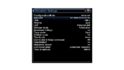
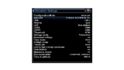
it works great. thank you very much for the interest and the effort. For the new satellite configuration screen may be you can refer to the screenshots attached. They are from Dreambox enigma2 advanced tuner configuration as I mentioned before. I hope it helps
It is good to know that the patch works for you.
Regarding the dreambox settings: those are very advanced. We might be able to add some of them:
Priority = what is this?
LOF/L = yes, absolutely
LOF/H = yes, absolutely
Threshold = yes, absolutely
Voltage mode = what does this do? What options are available?
Increased voltage = no - this would require tuner driver support -> outside our control
Tone mode = what is this?
DiSEqC mode = I'm not sure why the mode would matter. You will have choice to use committed or uncommitted commands, and hopefully raw commands too (the interface for this could be tricky).
Tone burst = if it is the tone burst I'm thinking of then some drivers support this, but many do not. I think it might be possible in the Windows 7 BDA DiSEqC interface. This is a "maybe".
Committed DiSEqC command = definitely!
Fast DiSEqC = what is this?
Sequence repeat = we could probably do this
Command order = this would be tricky - is it important?
Tone amplitude = no - again, this would require driver support which doesn't exist (so far as I know)
In general, if the tuner driver supports it then we should be able to add it.
Now that 1.2.0rc is out, some people will be needing a new version of this patch!
I've attached the patch files for 1.2.0rc to this post. The instructions are less complicated than for 1.2.0b, but still read carefully and feel free to ask questions if necessary. Note that for simplicity I'm only providing instructions for upgrades from 1.2.0b or clean installations. If you were thinking of upgrading from 1.2.0a direct to 1.2.0rc then PM me for instructions.
Instructions
1. Stop the TVService if TV Server is installed.
2. Install or upgrade to 1.2.0rc.
3. Stop the TVService if it is running.
4. Take a backup of the following files in your TV Server install folder:
5. Download and extract the files in Independent_Custom_LNB_Settings(v1.1)[1.2.0rc].zip into your TV Server install folder.
6. Copy the following files into your MediaPortal client install folder:
If you are installing my patch for the first time then download and extract the DB Scripts zip file and run either MySQL_Changes.sql *or* SQL_Server_Changes.sql (depending on which database you use). Otherwise you don't have to run any database scripts.
...and you're done!
Start the TV Service and everything should work. If you have any problems then *please ask* - it is better to ask than to mess up your database/MP installation!
Yes, I saw that. Was beyond my understanding, however. Didn't see how to set that up. I'm a relative neophyte, who's done hardly any command-line coding.
To be more specific: I don't see, under either "Grabbing Listings" or in the "First use example," where it is designated just where on one's C drive the tv.xml file is...
Yes, I saw that. Was beyond my understanding, however. Didn't see how to set that up. I'm a relative neophyte, who's done hardly...
Does anyone know how to “fix” the MC2XML application, and hopefully permanently? Mine stopped working sometime after September 29...
Thank you for this tip! I'm moving MP TV Server to a new machine. I installed the 64-bit version and most of the MP firewall rules were set to Public. I couldn't connect to the new TV Server from my old single-seat installation running 32-bit until I changed all MP-related firewall rules on the new machine to Private. Before I did...
Thank you for this tip! I'm moving MP TV Server to a new machine. I installed the 64-bit version and most of the MP firewall...
Server and client on modern uptodate Windows 11 desktop. Software is Server and Client version x86 1.38.003
Remote client on...
Looks like there's some kind of error regarding translations that I can't pinpoint about Subcentral. You'll find it in the log file I attached to my previous message. I don't understand it because I use MP in english, I search for subtitles in english and not in my native language, so I can't figure out what's translation got to do...
Looks like there's some kind of error regarding translations that I can't pinpoint about Subcentral. You'll find it in the log file...
I don't now what to say, I don't know where to begin. Mediaportal user since 2004. Always a satisfied user, I must add. Lately...
Many many years ago, I opened a bug report after I got that same message but I never got a reply. The reason was I had unchecked the Windows Media Player item in Windows 10 Control Panel > Program and Features > Turn Windows features on or off as I didn't need it, without thinking that it was needed by MediaPortal. I kept the "Media...
Many many years ago, I opened a bug report after I got that same message but I never got a reply. The reason was I had unchecked...
We have just released MediaPortal 1.39 - Endurance x86 and x64 version.
Highlights of this release
Bugfixes:
[MP1-5257] - Skin...