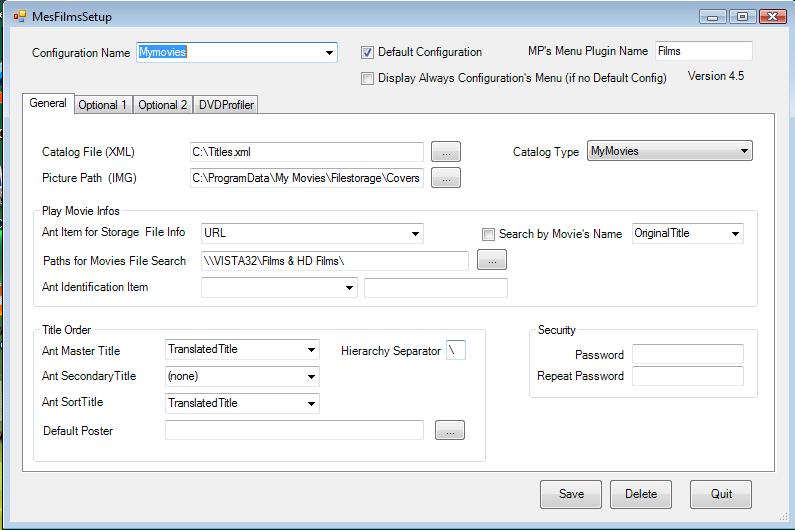
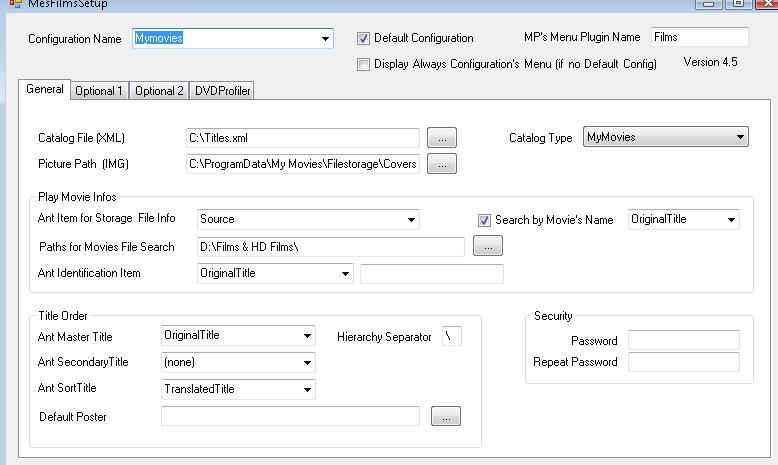
No problem, please upload a screen-capture of your MyFilms settings, and also one of your ANT-Database entries....I will have a look at what you have wrong.
I don't use ANT as it takes to long to configure, i use mymovies2, which is suppose to be supported, the XML file i exported is located on the loca;l drive C:
I don't use ANT as it takes to long to configure, i use mymovies2, which is suppose to be supported, the XML file i exported is located on the loca;l drive C:
OK, I'm going to have asume that the "ANT" and "MyMovies2" XML looks the same, because I dont use MyMovies2...if its not, then I dont know what the problem might be....sorry.
In case that it is the same, then I see a few possible problems with your setup...
1) Try mapping a drive rather than entering your network-path under "Path For Movie File Search", so it should be something like "E:\Films & HD Films\"
2) Change the "Ant Item for Storage File Info" to "Source", or do you have the location for your files in the "URL" XML-entry? It does not matter if its in the "URL" or "Source" entry, but the xml-value should be the same as path...something like "E:\Films & HD\Transformers.avi"...
3) To help MyFilms to find the file, also complete the "Ant Identification Item", it should be the XML-entry that contains your Movie-Name...in my case its the "Original Title"....
4) I also have the "Search by Movie's Name" ticked, and also selected "Original Title", the same as in point-3 above..
My understanding from the wiki is that you have to complete the items under "Play Movie Infos", even if you select MyMovies as the "catalog type"....but I might be wrong
I don't use ANT as it takes to long to configure, i use mymovies2, which is suppose to be supported, the XML file i exported is located on the loca;l drive C:
I have had a quick look.....your XML-file looks very different from the ANT one..but I'll stry to analyse it for you...
I'm working a bit blind here, I have no idea what your MyMovie configuration looks like....can you please post the MyMovies2 config-screen for the "Balls of Fury" entry?
Your XML-file shows the following path <LocationSideA>D:\Films\Balls Of Fury</LocationSideA>, is this where your Movie-Files are located, as seen from your MediaPortal-PC? If it is, try changing the config in MyFilms to point to "D:\Films".....
When I get home later, I will have a look at the available config-items in MyFilms and see if I can match them to your XML-File entries....
Your XML-file shows the following path <LocationSideA>D:\Films\Balls Of Fury</LocationSideA>, is this where your Movie-Files are located, as seen from your MediaPortal-PC? If it is, try changing the config in MyFilms to point to "D:\Films"...
Got it working again!!! (y) (y)
It seems the file "DialogMenu.xml" in the theme folder does not have the onX settings in the file by default (after MP 1.36) and when you install a later version of MP.
I modified the MP 1.38 file with the onX settings from MP 1.36. Also I have found the "DialogMenu.xml" from MP 1.36 will work with MP...
Got it working again!!! (y) (y)
It seems the file "DialogMenu.xml" in the theme folder does not have the onX settings in the file...
Hi
This is a general question about OnX.
I have been using the TvWishList plugin for a while and have recently updated (update...
Ok, so perhaps a solution, but not the "right" solution. On the client, within media portal configuration, under TV settings, advanced options, I switched to UNC paths instead of the default RSS, and it's working very well. Sure I had to figure out the paths, but no big deal.
Maybe helpful for someone in the future. Thanks for the...
Ok, so perhaps a solution, but not the "right" solution. On the client, within media portal configuration, under TV settings...
Hi folks. I have an issue with a new install/integration into my mediaportal system. I have a “mediaportal server” which has the TV...
I had the same issue and found the executable under
C:\ProgramData\Team MediaPortal\MediaPortal\skin\Titan\BasicHome.Editor\TitanEditor.exe
Only the shortcut was missing.
I had the same issue and found the executable under
C:\ProgramData\Team...
Hi all,
Not a rant, more a sharing of experience (maybe hoping to get some clarification on which wrong turn I took)
It has been...



 South Africa