PureVision 4:3 (9 Viewers)

Status
Not open for further replies.

mbu10

Portal Pro
March 20, 2007
65
3
great skin but always come up with " the skin is out date"

great skin but always come up with " the skin is out date"
and you have to press ignore
but want it to load up with out this appearing
any soloution
thanks
 

catavolt

Design Group Manager
  • Team MediaPortal
  • August 13, 2007
    14,896
    11,786
    Königstein (Taunus)
    Home Country
    Germany Germany
    • Thread starter
    • Moderator
    • #62
    great skin but always come up with " the skin is out date"
    and you have to press ignore
    but want it to load up with out this appearing
    any soloution
    thanks
    Yep, you are using MP version 0.2.3. The skin is compatible with that version, but it is recommended to update to MP 1.0 RC1 (and if you like latest SVN).

    If you do not want to update, proceed as follows:

    Go to your PureVision directory and open the file REFERENCES.XML.
    At the beginning of the file you´ll find a line with the text

    <version>0.9.2.0</version>

    Change this line to

    <version>0.2.3.0</version>

    and save the file. Restart MP. The message has gone.

    BTW: you could have found this solution under #118 in this forum... ;)
     

    zanlation

    Portal Pro
    May 26, 2008
    107
    0
    Home Country
    Yes, I am using TV Server. Both MP and TV Server as of SVN 27 June 08.

    I can still hear sound and I can see parts of the TV video around the black mask between the edge of the skin TV.

    I replaced the images in the animations\mytv directory with new ones and the problem went away. :confused:
     

    catavolt

    Design Group Manager
  • Team MediaPortal
  • August 13, 2007
    14,896
    11,786
    Königstein (Taunus)
    Home Country
    Germany Germany
    • Thread starter
    • Moderator
    • #66
    Update for PureVision 1.2 (4:3)

    Hi to all,

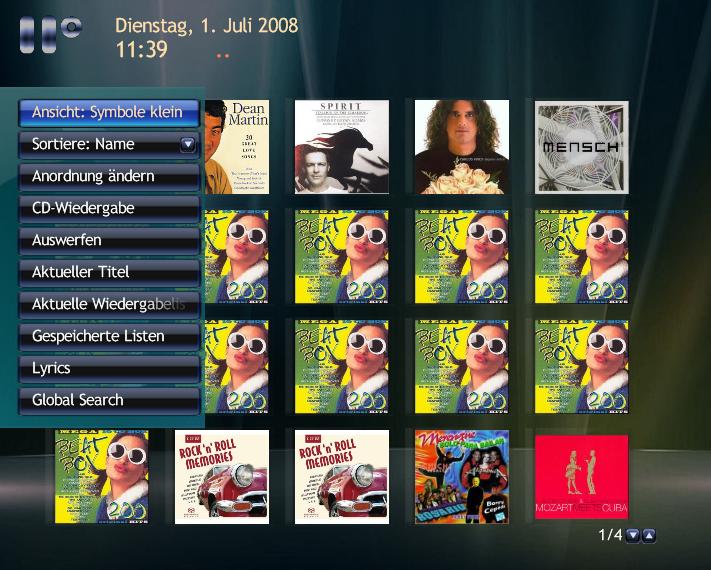
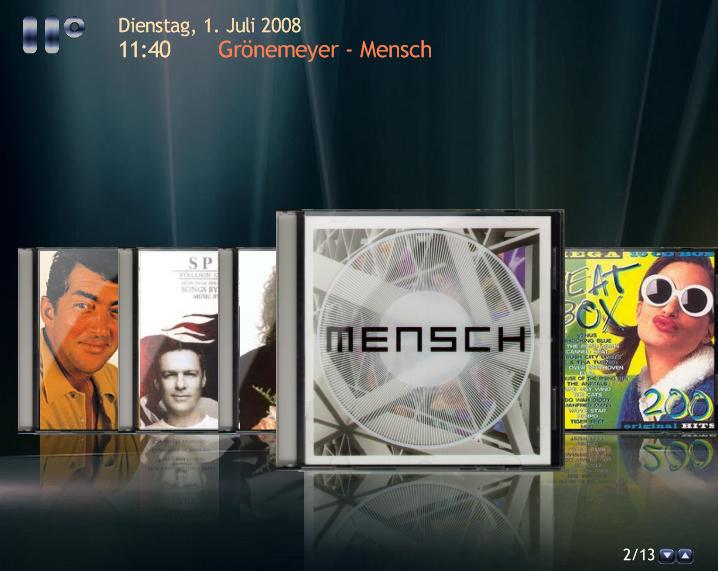
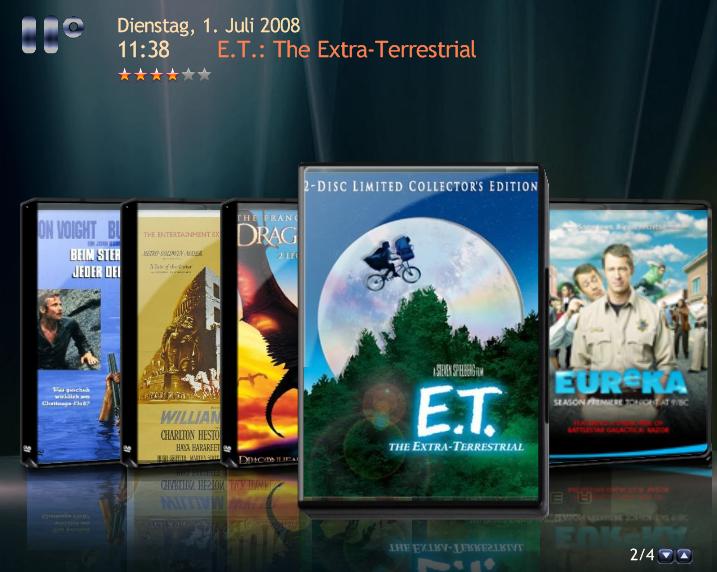
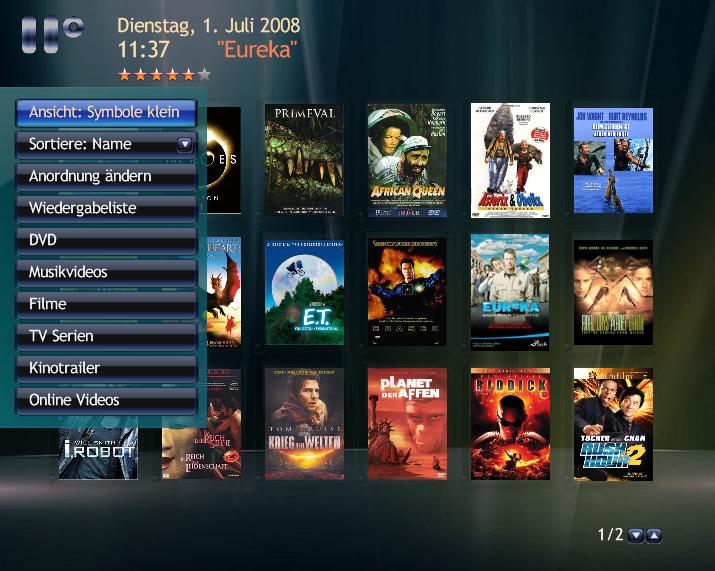
    After evaluating the proposals of 2BitSculptor I made up the sections video and music with action menus and bigger thumbs.

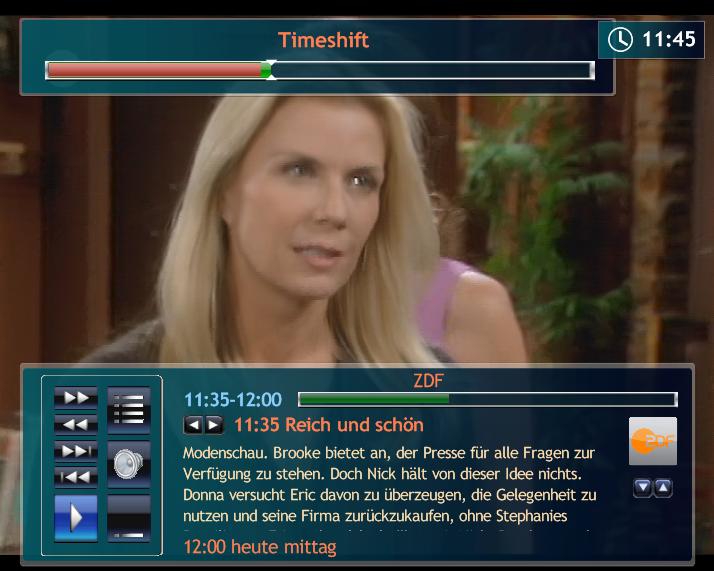
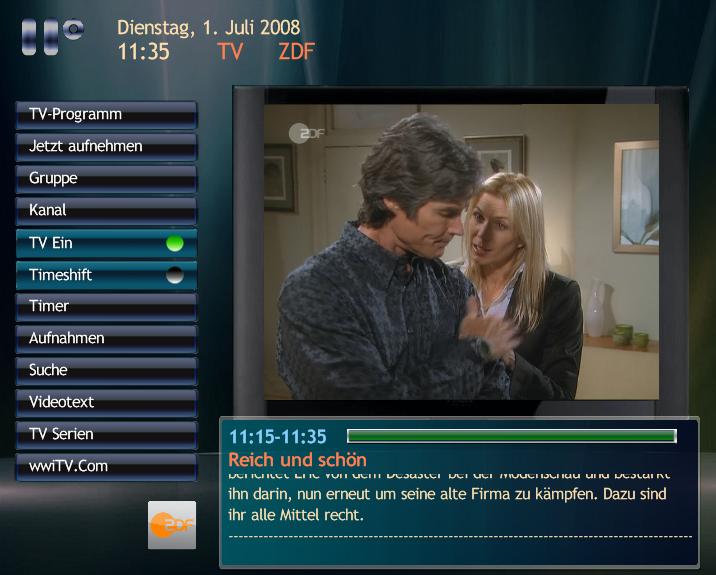
    I also changed the aspect ration of the tv on tvhome as well as some positioning and gfx matters.

    Enclosed you will find the PureVision Update.rar for download.

    Please overwrite the respective xmls in your directory of PureVision, copy the pngs into your directory ..\PureVison\Media, clear the PureVision cache and restart.

    I hope you will enjoy the new features.

    Here are some screenshots of the revised screens:
     

    Attachments

    • PVU Music1.jpg
      PVU Music1.jpg
      86.6 KB
    • PVU Music2.jpg
      PVU Music2.jpg
      53.5 KB
    • PVU TV2.jpg
      PVU TV2.jpg
      57.2 KB
    • PVU TV.jpg
      PVU TV.jpg
      56.7 KB
    • PVU Video2.jpg
      PVU Video2.jpg
      59.7 KB
    • PVU Video.jpg
      PVU Video.jpg
      75.4 KB

    catavolt

    Design Group Manager
  • Team MediaPortal
  • August 13, 2007
    14,896
    11,786
    Königstein (Taunus)
    Home Country
    Germany Germany
    • Thread starter
    • Moderator
    • #67

    I tested it over and over - can´t reproduce your error. Make sure you configure TVSeries for graphical view, and possibly you have to clear the PureVision cache. Maybe the new xml from the a.m. update may help you?!?

    EDIT: I found the error: You are using the latest SVN which is NOT COMPATIBLE with the skin screens.
    Please use this one:
     

    2BitSculptor

    Super Moderator
  • Team MediaPortal
  • January 23, 2008
    2,007
    1,052
    South Central Wisconsin
    Home Country
    United States of America United States of America
    WONDERFUL!!!

    I love the changes to the screens! The new size for the icons make good use of screen space much better. The filmstrip view will take some getting used to.

    In testing (not on HTPC- it is still broken) I found some small issues for tweeking.

    On fullscreen TV.. the osd background bar is in middle of screen, not behind text of Aspect at top of screen. Same with RW/FF/skip speed too.

    On menus for Music and Videos... focus on some buttons does not move up when up key is pressed, it exits menu instead. ...and put space under EJECT button, it looks better.

    On List View screens... maybe add large icon of highlighted list item in empty space at left.. for balance, and because icons in list are too small to read.

    On Filmstrip view. focus covers seem like they don't fit the "case" overlay .. they look like they stick up above the top and don't quite fit the width inside. Especially noticed with music covers.

    (and please, don't forget my special request on menu item order for my wife.. I don't think the last ones you made for me will work with the action menus)

    :D SO VERY MUCH for a very pleasant and readable 4:3 skin.

    Your work is much appreciated.


    Chuck
     

    parkuhr

    Portal Pro
    September 2, 2007
    357
    4
    Home Country
    Germany Germany
    hi Catavolt
    i have discoverd today a nice plugin called RelictInternetTV.
    if you find the time, can you plse support it in purevision?

    greetings
    parkuhr
     

    2BitSculptor

    Super Moderator
  • Team MediaPortal
  • January 23, 2008
    2,007
    1,052
    South Central Wisconsin
    Home Country
    United States of America United States of America
    While looking at the Random Screenshot on the MP Home Page I saw the IMDB screen of an other skin. It gave me the idea... and I also see it done in Monochrome skin List View.

    Can you combine the List View screen with the display of DB info next to the cover art.
    Visualize the IMDB screen with the menu replaced by the "List"... you may have to move the cover art and DB info over just a bit, to make room for a wider "List".. but I think it would make for a much more interesting and informative List View screen.

    I can see Purevision becoming the defacto 4:3 skin for MP1 ... or design a new 4:3 skin (based on Purevision) to add all the cool stuff the widescreen skins are getting, like fanart, changing backgrounds and new plug-ins (like MediaSlayer).

    Chuck

    ... still young enough to be causing trouble :D
     
    Status
    Not open for further replies.

    Users who are viewing this thread

    Similar threads

    MP1 MP2 Comskip Ad removal DE
    Hi all Was just looking at Ad Removal - Comskip and note: - MP1 only - 4 The Record 1.3.3 seems to no longer exist Question: Does anybody have pointers as to how I/we can setup or install something to automatically remove ads during playback on MP2? Thanks in advance Henry
    Hi all Was just looking at Ad Removal - Comskip and note: - MP1 only - 4 The Record 1.3.3 seems to no longer exist Question...
    Hi all Was just looking at Ad Removal - Comskip and note: - MP1 only - 4 The Record 1.3.3 seems to no longer exist Question...
    Replies
    0
    Views
    668
    If there is a TVDB representative on the forum, please respond. I have a quick question. Thanks in advance. https://www.thetvdb.com/
    If there is a TVDB representative on the forum, please respond. I have a quick question. Thanks in advance. https://www.thetvdb.com/
    If there is a TVDB representative on the forum, please respond. I have a quick question. Thanks in advance. https://www.thetvdb.com/
    Replies
    0
    Views
    1K
    Is there a time limit for recordings. I've been trying to record over IPTV but the recordings seem to cut off after 3 hours exactly.
    Is there a time limit for recordings. I've been trying to record over IPTV but the recordings seem to cut off after 3 hours exactly.
    Is there a time limit for recordings. I've been trying to record over IPTV but the recordings seem to cut off after 3 hours exactly.
    Replies
    0
    Views
    416
    MP1 MP2 Recording length DE
    If you use "Manual Booking" (left side menu on the "Recording Schedule" panel), you can schedule a recording duration of up to 24 hours. However... That is using the "conventional" TV sources, i.e. a DVB-T tuner, a DVB-S tuner, or an analogue tuner. You stated in your other thread that you are using an IPTV source. Perhaps there is a...
    If you use "Manual Booking" (left side menu on the "Recording Schedule" panel), you can schedule a recording duration of up to 24...
    Is there a limit to recording length? My TVServer recordings all cut off at 3 hours but I can't find a setting anywhere to change...
    Replies
    1
    Views
    228
    I do not know why this xml was in my theme folders, it must have sneaked in some time ago (years?). I simply removed the file. The Latest Media Handler plugin seems to be working as expected. I've had no lock-ups.
    I do not know why this xml was in my theme folders, it must have sneaked in some time ago (years?). I simply removed the file. The...
    Before you create this bug report: Make sure that your system (windows, codecs and drivers) is up to date, matching the...
    Replies
    13
    Views
    4K
    Top Bottom