Store language(s) from MediaInfo (1 Viewer)

barneh

MP Donator
  • Premium Supporter
  • February 4, 2010
    245
    54
    Malmö
    Home Country
    Sweden Sweden
    I have been looking into where the Online_Parsing_Classes.OnlineAPI.SelLanguageAsString is been used, and changed it to use the Series preferred language, if an override exists.

    But in GetRandomBanner() in imageAllocator.cs I can't know witch Series the call has been done for. So the random get less random when the specific Series language is not "en" (and the random option is enabled)

    In the CompareTo() in GetBanner.cs (you posted the code for it in an earlier post here) I don't know if I should change this?
    Because I don't find anywhere it's used?
     

    ltfearme

    Community Plugin Dev
  • Premium Supporter
  • June 10, 2007
    6,760
    7,224
    Sydney
    Home Country
    Australia Australia
    In the CompareTo() in GetBanner.cs (you posted the code for it in an earlier post here) I don't know if I should change this?
    Because I don't find anywhere it's used?
    It's used when .Sort() is called e.g
    Code:
    // sort by highest rated
    widebannerSeriesList.Sort();
     

    ltfearme

    Community Plugin Dev
  • Premium Supporter
  • June 10, 2007
    6,760
    7,224
    Sydney
    Home Country
    Australia Australia
    Hmm.... I don't get that behaviour :(
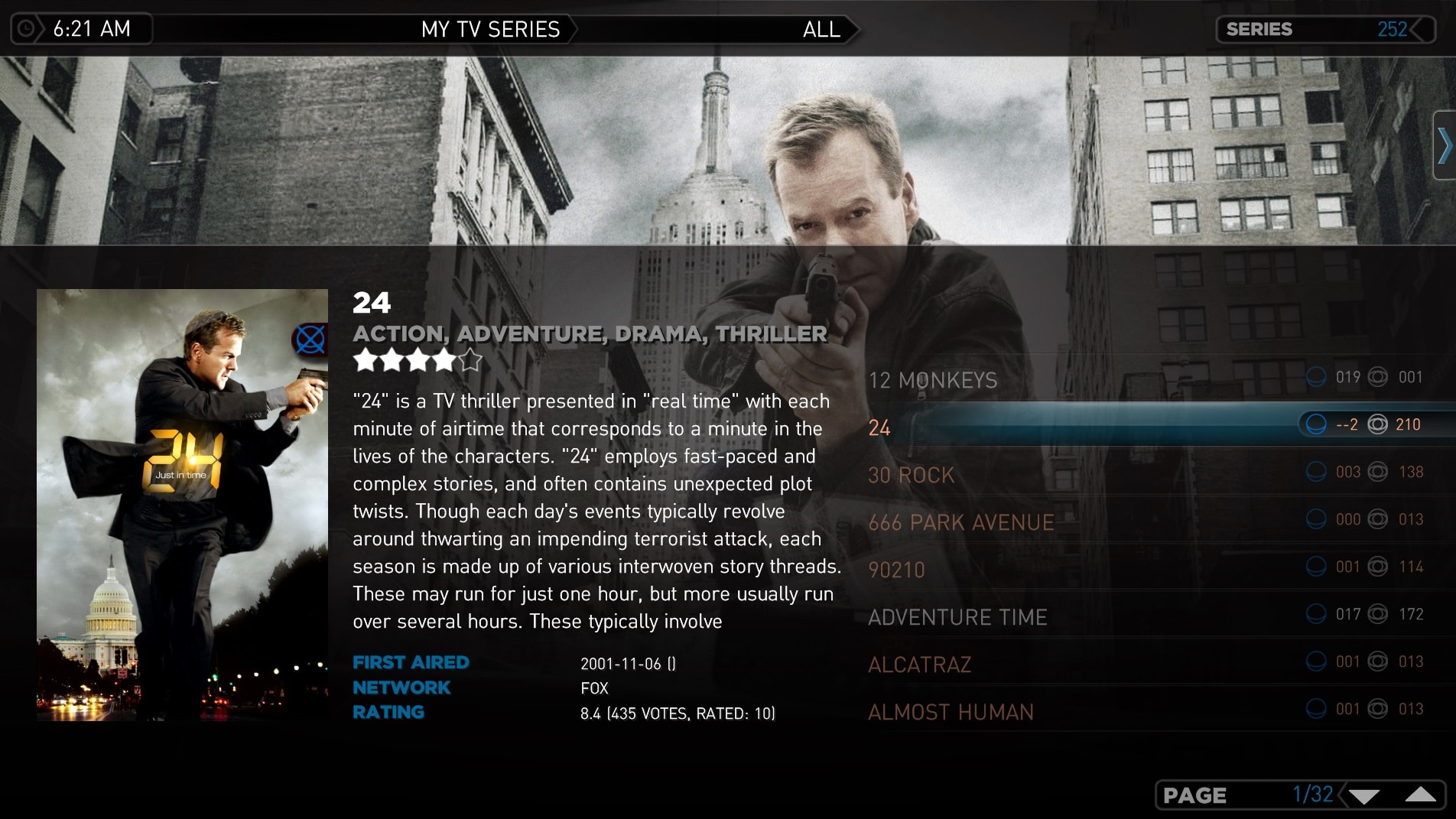
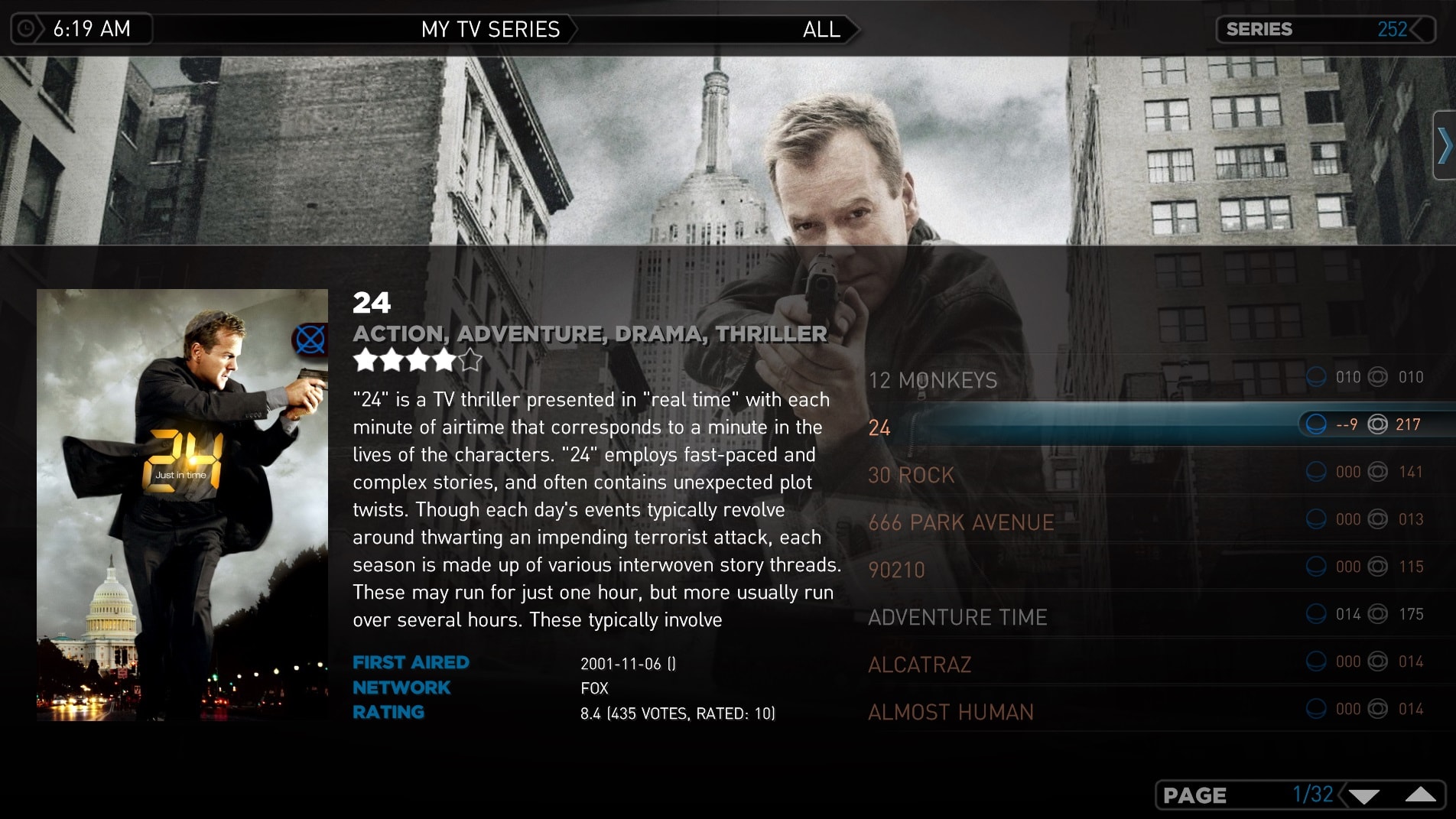
    You should have had 10 unwatched and 10 watched with the feature ON, and 19 unwatched and 1 watched with the feature OFF in Series view.

    As you see in my run I get for "Kampen om Tungtvannet" 5 unwatched and 2 watched with the feature ON, and 6 unwatched and 1 watched with the feature OFF in Series view.
    Are you testing after an Import?

    I tried your GUI Options Toggle (it takes a long time by the way so its probably better ensuring it takes the same path as the import one which is way faster). It may be better to just not have the option toggle, and only allow user to change from configuration.

    Anyway the results are different and even though it looks correct for 12 Monkeys, it some how got a negative result for 24.

    There is an option to skip counting on unaired episodes or episodes without air-dates, its most likely because of that. I have 'count episodes that have no air date or air in the future' off.

    Here is what I would recommend, remove the option from OPTIONS in the GUI. Just concentrate on fix for the series/season counting when an import is done.
     

    Attachments

    • option_off.jpg
      option_off.jpg
      512.6 KB
    • option_on.jpg
      option_on.jpg
      512.3 KB

    ltfearme

    Community Plugin Dev
  • Premium Supporter
  • June 10, 2007
    6,760
    7,224
    Sydney
    Home Country
    Australia Australia
    I had a look at the code and can see the logic issue, you were never incrementing the series unwatched count unless the option was enabled
    Code:
    if ( (season[DBSeason.cIndex] != 0) && (DBOption.GetOptions(DBOption.cCountSpecialEpisodesAsWatched)) )
    {
       seriesEpsUnWatched += unWatchedCount;
    }
    In that case if cCountSpecialEpisodesAsWatched was disabled then unwatched at the series level will always 0.

    I think what you intend is something like:
    Code:
    if ( (season[DBSeason.cIndex] != 0) || (season[DBSeason.cIndex] == 0 && !DBOption.GetOptions(DBOption.cCountSpecialEpisodesAsWatched)))
    {
       seriesEpsUnWatched += unWatchedCount;
    }

    Here is will always increment if not a special, and if it is a special then only increment unwatched if the option is disabled.
     

    Edalex

    Community Plugin Dev
  • Premium Supporter
  • January 3, 2008
    2,958
    1,271
    Saratov
    Home Country
    Russian Federation Russian Federation
    What about splitting code for handling specials and languages?
     

    barneh

    MP Donator
  • Premium Supporter
  • February 4, 2010
    245
    54
    Malmö
    Home Country
    Sweden Sweden
    There is an option to skip counting on unaired episodes or episodes without air-dates, its most likely because of that. I have 'count episodes that have no air date or air in the future' off.
    You right, I manage to reproduce the problem you got!

    The problem you have occurs when the:
    • "Count episodes that have no AirDate or air in the Future" is OFF
    • "Count the Special (Season 0) episodes as watched" is ON
    This occurs regardless of you're suggested change of code.
    What we can do, is to group this two?

    I tried your GUI Options Toggle (it takes a long time by the way so its probably better ensuring it takes the same path as the import one which is way faster). It may be better to just not have the option toggle, and only allow user to change from configuration.
    How many Series do you test on?
    I have today 6 Series in my test environment, but I should maybe test with more?

    Here is what I would recommend, remove the option from OPTIONS in the GUI. Just concentrate on fix for the series/season counting when an import is done.
    Is this still you're recommendation about the case?
    For me it sounds fear, because either you use it, or you don't!
    (like the "Count episodes that have no AirDate or air in the Future" option).
     

    barneh

    MP Donator
  • Premium Supporter
  • February 4, 2010
    245
    54
    Malmö
    Home Country
    Sweden Sweden
    What about splitting code for handling specials and languages?
    Yeah... it had been the cleaner way! But I missed that the artwork had a language property, so I started the "handing specials" after I thought I was finished with the language changes for the Series. Then @ltfearme asked about the Artwork :eek:

    So I'm to blame here :oops:
    But I'm starting to patch up the glitches now ;)
     

    Edalex

    Community Plugin Dev
  • Premium Supporter
  • January 3, 2008
    2,958
    1,271
    Saratov
    Home Country
    Russian Federation Russian Federation
    /offtopic
    Damn, your enthusiastic work reminded me of my unfinished Remapper feature for MP-TVSeries. :unsure:
    I have to finish it!
     

    ltfearme

    Community Plugin Dev
  • Premium Supporter
  • June 10, 2007
    6,760
    7,224
    Sydney
    Home Country
    Australia Australia
    I have today 6 Series in my test environment, but I should maybe test with more?
    Over 200 hundred. Yes you should test with more, it will show that the execution path taken it is not optimised when you do the option toggle vs the import execution path.

    Import:
    Code:
    var episodesForCount = DBSeries.GetEpisodesForCount();
    foreach (DBSeries series in allSeries)
    {
       DBSeries.UpdateEpisodeCounts(series, episodesForCount);
    }

    The Option Toggle you Added:
    Code:
    foreach (var series in allSeries)
    {
       int epsTotal = 0;
       int epsUnWatched = 0;
       DBEpisode.GetSeriesEpisodeCounts(series[DBSeries.cID], out epsTotal, out epsUnWatched);
       series[DBOnlineSeries.cEpisodeCount] = epsTotal;
       series[DBOnlineSeries.cEpisodesUnWatched] = epsUnWatched;
       series.Commit();
    }

    As you can see its two different paths. The reason why its faster is because DBSeries.GetEpisodesForCount(); does the database query needed for all series, where as you're doing a query on every single series.
     

    barneh

    MP Donator
  • Premium Supporter
  • February 4, 2010
    245
    54
    Malmö
    Home Country
    Sweden Sweden
    What I will do is remove the Option in GUI, because this is the same type of feature as "Count episodes that have no AirDate or air in the Future". And that type you either have it ON or OFF.

    Then I will do a some test on a bigger collection!
     

    Users who are viewing this thread

    Similar threads

    After many hours of troubleshooting I've given up and accepted that it's just "one of these things" when using madVR for watching live TV. I've now ticked the box to "Use EVR for LiveTV", with a default display refresh rate of 50Hz. In combination with tweaking some of the Nvidia 3D settings for the MP executable only, I now have a...
    After many hours of troubleshooting I've given up and accepted that it's just "one of these things" when using madVR for watching...
    Every so often, when I switch to a TV channel, my MP client stops accepting user inputs, either from the remote or keyboard/mouse...
    Replies
    30
    Views
    8K
    Sadly, it seems that development of MP2 has come to a stop. Perhaps it will restart in the future. Meanwhile... MP1 has a "Tuning Details" panel that displays signal strength, signal quality, and picture resolution. It is updated in real time when viewing a channel: However, perhaps you are already aware of this, but prefer MP2...
    Sadly, it seems that development of MP2 has come to a stop. Perhaps it will restart in the future. Meanwhile... MP1 has a "Tuning...
    For those of us watching broadcast (over-the-air) television, it would be very handy to have a signal strength meter readily...
    Replies
    1
    Views
    4K
    I'm running 2.5 with the WMC skin. I have .mp4 files, along with the related .srt files in the same folder. I can watch the movies just fine. In past versions of MP, like 2.4x, I could press the More Info button on my remote twice, and on the second press, an option for showing/choosing the subtitles was listed. I'd select the...
    I'm running 2.5 with the WMC skin. I have .mp4 files, along with the related .srt files in the same folder. I can watch the...
    I'm running 2.5 with the WMC skin. I have .mp4 files, along with the related .srt files in the same folder. I can watch the...
    Replies
    0
    Views
    3K
    I do not know why this xml was in my theme folders, it must have sneaked in some time ago (years?). I simply removed the file. The Latest Media Handler plugin seems to be working as expected. I've had no lock-ups.
    I do not know why this xml was in my theme folders, it must have sneaked in some time ago (years?). I simply removed the file. The...
    Before you create this bug report: Make sure that your system (windows, codecs and drivers) is up to date, matching the...
    Replies
    13
    Views
    4K
    I have recently installed MediaPortal 1.37 (x64) and MP-TVSeries v4.5.1.697 and unfortunately the TV episode runtime duration is missing in my Titan skin. This only applies to my .TS files, my .MKV files are OK. I believe the difference is likely to be because .MKV files embed the runtime in the file unlike .TS files. I have done...
    I have recently installed MediaPortal 1.37 (x64) and MP-TVSeries v4.5.1.697 and unfortunately the TV episode runtime duration is...
    I have recently installed MediaPortal 1.37 (x64) and MP-TVSeries v4.5.1.697 and unfortunately the TV episode runtime duration is...
    Replies
    0
    Views
    847
    Top Bottom