Titan - Bug Reports & Issues (10 Viewers)

powermarcel10

Retired Team Member
  • Premium Supporter
  • November 30, 2010
    2,839
    898
    37
    Groningen
    Home Country
    Netherlands Netherlands
    I think he means:
    C:\ProgramData\Team MediaPortal\MediaPortal\skin\Titan\Media\hover_tv series.png

    Yep, that's it!
    Thanks guys
    I know the file location.
    What I would like to know is in which XML files are hover names configured.

    Well, may I ask why you like to now that? Do you want to make them visible in the basichome screen or something like that? In that case you need to customize BasicHome.BackgroundSelected.xml and it's located here: C:\ProgramData\Team MediaPortal\MediaPortal\skin\Titan
     

    manray

    Portal Pro
    December 5, 2008
    56
    19
    Yep, that's it!
    Thanks guys
    I know the file location.
    What I would like to know is in which XML files are hover names configured.

    Well, may I ask why you like to now that? Do you want to make them visible in the basichome screen or something like that? In that case you need to customize BasicHome.BackgroundSelected.xml and it's located here: C:\ProgramData\Team MediaPortal\MediaPortal\skin\Titan
    Hi
    I'm using "Clasic Home", not "Basic Home".
    I would like to know that just to find the "hover_*.png" file names.
    For example: if I want to use the hover images for Moving Pictures, IMDb+ and other plugins, what are the name of these hover files, where is it configured?
    You see my point?
    Thanks
     

    joit

    MP Donator
  • Premium Supporter
  • August 5, 2008
    209
    8
    Home Country
    Germany Germany
    where is it configured?
    here:
    C:\ProgramData\Team MediaPortal\MediaPortal\skin\Titan\Media[DOUBLEPOST=1363962916][/DOUBLEPOST]On one machine (Intel hd2000 graphics), I have a strange bug. I use classic home and the menu items under the hover images don't correspond to the images. The images are correct, the menu items aren't. Any ideas?
     
    Last edited:

    blair_haynes

    MP Donator
  • Premium Supporter
  • October 26, 2007
    224
    41
    Gisborne
    Home Country
    New Zealand New Zealand
    Hi Guys

    I'm pretty sure that this hasn't been identified before, but if it has, please accept my apologies.

    My issue is with the MP-TVSeries playlist. It does not seem to be completed. I'd only recently stumbled across this feature in MP-TVSeries when I was looking for a way to play a whole lot of short TV programs for the kids in a row - e.g. queuing Pingu where each episode is only 5 minutes each. Screenshot is as below:

    03-10-24.png
     

    ajs

    Development Group
  • Team MediaPortal
  • February 29, 2008
    16,855
    12,114
    Kyiv
    Home Country
    Ukraine Ukraine
    How to add Year for Album in Music Artist view?
     

    Knives03

    Portal Pro
    March 6, 2009
    103
    2
    Hi Guys

    I'm pretty sure that this hasn't been identified before, but if it has, please accept my apologies.

    My issue is with the MP-TVSeries playlist. It does not seem to be completed. I'd only recently stumbled across this feature in MP-TVSeries when I was looking for a way to play a whole lot of short TV programs for the kids in a row - e.g. queuing Pingu where each episode is only 5 minutes each. Screenshot is as below:

    View attachment 124716
    I have also noticed this same exact thing. There is nothing behind the text as found in your image.
     

    kiwijunglist

    Super Moderator
  • Team MediaPortal
  • June 10, 2008
    6,746
    1,751
    New Zealand
    Home Country
    New Zealand New Zealand
    @ncoH

    Moving Pictures Missing Audio Logos

    AC3.png (you can reuse existing AC-3.png for this)
    3.png (you can reuse existing 2.1.png for this)

    Moving Pictures Missing Certification Logos

    M.png - "Mature"
    NR.png - "Not Rated"
    R13 R15 R16 R18.png - "Restrict to #years and over"
     
    Last edited:

    red_zebra

    Portal Pro
    September 1, 2009
    70
    46
    Leipzig
    Home Country
    Germany Germany
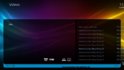
    There is a bug in "Videos"-section when using List view:

    The section is displayed correctly until you start a video. After stopping the video the screen is somehow re-arranged (screen goes black for some milliseconds) and it looks like in the screen attached (see screenshots for before & after). Could anyone please confirm that issue? Thanks.

    before starting video.jpg after stopping video.jpg
     
    Last edited:

    Users who are viewing this thread

    Similar threads

    MP1 MP2 MP2 - V2.3 EPG has stopped DE
    The only configuration that is certain to work is when the MP client and MP server are from the same release. It is sometimes possible to use MP clients from a release that is different to the MP server, but whether it works depends on the specific changes that were made between the two releases. -- from CyberSimian in the UK
    The only configuration that is certain to work is when the MP client and MP server are from the same release. It is sometimes...
    Before you create this bug report: Make sure that your system (Windows, codecs and drivers) is up to date, matching the...
    Replies
    10
    Views
    4K
    Before you create this bug report: Make sure that your system (Windows, codecs and drivers) is up to date, matching the Requirements and you've filled in your System Specs. Have a look at our MediaPortal Wiki! Maybe the solution is already there. Have a look at our Jira (Bug and Issue Tracker)and the threads in this section, maybe...
    Before you create this bug report: Make sure that your system (Windows, codecs and drivers) is up to date, matching the...
    Before you create this bug report: Make sure that your system (Windows, codecs and drivers) is up to date, matching the...
    Replies
    0
    Views
    1K
    Before you create this bug report: Make sure that your system (Windows, codecs and drivers) is up to date, matching the Requirements and you've filled in your System Specs. Have a look at our MediaPortal Wiki! Maybe the solution is already there. Have a look at our Jira (Bug and Issue Tracker)and the threads in this section, maybe...
    Before you create this bug report: Make sure that your system (Windows, codecs and drivers) is up to date, matching the...
    Before you create this bug report: Make sure that your system (Windows, codecs and drivers) is up to date, matching the...
    Replies
    0
    Views
    859
    I do not know why this xml was in my theme folders, it must have sneaked in some time ago (years?). I simply removed the file. The Latest Media Handler plugin seems to be working as expected. I've had no lock-ups.
    I do not know why this xml was in my theme folders, it must have sneaked in some time ago (years?). I simply removed the file. The...
    Before you create this bug report: Make sure that your system (windows, codecs and drivers) is up to date, matching the...
    Replies
    13
    Views
    2K
    There is a conflict as you have said between WinTV ad MP TV. MP TV takes over the Hauppauge HVR-1265 card. I may be even getting more channels with it. The Titan TV worked great until last year. Now it will not run the scheduler. WinTV scheduler will let me program manually but I have to set a program for each day. If I try to set...
    There is a conflict as you have said between WinTV ad MP TV. MP TV takes over the Hauppauge HVR-1265 card. I may be even getting...
    Sorry, but I have followed all the links that show how to upload specs and logs. I have read numerous pages that seem to be out of...
    Replies
    7
    Views
    4K
    Top Bottom