Upgrade to 1.13.0 and the DefaultWideHD skin (1 Viewer)

Anthony Vaughan

MP Donator
  • Premium Supporter
  • June 25, 2015
    598
    368
    Home Country
    United Kingdom United Kingdom
    The SurfacePro3 machine whose logs I sent you demonstrating 1.12.0 accessing the programs previously had 1.13.0 installed and I got exactly the same issue as I am getting with every other machine with 1.13.0 installed. I am only running the different versions on different machines because it is easier to reproduce logs for you than by constantly installing and de-installing MP.

    I can also confirm that I get the same issue when the running 1.13.0 on the machine that holds the programs.

    I have been assuming that there is some basic difference between 1.12.0 and 1.13.0 that is causing one to work and the other not to; maybe in the way they handle video files. I have also checked the file permissions, and they are all the same - the ones that do and don't display properly.

    I also copied one of the offending video files to the MPClient03's user video folder and got the same behaviour.

    Please let me know if I can help in any other way and thank you for your patience.

    Tony[DOUBLEPOST=1455637562][/DOUBLEPOST]Here's the log for MPClient03 with the video file in the user folder.

    Hope that helps.

    Tony
     
    Last edited:

    Sebastiii

    Development Group
  • Team MediaPortal
  • November 12, 2007
    16,523
    10,466
    France
    Home Country
    France France
    There is a lot of fixes for the next 1.14 build, we can send you a link for it (you surely need to revert mediainfo.dll but could be nice if you can test :) )
     

    Anthony Vaughan

    MP Donator
  • Premium Supporter
  • June 25, 2015
    598
    368
    Home Country
    United Kingdom United Kingdom
    Hi Regeszter

    I have installed your version that allows the last position watched in a video file to be shared across all clients.

    Do you mind telling me where that information, the position, is stored so I can see that I have installed the version properly?

    Tony
     

    Anthony Vaughan

    MP Donator
  • Premium Supporter
  • June 25, 2015
    598
    368
    Home Country
    United Kingdom United Kingdom
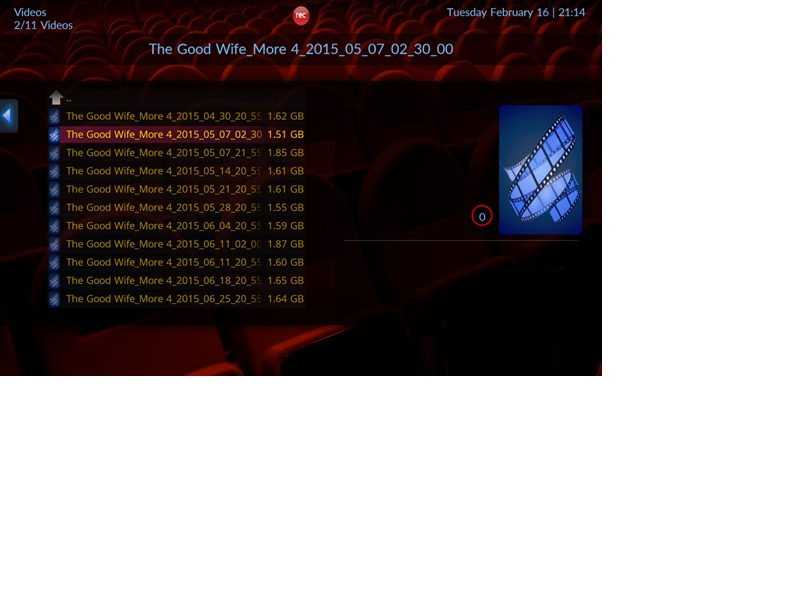
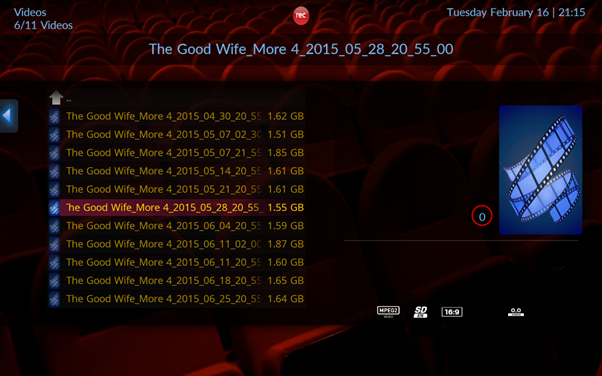
    I am wondering whether these screen prints might help.

    Please look in the attached file for two screen prints. The bad aspect ration file shows no attributes on the right whereas the other image shows attributes; the second displays correctly.

    Under 1.12.0, none of the files display attributes. Does this difference have something to do what is happening?

    Tony
     

    Attachments

    • Bad Aspect Ratio.png
      Bad Aspect Ratio.png
      236.9 KB
    • Correct Aspect Ratio.png
      Correct Aspect Ratio.png
      230.6 KB

    Sebastiii

    Development Group
  • Team MediaPortal
  • November 12, 2007
    16,523
    10,466
    France
    Home Country
    France France
    Ah yes it's possible there is a branch that display attribute between 1.12 and 1.13 and use mediainfo.dll to get that.
    But from screenshot i didn't see the bad ratio, does you mean that MP is in more little window ?
     

    mm1352000

    Retired Team Member
  • Premium Supporter
  • September 1, 2008
    21,544
    8,236
    Home Country
    New Zealand New Zealand
    Guys, after studying the code some more I think I need to eat some humble pie and say I was wrong.

    It looks like the cause of the change in behaviour between 1.12 and 1.13 is here:
    https://github.com/MediaPortal/Medi...diaportal/Core/Player/VideoPlayerVMR9.cs#L551

    Since MediaInfo is not able to read the file attributes, the code treats the file as if it's audio-only. That's why you get the video in the overlay renderer.

    This was part of a change made by Sebastiii:
    https://github.com/MediaPortal/MediaPortal-1/commit/45d2e3f844ed43cb8f0c6f86dcaa24ca2f7e7715

    At this stage 1.12 is working properly purely by chance.
    If MediaInfo were able to read the file properties properly then both 1.12 or 1.13 would be fine. However, it seems that MediaInfo does not support WTV:
    https://sourceforge.net/p/mediainfo/feature-requests/283/
     

    Sebastiii

    Development Group
  • Team MediaPortal
  • November 12, 2007
    16,523
    10,466
    France
    Home Country
    France France
    Last edited:

    Sebastiii

    Development Group
  • Team MediaPortal
  • November 12, 2007
    16,523
    10,466
    France
    Home Country
    France France
    Above will not work :)
    So i have modified the code (attached is the patch against master for dev and dll for testing) :)
     

    Attachments

    • Core_WTV.zip
      1.1 MB
    • 0001-WIP-WTV-rework-with-MediaInfo.patch
      4.7 KB

    Users who are viewing this thread

    Top Bottom