Using an External Bluray / HD-DVD Player (1 Viewer)

jof

MP Donator
  • Premium Supporter
  • December 10, 2007
    417
    14
    Home Country
    Austria Austria
    Congratulations!!
    The external Player Option for blu ray discs is so great!
    I tested it right now with pdvd and it worked without a problem.


    Thanks for this great plugin!
     

    wkwapil

    MP Donator
  • Premium Supporter
  • September 27, 2008
    140
    7
    192.168.x.x
    Home Country
    Germany Germany
    jof:
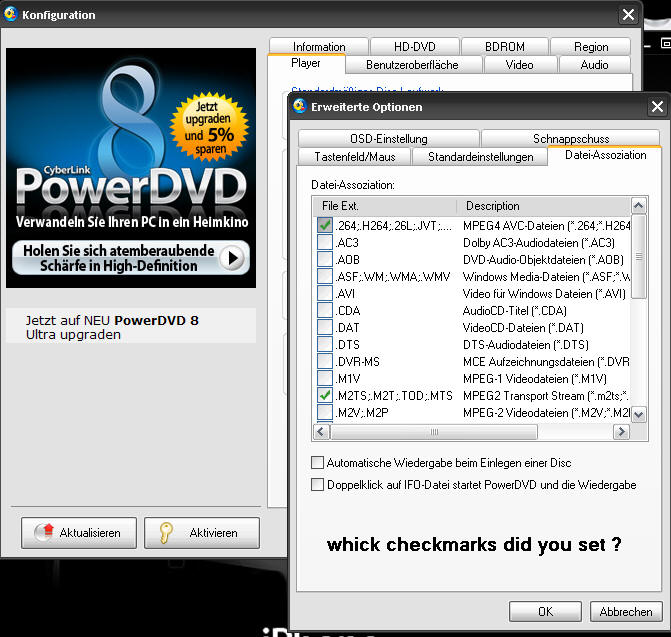
    which settings do you have in the plugin-config ? (my PDVD didn't start the blu-ray-iso)

    C:\Programme\CyberLink\PowerDVD\PowerDVD.exe or
    "C:\Programme\CyberLink\PowerDVD\PowerDVD.exe" ?

    %filename% or
    "%filename%" ?

    which chekmarks in PDVD-settings ?
    Thx for your efforts
     

    Attachments

    • Snap1.jpg
      Snap1.jpg
      95.2 KB

    fforde

    Community Plugin Dev
    June 7, 2007
    2,667
    1,702
    44
    Texas
    Home Country
    United States of America United States of America
    Moved your posts over here to keep things on track in the release thread.

    For those not aware of what's being discussed, Moving Pictures 0.7.1 allows you to specify an external application to play Bluray and HD-DVD content. You can get more details from this guide on the wiki. If anyone has any trouble though, this is the place to ask.
     

    wkwapil

    MP Donator
  • Premium Supporter
  • September 27, 2008
    140
    7
    192.168.x.x
    Home Country
    Germany Germany
    John, sry if I have posted in the wrong thread...but I'm a little bit irritated, because my PDVD won't start when playing a blu-ray-iso.
    In your Wiki it's mentioned with inverted comma
    Command-line Arguments
    /fullscreen "%filename%"
    and when I look into MPClient-Config...Moving Pictures Plugin
    there's mentioned %filename% without the inverted comma
    well I'm irritated because I don't know if the inverted comma is needed

    ...that's the reason I asked for an answer

    shit happens ;-(
    I forgot to read the Note !
    sry 4 posting
     

    fforde

    Community Plugin Dev
    June 7, 2007
    2,667
    1,702
    44
    Texas
    Home Country
    United States of America United States of America
    Don't worry you did nothing wrong, :p I was just trying to keep the conversation focused and get this discussion in a place other people can find it if they need help too.

    As for the quotes they are usually required. It gets a tiny bit technical, but PowerDVD will probably not properly find the video content if the path contains a space in it unless the path is wrapped in quotes. It will never hurt to add quotes though, and depending on your setup sometimes they are required, so I would just always put them in.
     

    armandp

    Retired Team Member
  • Premium Supporter
  • April 6, 2008
    987
    623
    Zoetermeer
    Home Country
    Netherlands Netherlands
    The default settings are just dummy values. It's possible to setup ANY (future) player that will handle Bluray/HD-DVD. The exact settings depend on what player is being used. From experience i know the quotes are needed for both PowerDVD and ArcSoft. For example configurations read the guide. The version of PowerDVD or ArcSoft is also important as some versions can't play from folders and only from iso's or are generally not working correctly but that's out of our hands. Again from experience i know that ArcSoft TMT .125 will play everything correctly when you set it up according to the guide.
     

    jof

    MP Donator
  • Premium Supporter
  • December 10, 2007
    417
    14
    Home Country
    Austria Austria
    Here are my settings:

    Executable: C:\Program Files\CyberLink\PowerDVD8\PowerDVD8.exe
    Commandline arguments: /fullscreen "%filename%"
    --------

    I also disabled autoplay for pdvd!

    I forgot to mention that sometimes I have to press the play button twice for the movie to start. Sometimes nothing happens at first time. But I think this is a daemon tools issue.
     

    armandp

    Retired Team Member
  • Premium Supporter
  • April 6, 2008
    987
    623
    Zoetermeer
    Home Country
    Netherlands Netherlands
    I forgot to mention that sometimes I have to press the play button twice for the movie to start. Sometimes nothing happens at first time. But I think this is a daemon tools issue.

    i pm'd you a test dll to fix the double click, can you confirm if this fixes the issue?
     

    wkwapil

    MP Donator
  • Premium Supporter
  • September 27, 2008
    140
    7
    192.168.x.x
    Home Country
    Germany Germany
    armandp:
    thx for your explanations
    I've got PDVD working if I start the ISO twice... and I've sent you a PM asking for send the "Test-DLL".
     

    jof

    MP Donator
  • Premium Supporter
  • December 10, 2007
    417
    14
    Home Country
    Austria Austria
    I forgot to mention that sometimes I have to press the play button twice for the movie to start. Sometimes nothing happens at first time. But I think this is a daemon tools issue.

    i pm'd you a test dll to fix the double click, can you confirm if this fixes the issue?

    Thanks for the fix! With this dll it works the first time I press play!
     

    Users who are viewing this thread

    Similar threads

    I don't know about MP2 but as you said you tried MP1 too, how is the MP music config ? MP(1) will only use LAV if you select "Internal DirectShow player" as music output, but then you lose gapless playback. If you you don't have multichannel music you can choose WASAPI as the output and set the number of speakers to stereo. I have...
    I don't know about MP2 but as you said you tried MP1 too, how is the MP music config ? MP(1) will only use LAV if you select...
    Not sure if this a a bug/config/settings problem. I am running a media portal 2.5 server with 2.41 client but it seems I get the...
    Replies
    1
    Views
    651
    i love how subtitles are implemented in the MP2 videoplayer, this is just perfect. 1080p playback is also very good. But video playback in MP2 is buggy when playing 4k material. Therefore: PLEASE add an option for an external video player! I'd LOVE to have VLC back as videoplayer, like in MP1! This works perfectly. You will make a...
    i love how subtitles are implemented in the MP2 videoplayer, this is just perfect. 1080p playback is also very good. But video...
    i love how subtitles are implemented in the MP2 videoplayer, this is just perfect. 1080p playback is also very good. But video...
    Replies
    0
    Views
    1K
    4.5 is really old. I'm not sure 4.5.5 even is a version that actually existed. You should be able to install .NET Framework 4.8.0 on Windows 7 SP1
    4.5 is really old. I'm not sure 4.5.5 even is a version that actually existed. You should be able to install .NET Framework 4.8.0...
    My TV PC is more a cast-off on older hardware (a 'Quiet PC' i5 4690, 16GB ram, 2xSSD 1xHDD, system graphics), mainly as a cheap way...
    Replies
    5
    Views
    2K
    Thanks, will test that next time.
    Thanks, will test that next time.
    I don't know how many of you are aware of this, however, it may be that AnyDVD HD has finally come to an end. Their web site can no...
    Replies
    14
    Views
    8K
    I see no reason in Windows XP or 7, in my experience, on ancient Atom, Windows 10 worked faster than XP or 7...
    I see no reason in Windows XP or 7, in my experience, on ancient Atom, Windows 10 worked faster than XP or 7...
    Hi all, I'm new to MediaPortal and looking forward to using it. Just one catch and I apologize if it sounds silly - I want to run...
    Replies
    3
    Views
    2K
    Top Bottom