aMPed 3.0 - revaMPed (1 Viewer)

Reg

Portal Pro
November 22, 2008
163
29
Christchurch
Home Country
New Zealand New Zealand
Tv guide

I just noticed that the little buttons on my TV guide that used to allow me to adjust the TV guide to display one hr half hr or 15 minute seem to have gone and it has set itself on to 15 minute display . How to I get it back to one hr?:D
 

Latvian3Dman

Portal Member
May 11, 2009
37
3
Riga
Home Country
btw, folks, i see all that large discussions about screen resolutions and all, and i am little confused. Isn't 800x600 standart and unavoidable (without special tricks), if you set graphic card output to TV? I have my secondary output of GeForce to TV as 800x600, and of course its where MediaPortal starts. And I never had any skin problems that would seem screen resolution related. Am I lucky or is it a norm? :)
 

joz

Portal Pro
March 17, 2008
1,353
306
Home Country
Netherlands Netherlands
as 2bitsculptor already has said;

Overscan/underscan varies from tv to tv. So yes you are lucky.
800x600 maybe a normal resolution for your videocard, it definetely is not for your TV.

PAL resolution = 720x576
NTSC resolution = 720 x 480

again powerstrip is your friend if you know how to work it.I know MP has screen calibration too but powerstrip has long been praised by various sources for it's enormous amounts of flexibility and actually doing things like it should be done in windows.
Not that I'm saying MP isn't all that. Actually not all that familiar with that part of MP (so I shouldn't be jumping to conclusions) but I know Dadeo is.
 

2BitSculptor

Super Moderator
  • Team MediaPortal
  • January 23, 2008
    2,007
    1,052
    South Central Wisconsin
    Home Country
    United States of America United States of America
    Hey Chuck, sorry, I was very tired last night and may have missed your point!

    Is your issue only with BasicHome? If so I can fix it. I can even do a version of BasicHome for 800x600 for you. However, I think your problem must exist in many places throughout the skin.

    Maybe I am mistaken? Since you had already tested the skin before release, using SVN, perhaps the problems apply only to a few windows? If so, please let me know the specific windows that are problematic and I will do what I can.

    I had tested the skin using my multisync monitor, and was concerned at the time, only with design element association with font size and readability. I ran into operational issues with earlier attempts to run previous versions of the skin on my HTPC. This is the first version I have tried to run on my HTPC since.

    Indeed, many screens in the skin are effected, all which use the 20 pixel overscan allowance to place elements along the borders, as that is insufficient allowance for my NTSC overscan. I had to completely redo my own 800x600 skin because I was following a similar allowance which looks quite nice on a multisync monitor, but gives no 'breathing room' on a regular TV. BTW, the new version looks awful on a multisync monitor, with visually too much border space.

    I am confused. The last I heard, you were going to bump up aMPed to 800x600 using the same genius method you are using for your TrueVision skin. So are you saying that won't work because text is too close to the edges of the screen?

    I am eagerly awaiting the release of TrueVision so I can tell all the 800x600 users to use it! It is completely selfish on my part :D But I know how much work it is.

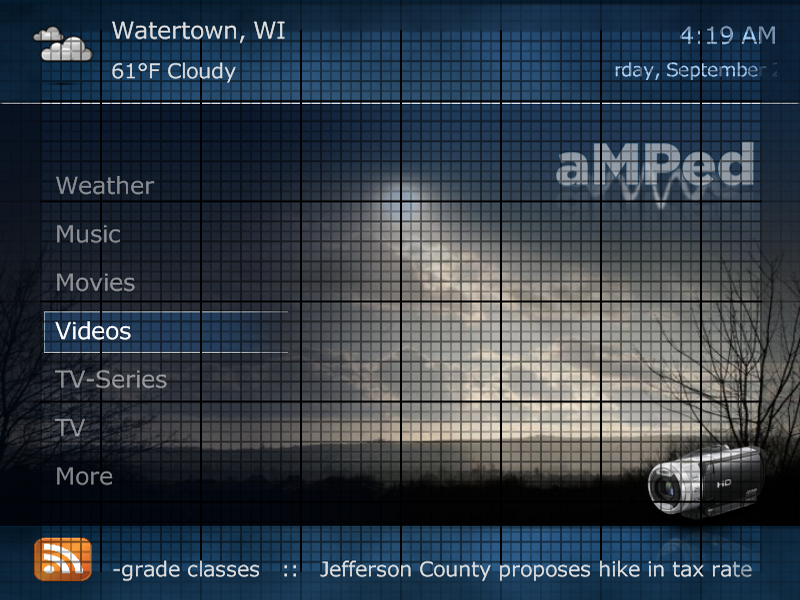
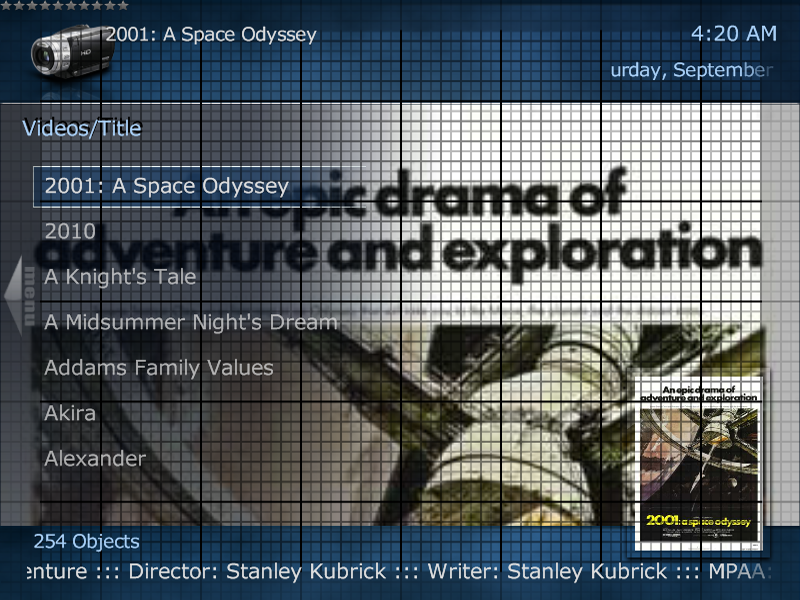
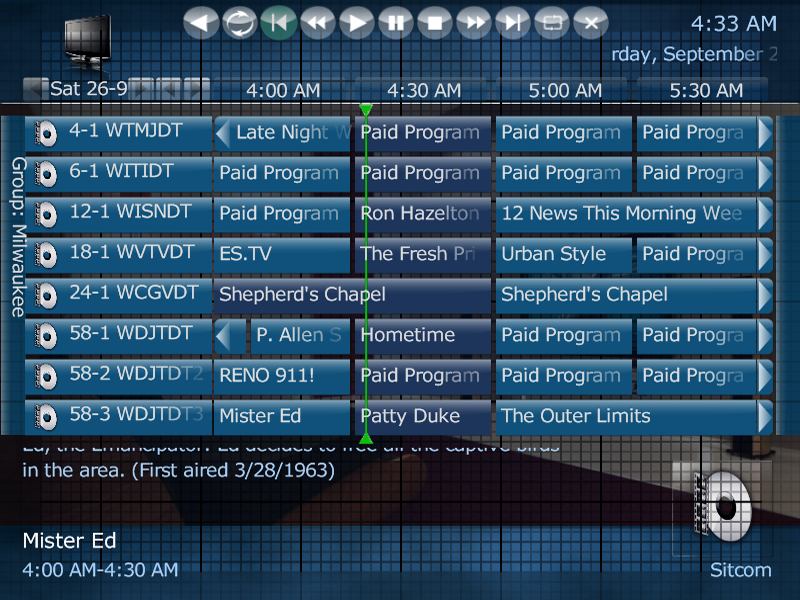
    I have already converted the 'installed' skin to 800x600 resolution, There are many tweeks I must do for it to fit my requirements, including making a custom fonts.xml and adjusting font elements in the other xmls, plus moving all the elements to fit inside my overscan allowance. ... I've added a grid overlay (with the overscan area designated) to all the screens as a placement guide - the attached examples show the grid - it shows clearly where I need to make placement adjustments.

    Chuck
     

    Attachments

    • BasicHome.png
      BasicHome.png
      481.3 KB
    • Videos.png
      Videos.png
      540.3 KB
    • TVGuide.png
      TVGuide.png
      410.9 KB

    joz

    Portal Pro
    March 17, 2008
    1,353
    306
    Home Country
    Netherlands Netherlands
    2BitSculptor:

    I still do not really grasp your problem. Why can't you run 720x576?
    And besides that what issues do you have when doing overscan adjustments? Never had any issues with that (using powerstrip). Back in my tiny 15 inch crt days I had to adjust for overscan a bit too (was even before amped 2.0 I think) but never gave me any sort of issues.

    This skin is specifically designed for 720x576 so all users running on a different resolution than that could have problems. As I already said we can't take into account all screen resolutions, neither can't the wide screen skins. For example I run streamedMP on 16:10 ratio, that has issues too.
    So I guess what I'm saying is that if you do not run the supported screen resolution well that's up to you but just know amped does not support that officialy. If you want to run amped as it was designed, run it on 720x576. Then it will have some room for over/under scan. If that's still not enough for your tv/monitor then start using either MP screen calibration or the prefered by me method; powerstrip
     

    Dadeo

    Docs Group Manager
  • Premium Supporter
  • November 26, 2006
    5,340
    3,321
    Himalayas, India
    Home Country
    Canada Canada
    Reg the buttons should be there on TVGuide. If not, please post a screenshot. With l18pt font they get scaled up and overlap. That's why in aMPed 2.0 I had moved them, but some users complained about that, so I put them back in the 'usual' location. They are really only for mouse users imo. It is much easier to use FF and REW remote keys to adjust the time periods.
     

    2BitSculptor

    Super Moderator
  • Team MediaPortal
  • January 23, 2008
    2,007
    1,052
    South Central Wisconsin
    Home Country
    United States of America United States of America
    @2bitsculptor:

    I still do not really grasp your problem. Why can't you run 720x576?

    I have no other means to convert a 720x576 computer display to a 740x480 NTSC analog TV (I am in the US). My converter works only with standard computer displays (eg. 640x480, 800x600 and 1024x768) 640x480 is too small to do anything productive (compter operations) as dialog boxes are too large to find the edges for any buttons. 1024x768 is too large to be able to read normal screen text on the NTSC TV ... so I use 800x600. A 720x576 MediaPortal skin in full screen on an 800x600 display shows no discernible offset errors.

    And besides that what issues do you have when doing overscan adjustments? Never had any issues with that (using powerstrip). Back in my tiny 15 inch crt days I had to adjust for overscan a bit too (was even before amped 2.0 I think) but never gave me any sort of issues.

    My PCtoTV converter only has two overscan settings (on/off). As I explained above I have brightness bloom issues when it is off (underscan). The ATI Catalist software is fully adjusted to its smallest vertical dimension and pushed all the way to the top of the display space (and still runs off a couple pixels at the bottom). Ideally, I should be able to adjust the vertical position and stretch on the TV itself, but those controls are nonexistent. All this means that I cannot make the displayed picture smaller when in overscan. I do not want to chance damaging the PCtoTV converter by sending it nonstandard sync.

    This skin is specifically designed for 720x576 so all users running on a different resolution than that could have problems. As I already said we can't take into account all screen resolutions, neither can't the wide screen skins. For example I run streamedMP on 16:10 ratio, that has issues too.
    So I guess what I'm saying is that if you do not run the supported screen resolution well that's up to you but just know amped does not support that officialy. If you want to run amped as it was designed, run it on 720x576. Then it will have some room for over/under scan. If that's still not enough for your tv/monitor then start using either MP screen calibration or the prefered by me method; powerstrip

    I can run 720x576 on my 800x600 display (converted to 720x480) without issue. As I tried to demonstrate above, is that the overscan allowance you have used in aMPed (20 pixels) is insufficient for my TV. An allowance of no less than 27 pixels is acceptable. The viewable physical space is reduced to 662x528, with the rest lost in overscan.

    When aMPed is converted (using the neat little conversion software) to true 800x600 resolution, the overscan issue is also transfered intact, but the minimum space is now 30 pixels top and bottom and 40 pixels on each side. Following the 10% rule, my physical display space is now 720x536 with the rest lost to overscan.

    Best regards,

    Chuck

    edit:

    I would not be concerned about this 'issue' if I didn't feel so strongly about the potential of the aMPed skin for 4x3 analog TV users that have yet to dive into the MediaPortal pool, who are holding back because of the assumed disparity between PAL and NTSC standards. I feel I am the lowest common denominator right now, and if aMPed can work 'out of the box' for me, then it will be the best d@mn skin for 4x3 viewers worldwide.

    best regards,

    Chuck
     

    Reg

    Portal Pro
    November 22, 2008
    163
    29
    Christchurch
    Home Country
    New Zealand New Zealand
    @Reg the buttons should be there on TVGuide. If not, please post a screenshot. With l18pt font they get scaled up and overlap. That's why in aMPed 2.0 I had moved them, but some users complained about that, so I put them back in the 'usual' location. They are really only for mouse users imo. It is much easier to use FF and REW remote keys to adjust the time periods.


    Yes they are there and overlapping the buttons that are used to shift to the next day. Using FF and Rew on the remote is a much better idea now that you reminded me I can do that. Only problem is that the overlapping buttons makes it harder to select the buttons to jump to the next day. Dont suppose there is a remote button that will jump one day or more?


    I also tested out the date formatting options you told me about in aMPed config. and that is a very handy function, especially for 18 pt font users like me. I now have mine set in short form after editing them so now it reads:

    Mon 28 Sep

    which fits nicely and doesn't force it to scroll, which can be annoying especially as I have my scroll speed set to very slow so I can read programme info well.

    Thanks heaps to whoever added those functions to aMPed config.


    :D:D
     

    2BitSculptor

    Super Moderator
  • Team MediaPortal
  • January 23, 2008
    2,007
    1,052
    South Central Wisconsin
    Home Country
    United States of America United States of America
    Okay... I tried Powerstrip. It sorta worked.

    I cannot set the display res to 720x576 (PAL) without the TV sync going ballistic. As I said before, using NTSC res makes the display unusable for other computer apps (but I would only need a sub-D to S-video connector), so 800x600 is still my best option, which requires the use of the external PCtoTV converter to scale the whole display to NTSC for the TV.

    Squeezing the vertical on the display to where it should be (for the 20 pixel margin) also makes the sync go ballistic (I have to back it off to get proper sync). Horizontal squeeze works within acceptable limits. I still get overrun on the top and bottom, but not as much as it was. The top-of-screen text is 'just' inside the mask-frame of my TV (because the font has some head-space built-in - most evident in the larger font sizes). The descenders on the bottom screen text (in the fadelabels) run off-screen (although the RSS button has plenty of room). Many of the screen icons in the top left corner run off-screen.

    My suggestion: since I previously noted that the bottom line of text was displayed below the 20 pixel mark, using a smaller font or moving the line up 10 pixels will give adequate room to be marginally acceptable for NTSC 4x3 users in similar situation, as then the display can be adjusted down a bit more in Powerstrip to make room at the top-of-screen.

    This still doesn't deter me from attempting a true 800x600 skin :D

    regards,

    Chuck

    btw, JOZ, thanks for the link to Powerstrip ... now I have to come up with the $$ before the try-then-buy time limit runs out.
     

    Smolle

    Portal Member
    August 7, 2007
    7
    0
    Hi, great skin, the only usable for 4:3. But the miniguide has some bugs. The text overlapps the logo an there is no "Now"-Information. I´ve tried all in tvminiguide.xml with no luck to format it right.

    Smolle
     

    Users who are viewing this thread

    Similar threads

    If you’re planning to submit a pull request, let’s go through the list of issues and their solutions. I or someone from the team will create a Jira ticket, and for each ticket, you’ll make the changes and submit a pull request. This will be transparent and straightforward.
    If you’re planning to submit a pull request, let’s go through the list of issues and their solutions. I or someone from the team...
    I'm very glad to see that mediaportal 1 is on github, where ordinary devs with github accounts can make contributions. Please can...
    Replies
    7
    Views
    1K
    MP1 MP2 Spell Check gone? DE
    Got it.:) I clicked on the box highlighted in the attached screenshot and also added English GB to that and removed the existing English EN. Misspellled words (like that one) are now underlined with red wavy line.:)
    Got it.:) I clicked on the box highlighted in the attached screenshot and also added English GB to that and removed the existing...
    Up untill recently I'm sure there was a spell checker on new posts, (misspelled words were highlighted). It does not seem to be...
    Replies
    8
    Views
    2K
    4.5 is really old. I'm not sure 4.5.5 even is a version that actually existed. You should be able to install .NET Framework 4.8.0 on Windows 7 SP1
    4.5 is really old. I'm not sure 4.5.5 even is a version that actually existed. You should be able to install .NET Framework 4.8.0...
    My TV PC is more a cast-off on older hardware (a 'Quiet PC' i5 4690, 16GB ram, 2xSSD 1xHDD, system graphics), mainly as a cheap way...
    Replies
    5
    Views
    2K
    Greetings to all Denizens of the land of MediaPortal... It seems our Zap2XML/GraceNote access is broken again. I (as many others) have been using the latest NewZap2xml_6 and it has worked flawlessly. A few days ago it all died. I wonder if anyone is working a solution to save the masses. I am hoping the good citizen of past is...
    Greetings to all Denizens of the land of MediaPortal... It seems our Zap2XML/GraceNote access is broken again. I (as many others)...
    Greetings to all Denizens of the land of MediaPortal... It seems our Zap2XML/GraceNote access is broken again. I (as many others)...
    Replies
    0
    Views
    778
    Thanks guys. Ok, spent the (whole) weekend on this lol. First; TVHeadend/Kodi.... Nah. Given up on that - 'non-tech'; its horrible. 'Tech' - a few reasons but mostly that it is buggy. It is actually a real shame as it does have potential and promises a lot (was great to have Kodi on my phone and be able to watch live/recordings...
    Thanks guys. Ok, spent the (whole) weekend on this lol. First; TVHeadend/Kodi.... Nah. Given up on that - 'non-tech'; its...
    So, a very long-time MP fan here. Family have used MP (Only MP1 as all addicted to Titan skin) for ever - for my 13yo, thats 100%...
    Replies
    5
    Views
    5K
    Top Bottom