
Feature wishlist for MediaStream (2 Viewers)

ThaClown

Moderator - Dutch Forums
May 28, 2006
807
26
Den Bosch
Home Country
Netherlands Netherlands
- I'd like to see the artist name and info clearly shown in the various music menu's.
I use the filmstrip view with the album art to browse my music, and in this view the artist name and album title are not displayed..

- Also the radio menu looks 'wrong' someway, the icons stay on the left and there is alot of free space everywhere.
I'd like to see a large radio logo and the name of the station bigger.

- Personally for me, I think the details view of the Moving Pictures plugin has too little of the fanart shown, are there mods for this screen to make the info more down and move the dark gradient down a bit?

I love the skin, great work!
 

RobinE

Portal Member
December 30, 2007
38
2
Home Country
Netherlands Netherlands
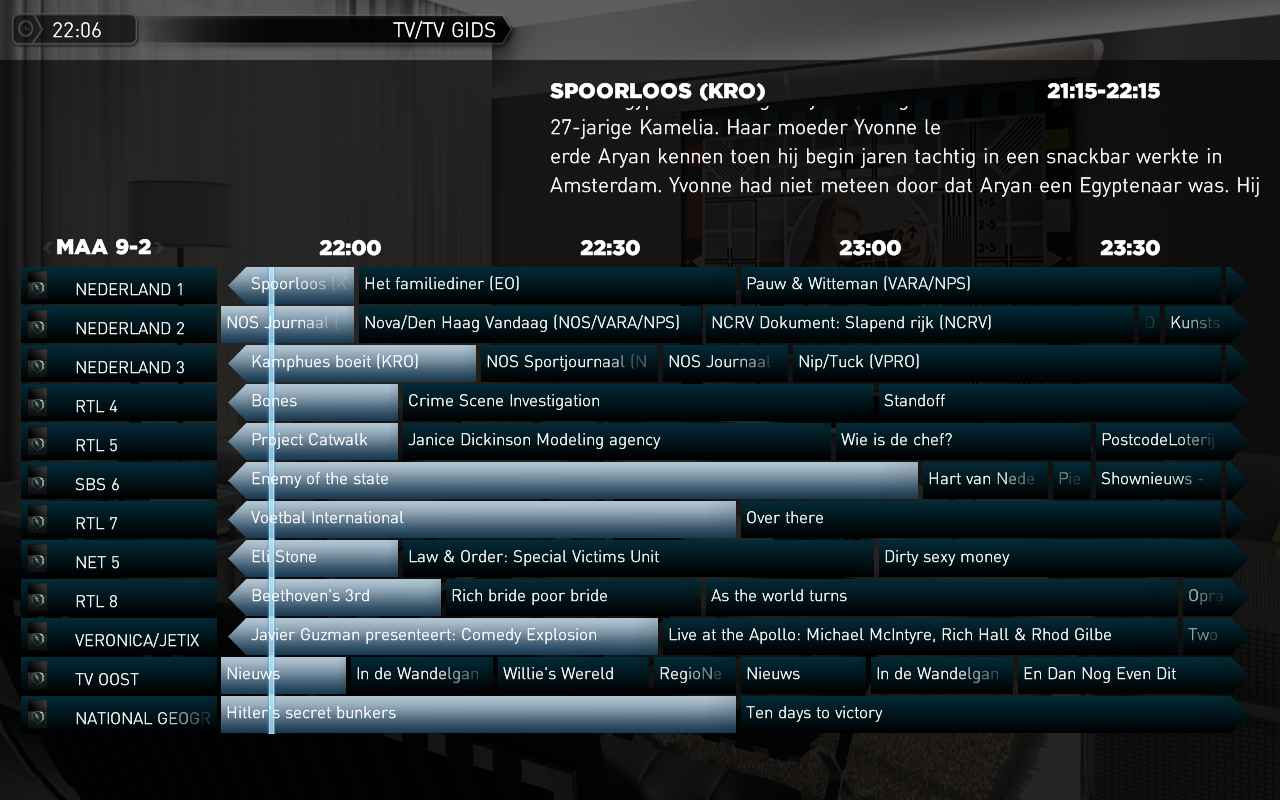
Is it possible to make a 12 row TV guide? I like this option in the monochrome/indigo skin where you can choose between 8 or 12 rows.

Thanks for this great skin.

Yes, but I don't think the overlay of now playing can fit in the screen...personally I don't have more than 4 channels right now, so isn't really a big issue, but it should be relatively simple to change, you need to make the channel-container higher and move it up to make room on the screen.

I have changed the tvguide to 12 rows. I'm not a skinner so no guaranty! For my it works well. See attachments.
 

Attachments

  • 12row_guide.jpg
    12row_guide.jpg
    83.5 KB

tebba

Portal Pro
November 8, 2007
56
0
Home Country
Norway Norway
A small thing, yet usefull feature.

But, i'd like to see a "Number of movies: XXX" in the top when you browse the Moving Picture window. Just to see how many movies you've got in the database. :) I guess it's pretty easy to implement:)


Edit: Loving it Raytestrak, thx ;)
 

Raytestrak

MP Donator
  • Premium Supporter
  • April 12, 2008
    497
    21
    50
    Honselersdijk
    Home Country
    Netherlands Netherlands
    I'd like to see a modification in the mediastream.dll, making it possible to select custom backgrounds. My idea: place all the wallpapers the skin uses in \Media\Wallpapers and if you place a new .jpg or .png there, you can select it in the config applet with the drop down list. Don't know if it's possible though.

    tebba, I've added the movie count for you. Hope it's to your liking.
     

    Attachments

    • movingpictures.xml
      30.6 KB

    pilehave

    Community Skin Designer
  • Premium Supporter
  • April 2, 2008
    2,566
    521
    Hornslet
    Home Country
    Denmark Denmark
    • Thread starter
    • Moderator
    • #56
    I'd like to see a modification in the mediastream.dll, making it possible to select custom backgrounds. My idea: place all the wallpapers the skin uses in \Media\Wallpapers and if you place a new .jpg or .png there, you can select it in the config applet with the drop down list. Don't know if it's possible though.

    I changed the plugin to do this, will have to wait to compile until tonight. I'll release a new version with an explanation later :)
     

    Raytestrak

    MP Donator
  • Premium Supporter
  • April 12, 2008
    497
    21
    50
    Honselersdijk
    Home Country
    Netherlands Netherlands
    I'd like to see a modification in the mediastream.dll, making it possible to select custom backgrounds. My idea: place all the wallpapers the skin uses in \Media\Wallpapers and if you place a new .jpg or .png there, you can select it in the config applet with the drop down list. Don't know if it's possible though.

    I changed the plugin to do this, will have to wait to compile until tonight. I'll release a new version with an explanation later :)

    Thanks! Is there a skin update as well? Just asking, cause then I have to make a backup first. I've editted quite some xml files since v17.
     

    pilehave

    Community Skin Designer
  • Premium Supporter
  • April 2, 2008
    2,566
    521
    Hornslet
    Home Country
    Denmark Denmark
    • Thread starter
    • Moderator
    • #58
    I'd like to see a modification in the mediastream.dll, making it possible to select custom backgrounds. My idea: place all the wallpapers the skin uses in \Media\Wallpapers and if you place a new .jpg or .png there, you can select it in the config applet with the drop down list. Don't know if it's possible though.

    I changed the plugin to do this, will have to wait to compile until tonight. I'll release a new version with an explanation later :)

    Thanks! Is there a skin update as well? Just asking, cause then I have to make a backup first. I've editted quite some xml files since v17.

    Not really, just the dll :)
     

    pilehave

    Community Skin Designer
  • Premium Supporter
  • April 2, 2008
    2,566
    521
    Hornslet
    Home Country
    Denmark Denmark
    • Thread starter
    • Moderator
    • #59
    I'd like to see a modification in the mediastream.dll, making it possible to select custom backgrounds. My idea: place all the wallpapers the skin uses in \Media\Wallpapers and if you place a new .jpg or .png there, you can select it in the config applet with the drop down list. Don't know if it's possible though.

    A bit late at night, but would you be kind enough to test this new DLL out? You need to create a folder called "Wallpapers" in the "Media" folder as you suggested yourself :)

    In this, you have to put your background-images that used to be directly in the "Media" folder. It shouldn't be neccesary to edit menu-items to keep your current configuration running as usual.

    (fingers crossed!)
     

    Attachments

    • MediaStream.zip
      30.6 KB

    Raytestrak

    MP Donator
  • Premium Supporter
  • April 12, 2008
    497
    21
    50
    Honselersdijk
    Home Country
    Netherlands Netherlands
    I'd like to see a modification in the mediastream.dll, making it possible to select custom backgrounds. My idea: place all the wallpapers the skin uses in \Media\Wallpapers and if you place a new .jpg or .png there, you can select it in the config applet with the drop down list. Don't know if it's possible though.

    A bit late at night, but would you be kind enough to test this new DLL out? You need to create a folder called "Wallpapers" in the "Media" folder as you suggested yourself :)

    In this, you have to put your background-images that used to be directly in the "Media" folder. It shouldn't be neccesary to edit menu-items to keep your current configuration running as usual.

    (fingers crossed!)

    It's never too late to be fiddling with your htpc ;)
    It kinda works, and kinda doesn't.

    It probably needs a skin update now, or users have to manually move the current wallpapers to the new wallpapers folder, since it only let's you select files from that folder. I placed a new .jpg in the folder and I can select that file. When I update and save, only the updated menu item shows a background, the rest stay black even if I don't update them. Moving the background images from the media folder to the wallpapers folder makes them appear again.

    Edit: going to bed now, guess it is too late to be fiddling with my htpc ... will do some more testing again tomorrow of you need me to.

    Edit2: With all the backgrounds moved to the wallpapers folder, it works like a charm. Didn't have to update my other menu items, guess it just looks in the wallpapers folder and ignores the media folder. I think this is fine actually, now you have a clear view of what's what. The only downside is that the plugin xml files look for the backgrounds in the media folder, so either you copy them to wallpapers folder, resulting in a double set of wallpapers, or edit the xml files to point to wallpapers/background.png.
     

    Users who are viewing this thread

    Similar threads

    I am following the official documentation for setting up the Kodi plugin in media portal. I have got no issues with media portal, nor media portal plugin on Kodi, but with the Kodi plugin that must be installed in the media portal, as it is not getting detected. I have made a copy of the dll file into the plugins folder as found in my...
    I am following the official documentation for setting up the Kodi plugin in media portal. I have got no issues with media portal...
    I am following the official documentation for setting up the Kodi plugin in media portal. I have got no issues with media portal...
    Replies
    0
    Views
    205
    Got a reply from SD ... "Looks like your last successful download was on 5/23. On 5/24 for some reason we received 194 connections between 10:54 and 11:05 triggering a denial of service attack ban. The logs show it was lifted on 5/25, but I still see the entry in iptables. I reset fail2ban and hopefully you're working again." Weird...
    Got a reply from SD ... "Looks like your last successful download was on 5/23. On 5/24 for some reason we received 194...
    I'm using MediaPortal 1.38.1 x64 and have an SD-DD lineup account. In the last week, I have not been able to update my EPG, and...
    Replies
    3
    Views
    425
    Got it working again!!! (y) (y) It seems the file "DialogMenu.xml" in the theme folder does not have the onX settings in the file by default (after MP 1.36) and when you install a later version of MP. I modified the MP 1.38 file with the onX settings from MP 1.36. Also I have found the "DialogMenu.xml" from MP 1.36 will work with MP...
    Got it working again!!! (y) (y) It seems the file "DialogMenu.xml" in the theme folder does not have the onX settings in the file...
    Hi This is a general question about OnX. I have been using the TvWishList plugin for a while and have recently updated (update...
    Replies
    1
    Views
    1K
    MP1 MP2 [solved] Ignore "The" for Sort Name? DE
    Added to 1.38 Final
    Added to 1.38 Final
    I don't want to remove the title prefix from a movie title (i.e. "The Matrix" -> "Matrix, The", but I don't want to manually remove...
    Replies
    20
    Views
    4K
    Fixed, I think. Certainly the vintage MP2 installer that I was using no longer installs the LAV filters. I can only assume that these were never part of the install package itself, but rather downloaded during the install, and that link no longer exists. Shame that the installer doesn't indicate this. Last time when I installed the...
    Fixed, I think. Certainly the vintage MP2 installer that I was using no longer installs the LAV filters. I can only assume that...
    Hi all, I've recently retired my MP2 setup for my main HTPC and gone back to separates, but I wanted to retain the ability to play...
    Replies
    4
    Views
    155
    Top Bottom