Setup help - USA EPG (1 Viewer)

mm1352000

Retired Team Member
  • Premium Supporter
  • September 1, 2008
    21,544
    8,236
    Home Country
    New Zealand New Zealand
    Hmmm, is the xmltv.dtd file called xmltv.dtd.txt like the attachment? It also needs to be simply xmltv.dtd.
     

    Cambridge

    New Member
    November 28, 2014
    10
    0
    70
    Home Country
    Uzbekistan Uzbekistan
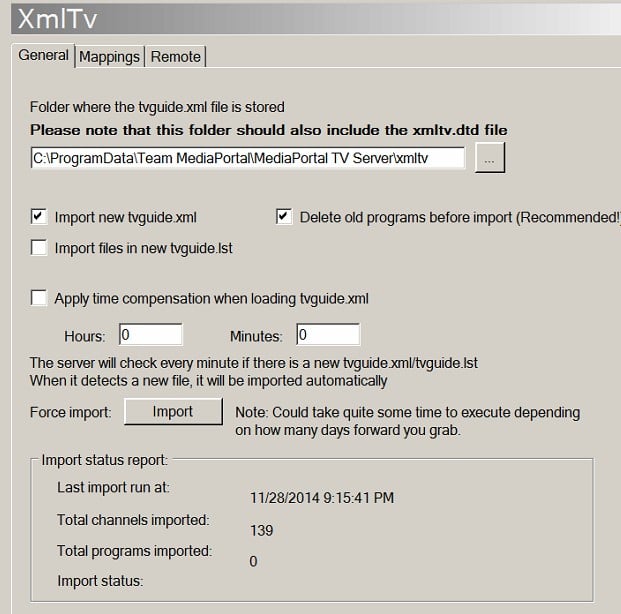
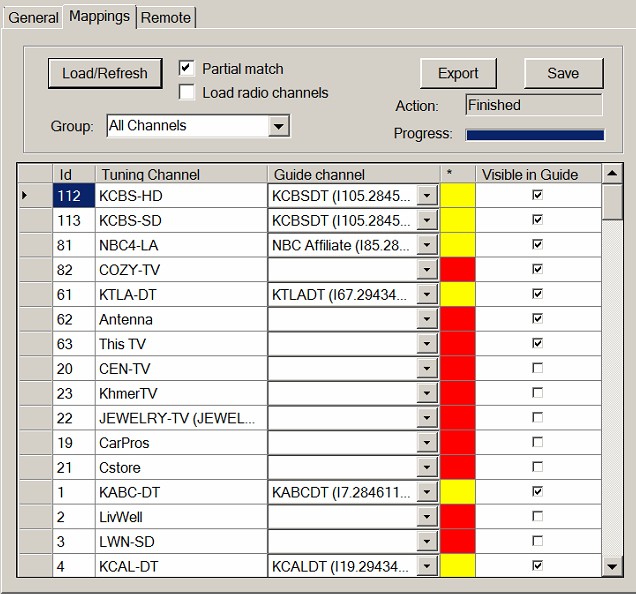
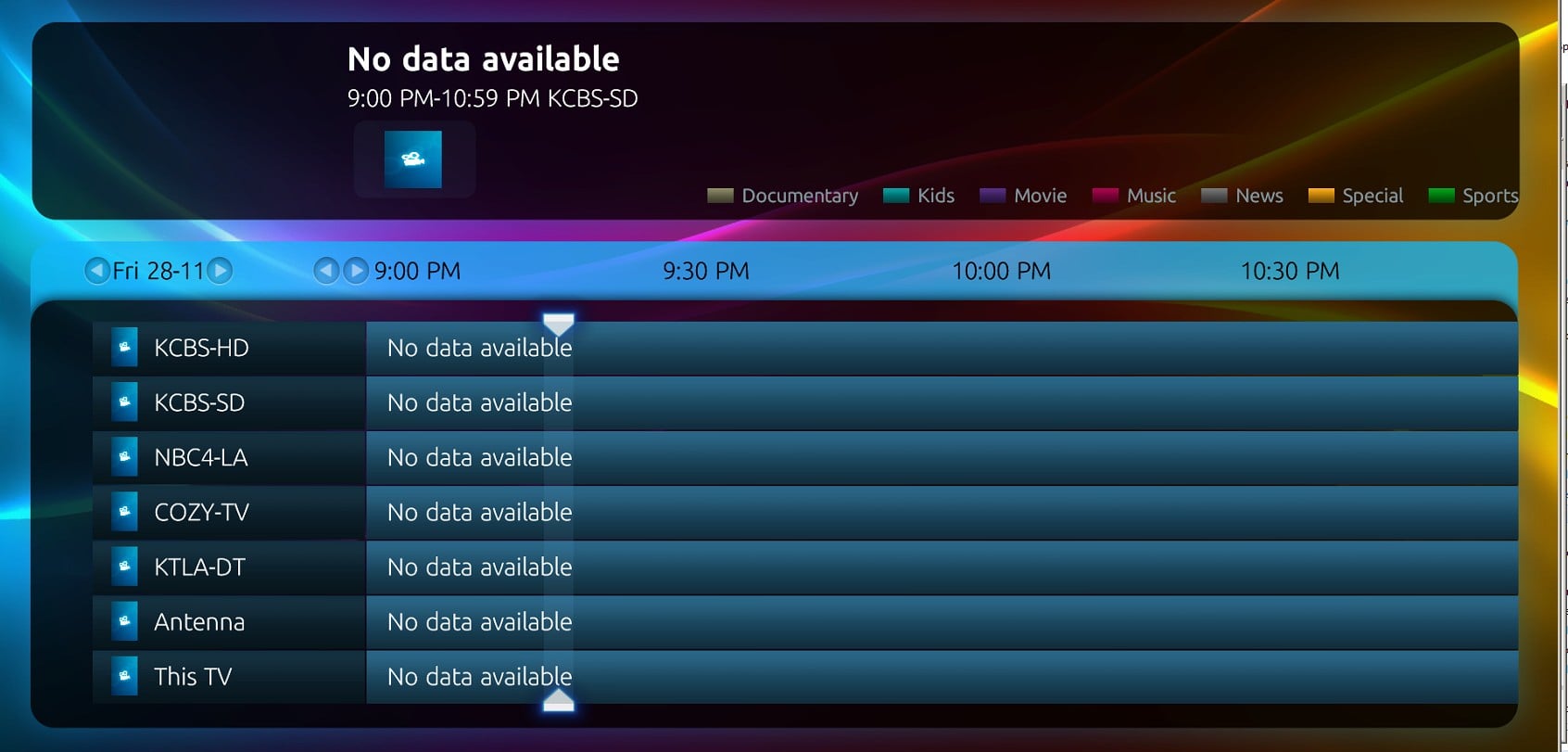
    Wow, I feel I'm sooo close to getting this thing to work. It appears that I was pointing to the wrong directory. So now we mapped the channels the channel guides come up, and I have most in yellow. And now when I went to the General tab and clicked import it came up with 139 channels imported...so that is good...checked the Import files in new tvguide.lst and clicked the Import again. closed TV Server Config and opened MediaPortal to see if the channels were imported and nothing! grrrrr Doesn't seem like it should be this difficult...any ideas?
     

    Attachments

    • ScreenHunter_339 Nov. 28 21.16.jpg
      ScreenHunter_339 Nov. 28 21.16.jpg
      73.8 KB
    • ScreenHunter_338 Nov. 28 21.16.jpg
      ScreenHunter_338 Nov. 28 21.16.jpg
      90.6 KB
    • ScreenHunter_340 Nov. 28 21.21.jpg
      ScreenHunter_340 Nov. 28 21.21.jpg
      177.6 KB

    mm1352000

    Retired Team Member
  • Premium Supporter
  • September 1, 2008
    21,544
    8,236
    Home Country
    New Zealand New Zealand
    Wow, I feel I'm sooo close to getting this thing to work.
    You are! :)

    So now we mapped the channels the channel guides come up, and I have most in yellow.
    Yellow means "partial match".
    The idea is that you would check/select the correct guide channel for each TV Server channel on the mapping tab. TV Server tries to assist you with this by mapping channels automatically where possible, but names don't always match so you will probably have to do some manual fixups. After setting all the mappings correctly, be sure to click save.
    Finally, go back to the general tab and click "import now" again, and the programs start importing. This will take 5 minutes or so. You should start to see them appearing in the MediaPortal guide.

    So to be clear: first import is to import the channels; second import after mapping imports the programs.

    And now when I went to the General tab and clicked import it came up with 139 channels imported...so that is good...
    Yep, that is good... but note the 0 programs imported, which means you haven't saved mappings. That's why no data is imported when you click import again. Must check/fix/select the mappings and save first, as above.
     

    Cambridge

    New Member
    November 28, 2014
    10
    0
    70
    Home Country
    Uzbekistan Uzbekistan
    it doesn't appear that a file is generated when I check "Import files in new tvguide.lst" and click the import button. Nothing seems to be updating or generating. Also should there be a "tvguide.lst" somewhere in one of my folders?
     

    mm1352000

    Retired Team Member
  • Premium Supporter
  • September 1, 2008
    21,544
    8,236
    Home Country
    New Zealand New Zealand
    it doesn't appear that a file is generated when I check "Import files in new tvguide.lst" and click the import button. Nothing seems to be updating or generating. Also should there be a "tvguide.lst" somewhere in one of my folders?
    Please leave the tvguide.lst option unticked. As the wiki says, that option is used when it is necessary to import more than one tvguide.xml file. Since you only have one tvguide.xml, the option is not relevant for you and you don't need a tvguide.lst file.
     

    Users who are viewing this thread

    Similar threads

    I have added a scheduled task to MariaDB to delete all entries with the same start and end date
    I have added a scheduled task to MariaDB to delete all entries with the same start and end date
    Hello, I'm encountering an issue after importing EPG data into the TV-Server/Database. The Problem: After importing an XMLTV...
    Replies
    7
    Views
    2K
    Hey CyberSimian you nailed it! Looks like the secret is:- After EPG Collector has Run and provided the TVGuide.xml Open MediaPortal - TV Server Configuration "Force Import" on the Plugins/Xmltv/General dialogue, (ignore the status) Go to the Mappings dialogue and Load/Refresh and Save a Group - (It does not appear to matter which...
    Hey CyberSimian you nailed it! Looks like the secret is:- After EPG Collector has Run and provided the TVGuide.xml Open...
    Hi everyone I posted in the EPG section a while back concerning MediaPortal EPG using EPG Collector and MediaPortal xmltv plugin...
    Replies
    51
    Views
    13K
    MP1 MP2 MP2 - V2.3 EPG has stopped DE
    The only configuration that is certain to work is when the MP client and MP server are from the same release. It is sometimes possible to use MP clients from a release that is different to the MP server, but whether it works depends on the specific changes that were made between the two releases. -- from CyberSimian in the UK
    The only configuration that is certain to work is when the MP client and MP server are from the same release. It is sometimes...
    Before you create this bug report: Make sure that your system (Windows, codecs and drivers) is up to date, matching the...
    Replies
    10
    Views
    5K
    I used to use the grabber but a few years back it disappeared on FreeSat DVBS. That is when I changed to EPG Collector. The extra benefit is that it collects from the Sky platform so it will give EPG for all the FreeSat channels plus the unencrypted movie channels on the Sky platform. It also allows me to pick the channels dedicated...
    I used to use the grabber but a few years back it disappeared on FreeSat DVBS. That is when I changed to EPG Collector. The extra...
    Hi everyone, I hope you are all well My Mum's Mediaportal lost it's marbles thanks to Microsoft update, (even though I had update...
    Replies
    2
    Views
    2K
    GitHub - jesmannstl/zap2xml: Automate TV guides to XMLTV much faster rewrite pulls full 14 day lineup in seconds. If pulling multiple lineups GitHub - jesmannstl/tvmerge: An updated and faster tvmerge utility merges 2 or more xmltv files. Both written in node.js.
    GitHub - jesmannstl/zap2xml: Automate TV guides to XMLTV much faster rewrite pulls full 14 day lineup in seconds. If pulling...
    Today I reached the end of my guide data. Upon researching what went wrong, I learned zap2it.com is dead. So zap2xml.exe doesn't...
    Replies
    13
    Views
    9K
    Top Bottom