[fixed] no Cards available (1 Viewer)

Sebastiii

Development Group
  • Team MediaPortal
  • November 12, 2007
    16,523
    10,466
    France
    Home Country
    France France
    You can try again without complete installation to update using separate installer :)
    start %temp% and you will find mediaportal dir and a deploy folder with installer (separate).
    Maybe a file was not update correctly.

    ofc if it will not work, clean install should be tested
     
    Last edited:

    elliottmc

    Retired Team Member
  • Premium Supporter
  • August 7, 2005
    14,927
    6,061
    Cardiff, UK
    Home Country
    United Kingdom United Kingdom
    Yes i stoped TV-Service before update. I Use 2xDVB-T and 1xDVB-S2.
    I'll try a complete uninstall and reinstall next week.

    Are the cards still showing in device manager?

    Can you take a screenshot of the section of SetupTV where the cards should be showing, so that we can see what IS there?
     

    harryzwo

    Portal Pro
    July 25, 2006
    948
    144
    Home Country
    Germany Germany
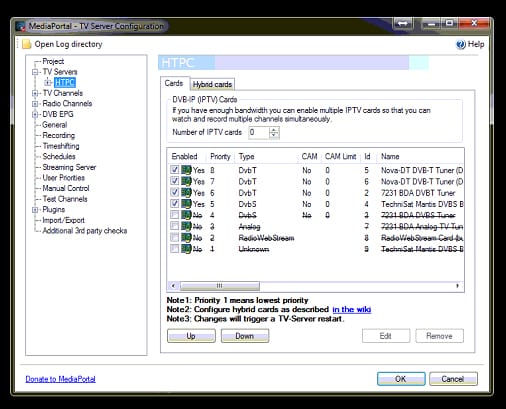
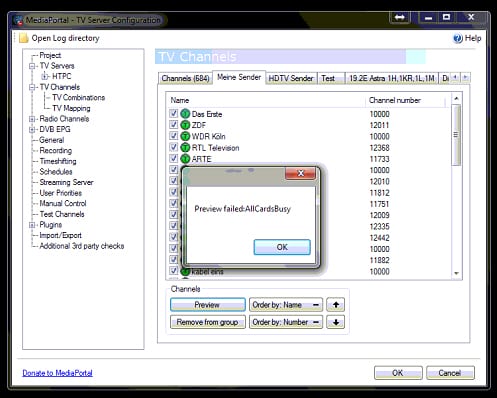
    Here are any Screenshots.

    All TVCards are showed idle.
     

    Attachments

    • TVCard01.jpg
      TVCard01.jpg
      165.5 KB
    • TVCard02.jpg
      TVCard02.jpg
      143.7 KB
    • TVCard03.jpg
      TVCard03.jpg
      146.1 KB

    elliottmc

    Retired Team Member
  • Premium Supporter
  • August 7, 2005
    14,927
    6,061
    Cardiff, UK
    Home Country
    United Kingdom United Kingdom
    Are the channels correctly mapped to cards?

    I would almost be inclined to delete all channels and rescan.
     

    harryzwo

    Portal Pro
    July 25, 2006
    948
    144
    Home Country
    Germany Germany
    The Channels are Mapped. Rescan is not possible, because no Signal. Test with DVBViewwer is OK.
     

    elliottmc

    Retired Team Member
  • Premium Supporter
  • August 7, 2005
    14,927
    6,061
    Cardiff, UK
    Home Country
    United Kingdom United Kingdom
    The Channels are Mapped. Rescan is not possible, because no Signal. Test with DVBViewwer is OK.

    Is it possible that you have other software that is using the card, or at least a service (MCE services) that has a lock on the cards?
     

    harryzwo

    Portal Pro
    July 25, 2006
    948
    144
    Home Country
    Germany Germany
    I have this Update tried twice. 1.2.3 function is OK -> Update to 1.3.0 no Cards. The envirement is exactly the same.
     

    mm1352000

    Retired Team Member
  • Premium Supporter
  • September 1, 2008
    21,544
    8,236
    Home Country
    New Zealand New Zealand
    Hi harryzwo

    It seems clear to me that there is a problem with the tuner reservation system - gibman will need to look at this.
    Just on a hunch: it looks like the channel that you tried to tune had more than one tuning detail. Can you try to delete the other tuning details and map the channel to only one tuner and see if it makes a difference?

    mm
     

    harryzwo

    Portal Pro
    July 25, 2006
    948
    144
    Home Country
    Germany Germany
    I Don't understand. What are the Tuningdetails?? Is it enough to disable all Cards and enable only one? Should i delete all Channels before??
     

    mm1352000

    Retired Team Member
  • Premium Supporter
  • September 1, 2008
    21,544
    8,236
    Home Country
    New Zealand New Zealand
    Hi again

    I Don't understand. What are the Tuningdetails??
    There is an example -->here<--. The channel that you tested has more than one tuning detail - at least one for DVB-T and one for DVB-S so that different types of tuners can tune it. Another way of saying it is that you combined the channels in the past, and now you need to un-combine them.

    1. Open TV Server configuration.
    2. Go to the TV Channels list.
    3. Select one channel that you know does not work.
    4. Click "edit".
    5. Delete all except one of the tuning details (the rows) in the middle part of the screen.
    6. Click OK.

    Now try to tune the channel again.

    Should i delete all Channels before??
    No! Definitely don't do that - it is not necessary.

    mm
     
    Last edited:

    Users who are viewing this thread

    Similar threads

    two simultaneous recordings succeeded. All good!
    two simultaneous recordings succeeded. All good!
    Since upgrading from 1.36 to 1.38, MP1 no longer connects to my tuners. They no longer appear under the server in the left-hand...
    Replies
    11
    Views
    2K
    I note that you are using MP2. The following applies to MP1, but I think that MP2 is identical in this situation. "TV Server Config" has a "TV Mapping" panel in the "TV Channels" section. On the "TV Mapping" tab: The left column lists the channels that have not yet been mapped to the TV tuner identified by the drop-down menu just...
    I note that you are using MP2. The following applies to MP1, but I think that MP2 is identical in this situation. "TV Server...
    I've scanned for channels, and got all channels mapped to tuner 0 of my 8 channel TV card (eg: 2 cards of 4 channels each) Is there...
    Replies
    1
    Views
    813
    Hi This is a general question about OnX. I have been using the TvWishList plugin for a while and have recently updated (update install) from MP 1.36 x86 to 1.37 x86 and found there seemed to be no Onx menu in the TV guide. I then configured the onx.presets.xml file like I would normally do with updates or fresh installs, but still...
    Hi This is a general question about OnX. I have been using the TvWishList plugin for a while and have recently updated (update...
    Hi This is a general question about OnX. I have been using the TvWishList plugin for a while and have recently updated (update...
    Replies
    0
    Views
    764
    MP1 MP2 MP2 - V2.5 Sony Bravia 32S5100 DE
    When i was using 2.5, and like im using MP1, i set the resolution of my desktop. And MEPo just uses whatever i have set.
    When i was using 2.5, and like im using MP1, i set the resolution of my desktop. And MEPo just uses whatever i have set.
    MP 2.5 does not recognize my Bravia 32S5100 as 1920x1080 but only as 1280x720. The PC's monitor is recognized as 1920x1080. Both...
    Replies
    2
    Views
    769
    i think info but I'm really not sure
    i think info but I'm really not sure
    When I import new films using Moving Pictures, it takes an incredibly long time for the information to be found and downloaded...
    Replies
    3
    Views
    696
    Top Bottom