[fixed] no Cards available (1 Viewer)

harryzwo

Portal Pro
July 25, 2006
953
147
Home Country
Germany Germany
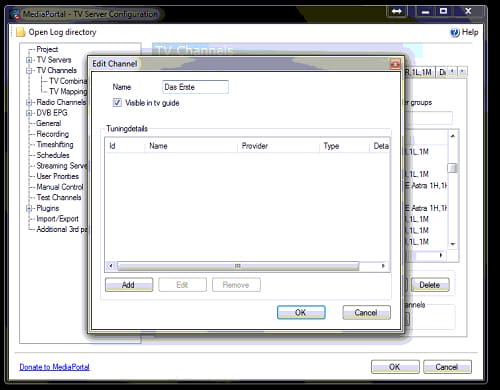
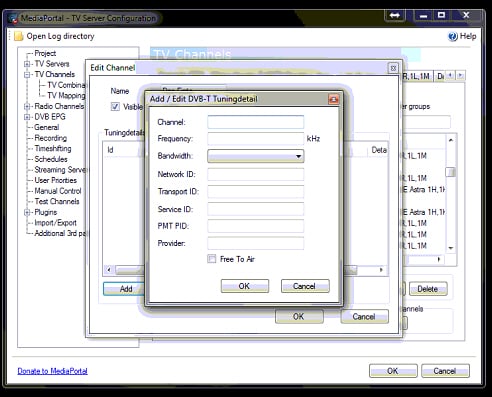
i have delete all Details, but now i don't know what Details i have to use in Tune3.jpg
 

Attachments

  • Tune01.jpg
    Tune01.jpg
    125.8 KB
  • Tune02.jpg
    Tune02.jpg
    184.8 KB
  • Tune03.jpg
    Tune03.jpg
    147 KB

mm1352000

Retired Team Member
  • Premium Supporter
  • September 1, 2008
    21,544
    8,236
    Home Country
    New Zealand New Zealand
    i have delete all Details, but now i don't know what Details i have to use in Tune3.jpg

    I said in my instruction:

    5. Delete all except one of the tuning details (the rows) in the middle part of the screen.

    Since you deleted them all, you will need to rescan that channel now.
    You can choose another channel to test. This time, do not delete all - save one. ;)
     

    harryzwo

    Portal Pro
    July 25, 2006
    953
    147
    Home Country
    Germany Germany
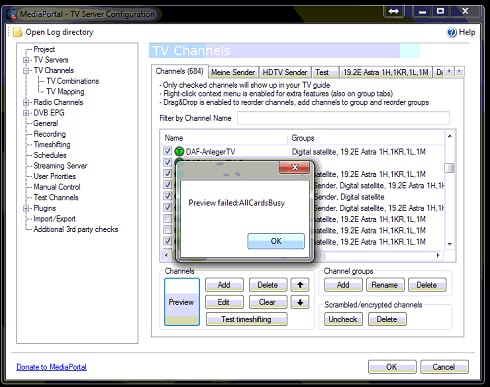
    I tried it with Das Erste HD. The Message is the same 'no Card'.
     

    mm1352000

    Retired Team Member
  • Premium Supporter
  • September 1, 2008
    21,544
    8,236
    Home Country
    New Zealand New Zealand
    Please restart the TV service, then try again. If there is still a problem, please provide the logs again.

    Thx
    :)
     

    harryzwo

    Portal Pro
    July 25, 2006
    953
    147
    Home Country
    Germany Germany
    After restart tv-Service 'Das Erste HD' can previewed. What can i do with the other Channels? I don't like delete all Details manually.
     

    mm1352000

    Retired Team Member
  • Premium Supporter
  • September 1, 2008
    21,544
    8,236
    Home Country
    New Zealand New Zealand
    You can try to disable all of your tuners except one... or maybe try to only disable the satellite (DVB-S/S2) tuner and see if it still works.
     

    harryzwo

    Portal Pro
    July 25, 2006
    953
    147
    Home Country
    Germany Germany
    i disabled only dvb-s it dosen't work, then i disabeled all dvb-t and enable dvb-s. Only Channel 'Das ErsteHD' works all other not
     

    mm1352000

    Retired Team Member
  • Premium Supporter
  • September 1, 2008
    21,544
    8,236
    Home Country
    New Zealand New Zealand
    Okay. Seems like the only way to "fix" the problem would be to delete the tuning details. Maybe it would be better for you to stay with MP 1.2.3 until this problem has been fixed.
     

    harryzwo

    Portal Pro
    July 25, 2006
    953
    147
    Home Country
    Germany Germany
    Yes I think so, too. I will go back to 1.2.3 tonight. Thank You for helping.
     

    Users who are viewing this thread

    Similar threads

    two simultaneous recordings succeeded. All good!
    two simultaneous recordings succeeded. All good!
    Since upgrading from 1.36 to 1.38, MP1 no longer connects to my tuners. They no longer appear under the server in the left-hand...
    Replies
    11
    Views
    3K
    I note that you are using MP2. The following applies to MP1, but I think that MP2 is identical in this situation. "TV Server Config" has a "TV Mapping" panel in the "TV Channels" section. On the "TV Mapping" tab: The left column lists the channels that have not yet been mapped to the TV tuner identified by the drop-down menu just...
    I note that you are using MP2. The following applies to MP1, but I think that MP2 is identical in this situation. "TV Server...
    I've scanned for channels, and got all channels mapped to tuner 0 of my 8 channel TV card (eg: 2 cards of 4 channels each) Is there...
    Replies
    1
    Views
    998
    Thank you for confirming that U&W works for you. I ended up deleting U&W and rescanning for channels. That fixed the issue.
    Thank you for confirming that U&W works for you. I ended up deleting U&W and rescanning for channels. That fixed the issue.
    I have setup Refresh DVB EPG so that BBC One is the grabber channel (which is meant to grab all available channels) but the U&W...
    Replies
    2
    Views
    383
    Got it working again!!! (y) (y) It seems the file "DialogMenu.xml" in the theme folder does not have the onX settings in the file by default (after MP 1.36) and when you install a later version of MP. I modified the MP 1.38 file with the onX settings from MP 1.36. Also I have found the "DialogMenu.xml" from MP 1.36 will work with MP...
    Got it working again!!! (y) (y) It seems the file "DialogMenu.xml" in the theme folder does not have the onX settings in the file...
    Hi This is a general question about OnX. I have been using the TvWishList plugin for a while and have recently updated (update...
    Replies
    1
    Views
    1K
    I have also had this problem in the past. There are two components to this problem: Your internet router is pinging the HTPC at regular intervals in order to see if the HTPC is still present on the network. The network adapter in the HTPC has "Wake on Lan" enabled. So at the end of a recording, the HTPC transitions from away mode to...
    I have also had this problem in the past. There are two components to this problem: Your internet router is pinging the HTPC at...
    Nachdem ich mp 1.38 neu installiert habe klappt soweit alles wie früher. Ein Problem besteht aber und das ist Standby nach einer...
    Replies
    6
    Views
    739
    Top Bottom