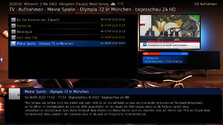
Maybe I explain it that way:
If you activate only one drive (the drive you use for recordings,) and use onlx s few properties for that, then the display in e.g. TV Recordings is OK - but the display in the DSF screen in settings general looks poor.
If you activate more drives and use the recommended properties, the display in DSF screen in settings general looks good, but in TV Recordings you have a lot of scrolling.
Therefore I´d like to have an extra property for the display in e.g. TV recordings showing only the drive for recordings.
Hope that is understandable?
The changelog v0.5 of the plugin lists the following: added #DriveFreeSpace.Enabled and #DriveFreeSpace.X.Enabled properties - first will contain true/false strings depending on weather any drive has been selected, second will contain true/false strings depending on weather drive X is selected.
I stop for today.
Just one remark.
Globally, I'm not sure users will go in general settings to see DFS.
But for sure, in home, recorded, scheduled (and just discovered now, display DFS infos in TV Search too), it could be more useful.
@catavolt To be honest, I just found out about this plugin, I've never even seen it before. But also, I am not interested in it, if I run out of space on NAS, NAS will tell me about it, and if there is room, I do not care how much of it is left there. For me, this plugin does not bring any useful information.
But I startet all this work because you wanted an extra page in settings
So I'll drop further development and stay with what we had, just an extra info in recordings screen - the rest will stay as it was.
Thx for your attention and support
To be honest, I just found out about this plugin, I've never even seen it before. But also, I am not interested in it, if I run out of space on NAS, NAS will tell me about it, and if there is room, I do not care how much of it is left there. For me, this plugin does not bring any useful information.
At first stage, there were overlap in home because, I didn't use DFS plugin.
After I added it to MP, you fixed another overlap or misplaced in home, we talk about the scroll in the home for more than one disk, I found info was also displayed in scheduled and TV search.
The only thing asked for was the useful TV recorded part.
And then, another user gave the information that someone else made a mod in another skin in settings.
So, I wondered if it could be interesting to switch the plugin from process to windows.
And finally, I thought it was not worth to.
Then, you decided to work in general settings part.
Here is the problem because, you need different behaviour of the plugin, depending where you want to display infos.
(C: need to be checked, another property, ...).
Then, I'm not sure it is interesting to work on 2 parts (settings and home/TV).
So, it's your choice but, if you decided to keep only one part, I think better would be to not go with settings because I'm not sure users will go there to see disk info.
And IIRC another plugin did that, long time ago (wasn't it HTPCinfo plugin or something like that ?)
After many hours of troubleshooting I've given up and accepted that it's just "one of these things" when using madVR for watching live TV. I've now ticked the box to "Use EVR for LiveTV", with a default display refresh rate of 50Hz. In combination with tweaking some of the Nvidia 3D settings for the MP executable only, I now have a...
After many hours of troubleshooting I've given up and accepted that it's just "one of these things" when using madVR for watching...
Every so often, when I switch to a TV channel, my MP client stops accepting user inputs, either from the remote or keyboard/mouse...
When I rebooted this morning, the same problem came back. But I did find my error, it turned out I had accidently clicked on "Filtering: On startup filter by: Unwatched Movies" in "Moving Pictures Configuration". Don't know how I did that. (n)
When I rebooted this morning, the same problem came back. But I did find my error, it turned out I had accidently clicked on...
About a 2 months ago I was having problems with filtering for unwatched movies. I couldn't find the filter for it. So I tried...
Fixed, I think.
Certainly the vintage MP2 installer that I was using no longer installs the LAV filters. I can only assume that these were never part of the install package itself, but rather downloaded during the install, and that link no longer exists. Shame that the installer doesn't indicate this.
Last time when I installed the...
Fixed, I think.
Certainly the vintage MP2 installer that I was using no longer installs the LAV filters. I can only assume that...
Hi all,
I've recently retired my MP2 setup for my main HTPC and gone back to separates, but I wanted to retain the ability to play...
Looks like there's some kind of error regarding translations that I can't pinpoint about Subcentral. You'll find it in the log file I attached to my previous message. I don't understand it because I use MP in english, I search for subtitles in english and not in my native language, so I can't figure out what's translation got to do...
Looks like there's some kind of error regarding translations that I can't pinpoint about Subcentral. You'll find it in the log file...
I don't now what to say, I don't know where to begin. Mediaportal user since 2004. Always a satisfied user, I must add. Lately...
If you’re planning to submit a pull request, let’s go through the list of issues and their solutions.
I or someone from the team will create a Jira ticket, and for each ticket, you’ll make the changes and submit a pull request.
This will be transparent and straightforward.
If you’re planning to submit a pull request, let’s go through the list of issues and their solutions.
I or someone from the team...
I'm very glad to see that mediaportal 1 is on github, where ordinary devs with github accounts can make contributions.
Please can...

 Germany