PureVisionHD 1080 DriveFreeSpace (1 Viewer)

catavolt

Design Group Manager
  • Team MediaPortal
  • August 13, 2007
    14,896
    11,786
    Königstein (Taunus)
    Home Country
    Germany Germany
    Here we go again :D
    I optimized skin and added a nice help text - be sure to read!
    As I said before you SHOULD activate drive C because of formatting of the skin.
    All other drives should be grouped automatically, not assigned drives show a respective message.
    Just copy the content of the attached ZIP into your PVHD folder (overwrite).
    Have fun!
     

    Attachments

    • DriveFreeSpace PureVisionHD 1080.zip
      79.6 KB

    framug

    Super Moderator
  • Team MediaPortal
  • January 31, 2005
    6,232
    2,386
    South of France
    Home Country
    France France
    • Thread starter
    • Moderator
    • #42
    Here we go again :D
    I optimized skin and added a nice help text - be sure to read!
    I read and do the same as displayed (text would be better than picture, for copy/paste) ;)

    As I said before you SHOULD activate drive C because of formatting of the skin.
    Yes, I read that but, I explain it and why in 3/ b)
    All other drives should be grouped automatically, not assigned drives show a respective message.
    Just copy the content of the attached ZIP into your PVHD folder (overwrite).
    Have fun!
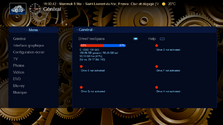
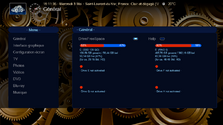
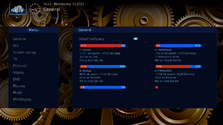
    1/ The only C: checked :

    zz1.png

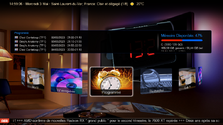
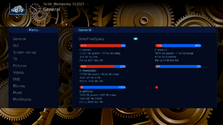
    2/ With E: checked, more than C: (please look at 2 times E: displayed)

    zz2.png

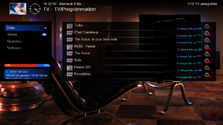
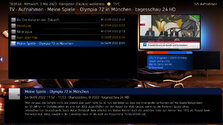
    3/ With your config :

    zz3.png

    a) rectangle can't contains all infos.
    b) Here is a problem : we already see that there is scroll for drives here BUT, you (and me) know that probably C: is not the drive where free space is critical.
    Then, before E: appears, others impatients users who will not wait scrolling could think OK, there are place in the disk, where it could not be the case...
     

    catavolt

    Design Group Manager
  • Team MediaPortal
  • August 13, 2007
    14,896
    11,786
    Königstein (Taunus)
    Home Country
    Germany Germany
    2/ With E: checked, more than C: (please look at 2 times E: displayed)
    Right - better I use the wording "This drive is not activated" ;)
    a) rectangle can't contains all infos.
    b) Here is a problem : we already see that there is scroll for drives here BUT, you (and me) know that probably C: is not the drive where free space is critical.
    Then, before E: appears, others impatients users who will not wait scrolling could think OK, there are place in the disk, where it could not be the case...
    a) unfortunately correct - have to think how adapt the size of that display ;)
    b) Scrolling starts per skin standard after 20 seconds - I´ll reduce that one for DFS to lets say 5 seconds
     

    framug

    Super Moderator
  • Team MediaPortal
  • January 31, 2005
    6,232
    2,386
    South of France
    Home Country
    France France
    • Thread starter
    • Moderator
    • #45
    a) unfortunately correct - have to think how adapt the size of that display ;)
    If a day, in "recorded" (wich is I think, more used than scheduled), would be great to adapt here too. ;)
    b) Scrolling starts per skin standard after 20 seconds - I´ll reduce that one for DFS to lets say 5 seconds
    Can be a solution or, completely avoid C: display.
    (My wife will never wait for 5 seconds). :D

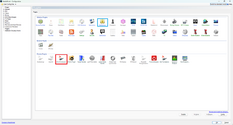
    Also, if you have GFX ideas for DFS plugin enabled/disabled instead of default one, a bit like I made for FileExplorer, I'll take it

    Enabled :

    zz1.png

    Disabled :

    zz2.png
     

    High_Five

    Design Group
  • Team MediaPortal
  • February 10, 2023
    186
    1,071
    Home Country
    Germany Germany
    I used the configuration from my last post for a quick test with your latest settings_general.xml, where C:, D: and E: are fixed drives/partitions, F: and H: are USB sticks, G: is a virtual drive and I: is an optical drive.

    1. All drives are enabled, G: is probably the drive with 0% shown twice, H: is only shown as a red dot.

    Test mit allen LAufwerken aktiviert.png

    2. Drive D: is disabled, the last drive as a red dot is probably I:, the enabled optical drive.

    Test ohne D.png

    Regarding the layout, it might be easier to show in e.g. mytvrecordedtv.xml only the drives that are checked in the config of DriveFreeSpace and to present in Settings perhaps by means of menubutton all drives on several pages, where the physically not present drives are e.g. grayed out or marked differently.
     
    Last edited by a moderator:

    catavolt

    Design Group Manager
  • Team MediaPortal
  • August 13, 2007
    14,896
    11,786
    Königstein (Taunus)
    Home Country
    Germany Germany
    G: is a virtual drive and I: is an optical drive.
    Not sure whether DFS recognize those correctly ;) Therefore the glitches may appear ;)
    Sorry to edit your post but images in fullscreen consume to much space ...
     

    Users who are viewing this thread

    Similar threads

    After many hours of troubleshooting I've given up and accepted that it's just "one of these things" when using madVR for watching live TV. I've now ticked the box to "Use EVR for LiveTV", with a default display refresh rate of 50Hz. In combination with tweaking some of the Nvidia 3D settings for the MP executable only, I now have a...
    After many hours of troubleshooting I've given up and accepted that it's just "one of these things" when using madVR for watching...
    Every so often, when I switch to a TV channel, my MP client stops accepting user inputs, either from the remote or keyboard/mouse...
    Replies
    30
    Views
    8K
    If you’re planning to submit a pull request, let’s go through the list of issues and their solutions. I or someone from the team will create a Jira ticket, and for each ticket, you’ll make the changes and submit a pull request. This will be transparent and straightforward.
    If you’re planning to submit a pull request, let’s go through the list of issues and their solutions. I or someone from the team...
    I'm very glad to see that mediaportal 1 is on github, where ordinary devs with github accounts can make contributions. Please can...
    Replies
    7
    Views
    1K
    I made some updates to the Wiki page describing the <import> and <include> tags, including adding a couple of new xml examples. For the first example, I highlighted the example text and eventually found the location in the menus where I could select the CODE macro to have the example text formatted as a code example. So far, so good...
    I made some updates to the Wiki page describing the <import> and <include> tags, including adding a couple of new xml examples. For...
    I made some updates to the Wiki page describing the <import> and <include> tags, including adding a couple of new xml examples. For...
    Replies
    0
    Views
    523
    Are the media/video folders on the Mint host?
    Are the media/video folders on the Mint host?
    I've used Mediaportal for years on a Windows Host with restricted online-access. Lately I reinstalled...
    Replies
    1
    Views
    1K
    TV Server plugins are listed on this page, and "EPG Cleaner" can be downloaded from this page. Note: I don't know what bitness the plugin has. It might be 32-bit, or it might be "any cpu". The plugin is not listed by the "MP Extensions" tool, so I don't know whether it has been tested with the most-recent MP releases. -- from...
    TV Server plugins are listed on this page, and "EPG Cleaner" can be downloaded from this page. Note: I don't know what bitness the...
    I'm looking for a better recording scheduler. Many recording titles (at least in the UK) change between episodes, sometimes being...
    Replies
    4
    Views
    1K
    Top Bottom